


Need help. TV noob


Thread Starter
Suzuka Master
Joined: May 2004
Posts: 6,558
Likes: 7
From: Queens, NY
Originally Posted by danny25
this pic seems to suggest there is a way to plug 2 things into the PS2

I'm going to have to take a look at that when I get home
I'm going to have to take a look at that when I get home
Not sure, thats a good point.
Im just gonna get the s video cable later on for that.

Safety Car


Joined: Jan 2002
Posts: 4,001
Likes: 17
From: Renton, WA
Originally Posted by danny25
this pic seems to suggest there is a way to plug 2 things into the PS2
I'm going to have to take a look at that when I get home
I'm going to have to take a look at that when I get home
Thread Starter
Suzuka Master
Joined: May 2004
Posts: 6,558
Likes: 7
From: Queens, NY
Ok, I'm back again. After all this mess and 3 returned wires later, I got this:

Now, I get video, but no audio, I have to use separate audio cables. I though these hdmi cables carried audio also? Any ideas? Is there somethingI need to change on my tv?
Now, I get video, but no audio, I have to use separate audio cables. I though these hdmi cables carried audio also? Any ideas? Is there somethingI need to change on my tv?

Suzuka Master
Joined: Dec 2001
Posts: 8,869
Likes: 2
From: TX
 that's the same kind of cable you bought off ebay. That's an HDMI to DVI. HDMI carries sound, but DVI doesn't. You need just and HDMI cable, it's the end shown on the left in that pic. You need this cable


Thread Starter
Suzuka Master
Joined: May 2004
Posts: 6,558
Likes: 7
From: Queens, NY
I have my dvd player connected to my TV with component video cables, and when I turn the tv on and put the dvd player on, its says 480i on the display. I thought the display would be higher with these cables. Is my DVD player not equipped for that? Do I need an upgraded one to get the 1080? Also, it looks really pixely in the background sometimes, is that because of the dvd player?
My dvd player is just a plain Sony progressive scan, nothing special
My dvd player is just a plain Sony progressive scan, nothing special

Originally Posted by pebecl97
I have my dvd player connected to my TV with component video cables, and when I turn the tv on and put the dvd player on, its says 480i on the display. I thought the display would be higher with these cables. Is my DVD player not equipped for that? Do I need an upgraded one to get the 1080? Also, it looks really pixely in the background sometimes, is that because of the dvd player?
My dvd player is just a plain Sony progressive scan, nothing special
My dvd player is just a plain Sony progressive scan, nothing special
Oh, and just some info... component cables are analog, whereas DVI and HDMI cables are digital... so you'll always get a better picture out of the DVI or HDMI cables since they can carry digital signals.
^ Also, check the specs of your TV. It's possible (not likely, but possible) that the TV does NOT upconvert analog signals, which may be why the DVDs are being displayed at 480i and not being upconverted.
Thread Starter
Suzuka Master
Joined: May 2004
Posts: 6,558
Likes: 7
From: Queens, NY
Originally Posted by danny25
you may also need to turn progressive scan on on the DVD player, otherwise it defaults to 480i.
How do you do that? there is no buttons I can see

You must be getting tired of my questions

Thread Starter
Suzuka Master
Joined: May 2004
Posts: 6,558
Likes: 7
From: Queens, NY
Originally Posted by juniorbean
DVD players output in 480i or 480p if it's progressive scan (which you said it was). If you want the DVD player to output in higher resolutions, you'll need a DVD player that upscales to 720p or 1080i. However, keep in mind that your TV should be doing the scaling... so even though your DVD player is outputting 480i, your TV should be upscaling it to 720p or 1080i (whichever is native).
Oh, and just some info... component cables are analog, whereas DVI and HDMI cables are digital... so you'll always get a better picture out of the DVI or HDMI cables since they can carry digital signals.
Oh, and just some info... component cables are analog, whereas DVI and HDMI cables are digital... so you'll always get a better picture out of the DVI or HDMI cables since they can carry digital signals.
NAtive on my tv should be 720, per the specs. Should I upgrade my dvd regardless?
My tv only has 1 HDMI input, so I am using that for my cable box. I am using the 1 component video input for the DVD player and S-video cables for my PS2, I just want to get the best picture out of this set. I am probably just not used to the LCD's picture yet.
^ I would only upgrade the DVD player if the TV is not upscaling or can't upscale. Generally you want the TV to do all of the work since it has more power then the little components do.
If, for some reason your TV is not properly upscaling the DVD player, then yes, at that point you may want to look into an upscaling DVD player.
If, for some reason your TV is not properly upscaling the DVD player, then yes, at that point you may want to look into an upscaling DVD player.
Suzuka Master
Joined: Dec 2001
Posts: 8,869
Likes: 2
From: TX
Originally Posted by pebecl97
How do you do that? there is no buttons I can see
You must be getting tired of my questions
You must be getting tired of my questions
 I felt the same way when I started a noob thread and jb kept answering all my questions.
Thread Starter
Suzuka Master
Joined: May 2004
Posts: 6,558
Likes: 7
From: Queens, NY
Originally Posted by danny25
Maybe somewhere in the DVD player menu? That's where the option is on mine.
I felt the same way when I started a noob thread and jb kept answering all my questions.
I felt the same way when I started a noob thread and jb kept answering all my questions.My dvd player doesnt even have a menu button, I'm telling you, its the most basic dvd player Sony probably makes. There is a 'light' for when progressive scan is on, but no way to actually turn it on? I dunno, it's not like its unbearable to watch, I just thought getting all these good wires would make it look awesome.
^ Well, you really didn't get any special wires. They're just component cables. Just b/c they say Monster on them doesn't make them any better then regular analog component cables 
The only time you'll see a big difference in picture is when going from component cables to HDMI or DVI cables. You mentioned that your TV has only one HDMI input which is being used by your cable box. If you really watch that many DVDs and want the picture to look that much better, invest in an HDMI switch which will allow you to hook up multiple HDMI devices to your TV which only has one port.
You can spend a lot of money if you want to hook up more then 2 devices, but something simple like this would do just fine for right now...
http://www.monoprice.com/products/pr...ormat=2&style=
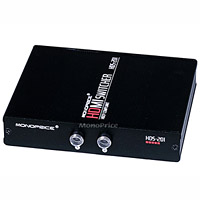
The only time you'll see a big difference in picture is when going from component cables to HDMI or DVI cables. You mentioned that your TV has only one HDMI input which is being used by your cable box. If you really watch that many DVDs and want the picture to look that much better, invest in an HDMI switch which will allow you to hook up multiple HDMI devices to your TV which only has one port.
You can spend a lot of money if you want to hook up more then 2 devices, but something simple like this would do just fine for right now...
http://www.monoprice.com/products/pr...ormat=2&style=
Thread Starter
Suzuka Master
Joined: May 2004
Posts: 6,558
Likes: 7
From: Queens, NY
Originally Posted by juniorbean
^ Well, you really didn't get any special wires. They're just component cables. Just b/c they say Monster on them doesn't make them any better then regular analog component cables
The only time you'll see a big difference in picture is when going from component cables to HDMI or DVI cables. You mentioned that your TV has only one HDMI input which is being used by your cable box. If you really watch that many DVDs and want the picture to look that much better, invest in an HDMI switch which will allow you to hook up multiple HDMI devices to your TV which only has one port.
You can spend a lot of money if you want to hook up more then 2 devices, but something simple like this would do just fine for right now...
http://www.monoprice.com/products/pr...ormat=2&style=
The only time you'll see a big difference in picture is when going from component cables to HDMI or DVI cables. You mentioned that your TV has only one HDMI input which is being used by your cable box. If you really watch that many DVDs and want the picture to look that much better, invest in an HDMI switch which will allow you to hook up multiple HDMI devices to your TV which only has one port.
You can spend a lot of money if you want to hook up more then 2 devices, but something simple like this would do just fine for right now...
http://www.monoprice.com/products/pr...ormat=2&style=
Thanks JB, definitely will look into. I dont think my dvd player has hdmi output though, have to check on that.
Like I said, Im not a hardcore a/v guy, I just want a nice picture. I was under the ssumption that buying these cables would drastically change the picture and it seems the same as when I had regular composite cables connected. This switch you posted may help though. Thanks
^ Component cables are better then standard compositt cables... but the difference varies from set to set. When I went from composite cables to component cables on my HD box, I noticed a difference. Then when I went from component to HDMI I noticed an even larger difference, and that is when the set shined.
BTW, the DVD player could be your culprit. If it's a standard DVD player, especially an older one, it may just not have a good picture via component cables. If it doesn't have HDMI, see if it has DVI (then you can buy a DVI/HDMI cable). If it does not have either, you may want to look into upgrading your DVD player...
BTW, the DVD player could be your culprit. If it's a standard DVD player, especially an older one, it may just not have a good picture via component cables. If it doesn't have HDMI, see if it has DVI (then you can buy a DVI/HDMI cable). If it does not have either, you may want to look into upgrading your DVD player...

Thread
Thread Starter
Forum
Replies
Last Post
08_UA7_Gr33k
Member Cars for Sale
13
Feb 11, 2016 02:17 PM
08_UA7_Gr33k
Member Cars for Sale
1
Sep 27, 2015 01:56 PM