


HDMI vs Component connections . . .


Thread Starter
Confused


Joined: Jan 2001
Posts: 4,008
Likes: 237
From: SoCal
HDMI vs Component connections . . .
What will give better image quality playing standard DVDs when connected to a high quality LCD TV, a DVD player with Component connections or a Blu-Ray player connected with HDMI? Asked before and till cannot get my head around it.

My Garage not
iTrader: (2)
Joined: Jun 2006
Posts: 2,121
Likes: 4
From: Westsiiiiiiiiiiiiiiiiiiiiiiiiiiiiiiiiiiide
the image quality will depend on the dvd player's upsampling abilities. if you don't know what upsampling is, it takes a regular standard definition dvd and scales it to look better on an hdtv. you didn't mention whether or not the regular dvd player upsamples. i think all of the BD players have upsampling built in although i could be wrong.
normally hdmi cables are better than component cables. hdmi is digital and includes the sound signal and component is an analog signal and you need an extra cable to hook up the sound.
the only answer is to try both. they actually make high-end upsampling regular dvd players that cost about $150. if you don't have both players just buy the BD with the upsampling built-in unless you are picky.
normally hdmi cables are better than component cables. hdmi is digital and includes the sound signal and component is an analog signal and you need an extra cable to hook up the sound.
the only answer is to try both. they actually make high-end upsampling regular dvd players that cost about $150. if you don't have both players just buy the BD with the upsampling built-in unless you are picky.

Hey Dan, is this on your XBR7. I used my bd player with hdmi and it looks decent on my xbr. Nothing special. LCD dont do a really good job with this. But in my bedroom(720p toshiba), I had a sony dvd player with hdmi out. This did a great job with my dvds.
Thread Starter
Confused
Joined: Jan 2001
Posts: 4,008
Likes: 237
From: SoCal
Yes with this old Yamaha DVD player with no HDMI out.
http://www2.yamaha.co.jp/manual/pdf/...DVD-S550_e.pdf
http://www2.yamaha.co.jp/manual/pdf/...DVD-S550_e.pdf

Well since the DVD does not upconvert, I dont know if you will even notice a difference bewteen Component RBG or just the composite.
Maybe over component you will get 480p vs 480i on the yellow composite.
You can buy my blu ray player from the classfied and unleash the potential of the XBR7.
Maybe over component you will get 480p vs 480i on the yellow composite.
You can buy my blu ray player from the classfied and unleash the potential of the XBR7.

Big Block go VROOOM!
Joined: Oct 2003
Posts: 8,578
Likes: 1
From: Chicago Burbs
One more potential option to test for upscaling/upconverting, let the TV do it. In Dan's case that would require using the Blu-Ray player with upscaling/upconverting turned off. The BDP would then just put a regular 480p signal out over the HDMI.
I tried this with with my Oppo upscaling DVD player. To be honest, letting my TV (2+ year old Panny plasma) do the upscaling looked just as good or better than the Oppo's dedicated upscaling circuitry.
I tried this with with my Oppo upscaling DVD player. To be honest, letting my TV (2+ year old Panny plasma) do the upscaling looked just as good or better than the Oppo's dedicated upscaling circuitry.
Trending Topics

Moderator Alumnus
Joined: Dec 2001
Posts: 9,263
Likes: 2
From: Lenexa, KS
No, actually your TV itself has to upscale anything that's not in it's native resolution. Regardless of source, Composite, S-video, Component, DVI, HDMI...
Your TV is a fixed resolution it will always be 1920x1080 (1920 pixels wide, 1080 pixels high) no matter what your feeding the TV it has to be shown at 1920x1080.
If you tried to display a DVD 720x480 on your display via HDMI/Component and there was no up scaling you'd have a small picture on the screen. As 720x480 will not fill up 1920x1080.
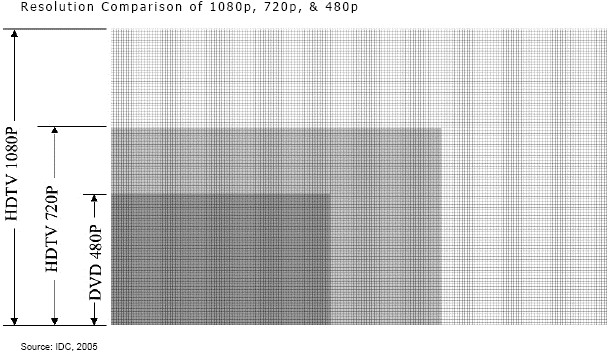
Without any up-scaling the DVD would occupy as much of your screen as you see in the DARK 480p area of the screen. The rest would be black...
The argument is if it's better to have your TV do the scaling or your DVD player? If you have the DVD player do it your TV will be receiving a 1080p/i and will not need to upscale it.
However if you upscale your DVD to 1080i in the DVD player and not to 1080p your TV will still have to do the de-interlacing. Which again can be another argument.
So videophiles generally find some DVD players have better up-scaling processors in them than their TV's or AV receivers. When you convert 720x480 (345,000 pixels) to 1920x1080 (2 million pixels) you have to make up the pixels that are not there. Some up-scaling chips have better image enhancing algorithms. So the one in your DVD player could be superior to the one in your TV.
The same thing goes for de-interlacing processors.
Your TV is a fixed resolution it will always be 1920x1080 (1920 pixels wide, 1080 pixels high) no matter what your feeding the TV it has to be shown at 1920x1080.
If you tried to display a DVD 720x480 on your display via HDMI/Component and there was no up scaling you'd have a small picture on the screen. As 720x480 will not fill up 1920x1080.
Without any up-scaling the DVD would occupy as much of your screen as you see in the DARK 480p area of the screen. The rest would be black...
The argument is if it's better to have your TV do the scaling or your DVD player? If you have the DVD player do it your TV will be receiving a 1080p/i and will not need to upscale it.
However if you upscale your DVD to 1080i in the DVD player and not to 1080p your TV will still have to do the de-interlacing. Which again can be another argument.
So videophiles generally find some DVD players have better up-scaling processors in them than their TV's or AV receivers. When you convert 720x480 (345,000 pixels) to 1920x1080 (2 million pixels) you have to make up the pixels that are not there. Some up-scaling chips have better image enhancing algorithms. So the one in your DVD player could be superior to the one in your TV.
The same thing goes for de-interlacing processors.
Last edited by SiGGy; Nov 11, 2009 at 07:42 AM.

Team Owner

Joined: Feb 2002
Posts: 28,444
Likes: 1,574
From: Miami, FL
You'll see some BD players on sale around BF weekend. Probably like around $100. Just pick one up then. Most upconverting on BD players I hear is pretty good. The BD's aren't that expensive. They have various sales and stuff so don't sweat the price of software.

Oliver!!!
Joined: May 2008
Posts: 3,962
Likes: 38
From: Orlando, FL
Siggy's got it right. It really depends on which has a better upscaler, the TV or the player. I've got a Sony 46XBR6 and the scaler in it is excellent. I feed it via component from an older high end Sony DVD player and it looks almost as good as Blu Ray coming from my PS3. I've compared a few movies that I have on both DVD and Blu Ray. The Blu Ray obviously looks better, but the DVD looks pretty darn good too. You should get similar results from your XBR7

Thread
Thread Starter
Forum
Replies
Last Post
navtool.com
5G TLX Audio, Bluetooth, Electronics & Navigation
31
Nov 16, 2015 08:30 PM
navtool.com
1G RDX Audio, Bluetooth, Electronics & Navigation
1
Sep 25, 2015 05:15 PM
