


Portable Storage


Thread Starter
Earth-bound misfit
Joined: Mar 2006
Posts: 31,704
Likes: 608
Portable Storage
Does anyone have a recommendation for portable storage? I'm leaving on a 10 day sailing trip in April, & will not have access to a computer to dump my cards. I'm looking for for at least 80 GB.

Big Block go VROOOM!
Joined: Oct 2003
Posts: 8,578
Likes: 1
From: Chicago Burbs
I've seen several solutions out there that would fit your needs. The biggest differentiator among the products is whether or not you want a screen on the device to review the images. Needless to say, the ones with the screens are a good chunk of change more expensive.
BTW, don't think of the screen as just a convenient little slide show. Without a screen, you're going on faith the your images were copied to the device's hard drive and that they aren't corrupted. How trusting are you?
BTW, don't think of the screen as just a convenient little slide show. Without a screen, you're going on faith the your images were copied to the device's hard drive and that they aren't corrupted. How trusting are you?
Thread Starter
Earth-bound misfit
Joined: Mar 2006
Posts: 31,704
Likes: 608
Originally Posted by jupitersolo
IPOD, I don't have. Waiting until new video ipod comes out. But it will allow many uses other than storage. You'll have to get an adaptor for CF.
Originally Posted by Billiam
I've seen several solutions out there that would fit your needs. The biggest differentiator among the products is whether or not you want a screen on the device to review the images. Needless to say, the ones with the screens are a good chunk of change more expensive.
BTW, don't think of the screen as just a convenient little slide show. Without a screen, you're going on faith the your images were copied to the device's hard drive and that they aren't corrupted. How trusting are you?
BTW, don't think of the screen as just a convenient little slide show. Without a screen, you're going on faith the your images were copied to the device's hard drive and that they aren't corrupted. How trusting are you?
 How big is the price difference? Do you have recommendations for either or both? It's something I'll use repeatedly, as I like to travel and don't have a laptop, so I don't mind spending a little more for a better product.



nnInn
Joined: Mar 2006
Posts: 37,670
Likes: 1,084
Originally Posted by wndrlst
I've got an iPod, but it's just the 4GB nano. I really don't need the bells & whistles of an upgrade, but it's a thought...
I had looked at these a while back for my f-i-law. They cost almost as much as an new ipod. That's when I told him to just use the ipod, just had to buy the adpator. Not sure if he ever did, he was going to Europe.
I too just have a Nano.

is learning to moonwalk i
Joined: Feb 2004
Posts: 15,520
Likes: 3
From: SoCal
I've also been thinking about getting something for the same purpose.
It's a major trade off between price and storage, especially when you go above 30 GB.
Here's a link to the 80+GB models available from newegg:
http://www.newegg.com/Product/Produc...SubCategory=23
Also, check the screen resolutions, as they vary between models.
It's a major trade off between price and storage, especially when you go above 30 GB.
Here's a link to the 80+GB models available from newegg:
http://www.newegg.com/Product/Produc...SubCategory=23
Also, check the screen resolutions, as they vary between models.
Trending Topics


Big Block go VROOOM!
Joined: Oct 2003
Posts: 8,578
Likes: 1
From: Chicago Burbs
For those of you that are talking about usning iPods as portable photo storage in the field, would you please explain to me how you plan on getting image files off of the camera's CF/SD card and onto the iPod?
The items I was thinking of are photo specific. They include products from companies like Epson and Jobo. Here's the item category at B&H.
http://www.bhphotovideo.com/bnh/cont...rch&Q=&ci=3369
The items I was thinking of are photo specific. They include products from companies like Epson and Jobo. Here's the item category at B&H.
http://www.bhphotovideo.com/bnh/cont...rch&Q=&ci=3369
nnInn
Joined: Mar 2006
Posts: 37,670
Likes: 1,084
Originally Posted by Billiam
For those of you that are talking about usning iPods as portable photo storage in the field, would you please explain to me how you plan on getting image files off of the camera's CF/SD card and onto the iPod?
The items I was thinking of are photo specific. They include products from companies like Epson and Jobo. Here's the item category at B&H.
http://www.bhphotovideo.com/bnh/cont...rch&Q=&ci=3369
The items I was thinking of are photo specific. They include products from companies like Epson and Jobo. Here's the item category at B&H.
http://www.bhphotovideo.com/bnh/cont...rch&Q=&ci=3369
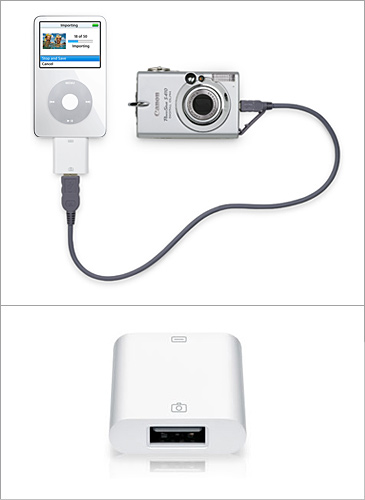
http://store.apple.com/1-800-MY-APPL...plm=M9861G%2FB

is learning to moonwalk i
Joined: Feb 2004
Posts: 15,520
Likes: 3
From: SoCal
One of the drawbacks of that iPod solution is you are draining the batteries of both the iPod and the camera when transfering data. One of the main advantages of the other portable storage devices is you conserve camera battery power. Is there a CF card reader attachment available?
nnInn
Joined: Mar 2006
Posts: 37,670
Likes: 1,084
Originally Posted by moeronn
Is there a CF card reader attachment available?
http://www.amazon.com/Belkin-F8E461-.../dp/B0000TNJU4

Maybe I should have shown this one first, but I forgot until you asked the question, but not too many people like it.
Thread Starter
Earth-bound misfit
Joined: Mar 2006
Posts: 31,704
Likes: 608
Thanks for the link, Billiam. Something like the Wolverine 100GB for $179 might be a good solution. No photo viewing, but it does have a display that gives file transfer status, space available, transfer confirmation, etc.  Looks like their are good options out there.
Looks like their are good options out there.
Thread Starter
Earth-bound misfit
Joined: Mar 2006
Posts: 31,704
Likes: 608
Originally Posted by jupitersolo
Belkin makes one, amazon carries for $40
http://www.amazon.com/Belkin-F8E461-.../dp/B0000TNJU4
Maybe I should have shown this one first, but I forgot until you asked the question.
http://www.amazon.com/Belkin-F8E461-.../dp/B0000TNJU4
Maybe I should have shown this one first, but I forgot until you asked the question.
^^ I haven't seen Dan post in here, but he has something pretty basic looking. I don't know the details, but you can see it in his "Post Your Camera Bag" post.
You guys are the best!


Photography Nerd
Joined: Sep 2003
Posts: 21,489
Likes: 11
From: Toronto
I use a 20GB Fotochute and it has worked flawlessly for me over the past couple of years. However, it's getting a little dated now and there are much bigger and faster solutions available. I didn't think speed would be that big of an issue at first, but when it takes 5 to 7 minutes per GB, it can take quite a while to back up a card.
Eventually, I'm going to move to a 60 or 80GB Hyperdrive: http://www.hypershop.com/shop/
Anyone who's considering the iPod route should find out what the transfer rates are like for uploading images from a card. It might be fine, but just check it out to be safe.
Eventually, I'm going to move to a 60 or 80GB Hyperdrive: http://www.hypershop.com/shop/
Anyone who's considering the iPod route should find out what the transfer rates are like for uploading images from a card. It might be fine, but just check it out to be safe.


Moderator Alumnus


Joined: May 2001
Posts: 4,295
Likes: 121
From: Ronkonkoma, NY
Why do I seem to recall that you can't really view your pics that you transfer to the ipod?
Maybe just a problem for raw files?
When I used my old IMagetank, I always double copied onto it, in case one went bad.
I still had a problem where the entire disk got corrupted, and I couldn't read ANY of my pics off of the drive when I got back from my alaska trip. (!!!!)
I managed to extract all my pictures using a program called PhotoRescue. I swear by it
ever since, and also started using a laptop to backup pics so I can visually confirm their existance afterwards.
Also, reviewing pics is a fun way to burn time on the ride home.
Maybe just a problem for raw files?
When I used my old IMagetank, I always double copied onto it, in case one went bad.
I still had a problem where the entire disk got corrupted, and I couldn't read ANY of my pics off of the drive when I got back from my alaska trip. (!!!!)
I managed to extract all my pictures using a program called PhotoRescue. I swear by it
ever since, and also started using a laptop to backup pics so I can visually confirm their existance afterwards.
Also, reviewing pics is a fun way to burn time on the ride home.
nnInn
Joined: Mar 2006
Posts: 37,670
Likes: 1,084
Originally Posted by ChodTheWacko
Why do I seem to recall that you can't really view your pics that you transfer to the ipod?
Maybe just a problem for raw files?
Maybe just a problem for raw files?
This is a review from Apple website on the transfer...
got a Camera Connector for use with my 80 gig Video Ipod and Nikon d80 DSLR.
While the D80 isn't on the Apple Approved List, it works just fine.
If you shoot JPEG, they come in real quick - about as fast as any other transfer so ignore all the rubbish on this site about speed. You see thumbnails and can browse full size images on the Ipod screen after the download.
If you shoot RAW, it will download them but you can't see them - just open Aperture or PE 4 and then Import them from the Ipod, using it as a drive - no sweat and a GREAT way to archive stuff off your camera SD card.
While the D80 isn't on the Apple Approved List, it works just fine.
If you shoot JPEG, they come in real quick - about as fast as any other transfer so ignore all the rubbish on this site about speed. You see thumbnails and can browse full size images on the Ipod screen after the download.
If you shoot RAW, it will download them but you can't see them - just open Aperture or PE 4 and then Import them from the Ipod, using it as a drive - no sweat and a GREAT way to archive stuff off your camera SD card.
nnInn
Joined: Mar 2006
Posts: 37,670
Likes: 1,084
Originally Posted by Dan Martin
I use a 20GB Fotochute and it has worked flawlessly for me over the past couple of years. However, it's getting a little dated now and there are much bigger and faster solutions available. I didn't think speed would be that big of an issue at first, but when it takes 5 to 7 minutes per GB, it can take quite a while to back up a card.
Eventually, I'm going to move to a 60 or 80GB Hyperdrive: http://www.hypershop.com/shop/
Anyone who's considering the iPod route should find out what the transfer rates are like for uploading images from a card. It might be fine, but just check it out to be safe.
Eventually, I'm going to move to a 60 or 80GB Hyperdrive: http://www.hypershop.com/shop/
Anyone who's considering the iPod route should find out what the transfer rates are like for uploading images from a card. It might be fine, but just check it out to be safe.
This is review from Apple website...
bought it to offload my 2GB SD card from my Nikon D80. To be extra sure before bringing it to vacation, I fully loaded the card and tried to download to a (fully charged) 60GB iPod. Worked fine, although it took a little bit more than an hour.
Moderator Alumnus
Joined: May 2001
Posts: 4,295
Likes: 121
From: Ronkonkoma, NY
Originally Posted by jupitersolo
This is review from Apple website...
I use a PCMCIA card with my laptop, and it also takes an age to copy files off.
However, since I offload every night, and I leave the laptop plugged in, it's not
that big of a deal that it takes so long.
nnInn
Joined: Mar 2006
Posts: 37,670
Likes: 1,084
Originally Posted by ChodTheWacko
Ew, half a meg a second.
I use a PCMCIA card with my laptop, and it also takes an age to copy files off.
However, since I offload every night, and I leave the laptop plugged in, it's not
that big of a deal that it takes so long.
I use a PCMCIA card with my laptop, and it also takes an age to copy files off.
However, since I offload every night, and I leave the laptop plugged in, it's not
that big of a deal that it takes so long.
I'd say using a laptop would be the idea way to do it. But for portability and speed that hyperdrive Dan posted is the way to go. If someone already has an ipod, and has time after a day trip to d/l.
Taking a sailing cruise leaves you wanting not to take a lot of stuff.

Thread
Thread Starter
Forum
Replies
Last Post
oyayjoe
Member Cars for Sale
1
Sep 12, 2015 04:40 PM