


Help with photo storage while on vacation


Thread Starter
Moderator


Joined: Oct 2004
Posts: 64,122
Likes: 3,371
From: Not Las Vegas (SF Bay Area)
Help with photo storage while on vacation
what kind of things could i use to help store photos while im on vacation.
my 4GB card can hold around 1k photos in jpeg or about 300 in raw, but being that i am going to be going to be gone for 1 month, i think im going to need something to offload my photos onto.
and no i dont have a laptop, i would get one but they are too expensive.
i was thinking something like this
http://www.bhphotovideo.com/c/produc...ge_Viewer.html
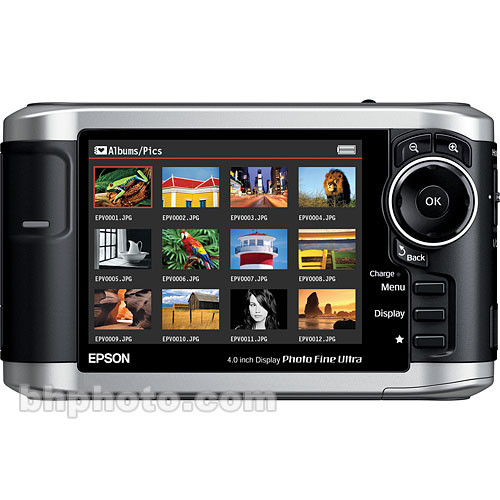
 i think 40GB should be enough space.
my 4GB card can hold around 1k photos in jpeg or about 300 in raw, but being that i am going to be going to be gone for 1 month, i think im going to need something to offload my photos onto.
and no i dont have a laptop, i would get one but they are too expensive.
i was thinking something like this
http://www.bhphotovideo.com/c/produc...ge_Viewer.html
i think 40GB should be enough space.

is learning to moonwalk i
Joined: Feb 2004
Posts: 15,520
Likes: 3
From: SoCal
There are these portable HD devices that you insert your CF cards into and just download your images to the device. I can't recall the right term for them, but I believe they have them at B&H. IIRC, Dan Martin might have one.

Thread Starter
Moderator
Joined: Oct 2004
Posts: 64,122
Likes: 3,371
From: Not Las Vegas (SF Bay Area)
http://www.newegg.com/Product/Produc...82E16834147773
http://www.newegg.com/Product/Produc...82E16834147784
http://www.newegg.com/Product/Produc...82E16834115426
those for starters, I have not really looked hard though.
http://www.newegg.com/Product/Produc...82E16834147784
http://www.newegg.com/Product/Produc...82E16834115426
those for starters, I have not really looked hard though.
is learning to moonwalk i
Joined: Feb 2004
Posts: 15,520
Likes: 3
From: SoCal
The products I was thinking of are Wolverine. Check this link - about the 5th item and down:
http://www.bhphotovideo.com/bnh/cont...t=Submit+Query
http://www.bhphotovideo.com/bnh/cont...t=Submit+Query
Trending Topics

Senior Moderator
Joined: Jun 2005
Posts: 14,667
Likes: 13
From: NY



Earth-bound misfit
Joined: Mar 2006
Posts: 31,704
Likes: 608
I bought an 80GB portable drive/viewer for my BVI trip. I liked the ability to review them to be certain they transfered properly. (In fact, I think someone here recommended that, and I thought it was a good point.)


 More importantly, where the heck are you vacationing for a month??

Drifting
Joined: Sep 2004
Posts: 3,138
Likes: 4
From: 808
^
I bought an extra 12 gigs of CF cards (15 gigs total) for a two week trip last month. It got me through, with about 2 gigs to spare. I think it would be cheaper to go this route, and you could probably sell them off easier if you don't need them when you get back. Although it is kinda nervous carrying around a bunch of cards and hoping you don't lose them, mix them up, or have them break. But I guess that goes with everything until you have time to back everything up.
now that I think about it, I'll loan some to you if you are desperate, as I don't think the extra one's I bought are going to get any use anytime soon...
I bought an extra 12 gigs of CF cards (15 gigs total) for a two week trip last month. It got me through, with about 2 gigs to spare. I think it would be cheaper to go this route, and you could probably sell them off easier if you don't need them when you get back. Although it is kinda nervous carrying around a bunch of cards and hoping you don't lose them, mix them up, or have them break. But I guess that goes with everything until you have time to back everything up.
now that I think about it, I'll loan some to you if you are desperate, as I don't think the extra one's I bought are going to get any use anytime soon...

Moderator Alumnus
Joined: May 2001
Posts: 4,295
Likes: 121
From: Ronkonkoma, NY
I had one a long time ago (the x drive). Back then you couldn't review pictures you had uploaded. I came back from the trip to find the hard drive corrupted and I couldn't read the directories.
Thank god photorescue was able to do a sector scan and extract off all my pics.
Laptop is nice - you can browse pics while in the airport / on the plane.
I've used a laptop since.
- Frank
Thank god photorescue was able to do a sector scan and extract off all my pics.
Laptop is nice - you can browse pics while in the airport / on the plane.
I've used a laptop since.
- Frank
Thread Starter
Moderator
Joined: Oct 2004
Posts: 64,122
Likes: 3,371
From: Not Las Vegas (SF Bay Area)
then im going to hong kong for the remaining days, with plans to visit shanghai and i dont know the english name but they have a bunch of those buried warriors from one of the dynasty's of china.
Thread Starter
Moderator
Joined: Oct 2004
Posts: 64,122
Likes: 3,371
From: Not Las Vegas (SF Bay Area)

Have camera, will travel
Joined: Jan 2004
Posts: 7,783
Likes: 0
From: Federal Way, WA
im going to be in japan for 8 days, Tokyo, Mt. Fuji - Hakone, Atami, Kobe, Kyoto, Nara, Osaka, Lake Biwa.
then im going to hong kong for the remaining days, with plans to visit shanghai and i dont know the english name but they have a bunch of those buried warriors from one of the dynasty's of china.
then im going to hong kong for the remaining days, with plans to visit shanghai and i dont know the english name but they have a bunch of those buried warriors from one of the dynasty's of china.

This thread is appropriate for me too. I'll be in Hawaii next week, and was in fact at Best Buy last night about to buy some extra CF cards, because I only have two 2GB now. 300 shots for 10 days in Kauai ain't gonna cut it.

But my fiancee reminded me she's bringing her MacBook with her, so we just bought a card reader instead, and I'll just upload the images to it as the cards fill up. She only has iPhoto, but I think that should work fine, because I hate having to resort to shooting jpeg if I don't have to. I'd still like to get one of those devices like moeronn posted at some point. I really like the idea of the portability and ability to review images, like wndrlst mentioned.
Have a great trip. Look forward to the shots.

Big Block go VROOOM!
Joined: Oct 2003
Posts: 8,578
Likes: 1
From: Chicago Burbs
Define your concerns and priorities. It will help you decide on a solution.
A) You don't currently have enough CF space to cover the trip and will need something to dump the images off onto as you shoot.
B) You have enough CF space and want a location to hold a second copy of your images.
IMO, more CF cards is not going to protect you any further against loss, theft, or damage, unless you carry and transport the cards in separate places. Almost no one does this.
A) You don't currently have enough CF space to cover the trip and will need something to dump the images off onto as you shoot.
B) You have enough CF space and want a location to hold a second copy of your images.
IMO, more CF cards is not going to protect you any further against loss, theft, or damage, unless you carry and transport the cards in separate places. Almost no one does this.

Photography Nerd
Joined: Sep 2003
Posts: 21,489
Likes: 11
From: Toronto
ASUS Eee PC 1000H
1GB Ram
160GB HD
WinXP Home
10" screen
3.2 lbs
7 hour battery life
$479
http://www.newegg.com/Product/Produc...82E16834220431
1GB Ram
160GB HD
WinXP Home
10" screen
3.2 lbs
7 hour battery life
$479
http://www.newegg.com/Product/Produc...82E16834220431
ASUS Eee PC 1000H
1GB Ram
160GB HD
WinXP Home
10" screen
3.2 lbs
7 hour battery life
$479
http://www.newegg.com/Product/Produc...82E16834220431
1GB Ram
160GB HD
WinXP Home
10" screen
3.2 lbs
7 hour battery life
$479
http://www.newegg.com/Product/Produc...82E16834220431
the availability of cheap small laptops totally destorys the purpose of that off loader thing.
Photography Nerd
Joined: Sep 2003
Posts: 21,489
Likes: 11
From: Toronto
It's a no brainer if you're going to spend $409 on a personal storage device. It's only $70 more and it has 4 times as much storage. It's also small enough you can keep it in your camera bag. If you're traveling, it would be nice to have a laptop to get you online at coffee shops and in the hotels.


Photography Nerd
Joined: Sep 2003
Posts: 21,489
Likes: 11
From: Toronto
I fumbled my camera with the 10-22 attached and it hit the beak of a metal loon sculpture at my cottage (pretty random, I know). It poked a 3mm dent/hole into the side of the body near the focus switch. 
I sealed the hole with gaffer's tape and I've used it for about 6 months since and everything still works great, but I've been looking into what it would cost to repair vs just taking a hit on selling it. I think I could still get about $475 to $500 for it, based on past ebay sales of 10-22's that are in worse shape than mine.
I sealed the hole with gaffer's tape and I've used it for about 6 months since and everything still works great, but I've been looking into what it would cost to repair vs just taking a hit on selling it. I think I could still get about $475 to $500 for it, based on past ebay sales of 10-22's that are in worse shape than mine.

What Would Don Draper Do?
Joined: Jan 2005
Posts: 22,223
Likes: 1
From: Houston
im going to be in japan for 8 days, Tokyo, Mt. Fuji - Hakone, Atami, Kobe, Kyoto, Nara, Osaka, Lake Biwa.
then im going to hong kong for the remaining days, with plans to visit shanghai and i dont know the english name but they have a bunch of those buried warriors from one of the dynasty's of china.
then im going to hong kong for the remaining days, with plans to visit shanghai and i dont know the english name but they have a bunch of those buried warriors from one of the dynasty's of china.
sounds like it'll be an awesome trip. have fun!

Team Owner
Joined: Jun 2007
Posts: 23,451
Likes: 54
I just found that kind of funny. My parents are leaving this Sunday for Kauai.
As far as the Far East trip, it sounds awesome. I keep on telling myself I need to get over there. I'm really interested to see some things over there. Is the trip just for pleasure?
As far as the Far East trip, it sounds awesome. I keep on telling myself I need to get over there. I'm really interested to see some things over there. Is the trip just for pleasure?

Drifting
Joined: Sep 2004
Posts: 3,138
Likes: 4
From: 808
^9gb for your whole trip, is that going to be enough?
i'm sure you can probably hunt some down if you run out of room, but when I was doing touristy stuff, I was hitting almost 1gb/day shooting raw. I guess it depends on what you are doing, and if you're making it a 'photographic' vacation.
i'm sure you can probably hunt some down if you run out of room, but when I was doing touristy stuff, I was hitting almost 1gb/day shooting raw. I guess it depends on what you are doing, and if you're making it a 'photographic' vacation.
Thread Starter
Moderator
Joined: Oct 2004
Posts: 64,122
Likes: 3,371
From: Not Las Vegas (SF Bay Area)
well im going with my mom 
so it wont be a photographic vacation.
im thinking ill just need enough cards to cover the 8 days in japan, then when im at my relatives place off load them onto an external HD or burn them onto DVDs
so it wont be a photographic vacation.
im thinking ill just need enough cards to cover the 8 days in japan, then when im at my relatives place off load them onto an external HD or burn them onto DVDs

B A N N E D
Joined: Jun 2007
Posts: 3,001
Likes: 0
From: in Madison, WI from Chicago, IL
im going to be in japan for 8 days, Tokyo, Mt. Fuji - Hakone, Atami, Kobe, Kyoto, Nara, Osaka, Lake Biwa.
then im going to hong kong for the remaining days, with plans to visit shanghai and i dont know the english name but they have a bunch of those buried warriors from one of the dynasty's of china.
then im going to hong kong for the remaining days, with plans to visit shanghai and i dont know the english name but they have a bunch of those buried warriors from one of the dynasty's of china.
you just solved your own problem and didn't even know it.
fuck the $400 laptop or wolverine.
YOU ARE GOING TO CHINA... LAND OF CHEAP ELECTRONICS!
just buy something there whether its a full laptop or just a shit ton of CF cards for .82 cents a dozen.
If you're going to Tokyo, why not visit the Electronic District of Akihabara? It's located in the central district of Tokyo. You can buy CF cards there cheap. Look for the Sofmap store or wonder down the small alleys with a ton of electronic vendors.
Will you be climbing Mt Fuji? The Hakone region is beautiful. I lived in Japan for 3 years and traveled all over Japan. IMO, Hokkaido is my all time favorite destination , especially in the winter during the Saporro ice festival at Odori park.
Will you be climbing Mt Fuji? The Hakone region is beautiful. I lived in Japan for 3 years and traveled all over Japan. IMO, Hokkaido is my all time favorite destination , especially in the winter during the Saporro ice festival at Odori park.

Senior Moderator
Joined: Apr 2003
Posts: 47,710
Likes: 801
From: Toronto, Canada
Have there been any advances in this area over the last year and a half? Don't want to buy or carry a Netbook. I was hoping there was a portable HD I could just dump to?
Video takes up quite a bit of space.
Video takes up quite a bit of space.