


Cannnnnnnnon 40D is here!

Thread Starter
mmmmmm....
Joined: Sep 2005
Posts: 20,524
Likes: 95
From: Glendale, CA
 Cannnnnnnnon 40D is here!
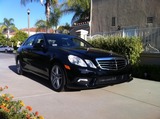
Finally, my camera came in today. I didn't had any time play with it yet, but it sure do look complicated, not going to be fun until I get this down.
Here it is...
Canon 40D
Lowepro 200
4G Sandisk Compactflash card
Clear touch screen protection
I probably will pick up 55mm lens within few months, but that's for now.

Here it is...
Canon 40D
Lowepro 200
4G Sandisk Compactflash card
Clear touch screen protection
I probably will pick up 55mm lens within few months, but that's for now.


Needs more Lemon Pledge
Joined: Mar 2005
Posts: 52,768
Likes: 2,000
From: Phoenix, AZ

Congrats!
Hey, that box is empty according to the Exif in your photo!!
I highly recommend "Understanding Exposure" by some guy I can't remember right now. Great book. Amazon/Google it. Then buy it.
Thread Starter
mmmmmm....
Joined: Sep 2005
Posts: 20,524
Likes: 95
From: Glendale, CA
Originally Posted by mltk53
great cam. congrats! 
Originally Posted by stogie1020
Congrats!
Hey, that box is empty according to the Exif in your photo!!
I highly recommend "Understanding Exposure" by some guy I can't remember right now. Great book. Amazon/Google it. Then buy it.
yeah, I was using my camera.
I'm definitely going to pick up that book.


Trending Topics




Thread Starter
mmmmmm....
Joined: Sep 2005
Posts: 20,524
Likes: 95
From: Glendale, CA
Originally Posted by TS_eXpeed
Haha...I'm just messin with you man. I can't say I would've picked a Canon, but I can't say that it isn't a nice camera!!  Happy shooting!!
Happy shooting!!
Drifting
Joined: Sep 2004
Posts: 3,138
Likes: 4
From: 808
haha, your canon hating is almost worse than all the nikon hating on the canon forums.
Congrats. Start saving your money for another lens . I have the SS200AW too. Just start shooting and learning. Don't use the green box!
Congrats. Start saving your money for another lens
. I have the SS200AW too. Just start shooting and learning. Don't use the green box!




Let's Go Pens
Joined: May 2007
Posts: 1,843
Likes: 2
From: Hamilton, NJ
Understanding Exposure:
http://www.amazon.com/Understanding-...5781942&sr=1-1
Also my company publishes a field guide for your camera (among many others) It might be useful
Canon EOS 40D Digital Field Guide (Paperback)
by Charlotte K. Lowrie (Author)
http://www.amazon.com/Understanding-...5781942&sr=1-1
Also my company publishes a field guide for your camera (among many others) It might be useful
Canon EOS 40D Digital Field Guide (Paperback)
by Charlotte K. Lowrie (Author)



 viking range ftw.






Team Owner
Joined: Jun 2007
Posts: 23,451
Likes: 54
Originally Posted by tnl_tsx
is that just the body? I'm selling my kit lens if you looking for one. It's 18-55 from my xti and it's in great condition with the filter.
No it was a kit.
He has the 28-135mm lens

Moderator Alumnus


Joined: May 2001
Posts: 4,295
Likes: 121
From: Ronkonkoma, NY
Take advantage of 'My Menu'. It's really useful for quickly setting things.
I put the following shortcuts:
AEB: For 1 shot HDRs (combined with High speed burst)
Live view Function settings - to quickly enable/disable it. (I'd recommend only enabling it when you NEED it. Otherwise you can bump the set button, turn on Live view, and drain your batteries)
Quality setting - If I'm taking a 'documentary shot', I flip it to Small jpeg. THis for stuff like maps, signs (to remember flower names, or whatever) , shots of trail intersections so I don't get lost on the way back, etc, etc.......
- Frank
I put the following shortcuts:
AEB: For 1 shot HDRs (combined with High speed burst)
Live view Function settings - to quickly enable/disable it. (I'd recommend only enabling it when you NEED it. Otherwise you can bump the set button, turn on Live view, and drain your batteries)
Quality setting - If I'm taking a 'documentary shot', I flip it to Small jpeg. THis for stuff like maps, signs (to remember flower names, or whatever) , shots of trail intersections so I don't get lost on the way back, etc, etc.......
- Frank
Thread Starter
mmmmmm....
Joined: Sep 2005
Posts: 20,524
Likes: 95
From: Glendale, CA
Originally Posted by ChodTheWacko
Take advantage of 'My Menu'. It's really useful for quickly setting things.
I put the following shortcuts:
AEB: For 1 shot HDRs (combined with High speed burst)
Live view Function settings - to quickly enable/disable it. (I'd recommend only enabling it when you NEED it. Otherwise you can bump the set button, turn on Live view, and drain your batteries)
Quality setting - If I'm taking a 'documentary shot', I flip it to Small jpeg. THis for stuff like maps, signs (to remember flower names, or whatever) , shots of trail intersections so I don't get lost on the way back, etc, etc.......
- Frank
I put the following shortcuts:
AEB: For 1 shot HDRs (combined with High speed burst)
Live view Function settings - to quickly enable/disable it. (I'd recommend only enabling it when you NEED it. Otherwise you can bump the set button, turn on Live view, and drain your batteries)
Quality setting - If I'm taking a 'documentary shot', I flip it to Small jpeg. THis for stuff like maps, signs (to remember flower names, or whatever) , shots of trail intersections so I don't get lost on the way back, etc, etc.......
- Frank
I'm still learning how to use this. This is WAY difficult than I thought.

nnInn
Joined: Mar 2006
Posts: 37,670
Likes: 1,084
Originally Posted by ChodTheWacko
Take advantage of 'My Menu'. It's really useful for quickly setting things.
I put the following shortcuts:
AEB: For 1 shot HDRs (combined with High speed burst)
Live view Function settings - to quickly enable/disable it. (I'd recommend only enabling it when you NEED it. Otherwise you can bump the set button, turn on Live view, and drain your batteries)
Quality setting - If I'm taking a 'documentary shot', I flip it to Small jpeg. THis for stuff like maps, signs (to remember flower names, or whatever) , shots of trail intersections so I don't get lost on the way back, etc, etc.......
- Frank
I put the following shortcuts:
AEB: For 1 shot HDRs (combined with High speed burst)
Live view Function settings - to quickly enable/disable it. (I'd recommend only enabling it when you NEED it. Otherwise you can bump the set button, turn on Live view, and drain your batteries)
Quality setting - If I'm taking a 'documentary shot', I flip it to Small jpeg. THis for stuff like maps, signs (to remember flower names, or whatever) , shots of trail intersections so I don't get lost on the way back, etc, etc.......
- Frank
Thread Starter
mmmmmm....
Joined: Sep 2005
Posts: 20,524
Likes: 95
From: Glendale, CA
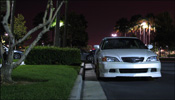
New pictures!!
I started to get hang of this camera. I still have long ago, but here are some pictures that I took.
Let me know what you guys think!


Here is my first HDR shot.

I'm currently use some trial hdr program, but as you can see the ad on the bottom.
Is there another program do you guys recommend? I don't feel like paying $55 for this program.
Let me know what you guys think!
Here is my first HDR shot.
I'm currently use some trial hdr program, but as you can see the ad on the bottom.
Is there another program do you guys recommend? I don't feel like paying $55 for this program.

Thread Starter
mmmmmm....
Joined: Sep 2005
Posts: 20,524
Likes: 95
From: Glendale, CA
Originally Posted by Mizouse
try pulling it out of program mode, i used to be like that when i first got my XTi, but found Av and M to be the best, and Tv for panning shots.
Okay.
