


Backup Camera with Nav


Thread Starter
Cruisin'
Joined: Jun 2006
Posts: 18
Likes: 0
Backup Camera with Nav
I have an Accord with nav. I purchased a Dom converter on the group buy and installed it.
I have since discovered that the Nav units that use the white disk have a port J7 for a camera.
I now have the camera connected directly. This has the advantage of not timing out but you can not use a DVD player.
The best part is that it does not modify the wiring in any way and there is no added cost for Doms box. I know it works on Accord, Ridgeline, and Pilot. I assume it works for all.
I have since discovered that the Nav units that use the white disk have a port J7 for a camera.
I now have the camera connected directly. This has the advantage of not timing out but you can not use a DVD player.
The best part is that it does not modify the wiring in any way and there is no added cost for Doms box. I know it works on Accord, Ridgeline, and Pilot. I assume it works for all.
Instructor
Joined: Apr 2005
Posts: 161
Likes: 0
From: Rocky Mountains
Originally Posted by GlennD
I have an Accord with nav. I purchased a Dom converter on the group buy and installed it.
I have since discovered that the Nav units that use the white disk have a port J7 for a camera.
I now have the camera connected directly. This has the advantage of not timing out but you can not use a DVD player.
The best part is that it does not modify the wiring in any way and there is no added cost for Doms box. I know it works on Accord, Ridgeline, and Pilot. I assume it works for all.
I have since discovered that the Nav units that use the white disk have a port J7 for a camera.
I now have the camera connected directly. This has the advantage of not timing out but you can not use a DVD player.
The best part is that it does not modify the wiring in any way and there is no added cost for Doms box. I know it works on Accord, Ridgeline, and Pilot. I assume it works for all.
Thread Starter
Cruisin'
Joined: Jun 2006
Posts: 18
Likes: 0
Yes, I have a 2006. The connector is at the top of the nav unit in the center. There is two connectors together, It is the left one.
The connector requires a jumper to turn it on. It supplies 8V which was too low for my Ebay camera and accepts normal composite video input. I used a 6 pin flat molex connector is not the original part but fits perfectly. I found the nav drawings at hondapilot.org.
The connector requires a jumper to turn it on. It supplies 8V which was too low for my Ebay camera and accepts normal composite video input. I used a 6 pin flat molex connector is not the original part but fits perfectly. I found the nav drawings at hondapilot.org.
Thread Starter
Cruisin'
Joined: Jun 2006
Posts: 18
Likes: 0
I posted this going my memoryand the name is in error. The connector is really D and the pins are: Jumper 6&7 to enable. Pin 5 is video and pin 2 is the shield.
The thread at Hondapilot .org is http://www.hondapilot.org / sh...?threadid=14900
The thread at Hondapilot .org is http://www.hondapilot.org / sh...?threadid=14900



Trending Topics
Thread Starter
Cruisin'
Joined: Jun 2006
Posts: 18
Likes: 0

Thread Starter
Cruisin'
Joined: Jun 2006
Posts: 18
Likes: 0
The connector really should be 7 pins. The flat molex only comes in even numbers and pin one is not used. It plugs in offset to the left or passenger side.
I purchased the connectors from frys. The Molex number is WMLX-103. Frys is 1899306 for a package of three with pins. $ 2.85
I purchased the connectors from frys. The Molex number is WMLX-103. Frys is 1899306 for a package of three with pins. $ 2.85

Senior Moderator
Joined: Jan 2006
Posts: 4,036
Likes: 1
From: ffx.va.us
Got an extra one you could mail me? I'd paypal you a buck or two for the bother 
Would you mind PM'ing me an email I can get you at about this? I have electical manual and want to make a more detailed writeup around this and test it myself.
Also, exactly which camera are you running?
-Reach
Would you mind PM'ing me an email I can get you at about this? I have electical manual and want to make a more detailed writeup around this and test it myself.
Also, exactly which camera are you running?
-Reach
Thread Starter
Cruisin'
Joined: Jun 2006
Posts: 18
Likes: 0
You are welcome to a connector. Just give me an address. By the way, you can test the support for the camera. If pins 6& 7 are jumpered without the camera you will get a blank screen whem going into reverse.

Instructor
Joined: Aug 2006
Posts: 134
Likes: 0
So this will work on the 06 TSX ? Just want to make sure before I try to take my nav out. Anyone know there is a way to trigger that video input to display w/o having to shift into reverse? Could save myself 200 bux....
Thread Starter
Cruisin'
Joined: Jun 2006
Posts: 18
Likes: 0
You asked about my camera. It is the very small one from Wendy on Ebay. I painted it to match the Alabaster Silver with Auto Zone Sunbeam Silver. The color is very close.
I can not figure out how to attach a photo of the camera installation.
I can not figure out how to attach a photo of the camera installation.


Instructor
Joined: Aug 2006
Posts: 160
Likes: 2
From: Goodyear, AZ
the 2006 has the ability for backup camera from the factory. on the back of the DVD rom there is a unused 7pin connector at the top. that is for backup camera. i took some crappy pics of where it is located and of the connector i made for my backup camera with my phone since my digi cam has been lost. photobucket is down right now so ill upload in the morning.
right now i have a POS camera, looking for something better soon. ill use this same connector to hook up the DVD player im buyin this week.
a write up has been done on this somewhere, but with crappy pics as well. when i get the DVD ill borrow my roomate's camera and do a DYI.
big points for me reach.
luther
right now i have a POS camera, looking for something better soon. ill use this same connector to hook up the DVD player im buyin this week.
a write up has been done on this somewhere, but with crappy pics as well. when i get the DVD ill borrow my roomate's camera and do a DYI.
big points for me reach.
luther
Instructor
Joined: Aug 2006
Posts: 160
Likes: 2
From: Goodyear, AZ
ok photobucket is back.
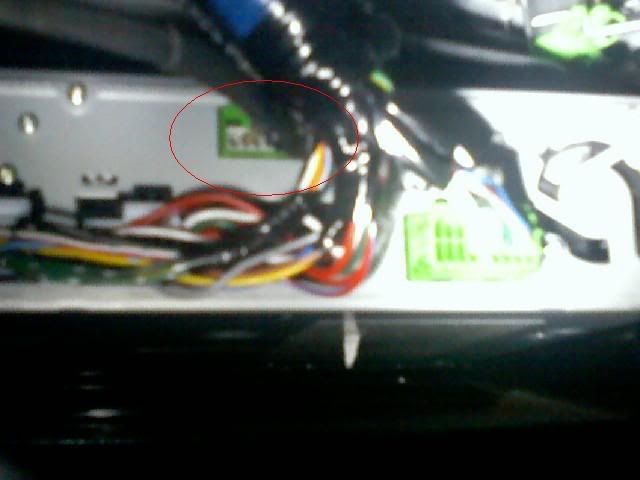
factory backup camera input. the top left green one that is circled
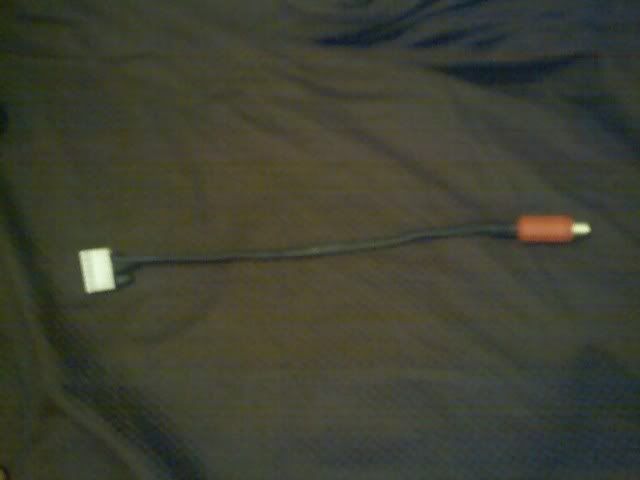
the adpater i made

blurry closeup of the 7pin connector
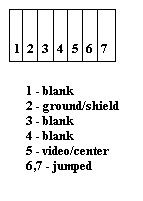
crappy drawing of the pinouts. this is how it is looking at the back of the DVD rom.
Luther
factory backup camera input. the top left green one that is circled
the adpater i made
blurry closeup of the 7pin connector
crappy drawing of the pinouts. this is how it is looking at the back of the DVD rom.
Luther

Senior Moderator
Joined: Jan 2006
Posts: 4,036
Likes: 1
From: ffx.va.us
Originally Posted by PhiSigBrotha
BTY reach which camera you end up with. good ones are expensive and ima cheap bastard.
Lo and behold, its a newer model than the one most people have. I ordered 2, so I can put one on my Highlander too.


That's her eBay name in the tag, just check for her store. I don't have them yet, I expect them to be delivered within a day or two. I'll post a pic of it in operation here when I get it.


Instructor
Joined: Feb 2006
Posts: 133
Likes: 0
Awesome find! Congrats to everyone involved. This is great news for me.
One question remains: how can I rig this so that I don't have to be in reverse? I want to hook up a PS2... there should be a way for me to put a switch in somewhere, correct?
any info would be great appreciated.
One question remains: how can I rig this so that I don't have to be in reverse? I want to hook up a PS2... there should be a way for me to put a switch in somewhere, correct?
any info would be great appreciated.
Instructor
Joined: Feb 2006
Posts: 133
Likes: 0
Looking at the diagram that is linked from hondapilot.org, it looks like connector C5 is the one that receives the reverse signal.
Signal goes to 12V when the car is in reverse (picture displays). So it seems like I should be able to wire my switch here to turn the display from my PS2 on/off.
Everyone agree with this, or am I going to destroy my navigation system?
Signal goes to 12V when the car is in reverse (picture displays). So it seems like I should be able to wire my switch here to turn the display from my PS2 on/off.
Everyone agree with this, or am I going to destroy my navigation system?
Senior Moderator
Joined: Jan 2006
Posts: 4,036
Likes: 1
From: ffx.va.us
You got it, its entirely possible.
You just need a switch to provide a signal to either 6 or 7, which ever one is ground, with the +12 that would be coming through the other one when in reverse.
You just need a switch to provide a signal to either 6 or 7, which ever one is ground, with the +12 that would be coming through the other one when in reverse.
Instructor
Joined: Feb 2006
Posts: 133
Likes: 0
I'm a little confused by your statement. I thought I could get by with:
1. A switch to flip C5 from 12V to GND (Connector 'C').
2. Pins 6 + 7 (7 pin connector) jumped together.
3. RCA input from PS2 going into pin 5 (7 pin connector).
4. Pin 2 going to ground (7 pin connector).
Not sure what you're saying about pins 6 + 7 though... could you elaborate?
Also, if anyone has any extra of these molex connectors, I would love one too. No Fry's near me and shipping is $7...
1. A switch to flip C5 from 12V to GND (Connector 'C').
2. Pins 6 + 7 (7 pin connector) jumped together.
3. RCA input from PS2 going into pin 5 (7 pin connector).
4. Pin 2 going to ground (7 pin connector).
Not sure what you're saying about pins 6 + 7 though... could you elaborate?
Also, if anyone has any extra of these molex connectors, I would love one too. No Fry's near me and shipping is $7...


2nd Gear
Joined: Jun 2009
Posts: 2
Likes: 0

I'm a little confused by your statement. I thought I could get by with:
1. A switch to flip C5 from 12V to GND (Connector 'C').
2. Pins 6 + 7 (7 pin connector) jumped together.
3. RCA input from PS2 going into pin 5 (7 pin connector).
4. Pin 2 going to ground (7 pin connector).
Not sure what you're saying about pins 6 + 7 though... could you elaborate?
Also, if anyone has any extra of these molex connectors, I would love one too. No Fry's near me and shipping is $7...
1. A switch to flip C5 from 12V to GND (Connector 'C').
2. Pins 6 + 7 (7 pin connector) jumped together.
3. RCA input from PS2 going into pin 5 (7 pin connector).
4. Pin 2 going to ground (7 pin connector).
Not sure what you're saying about pins 6 + 7 though... could you elaborate?
Also, if anyone has any extra of these molex connectors, I would love one too. No Fry's near me and shipping is $7...
The diagram here may be able to help you out: In your case the DVD will be your PS2.


Thread
Thread Starter
Forum
Replies
Last Post
rp_guy
Member Cars for Sale
9
Jul 16, 2017 07:33 AM
navtool.com
5G TLX Audio, Bluetooth, Electronics & Navigation
31
Nov 16, 2015 08:30 PM
