Anyway to clear error codes stored in Nav?

Thread Starter
Safety Car
iTrader: (4)
Joined: Sep 2007
Posts: 4,242
Likes: 949
From: Plainfield, IL
Anyway to clear error codes stored in Nav?
I did a search and didnt come up with much. Basically, over the weeks I have been diagnosing an issue with my 08 Type S 6mt in which several codes were triggered. I am able to clear the normal check engine light either by disconnecting the battery, or using my auto tap software, but is it possible to get rid of the stored codes in the nav without going to the dealership? Its weird there is a button that says delete codes, but it is never highlighted so you can press it. I guess its not a big deal that they are stored in there, but if im able I would prefer they are removed.
Thanks,
James
Thanks,
James

Stay Out Of the Left Lane


Joined: Oct 2003
Posts: 9,706
Likes: 1,399
From: SE Mass --- > Central VA --- > SE Mass
Try this and if there is a problem the message will come back, otherwise this worked for me and will you as well.
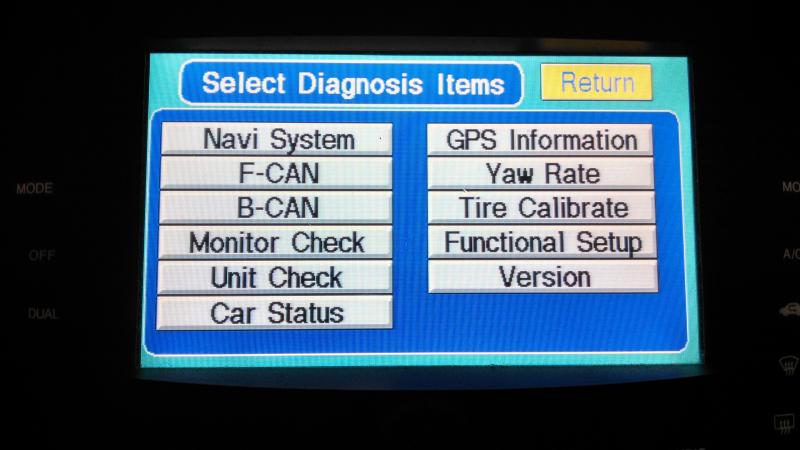
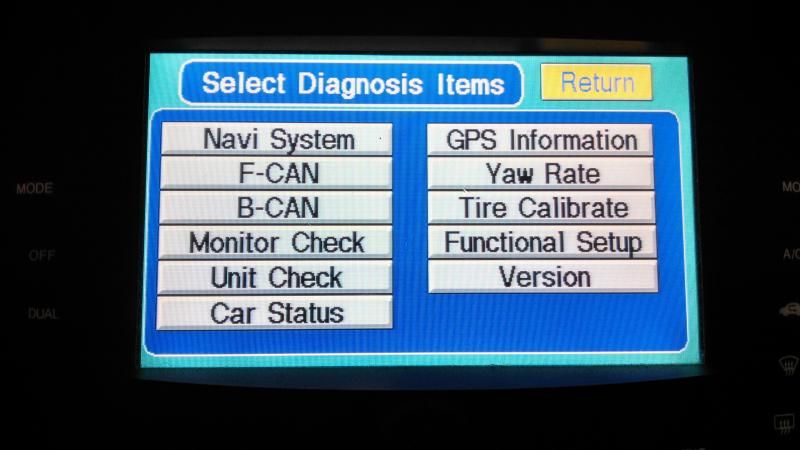
You'll need to evoke the diagnostic screen first, get in your car, turn the nav on, and hold down the "GUIDE", "MENU", and "CANCEL" buttons for about 5 seconds. The factory calibration screen will come up.
Then click on XM module, and you'll see the option to erase those messages. Believe it or not the diagnostic messages are stored in XM module.. dumb.
P.S. word of advice, be careful
You'll need to evoke the diagnostic screen first, get in your car, turn the nav on, and hold down the "GUIDE", "MENU", and "CANCEL" buttons for about 5 seconds. The factory calibration screen will come up.
Then click on XM module, and you'll see the option to erase those messages. Believe it or not the diagnostic messages are stored in XM module.. dumb.
P.S. word of advice, be careful




Thread Starter
Safety Car
iTrader: (4)
Joined: Sep 2007
Posts: 4,242
Likes: 949
From: Plainfield, IL
Awesome, I will go give it a shot. I have actually gone into this diagnostic menu on other TL's I have owned with no issues. Thanks much.
I will go try it.
James
I will go try it.
James


Thread Starter
Safety Car
iTrader: (4)
Joined: Sep 2007
Posts: 4,242
Likes: 949
From: Plainfield, IL
Thanks very much for the help it worked perfectly!! The only reason I wanted to is because a couple weeks ago I was doing some diagnosing which required disconnecting a couple sensors which in turn obviously triggered some codes. I was able to turn off the codes and reset the CEL, however the messages in the nav system stayed there. No real reason but I just didnt want them there anymore I like to keep everything clean...sort of like cleaning your PC and deleting your history if that analogy makes any sense. lol
Thanks again.
James
Thanks again.
James
Stay Out Of the Left Lane
Joined: Oct 2003
Posts: 9,706
Likes: 1,399
From: SE Mass --- > Central VA --- > SE Mass
I had an issue with a TPMS error because I had put rims and tires on my car that didn't have TPMS. I knew I was going to have a problem - just didn't have the extra TPMS units for my second set of rims. When I had them installed the TPMS worked fine, but still had the error messages.........
Stay Out Of the Left Lane
Joined: Oct 2003
Posts: 9,706
Likes: 1,399
From: SE Mass --- > Central VA --- > SE Mass
Thanks very much for the help it worked perfectly!! The only reason I wanted to is because a couple weeks ago I was doing some diagnosing which required disconnecting a couple sensors which in turn obviously triggered some codes. I was able to turn off the codes and reset the CEL, however the messages in the nav system stayed there. No real reason but I just didnt want them there anymore I like to keep everything clean...sort of like cleaning your PC and deleting your history if that analogy makes any sense. lol
Thanks again.
James
Thanks again.
James
Trending Topics



Advanced
Joined: Feb 2012
Posts: 65
Likes: 1
From: Andover, Ma
Man that's a great tip… my cars been fine since I got it but I did notice those messages saved and it was aggravating just knowing that they were there and that nothing was wrong with my car…… tried it and was successful
Thanks
Thanks
Stay Out Of the Left Lane
Joined: Oct 2003
Posts: 9,706
Likes: 1,399
From: SE Mass --- > Central VA --- > SE Mass
Just as an FYI - You can evoke the diagnotics menu the same way on the MDX as well - we have an MDX as well. I'm not sure about the whole Acura lineup, but would assume so.


Joined: Aug 2008
Posts: 1,303
Likes: 133
From: New Windsor, NY
So I tried this and got scared that I was going to mess something up...
I have an 08 TL-S and I want to make sure that I hit the right things. Here is what I have so far:
I hit held down the 3 buttons and this came up:
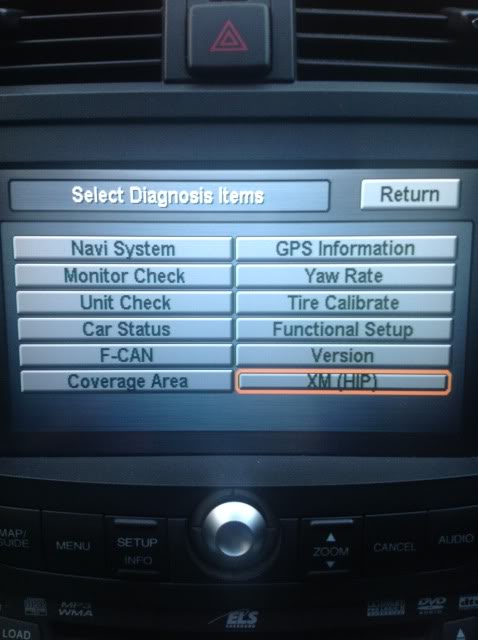
Then I hit the XM ECU button:
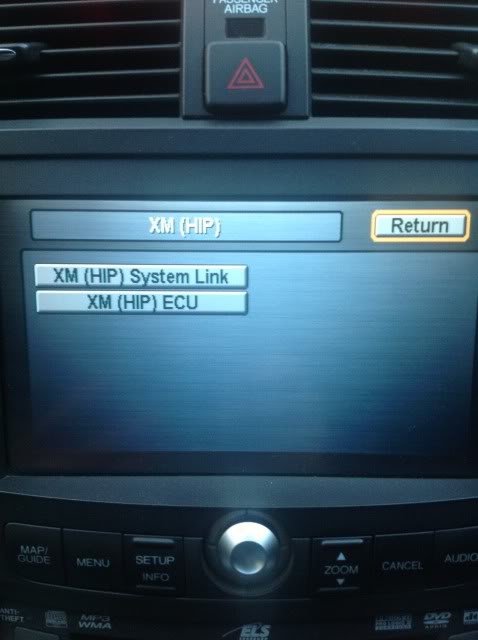
Thought that I would reset the data:
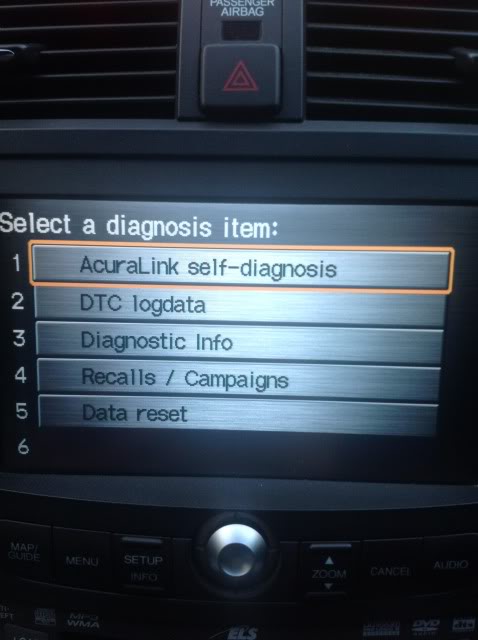
Then this came up and I got scared:
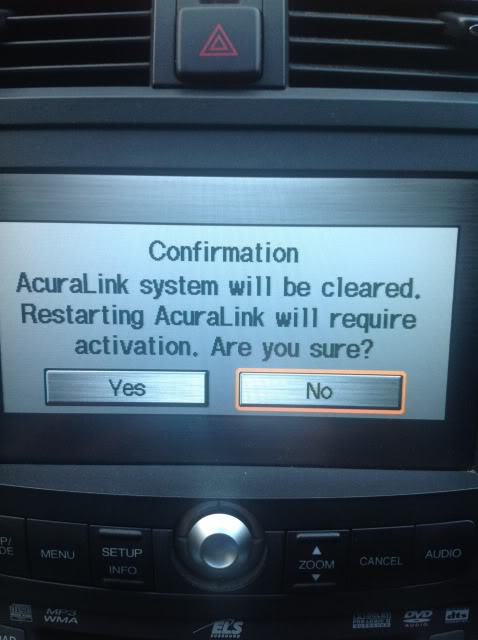
I don't see a "delete" button... MOst of the codes that I did see on another screen were from changing my steering wheel and pulling out the airbag, when I installed the RV-6 Exhaust, HFPC's, and TPMS related things.
Please advise
I have an 08 TL-S and I want to make sure that I hit the right things. Here is what I have so far:
I hit held down the 3 buttons and this came up:

Then I hit the XM ECU button:

Thought that I would reset the data:

Then this came up and I got scared:

I don't see a "delete" button... MOst of the codes that I did see on another screen were from changing my steering wheel and pulling out the airbag, when I installed the RV-6 Exhaust, HFPC's, and TPMS related things.
Please advise
Last edited by Morrissey25; May 22, 2013 at 07:07 PM.
Stay Out Of the Left Lane
Joined: Oct 2003
Posts: 9,706
Likes: 1,399
From: SE Mass --- > Central VA --- > SE Mass
It has been awhile since I have had any error messages to clear, but just looked in my TL. If I remember correctly you want to choose option #3 Diagnostics Info and not option #1, which I believe you have selected in your pix.
Perhaps others who have cleared codes more recently can confirm / correct.
Perhaps others who have cleared codes more recently can confirm / correct.
Joined: Aug 2008
Posts: 1,303
Likes: 133
From: New Windsor, NY
It has been awhile since I have had any error messages to clear, but just looked in my TL. If I remember correctly you want to choose option #3 Diagnostics Info and not option #1, which I believe you have selected in your pix.
Perhaps others who have cleared codes more recently can confirm / correct.
Perhaps others who have cleared codes more recently can confirm / correct.
Thank you.Then, out of curiosity, I hit the DTC logdata (option 2) and this screen came up:

When I hit one of the airbag system logs I got to this screen:

Is there any way to clear these logs? What do all the numbers mean? There didn't seem to be any real correlation between the "trip" numbers (time and mileage/km) and the various codes that were shown.
If and when I sell my TL, I don't want the buyer to think that my car has issues from installing the HFPC's and modifying my steering wheel trim

Stay Out Of the Left Lane
Joined: Oct 2003
Posts: 9,706
Likes: 1,399
From: SE Mass --- > Central VA --- > SE Mass
Not sure what those messages mean or if they are clearable or are part of the permanent datalog. You would probably need to talk with an Acura / Honda tech for that.
In terms of a buyer finding or seeing these, while possible, I would think very improbable.
In terms of a buyer finding or seeing these, while possible, I would think very improbable.
It has been awhile since I have had any error messages to clear, but just looked in my TL. If I remember correctly you want to choose option #3 Diagnostics Info and not option #1, which I believe you have selected in your pix.
Perhaps others who have cleared codes more recently can confirm / correct.
Perhaps others who have cleared codes more recently can confirm / correct.
Thanks, I had a fuel cap code and another related fuel issue code that has been fixed.
I still had these codes. I followed this thread and option 3 and was able to clear the codes I had stored.
Now I can monitor the system for any future issues. Thanks for the tips from many years ago.
Stay Out Of the Left Lane
Joined: Oct 2003
Posts: 9,706
Likes: 1,399
From: SE Mass --- > Central VA --- > SE Mass
Thanks, I had a fuel cap code and another related fuel issue code that has been fixed.
I still had these codes. I followed this thread and option 3 and was able to clear the codes I had stored.
Now I can monitor the system for any future issues. Thanks for the tips from many years ago.
I still had these codes. I followed this thread and option 3 and was able to clear the codes I had stored.
Now I can monitor the system for any future issues. Thanks for the tips from many years ago.
Thread Starter
Safety Car
iTrader: (4)
Joined: Sep 2007
Posts: 4,242
Likes: 949
From: Plainfield, IL
^^^ well it seems that some codes automatically get stored and come right back no matter how many times you delete them. I figured its normal because pretty much all of the TLs I have owned did it. However if you actually did have a check engine light on using this delete method will remove it from the system completely, unless ofcourse the problem was to come back.
Yea, its still good to clear codes. If you have an issue they will come back.
Either write them down first or look them up to see what kind of problem it was. That way you can build a history with your car first.
Either write them down first or look them up to see what kind of problem it was. That way you can build a history with your car first.
Stay Out Of the Left Lane
Joined: Oct 2003
Posts: 9,706
Likes: 1,399
From: SE Mass --- > Central VA --- > SE Mass
+1^ This. If the problems that caused the codes to be captured are still there - when you clear them the will come back. If you clear them and they don't come back, I believe you should be all set.
Last edited by NBP04TL4ME; Jul 19, 2013 at 03:48 PM. Reason: typo

Stay Out Of the Left Lane
Joined: Oct 2003
Posts: 9,706
Likes: 1,399
From: SE Mass --- > Central VA --- > SE Mass
Probably similar but slightly different. I don't have a 4th gen to play with so I won't be able to help. You might want to post in 4th gen and reference this thread.


Stay Out Of the Left Lane
Joined: Oct 2003
Posts: 9,706
Likes: 1,399
From: SE Mass --- > Central VA --- > SE Mass
Reasonably sure it worked on my 04, but no longer have it to test. Definitely works on my 08 TLS. Not that I think it would matter but do you have an active XM subscription?