


AcuraLink Connect/Navigation Issues


Thread Starter
Burning Brakes
Joined: Aug 2012
Posts: 767
Likes: 891
From: Ohio
AcuraLink Connect/Navigation Issues
I picked up my TLX on Friday... love it for the most part but I'm starting to have issues with Navi/Acura Link... some of them started on Saturday, the others started today.
1. Clock started resetting itself every time I turn the car on (it's supposed to be linked to satellite/navigation). It was going back to 8:00, now that I've set it manually the clock stops each time I turn off the car then resumes when I turn the car back on.
2. Date showing up as 12/31/2011
3. Compass is incorrect (street names are incorrect on the instrument panel)
4. Navigation map is showing where I previously was but not where I currently am. (like there is a delay from hours ago and the system is just now catching up/backtracking to the route I was previously on)
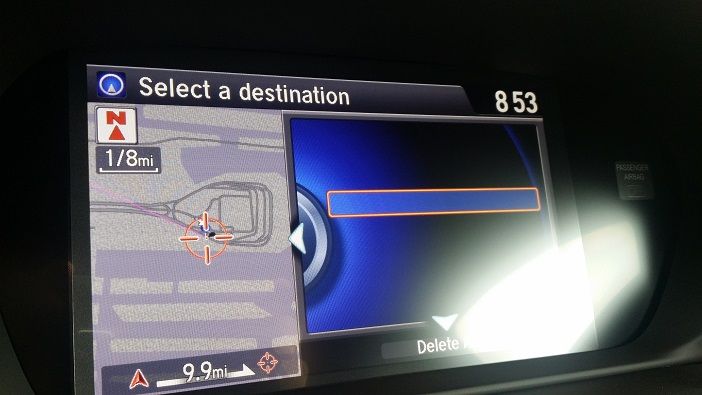
5. Acura Link Connect/Send Destination: When I send a destination to the car from my phone app or computer, the destination is sent to the car but it does not show the name of the destination. So if multiple destinations are sent I won't know what they are. The picture is shown below with the blank (the destination I sent)...
6. I will not be purchasing a subscription to Connect because it is extremely slow and not very reliable. It doesn't always work.
7. I'm in love with the Pandora integration... Aha not so much. Aha works half the time and when it does it's very clunky.
Has anyone experienced any of these?
(5. Sending destinations/routes to car issue):
1. Clock started resetting itself every time I turn the car on (it's supposed to be linked to satellite/navigation). It was going back to 8:00, now that I've set it manually the clock stops each time I turn off the car then resumes when I turn the car back on.
2. Date showing up as 12/31/2011
3. Compass is incorrect (street names are incorrect on the instrument panel)
4. Navigation map is showing where I previously was but not where I currently am. (like there is a delay from hours ago and the system is just now catching up/backtracking to the route I was previously on)
5. Acura Link Connect/Send Destination: When I send a destination to the car from my phone app or computer, the destination is sent to the car but it does not show the name of the destination. So if multiple destinations are sent I won't know what they are. The picture is shown below with the blank (the destination I sent)...
6. I will not be purchasing a subscription to Connect because it is extremely slow and not very reliable. It doesn't always work.
7. I'm in love with the Pandora integration... Aha not so much. Aha works half the time and when it does it's very clunky.
Has anyone experienced any of these?
(5. Sending destinations/routes to car issue):

Thread Starter
Burning Brakes
Joined: Aug 2012
Posts: 767
Likes: 891
From: Ohio
I'm getting ready to call Acura Client Care... I think my navigation issues have something to do with the Acuralink/Connect subscription, at least I'm hoping so rather than there being a hardware or software issue. If they can't help then I'll have to contact the dealership.


3rd Gear
Joined: May 2011
Posts: 3
Likes: 3
My TLX Navigation is extremely slow when starting the car. It takes 45 plus seconds from the time I start the car until the Navi responds to me pushing the "Menu" button. Anyone else having this experience? My brother's 2014 RLX responds within 10 seconds.

Moderator


Joined: Jul 2014
Posts: 1,993
Likes: 1,405
From: Ohio
That's my experience as well.

5th Gear
Joined: Nov 2014
Posts: 5
Likes: 4
5. Acura Link Connect/Send Destination: When I send a destination to the car from my phone app or computer, the destination is sent to the car but it does not show the name of the destination. So if multiple destinations are sent I won't know what they are. The picture is shown below with the blank (the destination I sent)...
I think the latest Nav software update has fixed this issue. The car that I test drove several weeks back had this issue, but the car I bought works just fine. My vin is outside the range for the update and all the features mentioned are already on my system.
I think the latest Nav software update has fixed this issue. The car that I test drove several weeks back had this issue, but the car I bought works just fine. My vin is outside the range for the update and all the features mentioned are already on my system.

Trending Topics

Advanced
Joined: Mar 2013
Posts: 99
Likes: 64
From: Charlotte, NC
That's good to know. I'm hoping that it also fixes the issue that when the car receives and address via AcuraLink and you say that you don't want to view it immediately, that there's no way to find/reference that address unless you re-send it.
It's happened to me twice and I don't think the use case would be that uncommon--that you send an address to the car for later (rather than immediate) use.
It's happened to me twice and I don't think the use case would be that uncommon--that you send an address to the car for later (rather than immediate) use.
Thread Starter
Burning Brakes
Joined: Aug 2012
Posts: 767
Likes: 891
From: Ohio
5. Acura Link Connect/Send Destination: When I send a destination to the car from my phone app or computer, the destination is sent to the car but it does not show the name of the destination. So if multiple destinations are sent I won't know what they are. The picture is shown below with the blank (the destination I sent)...
I think the latest Nav software update has fixed this issue. The car that I test drove several weeks back had this issue, but the car I bought works just fine. My vin is outside the range for the update and all the features mentioned are already on my system.
I think the latest Nav software update has fixed this issue. The car that I test drove several weeks back had this issue, but the car I bought works just fine. My vin is outside the range for the update and all the features mentioned are already on my system.
Instructor
Joined: Oct 2010
Posts: 118
Likes: 84
From: Atlanta, GA
Forgive my ignorance, but I didn't know that it's possible to send an address from your phone to the car's navigation unit. This sounds like a great feature. Can someone explain how it works or where in the manual to find it?
Three Wheelin'
Joined: Aug 2014
Posts: 1,321
Likes: 400
From: Thornhill, Ontario
You cannot download an address from a phone app, but with the AcuraLink service you can download an address from the AcuraLink web site (yes you could do this from a browser on your phone), or from the Concierge service (voice connection button near the sunroof controls).
Thread Starter
Burning Brakes
Joined: Aug 2012
Posts: 767
Likes: 891
From: Ohio
You cannot download an address from a phone app, but with the AcuraLink service you can download an address from the AcuraLink web site (yes you could do this from a browser on your phone), or from the Concierge service (voice connection button near the sunroof controls).
Thread Starter
Burning Brakes
Joined: Aug 2012
Posts: 767
Likes: 891
From: Ohio


Thread
Thread Starter
Forum
Replies
Last Post
Barb Jackson
2G RDX Audio, Bluetooth, Electronics & Navigation
11
Sep 15, 2015 02:27 PM
