


OBD Port and iPhone/iPad/Droid

Thread Starter
Colorado Springs
Joined: May 2009
Posts: 733
Likes: 40
OBD Port and iPhone/iPad/Droid
First off, mods, please move this thread if it doesn't apply for the performance/modifications subsection...
But I'm getting very interested in getting an OBD2 port plug-in (bluetooth) and getting an app on both my iPad and Droid that give me all the readouts I want on the information that goes through the port.
Has anyone done this? I have a couple of questions before I buy the OBD2 Port bluetooth connector:
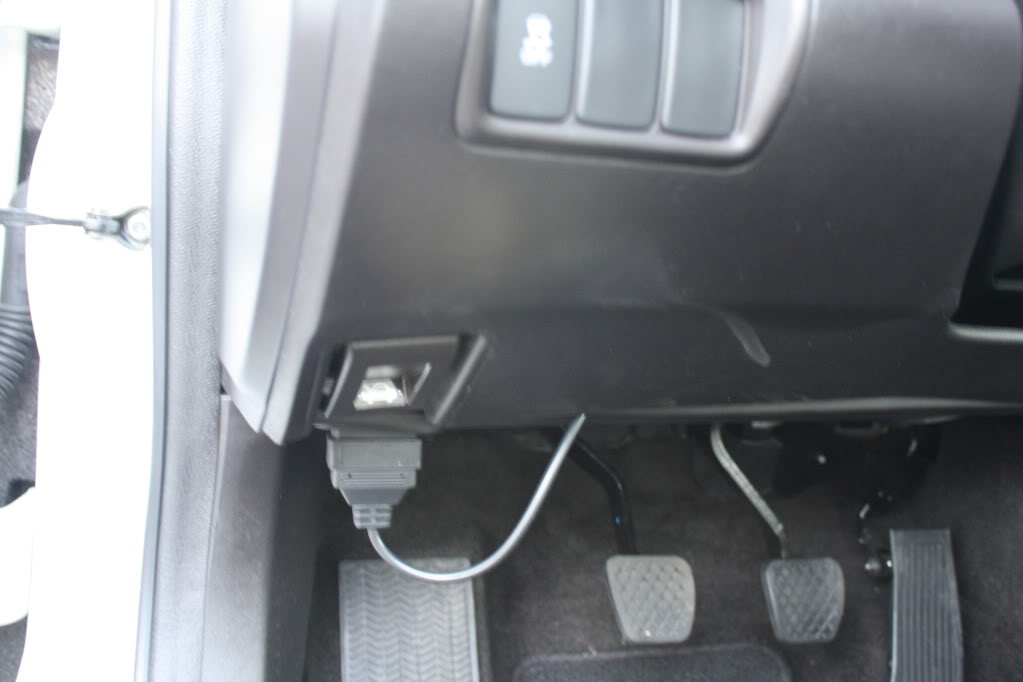
1.Where is the OBD2 port at on the TL? I assume it's somewhere in the driver's side footwell.
2. Will I be able to see all the parameters these apps promise I will be able to see? (throttle load, water temp, air temp, etc.)
I'll think of more questions later, I will probably buy a "dongle" in a week or so and post some pictures if everything works out.
But I'm getting very interested in getting an OBD2 port plug-in (bluetooth) and getting an app on both my iPad and Droid that give me all the readouts I want on the information that goes through the port.
Has anyone done this? I have a couple of questions before I buy the OBD2 Port bluetooth connector:
1.Where is the OBD2 port at on the TL? I assume it's somewhere in the driver's side footwell.
2. Will I be able to see all the parameters these apps promise I will be able to see? (throttle load, water temp, air temp, etc.)
I'll think of more questions later, I will probably buy a "dongle" in a week or so and post some pictures if everything works out.


Drifting
Joined: Oct 2009
Posts: 2,761
Likes: 86
From: Boston Metro

Advanced
Joined: Aug 2007
Posts: 80
Likes: 6
From: Flagstaff, AZ
I'm actually looking at this too!
I didn't know there was a Bluetooth version.... I was looking at the $180 cable that goes from the obd port to the iPad/iPhone directly. I certainly don't want to spend that on an f-ing cable. I have my apple devices jail broken and there is some sweet software for this on insallous. Let me know how it goes.
Thread Starter
Colorado Springs
Joined: May 2009
Posts: 733
Likes: 40
I want to use this program for the iPad I have, but I don't want to spend $150 for the damn wifi connector, wouldn't the one I have pictured above work? Does anybody know?
Rev app for iPhone/iPad
http://hackaday.com/2008/09/27/use-r...r-obd-ii-port/
Typical Wifi OBD-2 Port connector

Rev app for iPhone/iPad
http://hackaday.com/2008/09/27/use-r...r-obd-ii-port/
Typical Wifi OBD-2 Port connector
Trending Topics
Racer
Joined: Aug 2007
Posts: 371
Likes: 22
From: Seattle, WA
The bluetooth module should work with the iphone. That being said, I know that Apple has been very finicky with their bluetooth support and I wouldn't be surprised if that sort of bluetooth connection wasn't supported on the iphone, the iphone bluetooth connection still does not support Acuralink communications for example. Are you able to ask the software author if they know of the bluetooth module working with the iphone? They're probably your best source of what will and will not work with the program.
Last edited by maddogtheta; Oct 4, 2010 at 06:06 PM.
Racer
Joined: Aug 2007
Posts: 371
Likes: 22
From: Seattle, WA
Just found this on the FAQ section for Rev. http://devtoaster.com/products/rev/index.html
"Why don't you support USB or Bluetooth OBD-II interface hardware?
We have investigated the new hardware integration features of iPhone OS 3.0, which in theory allows us to support Bluetooth and Dock connector-based hardware. However, after confidential discussions with Apple, we have concluded that WiFi is still the most reasonable option at this moment—both from technical and business perspectives.
We will not be supporting Bluetooth or Dock Connector OBD II connections yet—but we continue to persue this option and will announce any updates as soon as we have them."
"Why don't you support USB or Bluetooth OBD-II interface hardware?
We have investigated the new hardware integration features of iPhone OS 3.0, which in theory allows us to support Bluetooth and Dock connector-based hardware. However, after confidential discussions with Apple, we have concluded that WiFi is still the most reasonable option at this moment—both from technical and business perspectives.
We will not be supporting Bluetooth or Dock Connector OBD II connections yet—but we continue to persue this option and will announce any updates as soon as we have them."
Thread Starter
Colorado Springs
Joined: May 2009
Posts: 733
Likes: 40
Awesome find maddogtheta, you saved me a questionable return on an item that wouldn't work.
I willl ultimately drop the cash on the wired connector within the next couple days then and download the app. Just for everyones reference, I have an ipad and not an iphone. I don't think there will be much of an issue because all apps available for iphone are also available on the ipad.
After I have it all set up, id like to do some tests with maybe putting the stock intake back on and doing some hp/tq runs and then doing the takeda for any quantifiable number differences. If at all possible, id also like to find somebody with a stock 6MT around the richmond, va area and get some baseline numbers from them using my ipad/connector.
Any takers?
I willl ultimately drop the cash on the wired connector within the next couple days then and download the app. Just for everyones reference, I have an ipad and not an iphone. I don't think there will be much of an issue because all apps available for iphone are also available on the ipad.
After I have it all set up, id like to do some tests with maybe putting the stock intake back on and doing some hp/tq runs and then doing the takeda for any quantifiable number differences. If at all possible, id also like to find somebody with a stock 6MT around the richmond, va area and get some baseline numbers from them using my ipad/connector.
Any takers?
Racer
Joined: Aug 2007
Posts: 371
Likes: 22
From: Seattle, WA
I'll definitely be interested to see what info you will have available to monitor. Wish I was closer to Richmond, I'd take you up on the offer. Unfortunately I think it's a little too far of a drive from Seattle, WA

Intermediate
Joined: Sep 2010
Posts: 48
Likes: 2
From: Dallas, TX
Awesome find maddogtheta, you saved me a questionable return on an item that wouldn't work.
I willl ultimately drop the cash on the wired connector within the next couple days then and download the app. Just for everyones reference, I have an ipad and not an iphone. I don't think there will be much of an issue because all apps available for iphone are also available on the ipad.
After I have it all set up, id like to do some tests with maybe putting the stock intake back on and doing some hp/tq runs and then doing the takeda for any quantifiable number differences. If at all possible, id also like to find somebody with a stock 6MT around the richmond, va area and get some baseline numbers from them using my ipad/connector.
Any takers?
I willl ultimately drop the cash on the wired connector within the next couple days then and download the app. Just for everyones reference, I have an ipad and not an iphone. I don't think there will be much of an issue because all apps available for iphone are also available on the ipad.
After I have it all set up, id like to do some tests with maybe putting the stock intake back on and doing some hp/tq runs and then doing the takeda for any quantifiable number differences. If at all possible, id also like to find somebody with a stock 6MT around the richmond, va area and get some baseline numbers from them using my ipad/connector.
Any takers?
Thread Starter
Colorado Springs
Joined: May 2009
Posts: 733
Likes: 40
I am not going to get the wired one anymore, I am going to get a Kiwi WiFi. I have concluded this is the best one I can get for the price, so keep posted and when i order it and it comes in, I'll let you all know!
Also, still looking for any stock 6MT's in the East or North Virginia area. George Knighton perhaps?
Also, still looking for any stock 6MT's in the East or North Virginia area. George Knighton perhaps?

Thread Starter
Colorado Springs
Joined: May 2009
Posts: 733
Likes: 40
Just to keep this thread active, I just finally got the Kiwi and iPad all synced up last night and took the car for a quick 10 minute spin to test it out. I will do a full write up tonight but the very first thing I wanted to test was the intake temperature on the Takeda intake because everyone seems to think that the car needs a cold air intake to get cooler air into the engine.
So to answer this age old question, the ambient temperature in Richmond last night was 54 degrees and as soon as I was going above 10mph, the intake air temperature was reading 60.4 degrees (it was reading 100+ if the car was just setting idle after being warmed up). Thus proving, you do not need a cold air intake to get cold air into the intake, all you need is the car to be moving!
So to answer this age old question, the ambient temperature in Richmond last night was 54 degrees and as soon as I was going above 10mph, the intake air temperature was reading 60.4 degrees (it was reading 100+ if the car was just setting idle after being warmed up). Thus proving, you do not need a cold air intake to get cold air into the intake, all you need is the car to be moving!

Thread Starter
Colorado Springs
Joined: May 2009
Posts: 733
Likes: 40
Ok, so here is the quick and dirty of tonight's session with the iPad and Kiwi PLX device. Tonight was definitely a practice/learning session because I had no idea how to get it to work right. Towards the end, I was catching on, but I'll give details a little later. For now, this testing was done thusly:
1. Drove up to the local state highway late tonight (rt 288) and pulled off on the side of the road. Turned flashers on and cleared last results and reset it to "0"
2. Waited for a decent time when no cars were in harms way in the front of me and no cars were approaching from the rear.
3. Usually revved up to 4,000rpms and dropped the clutch. I cut off anywhere from 80mph to 100mph and this was usually after shifting into 4th gear.
4. The REV program stored the highest numbers achieved and that's what you'll see in the pictures below.
The Kiwi PLX WiFi device...

Where I tucked it in...

All buttoned up...
After 3 near-starts, I got a good reading on a run down the highway.

Second run.
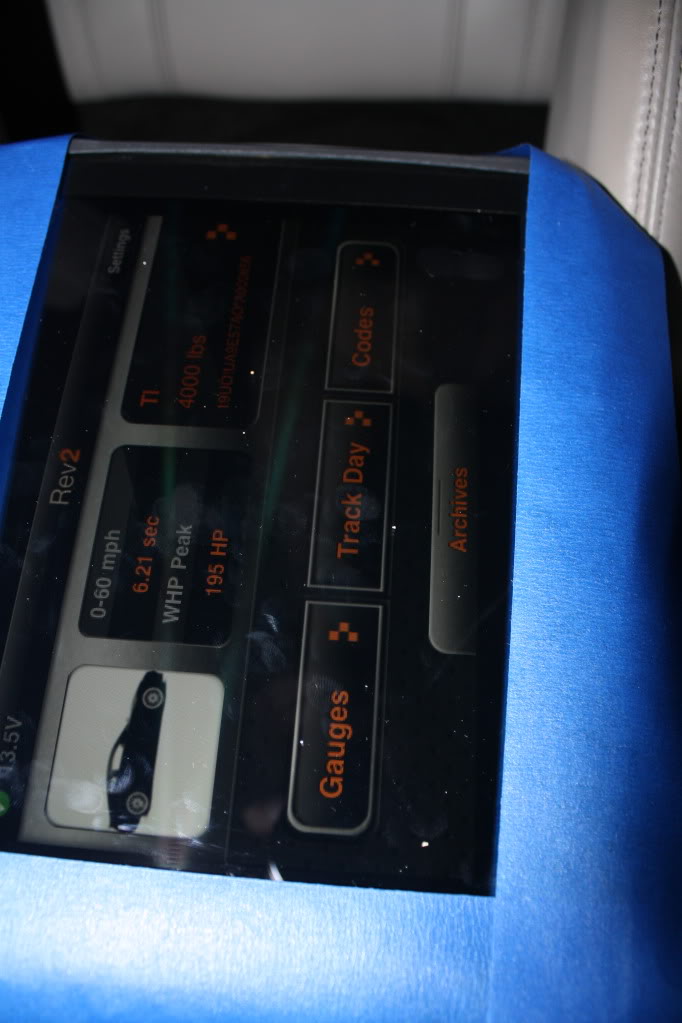
Third run.

And there was one more run after that, but I stayed on the rumble strips on the highway too long after initial blast-off and it hurt my time and WHP estimate more. So I didn't post it.
But the more I practice and get the hang of it, the more I will keep posting new results! We all know there is more HP in this thing than we see.
1. Drove up to the local state highway late tonight (rt 288) and pulled off on the side of the road. Turned flashers on and cleared last results and reset it to "0"
2. Waited for a decent time when no cars were in harms way in the front of me and no cars were approaching from the rear.
3. Usually revved up to 4,000rpms and dropped the clutch. I cut off anywhere from 80mph to 100mph and this was usually after shifting into 4th gear.
4. The REV program stored the highest numbers achieved and that's what you'll see in the pictures below.
The Kiwi PLX WiFi device...
Where I tucked it in...
All buttoned up...
After 3 near-starts, I got a good reading on a run down the highway.
Second run.
Third run.
And there was one more run after that, but I stayed on the rumble strips on the highway too long after initial blast-off and it hurt my time and WHP estimate more. So I didn't post it.
But the more I practice and get the hang of it, the more I will keep posting new results! We all know there is more HP in this thing than we see.
Thread Starter
Colorado Springs
Joined: May 2009
Posts: 733
Likes: 40
No updates... I still have this program, I just haven't used it lately. Now that I live in Colorado Springs (my home in particular is around 6400 feet altitude) my numbers will be way lower, and therefore, not as accurate. It's fun to help people diagnose and clear their Check Engine lights, though.
I took this to a photoshoot meet in Denver and nobody wanted to try it, even though 2 cars there had CEL's on. I will be happy to do a better write up later on though.
I took this to a photoshoot meet in Denver and nobody wanted to try it, even though 2 cars there had CEL's on. I will be happy to do a better write up later on though.

Thread
Thread Starter
Forum
Replies
Last Post
rp_guy
Member Cars for Sale
9
Jul 16, 2017 07:33 AM
InFaMouSLink
Car Parts for Sale
3
Oct 30, 2015 09:43 AM
blacktsxwagon
5G TLX (2015-2020)
42
Oct 27, 2015 10:12 PM
