


Set Navi Clock in Alaska

Thread Starter
Burning Brakes
Joined: May 2007
Posts: 867
Likes: 37
From: Anchorage, Alaska
Set Navi Clock in Alaska
Anyone know how to set the clock when you are out of the coverage area? I've read the threads that state to go to the nav screen, press the setup button, select option 4 and then change the time. Unfortunately, since I'm in Alaska and out of the coverage area, it won't do anything in the nav screen.



Thread Starter
Burning Brakes
Joined: May 2007
Posts: 867
Likes: 37
From: Anchorage, Alaska
Thanks for the help. I tried starting the car and still no setup screen with options. Could it be that I have a 2007 (and dvd drive)? I included pics of the screens:
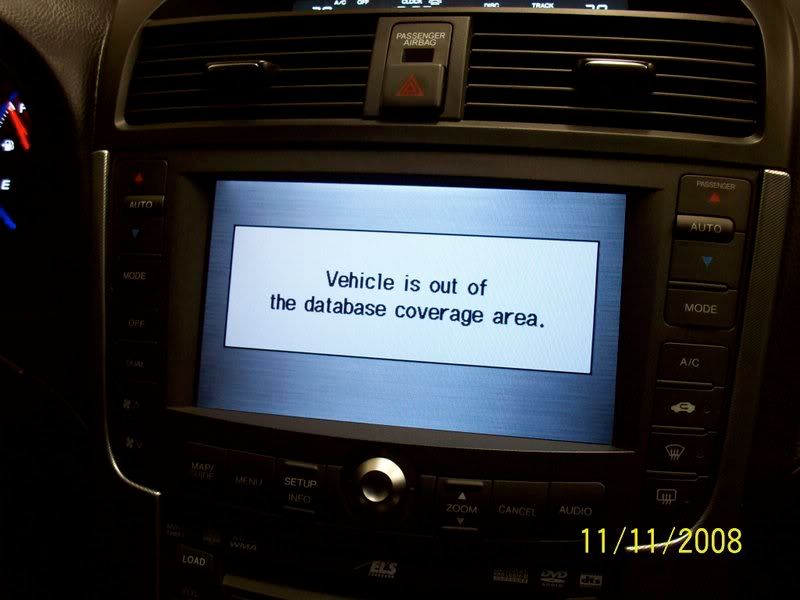

Any other ideas?
Any other ideas?

Keep Right Except to Pass

Joined: Aug 2004
Posts: 2,411
Likes: 45
From: Kingstowne, VA
That's odd. I drove my TL out of the coverage area this past July in Nova Scotia and I did not get that message. Hitting "OK" on the nag screen would just leave the nag screen displayed, but I could still use the Audio screen and I could also display the Setup screen (which I did each morning—I'd hit Setup and turn off the display, which meant that I could still use voice controls for the radio and the climate control if I wanted). Mine is a 2004, so perhaps there is some major difference in the 2007 software (yours uses a different-colored DVD from mine).
So once I got to the Setup menu, I could go to option 4 and change the clock. (Had to do this in Yarmouth because for some reason the Navi would not automatically update to Atlantic Time. But Yarmouth is within the Navi's coverage.) I'm surprised that you cannot do the same. Mine has four numbered buttons across the top where yours says "More," but your "More" option looks greyed-out to me?
So once I got to the Setup menu, I could go to option 4 and change the clock. (Had to do this in Yarmouth because for some reason the Navi would not automatically update to Atlantic Time. But Yarmouth is within the Navi's coverage.) I'm surprised that you cannot do the same. Mine has four numbered buttons across the top where yours says "More," but your "More" option looks greyed-out to me?
Thread Starter
Burning Brakes
Joined: May 2007
Posts: 867
Likes: 37
From: Anchorage, Alaska
Yeah, the "MORE" button is grayed out. It's kind of odd that I'm having this problem. I disconnected the battery for over 24 hours and it still remembered my seat and radio stations. I would have thought there were more people with the Navi option that live in Alaska or Hawaii.
Also, what is the "Nag" screen? Maybe the 07 -08 don't have it?
Also, what is the "Nag" screen? Maybe the 07 -08 don't have it?
Keep Right Except to Pass
Joined: Aug 2004
Posts: 2,411
Likes: 45
From: Kingstowne, VA
Yeah, the "MORE" button is grayed out. It's kind of odd that I'm having this problem. I disconnected the battery for over 24 hours and it still remembered my seat and radio stations. I would have thought there were more people with the Navi option that live in Alaska or Hawaii.
Also, what is the "Nag" screen? Maybe the 07 -08 don't have it?
Also, what is the "Nag" screen? Maybe the 07 -08 don't have it?
Thread Starter
Burning Brakes
Joined: May 2007
Posts: 867
Likes: 37
From: Anchorage, Alaska
Ok, I had to unplug my DVD drive during the install and it somehow allowed me into the map screen. From there I was able to press the "MORE" button and set my clock. I just wanted to tie up the loose end on this thread.
A few feet down the road I was again out of the coverage area . I unplugged it again, and apparently, only my driveway is in the coverage area. Before I left for work today, I unplugged my GPS antenna with the same results. Lame that if you are out of the coverage area that you don't have access to these options.
A few feet down the road I was again out of the coverage area
. I unplugged it again, and apparently, only my driveway is in the coverage area. Before I left for work today, I unplugged my GPS antenna with the same results. Lame that if you are out of the coverage area that you don't have access to these options.
Trending Topics

Instructor
Joined: Jan 2008
Posts: 197
Likes: 0
From: Lemoore, CA
Ok, I had to unplug my DVD drive during the install and it somehow allowed me into the map screen. From there I was able to press the "MORE" button and set my clock. I just wanted to tie up the loose end on this thread.
A few feet down the road I was again out of the coverage area. I unplugged it again, and apparently, only my driveway is in the coverage area. Before I left for work today, I unplugged my GPS antenna with the same results. Lame that if you are out of the coverage area that you don't have access to these options.
A few feet down the road I was again out of the coverage area
. I unplugged it again, and apparently, only my driveway is in the coverage area. Before I left for work today, I unplugged my GPS antenna with the same results. Lame that if you are out of the coverage area that you don't have access to these options.
Thread
Thread Starter
Forum
Replies
Last Post
Vejey Gandier
3G TL Audio, Bluetooth, Electronics & Navigation
4
Sep 12, 2015 08:59 PM
Ny1718
Car Parts for Sale
14
Sep 11, 2015 09:21 AM
braveheart
Car Parts for Sale
0
Sep 7, 2015 08:12 AM
