


P.I.E. X3 Multi-Source Aux Input Converter

Thread Starter
Racer
Joined: Dec 2005
Posts: 278
Likes: 0
From: Pittsburgh, PA
I guess it depends where you live. The great thing about XM is that they also transmit from radio repeaters near large cities. That's why most XM receivers show a "Satellite Signal Strength" and a "Terrestrial Signal Strength". I don't lose signal even in tunnels in Pittsburgh. Sirius does not offer this at all.
jjh1234
jjh1234

Cruisin'
Joined: Apr 2005
Posts: 18
Likes: 0
Originally Posted by ozone
Very nice. Congrats! This HK unit does appear (cosmetically, at least) to be one of the more polished iPod integration solutions. I do have a few questions:
- The uppermost picture is rather dark so I cannot tell where the wire from the LCD display unit runs. Is it visible?
- When the controller unit is tucked down into the cup holder, are you able to comfortably navigate with it, or must you pull it out a bit as you've shown in the last picture.
- What is your impression of how the HK controller works? Does it feel as easy and natural as navigating the iPod itself? Any complaints?
- If you were to add a second external device (such as a Sirius receiver), do you think you would add it to the extra Aux-in source that the Harmon-Kardon unit provides? or would you add it to the X3 switcher? (I assume the answer depends upon whether you use XM today. If not, it seems that going the HK route would be cleanest...as you'd never need to use the X3 selector that you've embedded into the armrest storage area).
- The uppermost picture is rather dark so I cannot tell where the wire from the LCD display unit runs. Is it visible?
- When the controller unit is tucked down into the cup holder, are you able to comfortably navigate with it, or must you pull it out a bit as you've shown in the last picture.
- What is your impression of how the HK controller works? Does it feel as easy and natural as navigating the iPod itself? Any complaints?
- If you were to add a second external device (such as a Sirius receiver), do you think you would add it to the extra Aux-in source that the Harmon-Kardon unit provides? or would you add it to the X3 switcher? (I assume the answer depends upon whether you use XM today. If not, it seems that going the HK route would be cleanest...as you'd never need to use the X3 selector that you've embedded into the armrest storage area).
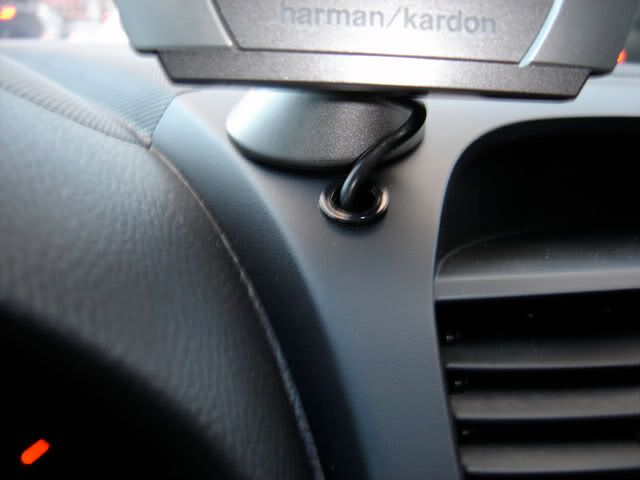
2. see pic for close-up of wire.
3. The Controller works just like the ipod...I have no complaints as of yet...but I'll be posting as soon as i do have some.
4. I do have Active XM so i do use the X3 Selector...if i was going to add another external aux device i'd use the X3.
Cruisin'
Joined: Apr 2005
Posts: 18
Likes: 0
Originally Posted by Acura_Enthusiast

Great work! This is exactly the option I'm considering, and I love how you did it.
I have a 2006 TL without Navigation. Is this what you have? Or a 2005?
So to summarize, this is a complete list of what you installed?
-PIE X3
-HondX3 03
-Harmon Kardon Drive Play
-Did I see the Belkin cup holder?
1) How is the sound quality? The Acura Music Link gets good reviews for audio quality, and this was my fall-back plan.
2) Did you consider other spots to mount the control? I was thinking on the left of the steering wheel, just below the air vent. The cup holder is the best place, but my wife will even use the ones in the rear when she's driving.
3) Do you have a picture of how the PIE controller was installed? Did you consider mounting this in the glove compartment?
4) Did this invalidate any of your warranties?
5) Lastly, if you don't know the installation details, would you mind telling us what Circuit City store your friend works at? I'm going to use Circuit City, too, but they aren't familiar with this kind of setup. At the very least, maybe I could get his code name so I could put the installer here in touch with him/her.
I'd really appreciate feedback, as I'm probably going to have to walk the installer through what needs to be done, except tearing my 1-day-old dash apart.

1. Sound is great while the music is playing...when it's not playing music (i.e paused) there is a slight hissing sound but only if i have the volume higher than 20.
2. I thought about that spot as well...It might work if ther is nothing under that panel...since you would have to Drill holes to mount it there....the glue pads don't work that well. I actually got the idea of the cup holder from another Member on the acurazine forums.
https://acurazine.com/forums/ramblings-12/pot-reclassification-starts-britain-today-129018/
It's a Thread dedicated to the HK Drive+Play...with much more info
3. No pics of the X3 Brain location...The wire wasn't long enough to mount the switch in the armrest and the brain behind the glovebox.
4. Beltsville, Maryland (Near University of Maryland just outside of Washington, DC) he is the Senior Installer.

Intermediate
Joined: Jul 2004
Posts: 46
Likes: 1
From: San Jose, CA
Originally Posted by So Cali
Just picked up TL yesterday. Previous car was 03 accord. Installed sirius tuner (using FM modulator)....interested to better understand what you mean by "hardwired" sirius line out???

You can see what I (and others) have done to add 3 aux-in jacks to the TL here:
https://acurazine.com/forums/showthr...25#post1379225
By connecting the Sirius receiver, MP3 player, etc via RCA cables to an aux-in device, you get *much* higher audio quality than by using an FM modulator to transmit the signal. To most ears, the difference is "night and day". To my ears, the quality of FM modulation is unacceptable, as are cassette adapters. Direct connection is the way to go.

Intermediate
Joined: Sep 2004
Posts: 48
Likes: 0
From: SoCal
Originally Posted by d0rk
So far I've had no response from PIE about this, but Logjam is sending me a new X-3 unit... they think mine just may be defective.
I'm pretty impressed with Logjam's customer service so far. They've already shipped the new one to me and are including a pre-paid UPS return label for me to ship the defective one back.
I'm pretty impressed with Logjam's customer service so far. They've already shipped the new one to me and are including a pre-paid UPS return label for me to ship the defective one back.
b

Intermediate
Joined: Dec 2005
Posts: 27
Likes: 0
Questions for people that have the blitzsafe and PIE. I have the PIE power connected to the front accessory outlet fuse, which I assumed was the switched 12+ volts power. Now for the Blitzsafe I need to plug in the same wire as well as a constant power. I am not to car savy, even though I did this installation myself, but I cant find the 2 fuses I should use. I thought I had two good ones but the ipod stays charger when the car is off. I know it should for another 20 minutes but I am talking about it never stop charging. Basically I was wondering what 2 fuses could I use? The wiring harness is well hidden and tucked away so I dont want to remove everything just to get into there. Thanks in advance for any help.
Intermediate
Joined: Sep 2004
Posts: 48
Likes: 0
From: SoCal
For anyone that has this setup and a working XM subscription, can you try the following:
Put XM on a working station
Switch PIE to MP3 player
Turn off the MP3 player
Turn the volume on the head unit to about 25 or 30
Do you hear XM?
b
Put XM on a working station
Switch PIE to MP3 player
Turn off the MP3 player
Turn the volume on the head unit to about 25 or 30
Do you hear XM?
b

Intermediate
Joined: Dec 2005
Posts: 27
Likes: 0
Originally Posted by bryanb
For anyone that has this setup and a working XM subscription, can you try the following:
Put XM on a working station
Switch PIE to MP3 player
Turn off the MP3 player
Turn the volume on the head unit to about 25 or 30
Do you hear XM?
b
Put XM on a working station
Switch PIE to MP3 player
Turn off the MP3 player
Turn the volume on the head unit to about 25 or 30
Do you hear XM?
b
I can hear it but it needs to be at almost max. Even then it is very very faint. You really have to pay attention to hear it.

Instructor
Joined: Dec 2003
Posts: 229
Likes: 0
From: Kansas City
Thanks to everyone for the info. I have just ordered the X3 and the Honda adapter from myradiostore.com, and should have it in hand to isntall this weekend. Can anyone tell me if connecting an ipod to the X3 via its headphone jack results in a different quality than using an option such as the Blitzsafe? I am planning on just using the headphone output for the time being, but I was wondering if I'm going to experience a degraded quality. My guess is no, but thought it would be worth asking...

10th Gear
Joined: Jul 2004
Posts: 11
Likes: 0
From: Des Moines, IA
Originally Posted by bryanb
I'm really just wondering why it happens.
At normal listening levels, I can't hear this even in a quiet garage with my ear up to the speakers.

9th Gear
Joined: Feb 2006
Posts: 9
Likes: 0
Audio quality with various adapters
Originally Posted by kilrb
Thanks to everyone for the info. I have just ordered the X3 and the Honda adapter from myradiostore.com, and should have it in hand to isntall this weekend. Can anyone tell me if connecting an ipod to the X3 via its headphone jack results in a different quality than using an option such as the Blitzsafe? I am planning on just using the headphone output for the time being, but I was wondering if I'm going to experience a degraded quality. My guess is no, but thought it would be worth asking...
I have had problems with distortion with the Belkin charger, when running the tape adapter through the Belkin charger. It takes a fair amount of tuning to ensure you get good output without distortion. Everything else I use is trouble-free.
Intermediate
Joined: Jul 2004
Posts: 46
Likes: 1
From: San Jose, CA
Originally Posted by kilrb
Can anyone tell me if connecting an ipod to the X3 via its headphone jack results in a different quality than using an option such as the Blitzsafe? I am planning on just using the headphone output for the time being, but I was wondering if I'm going to experience a degraded quality. My guess is no, but thought it would be worth asking...

Iro Ridg .308
Joined: Jan 2005
Posts: 1,241
Likes: 9
From: CA, IL, IN
Almost done. Just have to decide where I'm going to mount the gooseneck for the Ipod.
*I can you tell right now, if you plan on doing the install yourself either:
1. Take off silver trim that outlines the center console
2a. Remove the upper vent, then unscrew (4 screws) and pull out radio to reach XM plug
or
2b. Unscrew 4 screws to allow the whole armrest to move back. Then remove driver's side console panel (the one along your right leg....3 screws) to get to that XM plug.
Getting to that plug is a biiiiatch! I didn't have the appropriate pull-tool to take out that upper vent and was worried about ruining the dash doing it, so I decided to do option 2b instead.
Should have it done thursday during the day sometime. Will post pics later.
*I can you tell right now, if you plan on doing the install yourself either:
1. Take off silver trim that outlines the center console
2a. Remove the upper vent, then unscrew (4 screws) and pull out radio to reach XM plug
or
2b. Unscrew 4 screws to allow the whole armrest to move back. Then remove driver's side console panel (the one along your right leg....3 screws) to get to that XM plug.
Getting to that plug is a biiiiatch! I didn't have the appropriate pull-tool to take out that upper vent and was worried about ruining the dash doing it, so I decided to do option 2b instead.
Should have it done thursday during the day sometime. Will post pics later.

Drifting


Joined: Jan 2003
Posts: 2,356
Likes: 270
From: PA
Originally Posted by special-ed
Almost done. Just have to decide where I'm going to mount the gooseneck for the Ipod.
2b. Unscrew 4 screws to allow the whole armrest to move back. Then remove driver's side console panel (the one along your right leg....3 screws) to get to that XM plug.
2b. Unscrew 4 screws to allow the whole armrest to move back. Then remove driver's side console panel (the one along your right leg....3 screws) to get to that XM plug.
I dont think so.
Anyway I am going to do myself...I cant imagine how anyone can get to that plug unless they are a dwarf. Which 4 screws do you need to take out? Where are they located? Do you still have to take off the silver trim(which I REALLY dont want to do--no tool for it)
9th Gear
Joined: Feb 2006
Posts: 9
Likes: 0
That is outrageous
Originally Posted by SilverJ
I have the equipment sitting in a box. I got a quote from a stereo shop of 250 to install...without the ipod stuff.
I dont think so.
Anyway I am going to do myself...I cant imagine how anyone can get to that plug unless they are a dwarf. Which 4 screws do you need to take out? Where are they located? Do you still have to take off the silver trim(which I REALLY dont want to do--no tool for it)
I dont think so.
Anyway I am going to do myself...I cant imagine how anyone can get to that plug unless they are a dwarf. Which 4 screws do you need to take out? Where are they located? Do you still have to take off the silver trim(which I REALLY dont want to do--no tool for it)
 I paid $70-75 to Circuit City. It took them 4 hours, but they did a good job. They said they warranty the install if they sticky pad comes free (I had asked them to drill the dash to make sure it didn't come off). They also said it covers removal of the unit when I'm finished with it. I did buy the HK from Circuit City, but bought the P.I.E. X3 from Logjam.
Instructor
Joined: Dec 2003
Posts: 229
Likes: 0
From: Kansas City
I was wondering if anyone has any advice as far as running wires from behind the head unit to the center console. I'm planning to mount the X3 without removing the head unit, and I plan to run RCA back to my center console, and convert them to fit into my Ipod's headphone jack at that point. Does anyone have any tricks/tips to share about running wire?
Also, down the road, if I want to add the Blitzsafe UII, could I hook it into the RCA cables sitting in my center console, and wire it into the cigarette lighter power outlet in the center console (sorry, I don't know the technical name for that outlet)? Would there be a way to wire the Blitzsafe into a Cigarette style adapter, and simply stick it in that outlet, or would you have to hard-wire it?
Also, down the road, if I want to add the Blitzsafe UII, could I hook it into the RCA cables sitting in my center console, and wire it into the cigarette lighter power outlet in the center console (sorry, I don't know the technical name for that outlet)? Would there be a way to wire the Blitzsafe into a Cigarette style adapter, and simply stick it in that outlet, or would you have to hard-wire it?
Iro Ridg .308
Joined: Jan 2005
Posts: 1,241
Likes: 9
From: CA, IL, IN
Originally Posted by SilverJ
I have the equipment sitting in a box. I got a quote from a stereo shop of 250 to install...without the ipod stuff.
I dont think so.
Anyway I am going to do myself...I cant imagine how anyone can get to that plug unless they are a dwarf. Which 4 screws do you need to take out? Where are they located? Do you still have to take off the silver trim(which I REALLY dont want to do--no tool for it)
I dont think so.
Anyway I am going to do myself...I cant imagine how anyone can get to that plug unless they are a dwarf. Which 4 screws do you need to take out? Where are they located? Do you still have to take off the silver trim(which I REALLY dont want to do--no tool for it)
Removing the trim is really easy. Just use a microfiber cloth and a flat head screwdriver. Slip the cloth on both sides around the flat head blade then pry. Start from the glove box area then work your way up to the vents. There's 2 screws inside the glove box itself at the very bottom, the 2 other screws (sitting just beyond the seat heater buttons). Once you remove these 4 screws, you can slide the whole cup holder/arm-rest assembly back. From here, you just decide whether you want to pull/pry the top ac vent off which you need to do if you want to remove the navi/radio since there's 2 screws that holds the navi screen part down and the vent is covering these 2 screws.......or......
Remove the left console panel (the one that basically rubs against your right leg when you're driving.
IMO, if you can remove the top AC vent, much easier to access the XM plug.
Everything works so far. I'm just still determining where to mount the gooseneck for the Ipod.
A couple hours spent, but $75-$250 saved which will be going to the headers!!
Instructor
Joined: Dec 2003
Posts: 229
Likes: 0
From: Kansas City
Well, thanks again to everyone who provided the great tips on doing this install. I got the PIE X3 installed this weekend, and everything went off without a hitch, with the exception of a couple of broken clips on my dash section under the steering wheel, but it clipped back in without me being able to tell they were missing. The sound is great, even through the headphone jack, and I didn't get any XM bleeding at full volume. I mounted the source selector just above where my right leg rests against the center console. I just dremmeled a rectangle and used the flush mounting bracket, and it looks great (except for a nick I made with the dremmel  ).
).
Now for my next trick... I want to install the UII from Blitzsafe. I found a thing at Radio Shack that I would like to use if possible... It's basically a cigarette lighter type charger that has no cord coming out of it. You can hard wire a device to it for power, and I was trying to figure out whether the UII would work with that setup. I'm not worried about not having the secondary charge function work (where it charges for 20 minutes after the car shuts off). If that wouldn't work, can anyone give me advice as to where to tap into power for the UII? I currently have the RCA cables from the X3 run to my center console (thank God for that removable bottom). Can I tap into the cigarette lighter charger in the center console? Are there other power wires under the center console? Any help would be appreciated.
). Now for my next trick... I want to install the UII from Blitzsafe. I found a thing at Radio Shack that I would like to use if possible... It's basically a cigarette lighter type charger that has no cord coming out of it. You can hard wire a device to it for power, and I was trying to figure out whether the UII would work with that setup. I'm not worried about not having the secondary charge function work (where it charges for 20 minutes after the car shuts off). If that wouldn't work, can anyone give me advice as to where to tap into power for the UII? I currently have the RCA cables from the X3 run to my center console (thank God for that removable bottom). Can I tap into the cigarette lighter charger in the center console? Are there other power wires under the center console? Any help would be appreciated.

8th Gear
Joined: Oct 2005
Posts: 8
Likes: 0
From: Washington, DC
iPod Line Out option
Originally Posted by ozone
The sound that goes to the headphone jack gets routed through the volume circuitry of your iPod. Line-out outputs bypass the volume circuitry, meaning that the sound is a bit cleaner. Obviously, you can no longer control volume on the device - and would use the volume on your TL's head unit. Audiophiles would recommend the line-out jack whenever possible, but most of us are not audiophiles and may not notice the difference on our stock systems. If you do use the headphone jack, it is recommended that you keep the iPod volume somewhere around the 50-75% mark, which will reduce the amount of incremental distortion.
I purchased the item below for my iPod, which duplicates the device's line out. (I use it for hooking my iPod up to an external amp when using headphones.) It's a cheap way to get the sound benefits of using the line out rather than the standard headphone jack. I imagine you could use it if you're not using the Blitzsafe adapter (although you'd still need power).
http://www.sendstation.com/us/produc...ineout-fw.html
Hope this helps
Instructor
Joined: Dec 2003
Posts: 229
Likes: 0
From: Kansas City
Originally Posted by aeron17
I purchased the item below for my iPod, which duplicates the device's line out. (I use it for hooking my iPod up to an external amp when using headphones.) It's a cheap way to get the sound benefits of using the line out rather than the standard headphone jack. I imagine you could use it if you're not using the Blitzsafe adapter (although you'd still need power).
http://www.sendstation.com/us/produc...ineout-fw.html
Hope this helps
http://www.sendstation.com/us/produc...ineout-fw.html
Hope this helps
Iro Ridg .308
Joined: Jan 2005
Posts: 1,241
Likes: 9
From: CA, IL, IN
My install
- picture of 12 volt adapter I mounted in side console panel with goose neck mounted and right angle mini jack-to-RCA Y cable attached to the goose neck output.

- front shot. keep in mind I can move the ipod mounted on the goose neck to other locations.

- side distant shot

- nice flush/goes with the flow shot

- rear passenger distant shot

- everything stored away. Have extra 12 volt outlet if needed

* PIE switcher and controller mounted underneath steering wheel. Actual Switcher was mounted in the black console that covers the driver's foot well. Used a dremel then mounted switcher. Can't remember who did this with their install, but thanks for posting pics and for the idea!
- front shot. keep in mind I can move the ipod mounted on the goose neck to other locations.
- side distant shot
- nice flush/goes with the flow shot
- rear passenger distant shot
- everything stored away. Have extra 12 volt outlet if needed
* PIE switcher and controller mounted underneath steering wheel. Actual Switcher was mounted in the black console that covers the driver's foot well. Used a dremel then mounted switcher. Can't remember who did this with their install, but thanks for posting pics and for the idea!
Thread Starter
Racer
Joined: Dec 2005
Posts: 278
Likes: 0
From: Pittsburgh, PA
Ed,
Nice install. I like that heavy duty 12v outlet. Where did you get it?
My only concern would be your right knee. Do you have any clearance problems. What if you are in an accident. It seems that your adapter is blocking the knee bolster meant for crash protection. Maybe it's just the angle of the photos. Enjoy.
jjh1234
Nice install. I like that heavy duty 12v outlet. Where did you get it?
My only concern would be your right knee. Do you have any clearance problems. What if you are in an accident. It seems that your adapter is blocking the knee bolster meant for crash protection. Maybe it's just the angle of the photos. Enjoy.
jjh1234
Iro Ridg .308
Joined: Jan 2005
Posts: 1,241
Likes: 9
From: CA, IL, IN
Originally Posted by jjh1234
Ed,
Nice install. I like that heavy duty 12v outlet. Where did you get it?
My only concern would be your right knee. Do you have any clearance problems. What if you are in an accident. It seems that your adapter is blocking the knee bolster meant for crash protection. Maybe it's just the angle of the photos. Enjoy.
jjh1234
Nice install. I like that heavy duty 12v outlet. Where did you get it?
My only concern would be your right knee. Do you have any clearance problems. What if you are in an accident. It seems that your adapter is blocking the knee bolster meant for crash protection. Maybe it's just the angle of the photos. Enjoy.
jjh1234
Hey JJ, thanks. The outlet I purchased at Walmart for like 10 bucks. They advertise it as a bedliner outlet for trucks. It's nice because it's threaded with a locking piece that get's threaded from the back so it's really sturdy.
As for the knee, since I'm about 5'9" my knee has about a 2 inch clearance based on where I normally have my seat positioned. For taller people, definitely would be a concern. Either way, hopefully the defensive driving I picked up while riding motorcycles will help me avoid a frontal collision just in case!
The sound is great with the PIE and the goose neck. Goose neck has 2 audible levels that you can switch from. I chose the loudest setting and it sounds great. The bleed from XM at high levels with iPod off is barely noticeable. Shouldn't be a concern for future buyers. Plus I get to see the ipod screen, and get the iPod charged at the same time.
Pretty good setup IMO for the amount of money spent, less gadgets cluttering the cabin, I keep my 2 cup holders which I use alot, get a flush look with the middle console, can keep my console doors closed, and can save the room inside my armrest compartment for my spare change sandwich bag, plus extra 12 volt socket if ever needed (I have it wired parallel to the outlet in the armrest) that is easy to access.

Instructor
Joined: Dec 2003
Posts: 229
Likes: 0
From: Kansas City
Originally Posted by dkerns
I have this solution and it works great!! No integration with the Navi LCD, but sound is fantastic.

3rd Gear
Joined: Sep 2004
Posts: 3
Likes: 0
From: Belmont, CA
Originally Posted by special-ed
Removing the trim is really easy. Just use a microfiber cloth and a flat head screwdriver. Slip the cloth on both sides around the flat head blade then pry. Start from the glove box area then work your way up to the vents. There's 2 screws inside the glove box itself at the very bottom, the 2 other screws (sitting just beyond the seat heater buttons). Once you remove these 4 screws, you can slide the whole cup holder/arm-rest assembly back. From here, you just decide whether you want to pull/pry the top ac vent off which you need to do if you want to remove the navi/radio since there's 2 screws that holds the navi screen part down and the vent is covering these 2 screws.......or......
Remove the left console panel (the one that basically rubs against your right leg when you're driving.
Remove the left console panel (the one that basically rubs against your right leg when you're driving.
Thanks in advance!

Advanced
Joined: Dec 2004
Posts: 53
Likes: 0
From: Nova
Originally Posted by ezray
Working on this myself now, I've removed the trim, moved back the center console, and removed the two screws that were covered by the trim that attach the left console panel. But there seems to be one more screw that's holding the left console panel in place, under the dash, next to the air temperature sensor (I think that's what it is). It doesn't look like you can get to that screw without removing the entire lower dash panel, the part that wraps around the steering column and has the VSA and side mirror control cluster. For those of you who have done this, did you have to pull that whole lower panel off too? And if so, how do you do it, it looks like it's stuck on there pretty tight.
Thanks in advance!
Thanks in advance!
3rd Gear
Joined: Sep 2004
Posts: 3
Likes: 0
From: Belmont, CA
Originally Posted by iamthebert
ezray, you do have to remove the driver's dashboard lower cover. you have to remove a total of 4 screws (2 of them are pointy) in order to remove the left console panel. If you look from the ground (looking at the lower cover), you will see one clip (plastic screw). Remove that one first. Then disconnect the temperature sensor (green plug) and air hose. Then gently pull out the bottom of the dashboard lower cover to detach the clips. After you've removed the lower cover, you will see 2 more screws.
Instructor
Joined: Dec 2003
Posts: 229
Likes: 0
From: Kansas City
Just thougth I'd post this product I found that I'll be installing this weekend. http://www.jr.com/JRProductPage.process?Product=4063231
It's a charger for the Ipod that also has an amplified audio output via 3.5mm. I currently am using the headphone jack on my ipod, so this option works well. I was avoiding using the Blitzsafe UII, because 1. it had to be hard-wired, and 2. it didn't amplify the signal, and some of my music isn't particularly loud. I thought I'd post this link for anyone looking for a non-hard-wired option to charge/play their ipod through an aux-input.
It's a charger for the Ipod that also has an amplified audio output via 3.5mm. I currently am using the headphone jack on my ipod, so this option works well. I was avoiding using the Blitzsafe UII, because 1. it had to be hard-wired, and 2. it didn't amplify the signal, and some of my music isn't particularly loud. I thought I'd post this link for anyone looking for a non-hard-wired option to charge/play their ipod through an aux-input.
8th Gear
Joined: Oct 2005
Posts: 8
Likes: 0
From: Washington, DC
Another successful install
Had the PIE and Blitzsafe installed this weekend by a local car audio shop (labor was $195 with RCAs running to passenger carpet for future AUX add-ons) and absolutely LOVE it. I'm using the Pro-clip mount others have used (see jjh's posts) and it's incredibly convenient (although I have to be careful about changing songs etc while driving). Thanks to all of you for contributing to an excellent and very informative thread!

8th Gear
Joined: Nov 2004
Posts: 8
Likes: 0
From: Baltimore, MD
Hi everyone!
I just wanted to thank you all for your help! I just installed my Logjam X3 unit and it works GREAT! Volume on the AUX jacks is the same as xm... and I also have XM bleed in when the ipod is unplugged and the volume is turned up. But when the ipod is running you can't hear it. So it's all good. I haven't made up my mind yet where im going to put the switch but I think I'm going to put it where special-ed put his 12 volt adapter. I think I'm going to install the UII from Blitzsafe next!
Instructor
Joined: Dec 2003
Posts: 229
Likes: 0
From: Kansas City
Originally Posted by chrichton
I haven't made up my mind yet where im going to put the switch but I think I'm going to put it where special-ed put his 12 volt adapter.
 Ok, I can't figure out how to post a picture here...
  If you'd like to see it, let me know how to post it, or give me your e-mail address, and I'll send it to you.

Instructor
Joined: Aug 2005
Posts: 100
Likes: 0
From: Brooklyn, NY
Originally Posted by ddocta
Did everyone purchase from Logjam, or did anybody use the ebay link that was posted up earlier. I'm just afraid of getting a defective unit and then not being able to get it replaced.
I actually ordered mine from http://www.xmfanstore.com/ It is $79.98 including the harness/adapter (you choose the one you need from a drop down menu), and then shipping was only around $6. Logjam was $90 plus shipping, and I think this deal is even better than the guy on eBay. I got it in a few days and it shipped straight form P.I.E. You should have no problems exchanging a defective unit from them. Now all I have to do is get around to installing yet. Hope this helps

Cold & Cocky
Joined: Jan 2006
Posts: 27
Likes: 0
Originally Posted by ddocta
Another question:
What wire are people tapping to give the unit power and what did you use to tap it? I saw some self tapping wire adapters that seemed easy enough.
What wire are people tapping to give the unit power and what did you use to tap it? I saw some self tapping wire adapters that seemed easy enough.
Definetly was thinking of the Blitzsafe adapter since the X3 doesn't need to hit any power lines, but I still am wondering what lines people are using and how they are tapping them?