


Navi Hack Issues

Navi Hack Issues
Hey guys..
I am trying to do the navi hacks tonight and just cant seem to get it to work.. I am running an orange 3.5 disc. I downloaded all the patches from http://www.vistabug.com/bb/viewforum.php?id=2 and they seem to work. I think my problem is the media I am using. I tried memorex DVD R+ and a TDK CDR+.. these discs must be about 5 years old.. not sure if that is the problem.. but everytime I put the hack disc in the rom it seems like the dvd rom cant read it because it goes straight to the check disc screen..
Is there any specific media discs that work? I am using a brand new Toshiba laptop to burn these discs so I dont think that is the problem.
Please let me know! I really want to change the splash screen and get rid of that stupid ok button. .
Thanks!
I am trying to do the navi hacks tonight and just cant seem to get it to work.. I am running an orange 3.5 disc. I downloaded all the patches from http://www.vistabug.com/bb/viewforum.php?id=2 and they seem to work. I think my problem is the media I am using. I tried memorex DVD R+ and a TDK CDR+.. these discs must be about 5 years old.. not sure if that is the problem.. but everytime I put the hack disc in the rom it seems like the dvd rom cant read it because it goes straight to the check disc screen..
Is there any specific media discs that work? I am using a brand new Toshiba laptop to burn these discs so I dont think that is the problem.
Please let me know! I really want to change the splash screen and get rid of that stupid ok button. .
Thanks!

I haven't had any trouble with various types of disc. I currently use Memorex CD-R. Remember, you only need the 2 modified files BN2HLMD and BNHH401A on the cd to load the hacks. I have created a few disks with various logos so I can switch them up---right now I'm using the Ravens logo for football season.
I haven't had any trouble with various types of disc. I currently use Memorex CD-R. Remember, you only need the 2 modified files BN2HLMD and BNHH401A on the cd to load the hacks. I have created a few disks with various logos so I can switch them up---right now I'm using the Ravens logo for football season.
well didnt work still.. I am using windows vista media player to burn the files.. Im gonna download nero and try again.. this sux!! lol Ive wasted like 10 discs trying stuff out.. I even went out and purchased some new discs.. This time I have Memorex DVD -R and Memorex CD -Rs that I am trying..

Trending Topics


Do you have 3.5?
Hell, Tim. I didn't even think of doing it for you. I can do that , too. Let me know. dwb993@yahoo.com
LOL so much love in here
Why dont we all just make you one
seriously tho, i have 3.5 and will make you one next week if you want. Not a big deal about the CD, I have like 157 of them. If nobody makes you one by Monday lmk and im all over it, im afraid I wont be able to get to it till then tho.
Why dont we all just make you one
seriously tho, i have 3.5 and will make you one next week if you want. Not a big deal about the CD, I have like 157 of them. If nobody makes you one by Monday lmk and im all over it, im afraid I wont be able to get to it till then tho.
Cool!! Anyways, here is the pic i want to use..
I need it converted to BMP..
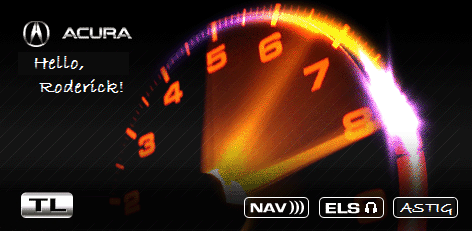
If you dont have time to convert to BMP you can use this pic:

Let me know how much you want to make this for me!
I need it converted to BMP..
If you dont have time to convert to BMP you can use this pic:
Let me know how much you want to make this for me!

Cruisin'
Joined: Sep 2009
Posts: 19
Likes: 0
You know it supposed to say that right? When it comes up with check disk you press Guide, menu, cancel then version and load disk. If your already doing that I suggest using imgburn and burn cd-r's at slowest supported speed, normally 4x.
Yah Ill try this today when I wake up!
OK I have no idea what I am doing wrong.. because this still didnt work.. my cd burners slowest write speed was 10x...
Anyways, maybe it is how I am loading the disk into the car is wrong.. let me verify what I am doing..
First of all my navi disk is in the dvd rom everytime my car is off.. So my navi is in the dvd rom everytime I try this.. so this is what I do..
1. Turn the car on.
2. Remove the Navi disk. Am I supposed to wait for the navi to load and get past the nag screen before I remove the navi disk?
3. I insert the hack disk.
4. I go into the car and wait til I get the disc read error.
5. I hold Map/Guide/Cancel for 5 seconds until Diagnostic screen pops up
6. I dont touch anything and wait for 5 seconds.
7. Then I choose "Version" on the navi screen
8. I wait 5 seconds again (I do this because the instructions in the Navi walkthrough thread are kinda confusing at this part)
9.Then I press "Load Disc"
- Now how long is it supposed to say loading disc for? Because whenever I do this it loads it for less then a second and then goes to the "Please check disc" screen
10. Then I go back to my trunk and install my navi disk.
- When I install it a Loading disk screen comes up with a loading bar.
- Then once its done loading my navi reveerts back to how it was with no mods..
Can someone help me!! lol
Anyways, maybe it is how I am loading the disk into the car is wrong.. let me verify what I am doing..
First of all my navi disk is in the dvd rom everytime my car is off.. So my navi is in the dvd rom everytime I try this.. so this is what I do..
1. Turn the car on.
2. Remove the Navi disk. Am I supposed to wait for the navi to load and get past the nag screen before I remove the navi disk?
3. I insert the hack disk.
4. I go into the car and wait til I get the disc read error.
5. I hold Map/Guide/Cancel for 5 seconds until Diagnostic screen pops up
6. I dont touch anything and wait for 5 seconds.
7. Then I choose "Version" on the navi screen
8. I wait 5 seconds again (I do this because the instructions in the Navi walkthrough thread are kinda confusing at this part)
9.Then I press "Load Disc"
- Now how long is it supposed to say loading disc for? Because whenever I do this it loads it for less then a second and then goes to the "Please check disc" screen
10. Then I go back to my trunk and install my navi disk.
- When I install it a Loading disk screen comes up with a loading bar.
- Then once its done loading my navi reveerts back to how it was with no mods..
Can someone help me!! lol
Loader: BNHH401A.bin
Updated file: BN2HH12C.bin
People are saying to also burn this BIN file: BN2HHMLD.BIN
What is this one for?
Let me know asap! Wish I had your number csmeance haha.


Senior Moderator


Joined: Feb 2006
Posts: 21,407
Likes: 2,185
From: Space Coast, FL
PM sent.
EDIT: the H12C is for the specific navi dvd drive, mine still uses this file even though it's 3.5. Since you have an 05 its probably the 401A.BIN. Way to check this is go to version and then press menu for 5 secs in the hidden menus
Senior Moderator
Joined: Feb 2006
Posts: 21,407
Likes: 2,185
From: Space Coast, FL
The MLD one is the loader, you must burn this one.
The one you need to modify is vehicle dependent. Turn on the car and wait for the OK button to appear. Then press the MAP MENU CANCEL buttons. You will get to the Hidden Menu, wait a few seconds and then press Version. Wait a few seconds for it to load and then press Menu button for 5 Seconds. You will see the file name listed there that you need to modify.
Modify this file as you did before and your done!
Or rename the modded file to the one it should be and your done!
PS you can call me till midnight on my #.
The one you need to modify is vehicle dependent. Turn on the car and wait for the OK button to appear. Then press the MAP MENU CANCEL buttons. You will get to the Hidden Menu, wait a few seconds and then press Version. Wait a few seconds for it to load and then press Menu button for 5 Seconds. You will see the file name listed there that you need to modify.
Modify this file as you did before and your done!
Or rename the modded file to the one it should be and your done!
PS you can call me till midnight on my #.
The MLD one is the loader, you must burn this one.
The one you need to modify is vehicle dependent. Turn on the car and wait for the OK button to appear. Then press the MAP MENU CANCEL buttons. You will get to the Hidden Menu, wait a few seconds and then press Version. Wait a few seconds for it to load and then press Menu button for 5 Seconds. You will see the file name listed there that you need to modify.
Modify this file as you did before and your done!
Or rename the modded file to the one it should be and your done!
PS you can call me till midnight on my #.
The one you need to modify is vehicle dependent. Turn on the car and wait for the OK button to appear. Then press the MAP MENU CANCEL buttons. You will get to the Hidden Menu, wait a few seconds and then press Version. Wait a few seconds for it to load and then press Menu button for 5 Seconds. You will see the file name listed there that you need to modify.
Modify this file as you did before and your done!
Or rename the modded file to the one it should be and your done!
PS you can call me till midnight on my #.
Also, if anyone can convert this pic to bmp to the correct size I would be really greatful!! Ill even paypal you 2.00!! haha
I've got both pics resized. Give me an email addy to send to. Mine is dwb993@yahoo.com
I've got both pics resized. Give me an email addy to send to. Mine is dwb993@yahoo.com
So first, I would like to thank csmeance for figuring out what exactly was wrong. And I would like to thank dwb993 for sending me the files that worked!!
Now onto the pics!!
- My original Welcome screen:

- New Welcome Screen:

- Nag Screen with AD's hack!

- Info Screen now has the following extra options!
- A/C Screen
- Trip Computer
- Diag Menu (No more holding Map/Menu/Cancel anymore!)

- Unlocked Trip Screen:

- Unlocked A/C Screen:

- Developer Menu:

Now onto the Hex editor to edit the Nag screen!! lol
Now onto the pics!!
- My original Welcome screen:
- New Welcome Screen:
- Nag Screen with AD's hack!
- Info Screen now has the following extra options!
- A/C Screen
- Trip Computer
- Diag Menu (No more holding Map/Menu/Cancel anymore!)
- Unlocked Trip Screen:
- Unlocked A/C Screen:
- Developer Menu:
Now onto the Hex editor to edit the Nag screen!! lol
Last edited by bzyrice; Oct 23, 2009 at 02:14 PM.
Intermediate
Joined: Oct 2009
Posts: 28
Likes: 0
From: Northern ,NJ
OK now that you guys got it im in the same problem. I have the Orange Disc with 3.5 on a 2006 TL. I did all the steps and it seems that the burned disc loads up and i see the blue picture an all but it doesnt seem to be saving the settings. STEP BY STEP please BZYRICE i know that you went through this problem. did you end up burning all nine BINS on a CD and included the two new one or i mean iam lost.
Once you have edited your BNHH401A.BIN file with the new bitmap and the hacks, burn it and BN2HHMLD.BIN to CD and load into your NAVI. When it reboots, make sure your custom image comes up and then re-insert your stock NAVI disk and you're done.
Intermediate
Joined: Oct 2009
Posts: 28
Likes: 0
From: Northern ,NJ
What do you mean by Edit?? I tought you only had to download those two files and burn them on a CD themselves. I didnt know they had to be edited in any way? Anyone please give me a closer in step by step as far as editing goes. Does this mean that i get my original navi DVD and transfer the files there? Iam not super savy with comps , please explain further if its more than just putting the two files which had the hack allready on a cd and burning them
OK now that you guys got it im in the same problem. I have the Orange Disc with 3.5 on a 2006 TL. I did all the steps and it seems that the burned disc loads up and i see the blue picture an all but it doesnt seem to be saving the settings. STEP BY STEP please BZYRICE i know that you went through this problem. did you end up burning all nine BINS on a CD and included the two new one or i mean iam lost.
What do you mean by Edit?? I tought you only had to download those two files and burn them on a CD themselves. I didnt know they had to be edited in any way? Anyone please give me a closer in step by step as far as editing goes. Does this mean that i get my original navi DVD and transfer the files there? Iam not super savy with comps , please explain further if its more than just putting the two files which had the hack allready on a cd and burning them
have you made a bmp image yet that you want?
have you downloaded both hacks? The navi hack and the HMImanager hack?
If not you need to do those first..
Intermediate
Joined: Oct 2009
Posts: 28
Likes: 0
From: Northern ,NJ
I have not done the image yEt. i really dont care for that YET... Also i have downloaded the two hack files allready. NOW am i supposed to burn those 2 hacks ALONE on a CD, and then use that or am i missing a step b4 burning them to a CD, whats next after downloading the HAcks?
I have not done the image yEt. i really dont care for that YET... Also i have downloaded the two hack files allready. NOW am i supposed to burn those 2 hacks ALONE on a CD, and then use that or am i missing a step b4 burning them to a CD, whats next after downloading the HAcks?
1. Copy Navi BIN files to your computer. Insert your navi disc into your computer and save all the BIN files to a folder.
2. Take the Loader BIN file and pull all the files out. (BIN files are kind of like zip files)
3. Run the hacks on the BIN files that you pulled out.
4. Replace the BIN files that you hacked and put them back into the Main BIN file.
5. Burn the BIN that the Navi uses to start the navigation (Different for different versions) and the Loader BIN file you hacked onto a black CD -R or DVD -R.
6. Put Burnt CD into the DVD drive.
7. Once it loads then put back your DVD.
Steps 2 - 5 also require a program called CEBIN or Dumpnavi.. more detailed info here in the sticky at the front page of the audio section: https://acurazine.com/forums/3g-tl-audio-bluetooth-electronics-navigation-94/navigation-hack-guide-welcome-screen-mod-trip-computer-ok-button-nag-removal-604912/
Intermediate
Joined: Oct 2009
Posts: 28
Likes: 0
From: Northern ,NJ
Sorry guys but iam wayyyyyy toooo lost i have no idea what to do i got the files i copie the navi files i got the dumpnavi but it doesnt even open on me and i have no clue where to do the command prompts that iam intrusted to do
Go to Start -> Accessories -> Command prompt
THat will get you the command prompt.. then follow the directions in that link..
Intermediate
Joined: Oct 2009
Posts: 28
Likes: 0
From: Northern ,NJ
haha i know somewhat wat that it is , i tought that dumpnavi had the promp command in it. as far as the dumpnavi program there were three versions 4 download when i open it it has two options ONE is to load the BOOTLOADER FILE and the second box is to load the BITMAP IMAGE.. is this the right DUMPNAVI program to use?
haha i know somewhat wat that it is , i tought that dumpnavi had the promp command in it. as far as the dumpnavi program there were three versions 4 download when i open it it has two options ONE is to load the BOOTLOADER FILE and the second box is to load the BITMAP IMAGE.. is this the right DUMPNAVI program to use?

