


My iPhone 3G Integrations Setup - LOTS OF PICS and EVEN ViDEOS!


8th Gear
Joined: Jan 2009
Posts: 8
Likes: 0
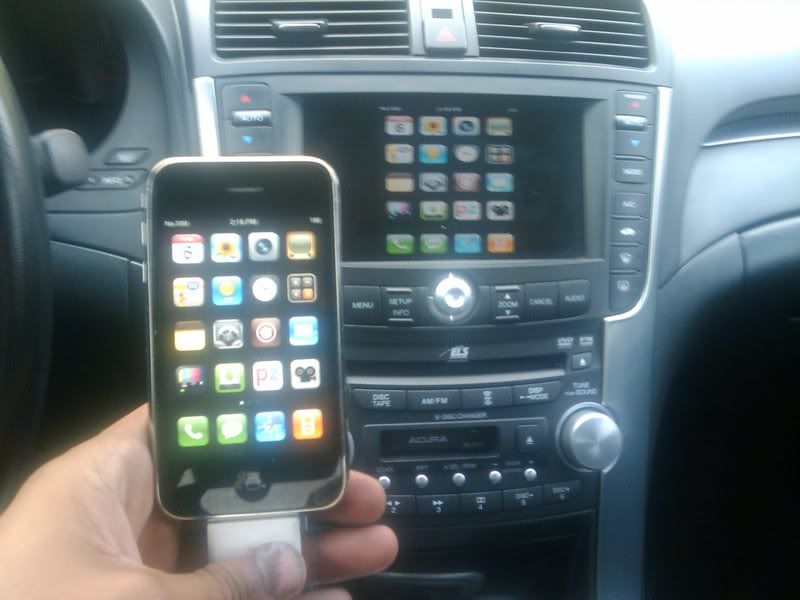
Just got part of my install done... holding out on the DOM until probably next month...I installed a usa spec pa15hon2y for the audio and since the 05' accord hybrid didn't come with a bluetooth option, I ordered a parrot ck3000 evolution for cheap. The usa spec integrates with through the XM option on the stereo. It shows text - song title, artist, category on the XM menu on the nav screen as well as scrolls across the upper led radio display. You can use your steering wheel control to skip to next song, change volumn, as well as use the voice feature built into the car to do so. The only thing if you have it set to the this mode, it will lock out the ipod section of the iphone - says accessory mode so you won't be able to see album art or change the selection directly on the iphone in this mode but you can still navigate to other iphone screens - pandora, phone, sms, etc.... there is also another mode that you can quickly change to - basically select the preselect 5 station on the xm radio and boom, it kicks it into direct mode which gives you full access to the ipod portion so you can scroll through the songs, category, playlist, etc. The usa spec also gives you 1 additional aux input which you toggle by using xm preset 6... I plan on using this aux input for video. Also, the usa spec charges the iphone as well - now just need to figure out if the apple cable snaps apart easily or is it a fully molded plastic all in one piece.... the usaspec can snap apart so I'm hoping I can splice the cables together.... I found a pin-out diagram on a different forum.
Also, for those who are curious, you don't lose XM functionality. I don't subscribe but I can still toggle to XM2 and hear all of their preview stations.
When you plug in the iphone, it automatically switches to XM and starts playing whatever is in your iphone... when you shut off the engine and disconnect the plug, it pauses.
I'm still torn on which mode to use - like the text (more for show) but want album art.... in direct mode, you can still use the stereo control to skip to the next song or podcast.
I didn't pick up a harness since I love the little magnet snap I have... bought it from a flee market a couple of years ago for $5. basically there is a flat tab you have to put on your iphone though... I glued it to the back of the silicon case I have (figure the case may save me some nicks and dents if I drop my iphone) - can't really notice it since it's small and flat... on the car side, there's a match box size thing that I attached to the panel underneath the nav of my car. When the iphone is in, you can't see the adapter and it looks like the iphone just floats there.... only bad thing is rotating it... still need to figure out an elegant solution for this.
1 suggestion for everyone - either unplug the battery or remove the radio and nav (on the accord, it's listed as backup) fuse. I ripped my dash out and hooked everything up and it tested fine but when I put everything back in, it wouldn't work - guess when I was cramming all of the wires in behind the dash, something shorted and blew a fuse... I first ripped my dash out again to check the wiring then checked the fuse box and saw the radio one blown. I pulled another fuse from another slot (think it was day lights) with the same rating and everything worked but you'll be left with a check engine light even if you get a new fuse. You'll then have to disconnect the ground from battery and let it sit for 5~10 minutes and then plug it back... check engine light clears.
Also, for those who are curious, you don't lose XM functionality. I don't subscribe but I can still toggle to XM2 and hear all of their preview stations.
When you plug in the iphone, it automatically switches to XM and starts playing whatever is in your iphone... when you shut off the engine and disconnect the plug, it pauses.
I'm still torn on which mode to use - like the text (more for show) but want album art.... in direct mode, you can still use the stereo control to skip to the next song or podcast.
I didn't pick up a harness since I love the little magnet snap I have... bought it from a flee market a couple of years ago for $5. basically there is a flat tab you have to put on your iphone though... I glued it to the back of the silicon case I have (figure the case may save me some nicks and dents if I drop my iphone) - can't really notice it since it's small and flat... on the car side, there's a match box size thing that I attached to the panel underneath the nav of my car. When the iphone is in, you can't see the adapter and it looks like the iphone just floats there.... only bad thing is rotating it... still need to figure out an elegant solution for this.
1 suggestion for everyone - either unplug the battery or remove the radio and nav (on the accord, it's listed as backup) fuse. I ripped my dash out and hooked everything up and it tested fine but when I put everything back in, it wouldn't work - guess when I was cramming all of the wires in behind the dash, something shorted and blew a fuse... I first ripped my dash out again to check the wiring then checked the fuse box and saw the radio one blown. I pulled another fuse from another slot (think it was day lights) with the same rating and everything worked but you'll be left with a check engine light even if you get a new fuse. You'll then have to disconnect the ground from battery and let it sit for 5~10 minutes and then plug it back... check engine light clears.
Thread Starter
Being an Acha Bacha in
iTrader: (2)
Joined: Mar 2005
Posts: 3,222
Likes: 127
From: Long Island, NY
Also, the usa spec charges the iphone as well - now just need to figure out if the apple cable snaps apart easily or is it a fully molded plastic all in one piece.... the usaspec can snap apart so I'm hoping I can splice the cables together.... I found a pin-out diagram on a different forum.
Also, for those who are curious, you don't lose XM functionality. I don't subscribe but I can still toggle to XM2 and hear all of their preview stations.
When you plug in the iphone, it automatically switches to XM and starts playing whatever is in your iphone... when you shut off the engine and disconnect the plug, it pauses.
I'm still torn on which mode to use - like the text (more for show) but want album art.... in direct mode, you can still use the stereo control to skip to the next song or podcast.
Also, for those who are curious, you don't lose XM functionality. I don't subscribe but I can still toggle to XM2 and hear all of their preview stations.
When you plug in the iphone, it automatically switches to XM and starts playing whatever is in your iphone... when you shut off the engine and disconnect the plug, it pauses.
I'm still torn on which mode to use - like the text (more for show) but want album art.... in direct mode, you can still use the stereo control to skip to the next song or podcast.

In honesty that would be the ultimate solution. Also, once you get that running, I'm assuming you know how to jailbreak your phone since you seem very handy, there is a program out that is called "TVOUT" which was suggested by someone else on this thread, it outputs anythign on the iphone or ipod onto the nav screen. So you can best of both worlds with the album covers and having direct control of your iphone.
The only reason I went my route is cause I wanted video from the iPhone and I didnt feel like splicing wires together, but if honestly if you figure it out, maad props and please please dont hold back!!
Thread Starter
Being an Acha Bacha in
iTrader: (2)
Joined: Mar 2005
Posts: 3,222
Likes: 127
From: Long Island, NY
Ok so I have everything figured out and ordered in, I am just having a little trouble figuring out how to hook up the PIE X 3. Just curious, how did you run your PIE unit to your center console? I mean I understand you said you ran it through AUX, but is there an AUX (Red an White) inputs somewhere behind the center console? Sorry for such the noob questions, but I really want to do this right. OR do I have to purchase the X3 Vehicle harness as well, please it would greatly appreciated if someone could help me out with this.
Drifting


Joined: Apr 2005
Posts: 2,447
Likes: 907
From: Clearwater Fl
so with that USA spec unit, if you're in direct mode, all you would need is a 'video' pin into the harness that ran all the way to Dom's device and you got video, or if you switch out of direct mode you can controll songs via the controls? That sounds pretty awesome.

8th Gear
Joined: Jan 2009
Posts: 8
Likes: 0
Yup - I posted about TVOut earlier in the thread: I'm still holding out on ordering the DOM - wife wants a new dresser for the bedroom so the DOM will need to wait until next month.... for those who already have the necessary parts and are adventurous enough, here's a link that I found on the pin-outs: http://www.allpinouts.org/index.php/Apple_iPod_dock .
Drifting
Joined: Apr 2005
Posts: 2,447
Likes: 907
From: Clearwater Fl
Yup - I posted about TVOut earlier in the thread: I'm still holding out on ordering the DOM - wife wants a new dresser for the bedroom so the DOM will need to wait until next month.... for those who already have the necessary parts and are adventurous enough, here's a link that I found on the pin-outs: http://www.allpinouts.org/index.php/Apple_iPod_dock .
8th Gear
Joined: Jan 2009
Posts: 8
Likes: 0
It may be a little more difficult than that since supposedly the official apple video cable has a chip to allow video - explains why cheap/old 3rd party video cables don't work on the iphone. my old ipod video cable had pin 8 but never would kick into tv out.... definitely would have to open both adapters up to see which pins each cable has.
Thread Starter
Being an Acha Bacha in
iTrader: (2)
Joined: Mar 2005
Posts: 3,222
Likes: 127
From: Long Island, NY
Yup, that's exactly right, Apple those buggers have installed an authentication chip and that's why I chose to purchase the cable directly from APPLE to avoid any hassles with the accessory not being compatible. Here's a link to see more on that:
http://sodamnhot.multiply.com/journa...3g_accessories
Also, be careful with the cheap eBay ones, as they might work now with the current iPhone software but it seems like everytime iPhone does an update to a new software, more and more 3rd party accessories take the shitter... LoL.. and this is why just to avoid that hassle I purchased directly from APPLE. Worth the $50 because I know that it will always work no matter what.
In any event I have gotten a contact where I can get these cables for half the price which is directly from the APPLE factory in China, downside is you will be waiting about 2-3 weeks for em, however its the same exact cable and I have confirmed that.
Now with that all said, what I want to know instead of trying to manipulate the video wire onto the iSimple cable, why not manipulate it from the APPLE AV COMPOSITE cable, and somehow put on a iSimple connector on the end and figure out whats the difference in wiring schematics there. This way you don't have to worry about the chip.
BTW good work bdtang!!
I wish I could dedicate more time to this but I'm studying for my boards.
http://sodamnhot.multiply.com/journa...3g_accessories
Also, be careful with the cheap eBay ones, as they might work now with the current iPhone software but it seems like everytime iPhone does an update to a new software, more and more 3rd party accessories take the shitter... LoL.. and this is why just to avoid that hassle I purchased directly from APPLE. Worth the $50 because I know that it will always work no matter what.
In any event I have gotten a contact where I can get these cables for half the price which is directly from the APPLE factory in China, downside is you will be waiting about 2-3 weeks for em, however its the same exact cable and I have confirmed that.
Now with that all said, what I want to know instead of trying to manipulate the video wire onto the iSimple cable, why not manipulate it from the APPLE AV COMPOSITE cable, and somehow put on a iSimple connector on the end and figure out whats the difference in wiring schematics there. This way you don't have to worry about the chip.
BTW good work bdtang!!
I wish I could dedicate more time to this but I'm studying for my boards.
Last edited by Elegant TYPE S; Jan 26, 2009 at 11:02 PM.
Drifting
Joined: Apr 2005
Posts: 2,447
Likes: 907
From: Clearwater Fl
It may be a little more difficult than that since supposedly the official apple video cable has a chip to allow video - explains why cheap/old 3rd party video cables don't work on the iphone. my old ipod video cable had pin 8 but never would kick into tv out.... definitely would have to open both adapters up to see which pins each cable has.
Raj: you shouldn't mess with the apple cable man, it'll alert Apple HQ that you are infringing on their proprietary crap. jk
I wish you guys would be closer, i'd be more ballzy to experiment with this crap with a 'buddy'. With my luck, i'd accidentally ground something which would fry to the ECU.
For now, I'll prepare to go with the setup described on page 1 sometime in March.

10th Gear
Joined: Jan 2009
Posts: 13
Likes: 2
From: Ocala
You need the harness bro. The harness is what connects the PIE X3 to the back of the stock radio into the XM port. The XM cable that is currently plugged in that port for our XM channels gets disconnected and piggie backed onto the PIE X3 cable, so it becomes a pass through connection. The aux cables you are referring to are basically 3.5mm to RCA Audio cables that I have run to my center console so that if someone else with a different MP3 player comes in the car they can play tunes by connecting my cable to their headphone jack. Hope this makes sense.
Hey Man, I just want to let you know that I Can't private message you yet to thank you for the write up b/c I'm still a new member, but I did exactly what you said, and man does it look sweeeeeeeeeet! I really appreciate your time and effort into this write up!!!! Also, do you happen to know where I can get my hands on some light up door sills like you have? Thanks man once again, kick ass write up, I'll post a video and photos of my stuff soon as I get some time.

Thread Starter
Being an Acha Bacha in
iTrader: (2)
Joined: Mar 2005
Posts: 3,222
Likes: 127
From: Long Island, NY
Your welcome Punit... I'm glad it worked out for you. The sills are no longer available I believe. They were made by SUPERCOMPUTERS for a limited time and that was it. I was lucky to get a new set recently from a member who bought them but never installed them, so just keep an eye out.
And Queenz my side mirrors are just the mirrors from the 07/08 TL. It was a direct swap.
And Queenz my side mirrors are just the mirrors from the 07/08 TL. It was a direct swap.

Instructor
Joined: Jan 2006
Posts: 215
Likes: 0
I have a Jailbroken phone. There's TV Out, but what about Screensplitr? Here's a vid on the latter http://www.youtube.com/watch?v=RokoEOhIGHU
Here's a vid of some guys driving around with their iPhone piped into their Nav. You can see cords hanging outhttp://www.youtube.com/watch?v=gRFVihLFKRk
Same folks with the nav running the iPhone's video cam (only avail. on Jailbreak iPhones also).
I currently have access to my husbands 2006 TL w/Nav but have no other parts to mess with. He'd be more interested in text control on the screen/steering than video but I'm the opposite. I'm thinking of purchasing a Hyundai so I'm likely screwed with all this perhaps.
So where are we all at with this now? How about a summary. Can we do what Elegant did in a simpler perhaps cheaper way AND get text from the music on the screen?
Elegant - Can you clarify.... You said only video will go on the Nav. Does that mean no Safari, apps, etc? And that's why we're talking about these Jailbreak options? (sorry, it's late)
Here's a vid of some guys driving around with their iPhone piped into their Nav. You can see cords hanging outhttp://www.youtube.com/watch?v=gRFVihLFKRk
Same folks with the nav running the iPhone's video cam (only avail. on Jailbreak iPhones also).
I currently have access to my husbands 2006 TL w/Nav but have no other parts to mess with. He'd be more interested in text control on the screen/steering than video but I'm the opposite. I'm thinking of purchasing a Hyundai so I'm likely screwed with all this perhaps.
So where are we all at with this now? How about a summary. Can we do what Elegant did in a simpler perhaps cheaper way AND get text from the music on the screen?
Elegant - Can you clarify.... You said only video will go on the Nav. Does that mean no Safari, apps, etc? And that's why we're talking about these Jailbreak options? (sorry, it's late)
Instructor
Joined: Jan 2006
Posts: 215
Likes: 0
I'm curious if the iSimple OmniWire would be of benefit. I'm sort of unclear as to how it would work.
http://www.isimplesolutions.com/CES/OmniWire.asp
http://www.isimplesolutions.com/CES/OmniWire.asp
Thread Starter
Being an Acha Bacha in
iTrader: (2)
Joined: Mar 2005
Posts: 3,222
Likes: 127
From: Long Island, NY
I'm curious if the iSimple OmniWire would be of benefit. I'm sort of unclear as to how it would work.
http://www.isimplesolutions.com/CES/OmniWire.asp
http://www.isimplesolutions.com/CES/OmniWire.asp
I'll be back in a few months.. in the mean time grab the stuff you need and we'll do it.. PM me and I'll give you my info.

Drifting
Joined: Apr 2005
Posts: 2,447
Likes: 907
From: Clearwater Fl
one thing I wanted to ask is how loud do you need to crank it up to get some volume going? When I play my iPod via teh 3.5mm aux input and my ipod is at 50% volume I need to crank my stereo to about 25 to get the same loudness as playing a CD at 7.
Thread Starter
Being an Acha Bacha in
iTrader: (2)
Joined: Mar 2005
Posts: 3,222
Likes: 127
From: Long Island, NY
Well .. when you use the DOCK connector like I do, you dont need to do anything. As a matter of fact the volume function on the iPhone doesnt work, it goes into Output mode and so volume is enhanced and you don't need to crank it on the HU.. I leave mine at like 13 or 18 max and that's loud.
Drifting
Joined: Apr 2005
Posts: 2,447
Likes: 907
From: Clearwater Fl
Well .. when you use the DOCK connector like I do, you dont need to do anything. As a matter of fact the volume function on the iPhone doesnt work, it goes into Output mode and so volume is enhanced and you don't need to crank it on the HU.. I leave mine at like 13 or 18 max and that's loud.
TeZZeeY
Joined: Apr 2008
Posts: 68
Likes: 0
From: Irvine CA
Elegant---
i have the UsaSpec + dom + composite cable (hong kong ebay special )
anyways i was thinking about hacking up the wire and splice in a peripheral unit so i get text display... heres what i was thinking
using these connectors
male connector to fit go into the iphone

Female connector for the peripherial cable to plug into

http://pinouts.ru/PortableDevices/ipod_pinout.shtml --iPhone usb cable pin diagram
so basically

let me know what you think
oah and the screen splitter app is amazing
i have the UsaSpec + dom + composite cable (hong kong ebay special
) anyways i was thinking about hacking up the wire and splice in a peripheral unit so i get text display... heres what i was thinking
using these connectors
male connector to fit go into the iphone
Female connector for the peripherial cable to plug into
http://pinouts.ru/PortableDevices/ipod_pinout.shtml --iPhone usb cable pin diagram
so basically
let me know what you think
oah and the screen splitter app is amazing
Thread Starter
Being an Acha Bacha in
iTrader: (2)
Joined: Mar 2005
Posts: 3,222
Likes: 127
From: Long Island, NY
Theortetically this is possilbe, however I have not had the time to figure it out. Hopefully I will have a better solution up shortly that is less involved, so stay tuned. Also for some reason that app doesn't want to work on my jailbroken iPhone and I just dont have the patience to F with it.
Studying for the boards sucks!
Studying for the boards sucks!
8th Gear
Joined: Jan 2009
Posts: 8
Likes: 0
Tezzeey,
The usa spec will provide text on the nav screen of the xm audio screen so you shouldn't need the peripheral unit. Only issue is that it throws up the "accessory not for iphone" nag since it's not shielded and autoplays the last song (if you were listening to something or the first song of your library if you weren't using your ipod). If you want text, it locks up the ipod screen but you can skip songs with the radio control. If you want to show the ipod screen, then you lose the song info - just shows up as ipod but you can still use the steering wheel control to skip songs. I've been waiting to pick up a DOM but will probably order one soon... which site did you get the composite cable from and can you confirm it works with your iphone? Need to pick one up too but don't want to spend the $50 for one from apple but the ones I've seen that are cheap doesn't work with the iphone since they don't have the special chip.
The usa spec will provide text on the nav screen of the xm audio screen so you shouldn't need the peripheral unit. Only issue is that it throws up the "accessory not for iphone" nag since it's not shielded and autoplays the last song (if you were listening to something or the first song of your library if you weren't using your ipod). If you want text, it locks up the ipod screen but you can skip songs with the radio control. If you want to show the ipod screen, then you lose the song info - just shows up as ipod but you can still use the steering wheel control to skip songs. I've been waiting to pick up a DOM but will probably order one soon... which site did you get the composite cable from and can you confirm it works with your iphone? Need to pick one up too but don't want to spend the $50 for one from apple but the ones I've seen that are cheap doesn't work with the iphone since they don't have the special chip.
Thread Starter
Being an Acha Bacha in
iTrader: (2)
Joined: Mar 2005
Posts: 3,222
Likes: 127
From: Long Island, NY
Tezzeey,
The usa spec will provide text on the nav screen of the xm audio screen so you shouldn't need the peripheral unit. Only issue is that it throws up the "accessory not for iphone" nag since it's not shielded and autoplays the last song (if you were listening to something or the first song of your library if you weren't using your ipod). If you want text, it locks up the ipod screen but you can skip songs with the radio control. If you want to show the ipod screen, then you lose the song info - just shows up as ipod but you can still use the steering wheel control to skip songs. I've been waiting to pick up a DOM but will probably order one soon... which site did you get the composite cable from and can you confirm it works with your iphone? Need to pick one up too but don't want to spend the $50 for one from apple but the ones I've seen that are cheap doesn't work with the iphone since they don't have the special chip.
The usa spec will provide text on the nav screen of the xm audio screen so you shouldn't need the peripheral unit. Only issue is that it throws up the "accessory not for iphone" nag since it's not shielded and autoplays the last song (if you were listening to something or the first song of your library if you weren't using your ipod). If you want text, it locks up the ipod screen but you can skip songs with the radio control. If you want to show the ipod screen, then you lose the song info - just shows up as ipod but you can still use the steering wheel control to skip songs. I've been waiting to pick up a DOM but will probably order one soon... which site did you get the composite cable from and can you confirm it works with your iphone? Need to pick one up too but don't want to spend the $50 for one from apple but the ones I've seen that are cheap doesn't work with the iphone since they don't have the special chip.
There is a seller on eBay that will sell you the OEM APPLE ones that are produced in the China Factory for cheaper. If memory serves correct I think its like 20 bux. Look it up.
Same cable!

3rd Gear
Joined: Feb 2009
Posts: 3
Likes: 0
I'm a new 04 TL owner. The previous owner installed the ilink valor, piex3, and the dom converter. Unfortunately, the ilink doesn't work with the newer ipods and iphones. It seems that your setup would be extremely simple for me to do since all of the hardware outside of the apple composite cable is already installed. I'm just having a little trouble finding where the wiring was installed in the car. There are two lines that go out of the ilink. 1. Is the power line and I can find that (although I imagine I don't need to do anything with that. I'll likely just unplug it and leave it). 2. Is the other output from the ilink (I assume this splits out into the two audio lines and the video line. Am I correct?). As far as I can tell after pulling back the carpeting and lower panel under the glove box, the wire goes somewhere behind the radio. The switch for the PIE X3 is mounted in the little space below the radio. It looks like they drilled a whole in the plastic to feed the wire through to the switch. How do I get access to that area behind the stereo? I've looked around for some diagrams or pictures with little success. Could someone point me in the right direction? Is my thinking on this installation correct. It seems simple. I'm assuming I just need to replace the outs from the ilink with the outs from the apple cable. Am I missing anything? Thanks.
TeZZeeY
Joined: Apr 2008
Posts: 68
Likes: 0
From: Irvine CA
from my understanding.. the UsaSpec does not have txt support.. the dice and peripheral units do.. if something has changed since i last checked let me know haha
i bought some cheap cable from hong kong ..it said it worked with the 3g iphone so i risked $10 got it in a week .. it works to some extent, the usb port will not charge the phone, and i haven't tested it with other cords but it seems to lag a little bit when im playing games on it or doing things other than music videos or movies.... i get a glitch every now and then (videos work perfectly)
i bought some cheap cable from hong kong ..it said it worked with the 3g iphone so i risked $10 got it in a week .. it works to some extent, the usb port will not charge the phone, and i haven't tested it with other cords but it seems to lag a little bit when im playing games on it or doing things other than music videos or movies.... i get a glitch every now and then (videos work perfectly)
3rd Gear
Joined: Feb 2009
Posts: 3
Likes: 0
I hadn't heard from anyone, so last night I just went for it. It took me a long time, but worked out alright. The problem was that I had no idea where the previous owner had the PIE installed. I'm still not completely sure, and I took apart half the front interior of my car (the driver side floor, side and steering panel, the center console and the passenger side floor panel, side panel, and glove box). I still couldn't see the PIE. Fortunately, the wires from the PIE were visible and the audio connection. Best I could surmise, the PIE is somewhere up right behind the center airvents. I tried removing the radio, but after a while I gave up on that. I ended up with an easier solution, although not ideal. The previous owner had another set of audio cables wired through the passenger side floor panels to the trunk, so he could one day add an xbox/dvd player if he chose. I decided to bring those up to the front, so I took off all of the side floor panels. Finally after getting those upfront, I was able to plug in my iphone and everything worked awesome. I've got video and audio. I then spent the next hour reassembling everything (I should have taken pictures to help me). I ended up with a couple extra screws. I haven't heard any unusual rattles, so I imagine it will be okay. I love the setup. I just need to go and purchase a dock for my phone now.
One question, rather than buying the usb/lighter thing from Griffen, I'm considering putting in some sort of converter/inverter in the center console box. Ideally it would have a normal electrical outlet. The idea would be to use the outlet to keep the iphone going with the idea that I could switch it to charge more computer every know and then. Any thoughts on what the best product for this would be. I'd like to keep it simple and just use the outlet in the center console.
By the way, this is the first time I've done anything like this (ripping my car apart). It was a bit intimidating at first, but actually turned out to be a lot of fun. I imagine I'll be more likely to do things like this in the future. Thanks for the inspiration.
One question, rather than buying the usb/lighter thing from Griffen, I'm considering putting in some sort of converter/inverter in the center console box. Ideally it would have a normal electrical outlet. The idea would be to use the outlet to keep the iphone going with the idea that I could switch it to charge more computer every know and then. Any thoughts on what the best product for this would be. I'd like to keep it simple and just use the outlet in the center console.
By the way, this is the first time I've done anything like this (ripping my car apart). It was a bit intimidating at first, but actually turned out to be a lot of fun. I imagine I'll be more likely to do things like this in the future. Thanks for the inspiration.

Intermediate
Joined: Jul 2006
Posts: 49
Likes: 0
From: Roanoke, Va
does the usb plug for the apple av cable. just for power or does it transfer files also..
just wondering cause i notice some of the off brands on ebay doesn't. i'm working on getting the isimple and the dom working together...
just wondering cause i notice some of the off brands on ebay doesn't. i'm working on getting the isimple and the dom working together...

2nd Gear
Joined: Mar 2009
Posts: 2
Likes: 0
Hey Elegant, I'm really loving the setup you've done. I have a proclip in my old Volvo, and they're really amazing. I'm going to be doing this shortly as well, my question for you is this: does the holder/charger you purchased also work with a regular ipod video? Or is it exclusive to the iPhone? I have an iPhone, but I have a lot more music on my ipod, so if I could make it work with both, it would be the best of both worlds really.
Also, which holder did you buy?
This one? http://www.proclipusa.com/?sectionpa...p_leftorright=
Or one of the $89 or $99 ones?
Also, which holder did you buy?
This one? http://www.proclipusa.com/?sectionpa...p_leftorright=
Or one of the $89 or $99 ones?
Thread Starter
Being an Acha Bacha in
iTrader: (2)
Joined: Mar 2005
Posts: 3,222
Likes: 127
From: Long Island, NY
Hey Elegant, I'm really loving the setup you've done. I have a proclip in my old Volvo, and they're really amazing. I'm going to be doing this shortly as well, my question for you is this: does the holder/charger you purchased also work with a regular ipod video? Or is it exclusive to the iPhone? I have an iPhone, but I have a lot more music on my ipod, so if I could make it work with both, it would be the best of both worlds really.
Also, which holder did you buy?
This one? http://www.proclipusa.com/?sectionpa...p_leftorright=
Or one of the $89 or $99 ones?
Also, which holder did you buy?
This one? http://www.proclipusa.com/?sectionpa...p_leftorright=
Or one of the $89 or $99 ones?
I bought the padded one, the $99 was adjustable and probably be more to your liking for what you want to use it for.
2nd Gear
Joined: Mar 2009
Posts: 2
Likes: 0
Also to clear up, do you still have XM access? Did you lose any normal functionality whatsoever? Backup camera, things like that?
Drifting
Joined: Apr 2005
Posts: 2,447
Likes: 907
From: Clearwater Fl