


ipod and our head unit


Thread Starter
Intermediate
Joined: Mar 2005
Posts: 29
Likes: 0
ipod and our head unit
LogJam claims to have a new interface that will allow us to use our IPODS with our factory stereos. http://www.logjamelectronics.com/piehon03pcpod.html They say it plugs into a CD changer output...Has anyone pulled out their headunits to see if a slot exists? Seems strange to have an output when it already comes with a 6 disc in dash. Like you all, I really hope to find a way to cleanly intergrate my IPOD! Thanks!


Trending Topics
Thread Starter
Intermediate
Joined: Mar 2005
Posts: 29
Likes: 0
THE COMPANY IS 100 PERCENT LEGIT! I HAD A SIMILAR UNIT IN MY 99 ACCORD AND IT WORKED AWESOME. I just want to make sure there is a slot for that harness to plug into. I talked to the maker and they claim it will work perfect. My question remains, has anyone inspected the back of their head unit? 


 No navi, so here's
  it works.
Thread Starter
Intermediate
Joined: Mar 2005
Posts: 29
Likes: 0
I assume they are working around it. . . which may be the reason for the delay.When I talked with the manufactor they kept talking about the cd changer input slot. So I would hope/assume that it would stand apart from the operation of the XM and in dash changer. I am just curious if the tape/cd button would change to the IPOD slot. On my accord I hit CD twice and it switched to my ipod. And it was fantastic, lossless sound!

So, w/ this installed on a non-navi TL, how would I access the CD player? Do I hit the CD/Tape button again to access CD's in my changer, or do I just turn off the PID device somehow and therefore free up the Cd player to play CD's?

Drifting


Joined: Jan 2003
Posts: 2,356
Likes: 270
From: PA
this sounds right...
I was talking to a car stereo shop yesterday---they said they could install something similar for 175. Not IPOD specific--just basically using the cd changer as an aux in. I am considering...
By the way---I own an ipod and an Iriver H10 as well as a Iriver H-120---
No comparison in the sound. If you dont already own an ipod check out the iriver players. They sound way better.
By the way---I own an ipod and an Iriver H10 as well as a Iriver H-120---
No comparison in the sound. If you dont already own an ipod check out the iriver players. They sound way better.

Team Anthracite Member
Joined: Oct 2004
Posts: 1,333
Likes: 1
From: Montreal, QC
I have a similar unit (minus the iPod control) in my car. I'm sure it's made by the same manufacturer cuz the box looks exactly the same. To access the AUX input, you just press the CD button twice and the head unit goes unit CD-C (CD Changer) mode. To get back to CD mode, you just press CD again. I have Navi in my TL, but it's a Canadian TL so I don't have XM radio. And I had to do the funky yellow-wire switch thing as mentioned in the famous Blitzsafe thread.

Team Nighthawk-C.M.A.
Joined: Jan 2004
Posts: 201
Likes: 0
From: Chicagoland, IL
It will never come for us navi ppl
Brian:
Since we are just a retailer, plus we do not have the product yet from the manufacturer, we do not know what the manufacturer's plans are for this product. To date, this particular manufacturer, P.I.E., has not made any of the their Honda/Acura interfaces compatible with radios that have navigation. So going by that, I would assume that the chances of them making an adapter that is compatible with radio nav systems is possible but unlikely.
Thank you,
Technical Support
Logjam Electronics
techsupport@logjamelectronics.com
www.logjamelectronics.com
-----Original Message-----
From: Brian
Sent: Thursday, March 24, 2005 10:35 AM
To: techsupport@logjamelectronics.com
Subject: RE: Acura and NAVI
In the future will you have integration with navi?
Brian
Since we are just a retailer, plus we do not have the product yet from the manufacturer, we do not know what the manufacturer's plans are for this product. To date, this particular manufacturer, P.I.E., has not made any of the their Honda/Acura interfaces compatible with radios that have navigation. So going by that, I would assume that the chances of them making an adapter that is compatible with radio nav systems is possible but unlikely.
Thank you,
Technical Support
Logjam Electronics
techsupport@logjamelectronics.com
www.logjamelectronics.com
-----Original Message-----
From: Brian
Sent: Thursday, March 24, 2005 10:35 AM
To: techsupport@logjamelectronics.com
Subject: RE: Acura and NAVI
In the future will you have integration with navi?
Brian
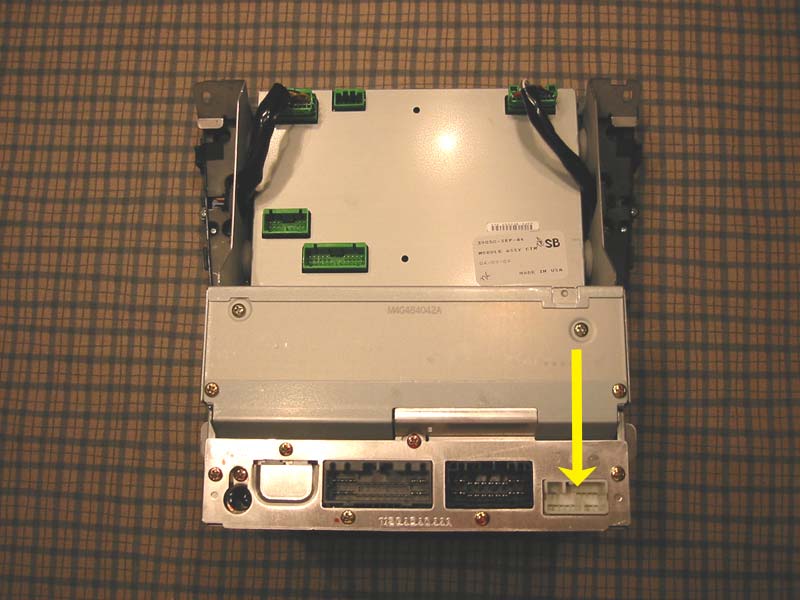
http://www.robertcotran.com/persephone/
pics thanks to Zax123 and his amazing job in compiling a very detailed log of his audio/electronics install.

Airline jet aircraft tech
Joined: May 2004
Posts: 134
Likes: 0
From: ATL, GA. Southside
Dash Unit connector descriptions
I am eagerly awating a fully functional I-Pod unit interface unit which will still allow XM to work. hopefully the PIE init is it. Here is some info on the Dash unit connectors.
The 3 Audio Unit connectors shown in the photo are as follows as per the Acura 2004 service manual, chapter 22-391-395:
Left connector C - 26 pin, has wires from dash unit to stereo amp unit for rear and door speakers, also contains signal wires from steering wheel remote switch.
Middle connector A - 20 pin, has wires from dash unit to stereo amp unit for subwoofer and front center speaker,
Right connector B - 14 pin(yellow arrow), all wires to/from XM receiver unit and dash unit.
From my experence with aircraft and automotive electronics, for the proposed PIE unit to work without disabling XM which is using the only external input(connector B) to the Audio Unit, it would have to use a pass-through or breakout connector which the XM harness would first plug into and then connect into the B connector. I have sent a info request to PIE at www.pie.net to confirm how they intend this item to interface with our dash units.
The 3 Audio Unit connectors shown in the photo are as follows as per the Acura 2004 service manual, chapter 22-391-395:
Left connector C - 26 pin, has wires from dash unit to stereo amp unit for rear and door speakers, also contains signal wires from steering wheel remote switch.
Middle connector A - 20 pin, has wires from dash unit to stereo amp unit for subwoofer and front center speaker,
Right connector B - 14 pin(yellow arrow), all wires to/from XM receiver unit and dash unit.
From my experence with aircraft and automotive electronics, for the proposed PIE unit to work without disabling XM which is using the only external input(connector B) to the Audio Unit, it would have to use a pass-through or breakout connector which the XM harness would first plug into and then connect into the B connector. I have sent a info request to PIE at www.pie.net to confirm how they intend this item to interface with our dash units.
Thread Starter
Intermediate
Joined: Mar 2005
Posts: 29
Likes: 0
ok so you have to choose XM or IPOD - - clearly there is not a third slot for the cable by itself. wonder if they are working on a duel mode? Thanks everyone for posting... im still very interested in this unit?

3rd Gear
Joined: Mar 2005
Posts: 3
Likes: 0
sorry, i'm a little confused. Besides an FM trans or the cassette adapter, is there a solutiong for a Non-Navi, who doesnt use the XM (no XM here in Hawaii). I've read through these boards a few times, and saw someone reference to it...but never really found any direct information. Actually...I got lost between the Canadian TL thread of how they couldn't do it because instead of the AM/FM seperate button.

Thread
Thread Starter
Forum
Replies
Last Post
rp_guy
Member Cars for Sale
9
Jul 16, 2017 07:33 AM
TLguy42
4G TL Audio, Bluetooth, Electronics & Navigation
0
Sep 26, 2015 11:27 AM
Eggs999bacon
2G TSX (2009-2014)
10
Sep 24, 2015 10:08 AM
