


DIY: How to fix Navi disk read errors


2nd Gear
Joined: Aug 2013
Posts: 2
Likes: 0
From: San Jose, CA
Hi,
A few months ago my MDX 04 Navi also started showing disk error and consult your dealer. I found this thread, follow the instruction and clean the lense. But after putting it back the Navi does not want to boot up at all. it show "downloading firmware" and then say disk error.
I tried to access the hidden diagnostic menu by holding the Map-Menu-Cancel buttons but that did not do anything. Already tried leaving battery disconnected over night as well but same behavior.
Aside from sending it into Alpine any other step I can try?
Thanks for sharing.
A few months ago my MDX 04 Navi also started showing disk error and consult your dealer. I found this thread, follow the instruction and clean the lense. But after putting it back the Navi does not want to boot up at all. it show "downloading firmware" and then say disk error.
I tried to access the hidden diagnostic menu by holding the Map-Menu-Cancel buttons but that did not do anything. Already tried leaving battery disconnected over night as well but same behavior.
Aside from sending it into Alpine any other step I can try?
Thanks for sharing.

4th Gear
Joined: Aug 2013
Posts: 4
Likes: 0
 Navigation booting up.
Quick question guys.. My navigation in my TL 2005 keep booting up to the world map and acura screen.. Sometimes it works for a little bit but it goes back to the booting mode. would this fix will work in this issue? I don't get the disk error message. My disk is a little scratch in one side.. Please let me know I will try this fix this weekend.. 
4th Gear
Joined: Aug 2013
Posts: 4
Likes: 0
 Navigation booting up.
Quick question guys.. My navigation in my TL 2005 keep booting up to the world map and acura screen.. Sometimes it works for a little bit but it goes back to the booting mode. would this fix will work in this issue? I don't get the disk error message. My disk is a little scratch in one side.. Please let me know I will try this fix this weekend..
Advanced
Joined: Apr 2010
Posts: 90
Likes: 0
Holy shit Sutitan.....thank you so much. I freaked out after the dealer telling me it would cost $1500 to tear everything a part and locate the problem, but after reading your post and following your directions it was fixed immediately. You saved a college kid a lot of money and I could not be more appreciative
Just a FYI, I had this same issue and took a air compressor with a blow gun chuck and blew air into the disk drive, to blow out dust and dirt (without the disc in obviously) and it has been working since. It might be a easier starting trouble shooting point over pulling out the unit and disassembling.

10th Gear
Joined: Sep 2013
Posts: 11
Likes: 1
I tried this. I didnt have success. im not sure but i think my laser iis located in the corner by the green dot. Am i cleaning the right thing. Because where hes cleaning with the q tip i didnt see any laser there. The lens im cleaning turns red when it operating right?

10th Gear
Joined: Feb 2013
Posts: 12
Likes: 2
On my 04 i first got the unable to read disc message. I than did the "fix", put it back in and got the "check disc" that didn't allow you to do anything else. So i figured i had nothing to lose by taking it all out and removing the little screw to insure that i could clean the lens properly. It took a long time to get the little screw/ spring contraption back together and i'm still not 100% sure that i did it right. But i did put it back in and the navi did work. However, it did ask for the navi code upon starting the car. So for those debating sending it to alpine i recommend trying to remove the screw first.
Thanks for the info, my Navi was acting up and i just placed a order for this part DV36M110, it sounds like it should arrive in about 20 days from China. I will let you know the results in a month or so. FYI I bought this mechanism for about $62 which is better than a $400 fix by sending it to Alpine. If it works.

Advanced
Joined: Jan 2012
Posts: 55
Likes: 1
From: DC
 Broken
Well I tried the forced air method to no avail. I then took a thin ruler and wrapped it in a screen wipe cleaner stuck it in and moved it around 'gently'. Now my DVD won't go back in and I've got a frickin a black screen with 'check your disk drive' that I have to look at now. To boot all of my audio setting are now stuck.


Just did this tonight on an 04 Nav unit for a local guy. I wasn't easy by any means. Kind of rough on the laser since I couldn't see it very well. It was pretty dirty and the nav cd was really clean with no sratches.
Put it back together and unit fired right up. The 5 of the 6 screws on the back were real tight. I had to use a pliers to turn the screwdriver.
Summary. This worked on a unit that had never worked for the current owner. Now, what to charge him...
Put it back together and unit fired right up. The 5 of the 6 screws on the back were real tight. I had to use a pliers to turn the screwdriver.
Summary. This worked on a unit that had never worked for the current owner. Now, what to charge him...

Advanced
Joined: Mar 2009
Posts: 72
Likes: 0
From: Northwest IN.
I just wanna say about what I experienced about this "disk errors". I am driving 08 Type-S and my wife is driving 08 MDX. What I've noticed is after I updated my navi software and decided to replaced my old disk back in the unit that's when it gave me "disk error". But when I put my newer software back in the DVD unit it was working just fine. I tried it in my wife's MDX and it did the same exact thing. I guess once you stick a newer software in the DVD unit you will not be able to use your old disk anymore. At least that's what happened in my case.
Advanced
Joined: Jan 2012
Posts: 55
Likes: 1
From: DC
Follow Up
Well I tried the forced air method to no avail. I then took a thin ruler and wrapped it in a screen wipe cleaner stuck it in and moved it around 'gently'. Now my DVD won't go back in and I've got a frickin a black screen with 'check your disk drive' that I have to look at now. To boot all of my audio setting are now stuck.

It's been two years since I've heard that sexy voice!! LLS!!

So if in doubt clean the other parts to the unit that are back there as well. Also he said that over the years (as stated in a few previous posts) the mechanisms in these units go back as the weather changes from hot/cold as some of the parts expand/contract. All in all $225 was better than paying $354, but free would have been great!
Last edited by 04desertmist; Nov 13, 2013 at 02:41 PM.
Burning Brakes
Joined: Jul 2010
Posts: 889
Likes: 89
From: Oxnard, CA
^Many of the audio shops I went to, I tried to get them to repair it but they refused to work on it as they only fixed aftermarket radios, speakers and navigation drives NOT OEM equipment.
So I wanted my navi and radio screen back so I paid to get it repaired by Alpine, I was willing to pay the $354.
but my parts were all bad and no amount of cleaning would fix my drive components. From what Alpine CS rep told me under comments/notes by the Alpine repair rep.
So I wanted my navi and radio screen back so I paid to get it repaired by Alpine, I was willing to pay the $354.
but my parts were all bad and no amount of cleaning would fix my drive components. From what Alpine CS rep told me under comments/notes by the Alpine repair rep.
Last edited by MandoTL; Nov 13, 2013 at 04:54 PM.
Burning Brakes
Joined: Jul 2010
Posts: 889
Likes: 89
From: Oxnard, CA
I even opened it up after I got it back to verify if parts were actually replaced, the inside was seriously clean, parts looked all new, as opposed to the original ones which were very dusty, dull looking and dirty.
So I believe what the Alpine told me was true, I have yet to encounter any problems since I got it fixed. The list of parts I got replaced was like getting a brand new drive which is way less than what a new one would have cost me.

Burning Brakes


Joined: Apr 2004
Posts: 774
Likes: 90
From: Chicagoland
I am looking to attempt the Navi fix tomorrow and I am wondering if anyone has any pictures showing how to take the dvd drive out of the trunk? I appreciate any information/pointers in that matter.

Intermediate
Joined: Jun 2011
Posts: 27
Likes: 2
From: Houston
ok... im about to attempt to take that little screw out and completely take apart the unit. i would be helpful if someone post pictures of how to take this apart. ( the middle screw). i will try to take some but if someone has them please post them up.
Burning Brakes
Joined: Apr 2004
Posts: 774
Likes: 90
From: Chicagoland
I cleaned up my dvd-rom drive and things are running great. I am not sure if this was already mentioned, but in addition to using q-tip's I also used compressed air (in a can) to kind of "vacuum" the inside of the drive.
Thanks again for the great DYI - saved me some decent chunk of money.

10th Gear
Joined: Jun 2012
Posts: 12
Likes: 7
From: Colorado
Cleaning didn't work
Thanks for the thread. I did the cleaning. I even removed the small screw to access the lens. My lens wasn't even dirty. Q-Tip came back white as could be. Guess I'll be sending my unit off to Alpine on Monday.
Thanks for the info, my Navi was acting up and i just placed a order for this part DV36M110, it sounds like it should arrive in about 20 days from China. I will let you know the results in a month or so. FYI I bought this mechanism for about $62 which is better than a $400 fix by sending it to Alpine. If it works.

Former Whyner
Joined: Jul 2005
Posts: 1,943
Likes: 9
From: 2up 2 down Boooiiiii
Thanks for the info, my Navi was acting up and i just placed a order for this part DV36M110, it sounds like it should arrive in about 20 days from China. I will let you know the results in a month or so. FYI I bought this mechanism for about $62 which is better than a $400 fix by sending it to Alpine. If it works.
http://www.aliexpress.com/item/100-B...617638250.html

Thread Starter
Racer
Joined: May 2005
Posts: 298
Likes: 91
From: Denver, CO
Glad to see this worked for some people. Im sorry for the time and headaches ive caused to those who couldn't get it to work. understand that the only reason I initially tried this was because I was stuck with a black screen and no controls like some of you are now. I had nothing to lose, so I figured it was worth a shot.
Its been roughly a year, and my Nav drive is still working great. When it got cold is when it tended to act up, but Florida has had a pretty warm winter this far.
The replacement drives are great. Im curious if the 07-08 DVD drives could be fit into the 04-06 units. I really doubt it, but it would be awesome if someone tried. The newer drives on aliexpress can be found for about $60. The 04-06 ones cost about $150. Here are a link to each. Just know that sellers on Ali come and go each night. These listings will more than likely not be valid in a few weeks.
07-08 Drive
http://www.aliexpress.com/item/Alpin...231954078.html
04-06 Drive
http://www.aliexpress.com/item/DV36T...522433701.html
Its been roughly a year, and my Nav drive is still working great. When it got cold is when it tended to act up, but Florida has had a pretty warm winter this far.
The replacement drives are great. Im curious if the 07-08 DVD drives could be fit into the 04-06 units. I really doubt it, but it would be awesome if someone tried. The newer drives on aliexpress can be found for about $60. The 04-06 ones cost about $150. Here are a link to each. Just know that sellers on Ali come and go each night. These listings will more than likely not be valid in a few weeks.
07-08 Drive
http://www.aliexpress.com/item/Alpin...231954078.html
04-06 Drive
http://www.aliexpress.com/item/DV36T...522433701.html


Head a da Family
Joined: Jul 2003
Posts: 5,505
Likes: 568
From: New Friggin Jerzy
The dealer sent mine back to Alpine a few years ago while it was still $158. They said that all the returned units had their power supplies replaced, an upgrade, FWIW. And now, a few years later, I get the Disk Read Error once in a while when I start the car, but it corrects itself after a minute or so.
.
.
.
.

3rd Gear
Joined: May 2009
Posts: 3
Likes: 0
From: NY
Easy to do and saved me $360. First attempt to clean the laser did not work. I guess I didn't clean it well (I was nervous to damage the unit). I pulled it out fir a second attempt and it worked.
Thanks for taking the time to do this write up citidelx!
Now if I could only get my damn HFL to pair to my phone. The oven trick didn't work. Maybe I should try it a second time.
Thanks for taking the time to do this write up citidelx!
Now if I could only get my damn HFL to pair to my phone. The oven trick didn't work. Maybe I should try it a second time.

6th Gear
Joined: Dec 2013
Posts: 6
Likes: 0
Disc Read Error - Acura TL '06
Sutitan, thank you for submitting this thread. I'm going to get someone to take my disc player out and try this as well. I took my car to the Acura dealership and the only thing they could suggest was to send it back to Alpine. I'm thinking about taking it back to them w/these instructions. I will post if it worked. Thanks again.
6th Gear
Joined: Dec 2013
Posts: 6
Likes: 0
Unhook Battery-Worse
Well, I think I messed up. As I posted before that I would try this, I figured I'll unhook my battery to reset. Welllll now I'm getting "please check your disk" on my display and it won't go any further....nothing rest. My radio/XM play just no display. 

Registered but harmless
Joined: Aug 2005
Posts: 14,887
Likes: 1,164
From: Los Angeles, CA
If not, do it and see if cleaning resolves the problem.
Otherwise, it's time to send the unit to Alpine, or a knowledgeable local who'll warranty replacement of parts...
Thread Starter
Racer
Joined: May 2005
Posts: 298
Likes: 91
From: Denver, CO
As ive said to many people in your situation, try again! You're at the point at which I started, and have pretty much nothing to lose. Try to clean once more, an also clean the disk. There have been a few people who have not had success their first time, but were able to get it working with a little extra cleaning. Also, sometimes its takes the drive a bit to "warm up". I know when my navigation began acting up, it would repeatedly try to start, and then eventually would work. You could essentially try to turn to power off and back on when it gives you that check disk message.

Thread Starter
Racer
Joined: May 2005
Posts: 298
Likes: 91
From: Denver, CO

9th Gear
Joined: Dec 2009
Posts: 9
Likes: 0
My Nav has been down for 3 years now. I am about to break down and send it to Alpine. I see you live in Tampa how much would you charge to see if you can clean my lense. I tried taking it out and cleaning it earlier this year with your instructions but didnt get it to work. Let me know please.

Intermediate
Joined: Jun 2011
Posts: 27
Likes: 2
From: Houston
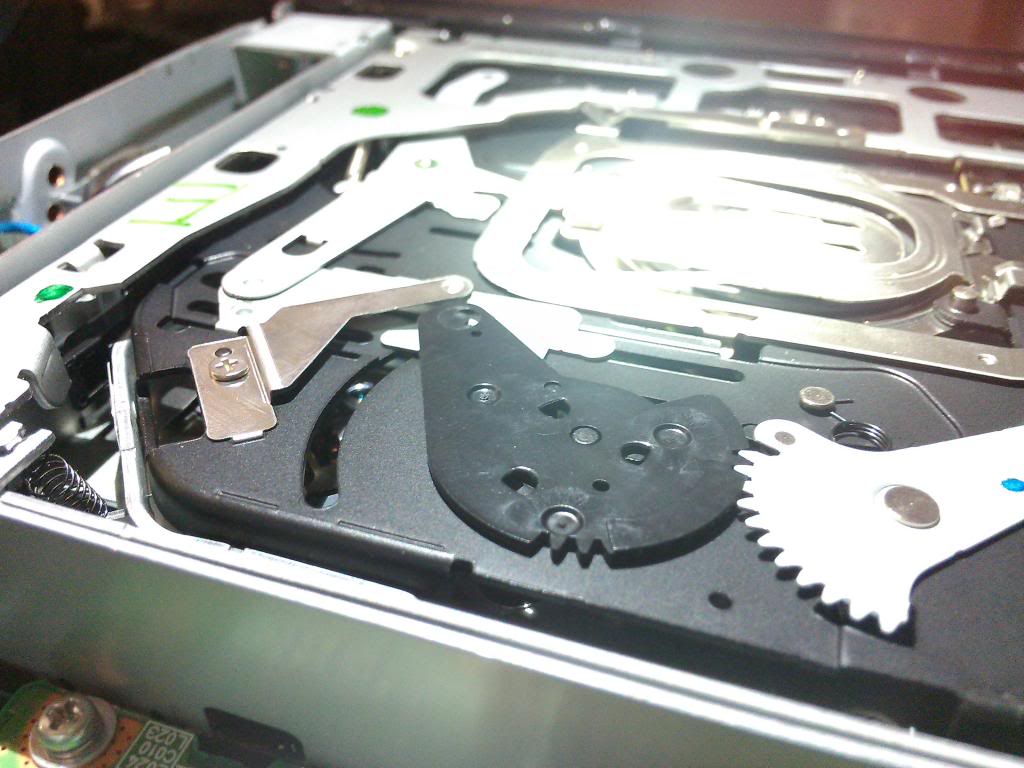
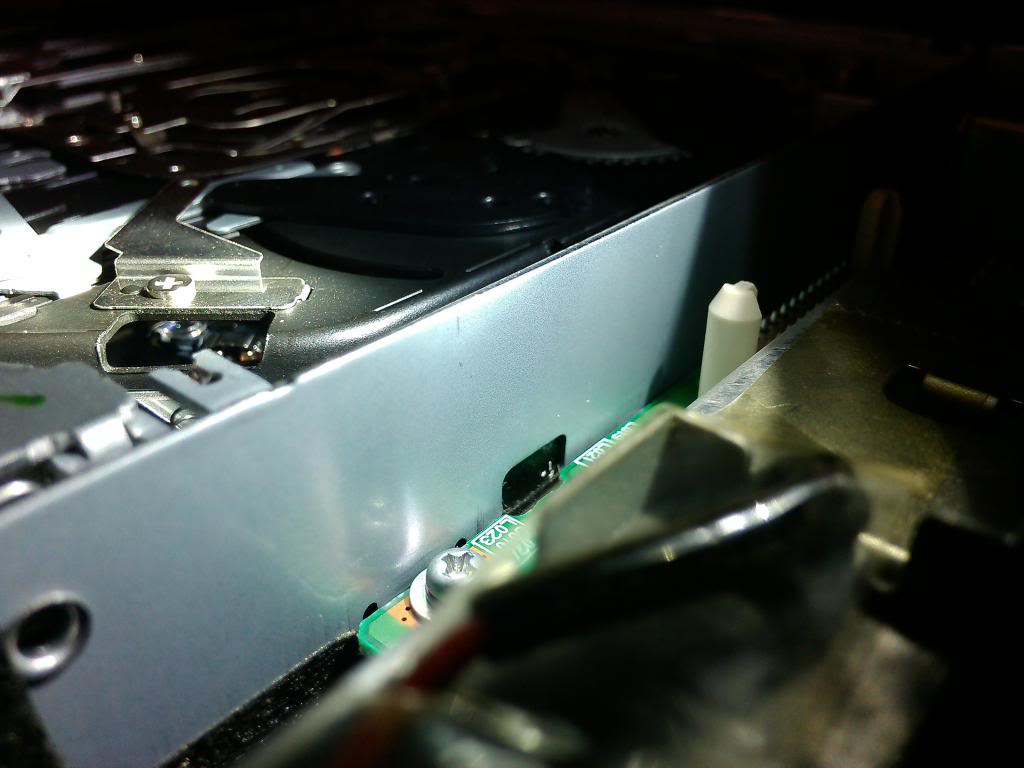
I have a question:
this is my third time cleaning the lens. so far it hasnt worked. I still get the green banner "please check your disk"
But I noticed that my lens are always all the way to the end, makes it easy to reach and clean but isnt the lens supposed to be near the center?
is this position where the lens are supposed to be ? as I remember some members had to remove the center screw to get to the lens.
this is my third time cleaning the lens. so far it hasnt worked. I still get the green banner "please check your disk"
But I noticed that my lens are always all the way to the end, makes it easy to reach and clean but isnt the lens supposed to be near the center?
is this position where the lens are supposed to be ? as I remember some members had to remove the center screw to get to the lens.

Intermediate
Joined: May 2012
Posts: 30
Likes: 3
thanks for the instruction to take apart nav system. I had the same problem you did but I am not to good at taking stuff apart and putting it back together so I took a risk and tried the ruler method and it worked like a charm. I bought a thin plastick ruler and some windex wipes. I wrapped a thin layer around the ruler and inserted it gently into the player going from right to left and left to right slowly. When I removed it the wipe was filthy! I did it slowly 3 more times. started car and nothing but I waited and started car again and I was uploading and in business. I know it was a risk but I figured I would try. If this is only a temp solution and I start to have the same problem I will bite the bullet and take it out and clean it the proper way. Thanks for the instructions!
#1--did you do this while the power was off?
#2--I tried it with a thin ruler and (with the power off) I was only able to get the ruler inserted about 1" before it hit something inside and does not want to go any further. Should I try to find a thinner ruler?


10th Gear
Joined: Feb 2014
Posts: 11
Likes: 1
Question..I recently purchased a 2008 TL, and within a day of purchasing I got the dreaded please check disk .....when purchasing the car they said it had a 90 day warranty, the guy said its probably the disk and he was ordering me one however if that does not work is the dvd unit covered under the warranty?