


Bluetooth Fails


Registered but harmless

Joined: Aug 2005
Posts: 14,889
Likes: 1,164
From: Los Angeles, CA
They are the same unit on the car-- HFL ("Hands Free Link") is Acura's name for the Bluetooth module, unless you mean the phone's Bluetooth.
Check the HFL status in your MID:
If the HFL says "Booting Up" more than a minute after starting the car, the HFL is probably bad. Check the HFL status again after driving to a destination-- if the MID status is still "Booting Up," the HFL is bad.
It does not matter whether the phone's Bluetooth is activated or not for checking HFL status-- if the HFL is good and the phone Bluetooth isn't on, the MID will NOT say "booting up," and the HFL will tell you it cannot find a phone if you try to make a call.
Also, if you have Navi, try using voice commands-- the voice commands use the HFL unit's microphone, so a problem with response to voice commands = a problem with the HFL.
If the Bluetooth on a phone is suspect, try to connect the phone to some other Bluetooth device-- headset, hands-free unit in another vehicle, etc.
G/L.
Check the HFL status in your MID:
If the HFL says "Booting Up" more than a minute after starting the car, the HFL is probably bad. Check the HFL status again after driving to a destination-- if the MID status is still "Booting Up," the HFL is bad.
It does not matter whether the phone's Bluetooth is activated or not for checking HFL status-- if the HFL is good and the phone Bluetooth isn't on, the MID will NOT say "booting up," and the HFL will tell you it cannot find a phone if you try to make a call.
Also, if you have Navi, try using voice commands-- the voice commands use the HFL unit's microphone, so a problem with response to voice commands = a problem with the HFL.
If the Bluetooth on a phone is suspect, try to connect the phone to some other Bluetooth device-- headset, hands-free unit in another vehicle, etc.
G/L.

Intermediate
Joined: Nov 2013
Posts: 33
Likes: 5
Our phones (wife and mine) could pair with other Bluetooth equipment, but not the TL. So the problem wasn't with the phones. When pressing the steering wheel buttons, the car gave me proper prompts, but obviously no phone calls could be made because the car didn't recognize the phones. So that left the HFL circuit boards in the headliner to try. Baked them, and all's well.

Instructor
Joined: Nov 2012
Posts: 212
Likes: 44
Mine is intermittent these past couple days. Sometimes nothing all day, other days I can talk for 30min before it disconnects. I was leaning towards a bad cap but this is an 07-08 model, so I am not sure if I should bake it and hope for the best, order a new, or cap test.

Intermediate
Joined: Apr 2008
Posts: 29
Likes: 2
From: Dallas
I have the same problem in my 07 Acura TLS and my battery keeps dying. I dont really use the HFL so can i Just disconnect it and prevent my battery from dying? or will the battery continue to die untill I fix or replace the HFL?
Thanks.
Thanks.

Registered but harmless
Joined: Aug 2005
Posts: 14,889
Likes: 1,164
From: Los Angeles, CA
As poster delbigs above says, try removing and baking the HFL's circuit board once you've pulled the HFL from the car to see if that fixes the HFL.

7th Gear
Joined: Jul 2013
Posts: 7
Likes: 0
Yes Def try the baking method! If that does not work after the second time then its a bad HFL. That happened to me and I had to just end up buying another one. Unfortunately this is a common problem with this HFL module

7th Gear
Joined: Dec 2013
Posts: 7
Likes: 0
So after croaking two batteries and not knowing why (blamed it on the FL heat), found this site and baked my HFL. Partially worked but kept going out. Bugged the dealership and Acura cust care for a few weeks and they ended up replacing it for the same price it would have cost me to buy a new HFL as mentioned at various sites on this thread. I wanted to have them do it so I got the 1 year warranty.

Cruisin'
Joined: Jul 2007
Posts: 15
Likes: 0
quick rundown of my 07 TSX's HFL status:
1. HFL died about 8 months ago but I never bothered to troubleshoot
2. 3 wks ago Navigation kept rebooting so I searched AZ archive
3. Negative battery cable had major corrosion build up so I cleaned it.
4. Navigation worked normally and surprisingly HFL worked!
5. The next day HFL was dead again so I pulled it and remounted/reconnected
6. HFL worked for 3 days after simple remount/reconnect before dying again.
7. Baked HFL in oven @ 385 for 9 minutes.
8. HFL works again.
9. Will report HFL status in 1 week.
1. HFL died about 8 months ago but I never bothered to troubleshoot
2. 3 wks ago Navigation kept rebooting so I searched AZ archive
3. Negative battery cable had major corrosion build up so I cleaned it.
4. Navigation worked normally and surprisingly HFL worked!
5. The next day HFL was dead again so I pulled it and remounted/reconnected
6. HFL worked for 3 days after simple remount/reconnect before dying again.
7. Baked HFL in oven @ 385 for 9 minutes.
8. HFL works again.
9. Will report HFL status in 1 week.

1st Gear
Joined: Feb 2014
Posts: 1
Likes: 0
2006 MDX bluetooth fixed
I got a 2006 Acura MDX. The bluetooth has gone bad for a couple of years now. I have been using those after market clip on bluetooth as a replacement. This work, but the hassle of recharge plus it connects to my phone from the garage and thus transffering conversation to my car in a middle of the call.
I measured my capacitor. But instead of the 220uF that gone bad, my is the 680uF that remains open. I ordered a replacement from
Digikey Part number: 399-6723-1-ND
Description: CAP ALUM 680UF 16V 20% SMD
Un-soldered the old one and replace with the new. Plug the module back into the car, it's working. I can pair and talk again. Thank you everyone for the removal instruction of the module and pointing out the defective parts.
My bluetooth has been dead for two year. It's alive again!
Lets hope it will last a while.
Here is a picture of the parts:
http://postimg.org/image/ilokdg6wb/
http://s25.postimg.org/8bm5e7h0v/Acu...eplacement.jpg

Hope this help.
Morningsun33
I measured my capacitor. But instead of the 220uF that gone bad, my is the 680uF that remains open. I ordered a replacement from
Digikey Part number: 399-6723-1-ND
Description: CAP ALUM 680UF 16V 20% SMD
Un-soldered the old one and replace with the new. Plug the module back into the car, it's working. I can pair and talk again. Thank you everyone for the removal instruction of the module and pointing out the defective parts.
My bluetooth has been dead for two year. It's alive again!
Lets hope it will last a while.
Here is a picture of the parts:
http://postimg.org/image/ilokdg6wb/
http://s25.postimg.org/8bm5e7h0v/Acu...eplacement.jpg
Hope this help.
Morningsun33



Advanced
Joined: Aug 2012
Posts: 56
Likes: 4
So after reading all post guys i am a little confused..
I have a 2006 Acura TL with NAVI with Royal Blue Pearl exterior and gray interior
I have a problem with my bluetooth because when i try to PAIR my phone , the unit does not find any phone and my cellphone cant find the HandsFreeLink either... so i want to REPLACE the UNIT.. ok.. but how can i be sure that the unit what i want to buy is the right one??
I dont think it is a capacitor because all buttons ARE OK.. Talk Button, End Button, Female Voice everything WORKS FINE except the PAIRING... i dont have a problem on buying a new one but.. could you please give me the part number?????
Thank you..
This is MY VIN NUMBER: 19UUA66286A025307
I have a 2006 Acura TL with NAVI with Royal Blue Pearl exterior and gray interior
I have a problem with my bluetooth because when i try to PAIR my phone , the unit does not find any phone and my cellphone cant find the HandsFreeLink either... so i want to REPLACE the UNIT.. ok.. but how can i be sure that the unit what i want to buy is the right one??
I dont think it is a capacitor because all buttons ARE OK.. Talk Button, End Button, Female Voice everything WORKS FINE except the PAIRING... i dont have a problem on buying a new one but.. could you please give me the part number?????
Thank you..
This is MY VIN NUMBER: 19UUA66286A025307
Registered but harmless
Joined: Aug 2005
Posts: 14,889
Likes: 1,164
From: Los Angeles, CA
I have a problem with my bluetooth because when i try to PAIR my phone , the unit does not find any phone and my cellphone cant find the HandsFreeLink either... so i want to REPLACE the UNIT.. ok.. but how can i be sure that the unit what i want to buy is the right one??
Advanced
Joined: Aug 2012
Posts: 56
Likes: 4
i did an unit change and everything back to normal... i highly recommend if you can... change the unit with the correct part number.. there is no need no disconnect the battery just plug and play.. very easy installation.. a very special thanks to Will Y. for helping me in this particular case..

10th Gear
Joined: Dec 2006
Posts: 14
Likes: 0
From: Santa Barbara, CA
 Brilliant
So my HFL died about a month ago (never had any problems with it before) and so I confirmed it was indeed the HFL module, and not my phone and then started doing some research...which I started (and subsequently ended) here!!
-I did call my local dealer (for grins) and they quoted roughly $350 to fix/replace the part.
-Then I called Acura Corporate/Customer Service to see if they were willing to help with this problem at all...and they were very prompt with their response, a resounding "NO, sorry out of warranty, don't care!"
-So I looked at replacing the part myself...certainly very easy...3-5 minutes with minimal tools or knowhow...current price on a couple OEM parts stores was about $181.
...But I really wasn't interested in paying anything, and I figured I had nothing to loose by trying to heat it up with a heat gun or oven before forking out the dough!
-I first tried the heat gun, I figured I wouldn't have to subject the whole board and all the components to high heat (well better than baking in an oven I figure). But that fix was only successful for about 1 day.
-So I took to the oven...385f for 9 minutes...used the foil underneath, foil balls to hold it up and a nice little foil cabin for them to bake in!
And whadaya know!! The thing is working perfectly for a solid week now!! Will update this of I have any problems...but a free fix that was this simple...could it be too good to be true!! I hope not!!
Good luck everyone and thank you to the ones that figured this crazy (albeit logical) fix out!!!
-I did call my local dealer (for grins) and they quoted roughly $350 to fix/replace the part.
-Then I called Acura Corporate/Customer Service to see if they were willing to help with this problem at all...and they were very prompt with their response, a resounding "NO, sorry out of warranty, don't care!"
-So I looked at replacing the part myself...certainly very easy...3-5 minutes with minimal tools or knowhow...current price on a couple OEM parts stores was about $181.
...But I really wasn't interested in paying anything, and I figured I had nothing to loose by trying to heat it up with a heat gun or oven before forking out the dough!
-I first tried the heat gun, I figured I wouldn't have to subject the whole board and all the components to high heat (well better than baking in an oven I figure). But that fix was only successful for about 1 day.
-So I took to the oven...385f for 9 minutes...used the foil underneath, foil balls to hold it up and a nice little foil cabin for them to bake in!
And whadaya know!! The thing is working perfectly for a solid week now!! Will update this of I have any problems...but a free fix that was this simple...could it be too good to be true!! I hope not!!
Good luck everyone and thank you to the ones that figured this crazy (albeit logical) fix out!!!

3rd Gear
Joined: Mar 2014
Posts: 3
Likes: 1
Failed but succeeded, 2007 MDX
So i did everything wrong, but it still worked out. I decided to bake with the components facing the cookie sheet. I thought a lot of things we cook get flipped halfway through the process, so it would be a help with this cook too. After the 9 minutes in the oven, i removed the pan and whoops, three of the thingies fell off. Well i tried to solder it but alas, my soldering skills are not up to snuff. Thank goodness we still have a TL to compare the HFLs since I don't know what capacitor goes where. Long story short, I baked it again componets up, and placing weights on the loose components, and voila, bluetooth is working again! I am including a photo of the HFL of an '07 MDX (TL too) in case you run into the same issue. Cheers!


3rd Gear
Joined: Mar 2014
Posts: 3
Likes: 0
Baking worked for me
Here's my story:
2006 TL, HFL worked like a charm for 8 years. Suddenly a few weeks ago phone would no-longer pair. That was the only problem I had. HFL just wouldn't find a phone...tried re-pairing and resetting system but nothing helped. Quickly determined it was car and not phone that was the problem.
Came here and searched for the problem. Decided to try the bake method. Separated the 2 boards, put both on covered cookie sheet, on foil balls, component side up. Built a house around the boards as well. Baked 385 degs for 9 minutes. Let cool. Reassembled and it worked. Will report back for an update soon.
One thing to note, when I re-installed it was not working at first but behaving strangely. I had only connected the HFL harness. I then reconnected the other 2 harnesses (lights and homelink??) and then it worked fine.
I took a few pictures so let me know if they're needed.
Thanks to all on the forum who shared their experience
2006 TL, HFL worked like a charm for 8 years. Suddenly a few weeks ago phone would no-longer pair. That was the only problem I had. HFL just wouldn't find a phone...tried re-pairing and resetting system but nothing helped. Quickly determined it was car and not phone that was the problem.
Came here and searched for the problem. Decided to try the bake method. Separated the 2 boards, put both on covered cookie sheet, on foil balls, component side up. Built a house around the boards as well. Baked 385 degs for 9 minutes. Let cool. Reassembled and it worked. Will report back for an update soon.
One thing to note, when I re-installed it was not working at first but behaving strangely. I had only connected the HFL harness. I then reconnected the other 2 harnesses (lights and homelink??) and then it worked fine.
I took a few pictures so let me know if they're needed.
Thanks to all on the forum who shared their experience

1st Gear
Joined: Mar 2014
Posts: 1
Likes: 0
I just fixed my 2006 MDX HFL without spending a dime.
It's been dead for months ( pressing the phone logo button but no beep sound at all) and the dealer will charge 400 bucks to replace it. After using a hair dryer to "wake up" the DVD player build in the entertainment system. I decided give this a try.
Just open the overhead light hood, took out the HFL unit, blown hot air with the same hair dryer for couple of minutes, put it back.... work like a charm again!!
I bet Acura dealership hate to see this, but I nailed it twice with a $20 hair dryer. BTW, I blown my gas range's sparkling system to working order too!!
So my conclusion is, the moisture may cause many device's circuit board malfunction. So just try to dry it out before you go for any helps, it won't break your bank!
Cheers and good luck guys!
It's been dead for months ( pressing the phone logo button but no beep sound at all) and the dealer will charge 400 bucks to replace it. After using a hair dryer to "wake up" the DVD player build in the entertainment system. I decided give this a try.
Just open the overhead light hood, took out the HFL unit, blown hot air with the same hair dryer for couple of minutes, put it back.... work like a charm again!!
I bet Acura dealership hate to see this, but I nailed it twice with a $20 hair dryer. BTW, I blown my gas range's sparkling system to working order too!!
So my conclusion is, the moisture may cause many device's circuit board malfunction. So just try to dry it out before you go for any helps, it won't break your bank!
Cheers and good luck guys!

3rd Gear
Joined: Nov 2011
Posts: 3
Likes: 1
Great thread guys. If it's not a sticky it should be.
I have a 07 TL S. A few months ago my battery started dying. I had my battery tested and it was fine. I jumped my car and it would run with the battery disconnected so I knew my alternator was fine. I called the local Acura dealership to setup an appointment. The service guy was actually surprisingly helpful. He told me all about this very common issue with the Acura TL. He said sometimes the HFL never shuts down causing the battery to drain. They were going to charge me $135 to pull out my old unit. Thankfully I came on here and found this thread. If you have not done it yet, removing the unit is super easy. I removed mine and my battery stopped dying.
But I then wanted my Bluetooth back. Reading this thread, I was shocked to read about people baking their HFL's in the oven. So I tried a blow dryer first. It worked half way. My HFL stop saying booting up but it would not pair with any phone, I tried three. So I said what the hell, and went with the oven idea. 385 degrees for eight minutes as previously listed early in this thread. My 07 TL has only one board instead of two.
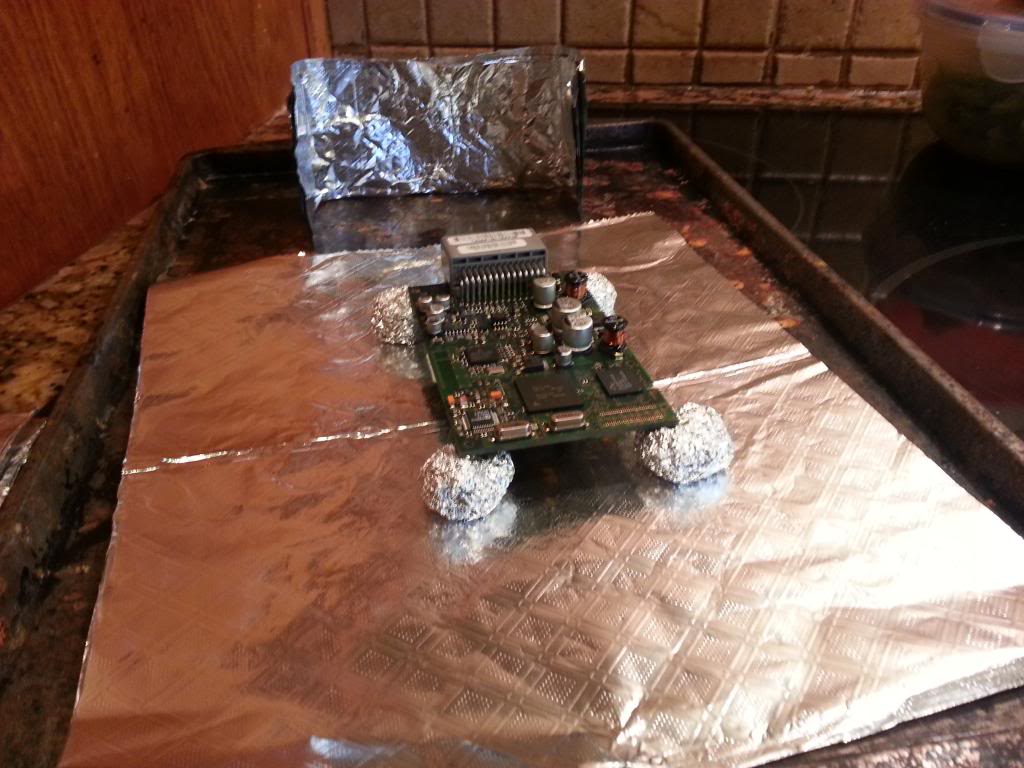
Ok so first I put down a flat sheet of aluminum foil on a cookie sheet. Next I made four aluminum balls, one for each corner for the circuit board to rest on. The I made four vertical corners and a roof to completely enclose the board. I made sure that besides the bottom four corners, no other parts of the board were being touched by the foil. I installed it and plugged in the moon roof switch and overhead lights, for some reason it wont work with out plugging everything back in. After about two or three minutes the booting up message cleared up. I paired up my Galaxy Note 2 and it worked perfectly!
I have included pictures below.


I have a 07 TL S. A few months ago my battery started dying. I had my battery tested and it was fine. I jumped my car and it would run with the battery disconnected so I knew my alternator was fine. I called the local Acura dealership to setup an appointment. The service guy was actually surprisingly helpful. He told me all about this very common issue with the Acura TL. He said sometimes the HFL never shuts down causing the battery to drain. They were going to charge me $135 to pull out my old unit. Thankfully I came on here and found this thread. If you have not done it yet, removing the unit is super easy. I removed mine and my battery stopped dying.
But I then wanted my Bluetooth back. Reading this thread, I was shocked to read about people baking their HFL's in the oven. So I tried a blow dryer first. It worked half way. My HFL stop saying booting up but it would not pair with any phone, I tried three. So I said what the hell, and went with the oven idea. 385 degrees for eight minutes as previously listed early in this thread. My 07 TL has only one board instead of two.
Ok so first I put down a flat sheet of aluminum foil on a cookie sheet. Next I made four aluminum balls, one for each corner for the circuit board to rest on. The I made four vertical corners and a roof to completely enclose the board. I made sure that besides the bottom four corners, no other parts of the board were being touched by the foil. I installed it and plugged in the moon roof switch and overhead lights, for some reason it wont work with out plugging everything back in. After about two or three minutes the booting up message cleared up. I paired up my Galaxy Note 2 and it worked perfectly!
I have included pictures below.


8th Gear
Joined: Feb 2014
Posts: 8
Likes: 0
The oven/heat gun fix will only last temporarily just like the xbox 3-red ring fix. Here is what I did from what I've read from this thread. You need to replace the 220uF capacitor. I got one from Radioshark for < $1. Low profile cap. Doesn't have to be surface mount cap. Just pull the old cap upward, remove it and solder the new one. It takes 10min max. Mine is working fine since.
10th Gear
Joined: Dec 2006
Posts: 14
Likes: 0
From: Santa Barbara, CA
So...indeed the baking fix was temporary...lasted about a month without issues, now it just won't work at all!!
So TTA...can you please post pictures with which capacitor you're talking about.
I am also considering getting a used unit out of another vehicle...does anyone know whether any other years or models (say...an MDX) are compatible??
Thanks!!
R.J.
So TTA...can you please post pictures with which capacitor you're talking about.
I am also considering getting a used unit out of another vehicle...does anyone know whether any other years or models (say...an MDX) are compatible??
Thanks!!
R.J.




3rd Gear
Joined: Mar 2014
Posts: 3
Likes: 0
Here's my story:
2006 TL, HFL worked like a charm for 8 years. Suddenly a few weeks ago phone would no-longer pair. That was the only problem I had. HFL just wouldn't find a phone...tried re-pairing and resetting system but nothing helped. Quickly determined it was car and not phone that was the problem.
Came here and searched for the problem. Decided to try the bake method. Separated the 2 boards, put both on covered cookie sheet, on foil balls, component side up. Built a house around the boards as well. Baked 385 degs for 9 minutes. Let cool. Reassembled and it worked. Will report back for an update soon.
One thing to note, when I re-installed it was not working at first but behaving strangely. I had only connected the HFL harness. I then reconnected the other 2 harnesses (lights and homelink??) and then it worked fine.
I took a few pictures so let me know if they're needed.
Thanks to all on the forum who shared their experience
2006 TL, HFL worked like a charm for 8 years. Suddenly a few weeks ago phone would no-longer pair. That was the only problem I had. HFL just wouldn't find a phone...tried re-pairing and resetting system but nothing helped. Quickly determined it was car and not phone that was the problem.
Came here and searched for the problem. Decided to try the bake method. Separated the 2 boards, put both on covered cookie sheet, on foil balls, component side up. Built a house around the boards as well. Baked 385 degs for 9 minutes. Let cool. Reassembled and it worked. Will report back for an update soon.
One thing to note, when I re-installed it was not working at first but behaving strangely. I had only connected the HFL harness. I then reconnected the other 2 harnesses (lights and homelink??) and then it worked fine.
I took a few pictures so let me know if they're needed.
Thanks to all on the forum who shared their experience
3rd Gear
Joined: Mar 2014
Posts: 3
Likes: 0
The oven/heat gun fix will only last temporarily just like the xbox 3-red ring fix. Here is what I did from what I've read from this thread. You need to replace the 220uF capacitor. I got one from Radioshark for < $1. Low profile cap. Doesn't have to be surface mount cap. Just pull the old cap upward, remove it and solder the new one. It takes 10min max. Mine is working fine since.

3rd Gear
Joined: May 2014
Posts: 3
Likes: 0
Fixed for now
Heya All,
I've got a 2006 TL which had its bluetooth die per the above. I replaced a cap on it with the same model posted here: http://postimg.org/image/ilokdg6wb/ .
After replacing the cap I still didn't get anywhere after I had hooked it up to the car. Handsfreelink always just showed 'booting'. I figured I had nothing to lose at this point so I baked it. 385 for 9 minutes just like everyone else. Though I sat mine on a piece of flame retardant material on top of a cookie sheet.
I re-installed the unit in the car and the bluetooth turned right back on. I'll set a reminder to report back in a month if it is still working.
I've got a 2006 TL which had its bluetooth die per the above. I replaced a cap on it with the same model posted here: http://postimg.org/image/ilokdg6wb/ .
After replacing the cap I still didn't get anywhere after I had hooked it up to the car. Handsfreelink always just showed 'booting'. I figured I had nothing to lose at this point so I baked it. 385 for 9 minutes just like everyone else. Though I sat mine on a piece of flame retardant material on top of a cookie sheet.
I re-installed the unit in the car and the bluetooth turned right back on. I'll set a reminder to report back in a month if it is still working.

5th Gear
Joined: Mar 2004
Posts: 5
Likes: 0
From: Sunnyvale, CA
'04 TL HFL Stopped Recognizing / Pairing Phones
My HFL suddenly stopped recognizing my paired phones and wouldn't pair any new phones. This happened to me once before and the dealer repaired it via warranty. Fortunately, I kept the Service Order and had the part number, 39770-SEP-A01ZC which is listed on the various Acura OEM parts sites as "TELEPHONE ASSY., HANDS FREE *YR240L* (LIGHT CREAM IVORY) - 2004 Acura TL (39770SEPA01ZC)" for $175.
http://www.acurapartsnow.com/acura/t...ht-cream-ivory
Unfortunately, American Honda no longer sells this part separately, but embeds it in a kit 04397-SEP-305ZC which sells for $505! The 04397-SEP-305ZC kit contains the 39770-SEP-A01ZC part and a 39050-SEP-307 part which is a "Navigation only" HFL circuit module that resides behind the Navigation screen.
The 39770-SEP-A01ZC part is actually the colored "Roof Console" shell that houses the overhead lights, sunroof switch and a HFL circuit module that stores the paired phone information and "Phone Book". Based on various Acurazine threads, this is the HFL module that most commonly fails. Note the last letter of the part ("C" in my case) is the shell trim color. Don't worry about matching your trim color, it's very easy to swap a new HFL circuit module into your existing "Rood Console" shell.
Based on the Acurazine threads, I replaced the "Roof Console" shell module first and solved the problem. The whole process took a "slow/careful" 20 minutes and was very easy. (See attached Acura Service Letter and this YouTube link
for more information.) Replacing the "Navigation only" module would have taken a lot longer because you have to remove the Navigation screen.
You'll need is a small flat screwdriver, a Torx #10 screwdriver and a 8mm socket. I didn't bother disconnecting the battery. Once you replace the part, you'll need to "re-pair" your phones and reload your "Phone Book". Too bad it's so expensive.
http://www.acurapartsnow.com/acura/t...ht-cream-ivory
Unfortunately, American Honda no longer sells this part separately, but embeds it in a kit 04397-SEP-305ZC which sells for $505! The 04397-SEP-305ZC kit contains the 39770-SEP-A01ZC part and a 39050-SEP-307 part which is a "Navigation only" HFL circuit module that resides behind the Navigation screen.
The 39770-SEP-A01ZC part is actually the colored "Roof Console" shell that houses the overhead lights, sunroof switch and a HFL circuit module that stores the paired phone information and "Phone Book". Based on various Acurazine threads, this is the HFL module that most commonly fails. Note the last letter of the part ("C" in my case) is the shell trim color. Don't worry about matching your trim color, it's very easy to swap a new HFL circuit module into your existing "Rood Console" shell.
Based on the Acurazine threads, I replaced the "Roof Console" shell module first and solved the problem. The whole process took a "slow/careful" 20 minutes and was very easy. (See attached Acura Service Letter and this YouTube link
You'll need is a small flat screwdriver, a Torx #10 screwdriver and a 8mm socket. I didn't bother disconnecting the battery. Once you replace the part, you'll need to "re-pair" your phones and reload your "Phone Book". Too bad it's so expensive.


1st Gear
Joined: May 2014
Posts: 1
Likes: 0
From: NC
HFL Replacement
Great thread everyone. I joined this site because of the helpful comments here. I just had to replace my 2003 TL type S because of getting rear ended and totaled  , and I got a nice used 2006 TL with manual transmission. Everything except the HFL was working great (that I have been able to discover, at least!).
I originally scheduled a service appointment at our local Acura dealership, but after reading all the tips here, I decided instead to order the appropriate part number from Oemacuraparts. With all the pictures and posts, it was a matter of less than 15 minutes to remove the old HFL and put in the replacement which works great. During this operation, I discovered that the old HFL was not even connected any longer, so it must have been disconnected as part of a service where the previous owner did not want to pay to replace the unit. I didn't even both trying to plug in the old one since the new one was already handy.
Great community you have here. I should have looked for it back when I got my 03 TLS.
, and I got a nice used 2006 TL with manual transmission. Everything except the HFL was working great (that I have been able to discover, at least!).I originally scheduled a service appointment at our local Acura dealership, but after reading all the tips here, I decided instead to order the appropriate part number from Oemacuraparts. With all the pictures and posts, it was a matter of less than 15 minutes to remove the old HFL and put in the replacement which works great. During this operation, I discovered that the old HFL was not even connected any longer, so it must have been disconnected as part of a service where the previous owner did not want to pay to replace the unit. I didn't even both trying to plug in the old one since the new one was already handy.
Great community you have here. I should have looked for it back when I got my 03 TLS.

Racer
Joined: Jan 2009
Posts: 291
Likes: 6
From: Phila PA
I finally fixed mine! (I just hope it stays fixed!) Ok, after some thorough troubleshooting, and lots of reading on this thread, I decided to bake my handsfree bluetooth link in the damn oven!! I know, it may sound crazy, but it worked!
I put aluminum foil on a cookie sheet, made little foil 'balls' to raise the boards up off the sheet for even heating and placed the 2 in the preheated 385 degree oven for 9 minutes. I don't know why, but I placed another piece of foil, like a cover over the 2 boards, (not touching the boards) but I didn't want the heat going directly on them, just evenly around them. The idea that the solder would melt and 'reconnect', repairing any potentially bad solder joints seemed to just make sense, and what do you know, IT WORKED! I plugged it back in and it went to the setup menu, then to the phone setup menu, and bam, paired up immediately! She's still hanging there but I talked on it for about 2 hours, 1 hour on my way to work and other hour on the way home. This MIGHT actually explain why some people had good results replacing the cap and some didn't. The cap may not have not necessarily been the cause, it may have been the cap's solder joint or a faulty solder joint of another component.
I really hope some of you have some luck baking your bluetooth! Make some brownies while you're at it! I will try to keep checking in to answer any questions and see if anyone else has any luck with this.
I put aluminum foil on a cookie sheet, made little foil 'balls' to raise the boards up off the sheet for even heating and placed the 2 in the preheated 385 degree oven for 9 minutes. I don't know why, but I placed another piece of foil, like a cover over the 2 boards, (not touching the boards) but I didn't want the heat going directly on them, just evenly around them. The idea that the solder would melt and 'reconnect', repairing any potentially bad solder joints seemed to just make sense, and what do you know, IT WORKED! I plugged it back in and it went to the setup menu, then to the phone setup menu, and bam, paired up immediately! She's still hanging there but I talked on it for about 2 hours, 1 hour on my way to work and other hour on the way home. This MIGHT actually explain why some people had good results replacing the cap and some didn't. The cap may not have not necessarily been the cause, it may have been the cap's solder joint or a faulty solder joint of another component.
I really hope some of you have some luck baking your bluetooth! Make some brownies while you're at it! I will try to keep checking in to answer any questions and see if anyone else has any luck with this.

Cruisin'
Joined: May 2014
Posts: 22
Likes: 0
From: The South
Setup won't complete
Hey all. I have not read the 600+ posts so I might as well ask. How come my phone won't finish the setup process? I make it through all the steps, then I get to say a name for my device. As soon as I say my name, nothing happens. I hit the button again and it exits the setup. So I have to go through the whole process again! Rather aggravating and google isn't much help. Any ideas? Suggestions? Thanks!
I have an '06 TL no navigation.
I have an '06 TL no navigation.
Last edited by Scotty Mac; May 31, 2014 at 08:44 AM. Reason: Forgot To add info

10th Gear
Joined: Feb 2011
Posts: 13
Likes: 1
From: Orlando, FL
I have an 08 TL and as of yesterday this is my second battery in 2 years. The HFL killed my yellow top, good thing for their 3 year warranty; got a replacement for free  I now have a battery tender on it daily to be safe and will be uninstalling the unit soon. Pretty ridiculous that Acura didn't recall this issue.
I now have a battery tender on it daily to be safe and will be uninstalling the unit soon. Pretty ridiculous that Acura didn't recall this issue.



Make MyTL Great Again
Joined: Nov 2004
Posts: 1,686
Likes: 5
From: Dunellen, NJ
Aside from the unit totally ceasing to work at all, or displaying a 'booting up' message, is a common symptom that the steering wheel buttons are in responsive?
Also it u have a 2005, do u need to use a 2005 replacement or is there a newer year model that should be used/more reliable??
Also it u have a 2005, do u need to use a 2005 replacement or is there a newer year model that should be used/more reliable??