


[Full Guide] 9.7in Android Touch Navi Upgrade (Tesla Style) for Acura TL 2004-2008


10th Gear
Joined: Oct 2021
Posts: 14
Likes: 0

Thread Starter
Instructor


Joined: Mar 2015
Posts: 247
Likes: 63
From: New York
10th Gear
Joined: Oct 2021
Posts: 14
Likes: 0

I watched a vid on youtube and i was wrong, i did recieve the main power harness but not the harness for whats circled in red in the picture. Im not sure if that port is used though because the in the vid i watched the guy had his working fine without the use of it. The guy installing mine is an older guy, and cant get the deck to turn on. Im gonna try it myself. If i hook it up like the guy in the vid did and still no power, then im gonna assume its a faulty radio fuse in car.

Thread Starter
Instructor
Joined: Mar 2015
Posts: 247
Likes: 63
From: New York
What issue are you having? Are you trying to install a 3P app? You should be able to plug in the usb to the Navi and it should show the contents inside the usb. I have tried it with box USB ports and it read my flash drive.

2nd Gear
Joined: Feb 2019
Posts: 2
Likes: 0
Is there anyway to separate content within the main storage? I have music content i don't want my kids to access. It seems it just throws it all together. Also is there a way to disable the auto volume correction feature?
Is there anyway to change app colors? My car is all blacked out and then i have a light blue media screen. ;o
BTW
I have noticed a clock bug where the time is incorrect for a minute or two and then sets itself correctly. Also the upper display sometimes gets a little buggy, but is also quick to correct itself. I was worried about the needing a noise filter but my does not suffer from that issue. I got my unit in October.
Is there anyway to change app colors? My car is all blacked out and then i have a light blue media screen. ;o
BTW
I have noticed a clock bug where the time is incorrect for a minute or two and then sets itself correctly. Also the upper display sometimes gets a little buggy, but is also quick to correct itself. I was worried about the needing a noise filter but my does not suffer from that issue. I got my unit in October.
Thread Starter
Instructor
Joined: Mar 2015
Posts: 247
Likes: 63
From: New York
Is there anyway to separate content within the main storage? I have music content i don't want my kids to access. It seems it just throws it all together. Also is there a way to disable the auto volume correction feature?
Is there anyway to change app colors? My car is all blacked out and then i have a light blue media screen. ;o
BTW
I have noticed a clock bug where the time is incorrect for a minute or two and then sets itself correctly. Also the upper display sometimes gets a little buggy, but is also quick to correct itself. I was worried about the needing a noise filter but my does not suffer from that issue. I got my unit in October.
Is there anyway to change app colors? My car is all blacked out and then i have a light blue media screen. ;o
BTW
I have noticed a clock bug where the time is incorrect for a minute or two and then sets itself correctly. Also the upper display sometimes gets a little buggy, but is also quick to correct itself. I was worried about the needing a noise filter but my does not suffer from that issue. I got my unit in October.
Also, i'm starting to think maybe old AMPs are causing the noise issue. Perhaps if I change my amp the noise will go away.
Thread Starter
Instructor
Joined: Mar 2015
Posts: 247
Likes: 63
From: New York
 04/15/2022 Noise Filter Update
Hi All! there is no way to edit the original post. @justnspace unless there is?
Anywho, there is an updated noise filter that from NaviTech that I hope to install when it arrives This is probably the filter the comes with the new devices!
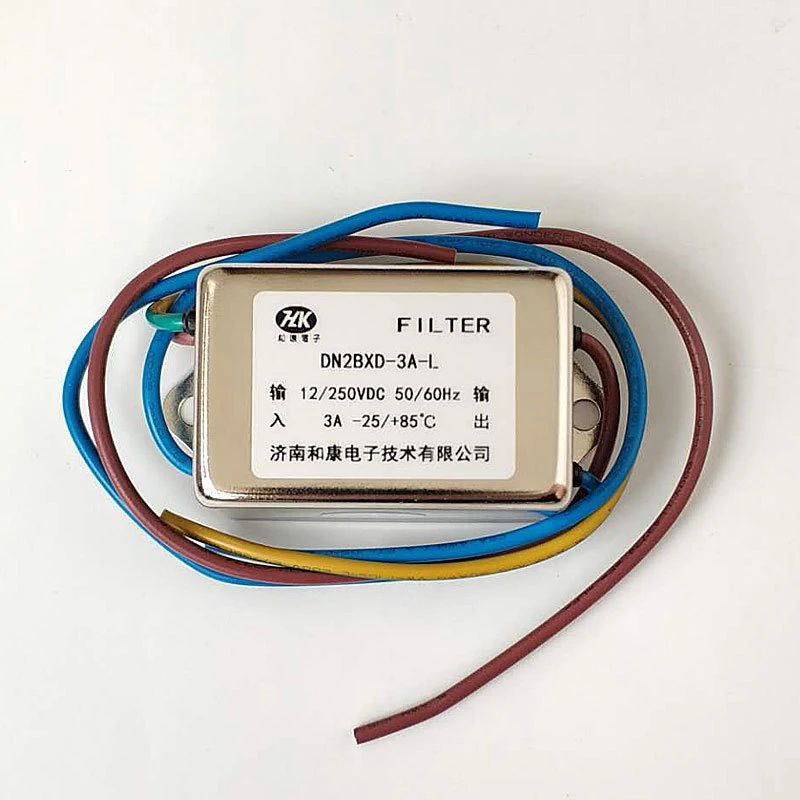
Click here to buy the new noise filter
Anywho, there is an updated noise filter that from NaviTech that I hope to install when it arrives
This is probably the filter the comes with the new devices!Click here to buy the new noise filter

Tested both 9.7” & 12.1”

Joined: Dec 2019
Posts: 6
Likes: 5
Hi All! there is no way to edit the original post. @justnspace unless there is?
Anywho, there is an updated noise filter that from NaviTech that I hope to install when it arrives This is probably the filter the comes with the new devices!
Click here to buy the new noise filter
Anywho, there is an updated noise filter that from NaviTech that I hope to install when it arrives
This is probably the filter the comes with the new devices!Click here to buy the new noise filter

This is the guide on how to connect the noise filter
Thread Starter
Instructor
Joined: Mar 2015
Posts: 247
Likes: 63
From: New York
Important software updates
Hi All,
I took some Time recently to reach out to NaviTech after ordering the new Noise Filter. I wanted to see if there was new software files and there are!! I will consolidated all the update files including the old ones in the new link to my Media-fire Share.
Why do I have the old update files?
Because I haven't tried the new update yet. I don't know what the update does and I don't really feel like testing it yet. Sometimes updates can screw up the device then there is no guarantee the old update files will fix it. But Im curious and I will try this weekend to do the update and return with the news.
IF your Navi is running fine, I would suggest skipping these updates or waiting for someone like me to try them first. The Navi Update probably won't add new features or anything and If your system isn't broken then don't touch it lol, just let it run.
Updates Link: https://www.mediafire.com/folder/0hf...%40onlydaanish)
I took some Time recently to reach out to NaviTech after ordering the new Noise Filter. I wanted to see if there was new software files and there are!! I will consolidated all the update files including the old ones in the new link to my Media-fire Share.
Why do I have the old update files?
Because I haven't tried the new update yet. I don't know what the update does and I don't really feel like testing it yet. Sometimes updates can screw up the device then there is no guarantee the old update files will fix it. But Im curious and I will try this weekend to do the update and return with the news.
IF your Navi is running fine, I would suggest skipping these updates or waiting for someone like me to try them first. The Navi Update probably won't add new features or anything and If your system isn't broken then don't touch it lol, just let it run.
Updates Link: https://www.mediafire.com/folder/0hf...%40onlydaanish)
Pro


Joined: Jul 2017
Posts: 519
Likes: 156
From: NJ
This is a beautiful post. My entire OEM nav screen just crapped out on me last week and I have been mulling around the idea of the Tesla screen for a while, mostly for the Android Auto features. Sucks that it's not compatible with the OEM back up camera, but at least the license plate frame camera is pretty damn cheap. Can't win 'em all.
I thank you for the hard work you've put into this all inclusive thread!
I thank you for the hard work you've put into this all inclusive thread!

Thread Starter
Instructor
Joined: Mar 2015
Posts: 247
Likes: 63
From: New York
This is a beautiful post. My entire OEM nav screen just crapped out on me last week and I have been mulling around the idea of the Tesla screen for a while, mostly for the Android Auto features. Sucks that it's not compatible with the OEM back up camera, but at least the license plate frame camera is pretty damn cheap. Can't win 'em all.
I thank you for the hard work you've put into this all inclusive thread!
I thank you for the hard work you've put into this all inclusive thread!

Safety Car

Joined: May 2007
Posts: 4,310
Likes: 860
From: At the Track
Those Aluminum runners dont have to stick out. there is a little tab that needs to be shaved down on each side. Be careful not to ruin anything. I was able to get mine to fit just like OEM. Though I uninstalled it because I like the OEM look better. Also its too much needless tech for me.
Thread Starter
Instructor
Joined: Mar 2015
Posts: 247
Likes: 63
From: New York
I watched a vid on youtube and i was wrong, i did recieve the main power harness but not the harness for whats circled in red in the picture. Im not sure if that port is used though because the in the vid i watched the guy had his working fine without the use of it. The guy installing mine is an older guy, and cant get the deck to turn on. Im gonna try it myself. If i hook it up like the guy in the vid did and still no power, then im gonna assume its a faulty radio fuse in car.
Thread Starter
Instructor
Joined: Mar 2015
Posts: 247
Likes: 63
From: New York
Those Aluminum runners dont have to stick out. there is a little tab that needs to be shaved down on each side. Be careful not to ruin anything. I was able to get mine to fit just like OEM. Though I uninstalled it because I like the OEM look better. Also its too much needless tech for me.
Thread Starter
Instructor
Joined: Mar 2015
Posts: 247
Likes: 63
From: New York
[UPDATE]
I installed the new noise filter and it didn't do anything for me :/ I have a feeling the amp could be the issue. I have given up at this point on the hissing noise and will live with it like I have been. Some people have mentioned that they have no noise issue with the new model screens.
I installed the new noise filter and it didn't do anything for me :/ I have a feeling the amp could be the issue. I have given up at this point on the hissing noise and will live with it like I have been. Some people have mentioned that they have no noise issue with the new model screens.


Pro
Joined: Jul 2017
Posts: 519
Likes: 156
From: NJ
Can't wait for the update.
Having had my old man's new CX-5 all last week while I was doing the clutch on the Type-S and using Android Auto with Waze got me thinking of some questions for this retrofit;
When using Waze (or whatever Nav app you want) does the nav sounds come through the OEM speakers? Or is there a tiny speaker on the tablet that it comes from?
And the notorious "wrong time" on the clock that has plagued everyone this year.... does this remedy that? (not exactly a deal-breaker, just curious)
Having had my old man's new CX-5 all last week while I was doing the clutch on the Type-S and using Android Auto with Waze got me thinking of some questions for this retrofit;
When using Waze (or whatever Nav app you want) does the nav sounds come through the OEM speakers? Or is there a tiny speaker on the tablet that it comes from?
And the notorious "wrong time" on the clock that has plagued everyone this year.... does this remedy that? (not exactly a deal-breaker, just curious)
Thread Starter
Instructor
Joined: Mar 2015
Posts: 247
Likes: 63
From: New York
Can't wait for the update.
Having had my old man's new CX-5 all last week while I was doing the clutch on the Type-S and using Android Auto with Waze got me thinking of some questions for this retrofit;
When using Waze (or whatever Nav app you want) does the nav sounds come through the OEM speakers? Or is there a tiny speaker on the tablet that it comes from?
And the notorious "wrong time" on the clock that has plagued everyone this year.... does this remedy that? (not exactly a deal-breaker, just curious)
Having had my old man's new CX-5 all last week while I was doing the clutch on the Type-S and using Android Auto with Waze got me thinking of some questions for this retrofit;
When using Waze (or whatever Nav app you want) does the nav sounds come through the OEM speakers? Or is there a tiny speaker on the tablet that it comes from?
And the notorious "wrong time" on the clock that has plagued everyone this year.... does this remedy that? (not exactly a deal-breaker, just curious)
Thread Starter
Instructor
Joined: Mar 2015
Posts: 247
Likes: 63
From: New York
@justnspace my good sir. I ask u once again. I have many updates for this post coming soon. Better photos and Organization. Is there a way to edit the original post 🥺
Thread Starter
Instructor
Joined: Mar 2015
Posts: 247
Likes: 63
From: New York
I can add to to my list of mods to make for the navi and one day i'll buy a tablet just for that.

Joined: Feb 2008
Posts: 4,096
Likes: 414
From: Scarborough, Ontario
I did, and I hate them all. Although Car Launcher Pro is a good one with tons of potential which i might dabble in one day. Its only good though if you have another android tablet (Which I don't) and use it to create a customer layout. Then transfer the layout over to the Navi. If you try to make the custom layout on the Navi itself, its like impossible.
I can add to to my list of mods to make for the navi and one day i'll buy a tablet just for that.
I can add to to my list of mods to make for the navi and one day i'll buy a tablet just for that.
For the TL, did the other launchers end up hiding the HVAC? How would you dig through the settings to get back to it if so?
Thread Starter
Instructor
Joined: Mar 2015
Posts: 247
Likes: 63
From: New York
Yeah I use car launcher pro on my Volvo's android radio and loved it. But it didn't have the HVAC controls so it wasn't an issue with other launchers.
For the TL, did the other launchers end up hiding the HVAC? How would you dig through the settings to get back to it if so?
For the TL, did the other launchers end up hiding the HVAC? How would you dig through the settings to get back to it if so?
Joined: Feb 2008
Posts: 4,096
Likes: 414
From: Scarborough, Ontario
Hmn. Might take the bullet on it when there's a sale then. My radio has gone bad so I been meaning to replace it anyway. Was debating tablet mod or this. Only issue was finding a modern (and fast) tablet that's 8-9" is pretty damn hard these days.
Thread Starter
Instructor
Joined: Mar 2015
Posts: 247
Likes: 63
From: New York
Yeah I only mention the HVAC thing 'cause I heard some people get a faulty unit where the physical buttons don't work and need a replacement (or they got shipped an old unit where the buttons don't work at all).
Hmn. Might take the bullet on it when there's a sale then. My radio has gone bad so I been meaning to replace it anyway. Was debating tablet mod or this. Only issue was finding a modern (and fast) tablet that's 8-9" is pretty damn hard these days.
Hmn. Might take the bullet on it when there's a sale then. My radio has gone bad so I been meaning to replace it anyway. Was debating tablet mod or this. Only issue was finding a modern (and fast) tablet that's 8-9" is pretty damn hard these days.
if your radio is out this is a no brainer tbh. I love it. You won’t regret getting it that’s for sure.
Joined: Feb 2008
Posts: 4,096
Likes: 414
From: Scarborough, Ontario
The unit uses your stock radio buttons. As long as you connect everything nice and properly it should be fine. Ive heard only one chase where someone’s climate control buttons didn’t work.
if your radio is out this is a no brainer tbh. I love it. You won’t regret getting it that’s for sure.
if your radio is out this is a no brainer tbh. I love it. You won’t regret getting it that’s for sure.
As mentioned so hard to find a fast modern 8-9" tablet. Only other option for something modern would be to do a CarPC. But the money I'd put into that I could probably just get this and have it plug and play. Less hassle. Wanted to do either of those since I actually still listen to CDs in my TL (and I still buy them whenever possible). I do have a random CD player at home I can listen to from there though.
Thread Starter
Instructor
Joined: Mar 2015
Posts: 247
Likes: 63
From: New York
I've used this at lowest maybe 20F but I'd imagine its fine. It actually runs pretty hot on normal usage. Sometimes i'll touch the screen and it's pretty warm. I would doubt you'll have any issue below freezing.

Intermediate
Joined: Jan 2021
Posts: 39
Likes: 8
Great post. Thank you.
I couldn't find details on RCA outputs but can see in the photo there are some red and white RCA lines. Do you know of there's separate RCA speaker front and rear and separate subwoofer (left and right or mono) RCA outputs?
I'm thinking of this but with aftermarket 5 channel amp and replacing all but the center channel speakers.
I couldn't find details on RCA outputs but can see in the photo there are some red and white RCA lines. Do you know of there's separate RCA speaker front and rear and separate subwoofer (left and right or mono) RCA outputs?
I'm thinking of this but with aftermarket 5 channel amp and replacing all but the center channel speakers.
Thread Starter
Instructor
Joined: Mar 2015
Posts: 247
Likes: 63
From: New York
Great post. Thank you.
I couldn't find details on RCA outputs but can see in the photo there are some red and white RCA lines. Do you know of there's separate RCA speaker front and rear and separate subwoofer (left and right or mono) RCA outputs?
I'm thinking of this but with aftermarket 5 channel amp and replacing all but the center channel speakers.
I couldn't find details on RCA outputs but can see in the photo there are some red and white RCA lines. Do you know of there's separate RCA speaker front and rear and separate subwoofer (left and right or mono) RCA outputs?
I'm thinking of this but with aftermarket 5 channel amp and replacing all but the center channel speakers.

Instructor
Joined: Mar 2013
Posts: 194
Likes: 49
From: Wisconsin
Anyone have any issues with the steering wheel controls not working? I have 2008 and everything works on the unit but the vol and track change on the steering wheel. Is it a software thing I can change or what?
Instructor
Joined: Mar 2013
Posts: 194
Likes: 49
From: Wisconsin
Figured it out. There is an app called "Control" and you have to configure it through there
Instructor
Joined: Mar 2013
Posts: 194
Likes: 49
From: Wisconsin
