


USB Audio Test


Instructor


Joined: Sep 2019
Posts: 117
Likes: 46
From: Central Florida
I too am having issues with the USB. I have tried 5 different sticks from different companies and varying sizes from 16gb to 512gb. Right now I have about 7 folders on current stick. Some folders have up to 7-10 songs in them and 2 that have 40+.
The strange thing now is I can be playing 1 folder only and I might get it to play the first 4 or 5 songs and I turn off the car to go to the store and return to start the car. The system will finish playing the current song and then jump to a random song anywhere that is on the stick, even though the current folder that was playing had 3 or more songs to go.
So if the last song title was say "Get it on", it would finish that song and then select the next song alphabetically from anywhere on the stick. I never get to hear the entire folder of 10 songs unless it is a long drive.
I have reformatted the USB sticks, tried FAT and EFAT and different file allocation sizes.
Also, I have found that if I don't use any folders and just put, say 200 songs on the stick, it seems to function better. It doesn't seem to like folders.
I'm at a loss.
The strange thing now is I can be playing 1 folder only and I might get it to play the first 4 or 5 songs and I turn off the car to go to the store and return to start the car. The system will finish playing the current song and then jump to a random song anywhere that is on the stick, even though the current folder that was playing had 3 or more songs to go.
So if the last song title was say "Get it on", it would finish that song and then select the next song alphabetically from anywhere on the stick. I never get to hear the entire folder of 10 songs unless it is a long drive.
I have reformatted the USB sticks, tried FAT and EFAT and different file allocation sizes.
Also, I have found that if I don't use any folders and just put, say 200 songs on the stick, it seems to function better. It doesn't seem to like folders.
I'm at a loss.

'20 RDX Elite
Joined: Dec 2019
Posts: 83
Likes: 16
From: B.C.
I finally got around using a USB stick with .flac (24-48), it sounded great in the car. I wonder if it would sound even better if I could get the .flac file directly without converting an mp3 (which is what I did).
XM and radio doesn't do justice to the audio system in the car. Bluetooth streaming is a bit better than the radio and xm, so was my phone connected directly.
The USB interface is buggy. One time, I started driving immediately before giving the infotainment had enough time to settle (it was still booting), it would not recognize the USB stick anymore. USB's like sd cards are always prone to issues.
When the USB was working, I was able to browse the songs and folders etc. Haven't played too much with it.
I have seen issue with the infotainment system if I jump into the car and start driving. If I take it slow, let the system boot completely, things usually work, thank you Android. Android is a crappy OS for use as an infotainment system (I use an android phone and have worked on Android based systems) and also Acura is running some old version anyways, this probably limits the usb devices that can be used.
It looks like the default behavior is to catalog the song alphabetically and play them irrespective of the location.
But I saw an option to list the folders, if you go this route, maybe it plays all the songs in that folder ?
Or maybe try to play it by Album ? I saw that option in there as well.
XM and radio doesn't do justice to the audio system in the car. Bluetooth streaming is a bit better than the radio and xm, so was my phone connected directly.
The USB interface is buggy. One time, I started driving immediately before giving the infotainment had enough time to settle (it was still booting), it would not recognize the USB stick anymore. USB's like sd cards are always prone to issues.
When the USB was working, I was able to browse the songs and folders etc. Haven't played too much with it.
I have seen issue with the infotainment system if I jump into the car and start driving. If I take it slow, let the system boot completely, things usually work, thank you Android. Android is a crappy OS for use as an infotainment system (I use an android phone and have worked on Android based systems) and also Acura is running some old version anyways, this probably limits the usb devices that can be used.
The strange thing now is I can be playing 1 folder only and I might get it to play the first 4 or 5 songs and I turn off the car to go to the store and return to start the car. The system will finish playing the current song and then jump to a random song anywhere that is on the stick, even though the current folder that was playing had 3 or more songs to go.
So if the last song title was say "Get it on", it would finish that song and then select the next song alphabetically from anywhere on the stick. I never get to hear the entire folder of 10 songs unless it is a long drive.
So if the last song title was say "Get it on", it would finish that song and then select the next song alphabetically from anywhere on the stick. I never get to hear the entire folder of 10 songs unless it is a long drive.
But I saw an option to list the folders, if you go this route, maybe it plays all the songs in that folder ?
Or maybe try to play it by Album ? I saw that option in there as well.
'20 RDX Elite
Joined: Dec 2019
Posts: 83
Likes: 16
From: B.C.
If I play by Album, it seems to play everything in the folder/album. But it seems to stay in that album.
Play by folder didn't help, as it went to alphabetical order after the first song, which is weird.
Play by folder didn't help, as it went to alphabetical order after the first song, which is weird.
Instructor
Joined: Oct 2018
Posts: 228
Likes: 86
From: Ohio
I finally got around using a USB stick with .flac (24-48), it sounded great in the car. I wonder if it would sound even better if I could get the .flac file directly without converting an mp3 (which is what I did).
XM and radio doesn't do justice to the audio system in the car. Bluetooth streaming is a bit better than the radio and xm, so was my phone connected directly.
The USB interface is buggy. One time, I started driving immediately before giving the infotainment had enough time to settle (it was still booting), it would not recognize the USB stick anymore. USB's like sd cards are always prone to issues.
When the USB was working, I was able to browse the songs and folders etc. Haven't played too much with it.
I have seen issue with the infotainment system if I jump into the car and start driving. If I take it slow, let the system boot completely, things usually work, thank you Android. Android is a crappy OS for use as an infotainment system (I use an android phone and have worked on Android based systems) and also Acura is running some old version anyways, this probably limits the usb devices that can be used.
It looks like the default behavior is to catalog the song alphabetically and play them irrespective of the location.
But I saw an option to list the folders, if you go this route, maybe it plays all the songs in that folder ?
Or maybe try to play it by Album ? I saw that option in there as well.
XM and radio doesn't do justice to the audio system in the car. Bluetooth streaming is a bit better than the radio and xm, so was my phone connected directly.
The USB interface is buggy. One time, I started driving immediately before giving the infotainment had enough time to settle (it was still booting), it would not recognize the USB stick anymore. USB's like sd cards are always prone to issues.
When the USB was working, I was able to browse the songs and folders etc. Haven't played too much with it.
I have seen issue with the infotainment system if I jump into the car and start driving. If I take it slow, let the system boot completely, things usually work, thank you Android. Android is a crappy OS for use as an infotainment system (I use an android phone and have worked on Android based systems) and also Acura is running some old version anyways, this probably limits the usb devices that can be used.
It looks like the default behavior is to catalog the song alphabetically and play them irrespective of the location.
But I saw an option to list the folders, if you go this route, maybe it plays all the songs in that folder ?
Or maybe try to play it by Album ? I saw that option in there as well.
'20 RDX Elite
Joined: Dec 2019
Posts: 83
Likes: 16
From: B.C.
Converting from MP3 to FLAC will not improve sound quality. That would be like trying to upscale a ripped VHS (480p) to 4k. You can't gain what is already lost in an MP3 so the only way to have lossless audio quality is to rip the music to FLAC. I recommend using EAC (Exact Audio Copy) to rip CDs to FLAC.

Instructor
Joined: Oct 2018
Posts: 228
Likes: 86
From: Ohio

Instructor
Joined: Sep 2018
Posts: 170
Likes: 21
I've had a lot of issues playing music from USB sticks. It gets stuck on loading, have to unplug and plug it in every time I start the car, etc. I started downloading music to my iPhone and it's worked flawlessly through CarPlay so I just use it through my phone.

Racer
Joined: Mar 2019
Posts: 435
Likes: 156
From: Mesa, AZ
I have a separate USB with my converted files from DVD or BlueRay discs that play in 5.1 mode. That really takes advantage of our system at its best.
Instructor
Joined: Oct 2018
Posts: 228
Likes: 86
From: Ohio
The only issue with using the iPhone and CarPlay is that the FLAC files won't play as such from the phone. I have some FLAC files stored on my iPhone but they are not recognized or played from my phone (iPhone 8+).
I have a separate USB with my converted files from DVD or BlueRay discs that play in 5.1 mode. That really takes advantage of our system at its best.
I have a separate USB with my converted files from DVD or BlueRay discs that play in 5.1 mode. That really takes advantage of our system at its best.
Racer
Joined: Mar 2019
Posts: 435
Likes: 156
From: Mesa, AZ
Instructor
Joined: Oct 2018
Posts: 228
Likes: 86
From: Ohio
Also, this will be useful to know when converting:
- CD audio is 16-bit with a sample rate of 44.1kHz.
- DVD audio is 24-bit with a sample rate of 96kHz.
Racer
Joined: Mar 2019
Posts: 435
Likes: 156
From: Mesa, AZ
As far as I know, ALAC supports up to 2 channels. AIFF (similar to WAV) supports 5.1 but since it's uncompressed, the file size will be pretty large. I recommend using AIFF for your 5.1 files and ALAC for the rest of your lossless audio.
Also, this will be useful to know when converting:
Also, this will be useful to know when converting:
- CD audio is 16-bit with a sample rate of 44.1kHz.
- DVD audio is 24-bit with a sample rate of 96kHz.

Racer
Joined: Jul 2018
Posts: 385
Likes: 124
Do AIFF files playback all channels via CarPlay? Using the Apple Music app or some other app? I have not tried this, but this would get around the issue of only 1 usb input.
Instructor
Joined: Oct 2018
Posts: 228
Likes: 86
From: Ohio
EAC should handle this fine. Disable autorun for your CDs as some will run software that will interfere with the ripping process. I've ripped many CDs and never had an issue.

4th Gear
Joined: Mar 2019
Posts: 4
Likes: 1
RDX USB Sucks
1st, I tried streaming using Bluetooth but the audio quality is horrible. 2nd, USB Audio is the best option but the RDX USB has so much problems: i started out with a 128GB drive, that took forever to load so I downgraded to a 8GB drive, better but still sucks. Most of the time, the car won’t recognize the drive, I had to unplug & plug it back in order for the car to recognize the drive. Very Frustrating!!! I have other cars, they all work fine. Anyway, RDX infotainment has a the Worst!!! 🤬🤬🤬

Instructor
Joined: Sep 2019
Posts: 117
Likes: 46
From: Central Florida
The USB has a mind of it's own. Every time you turn off the car it seems to forget what songs it has already played. After 6-8 songs it will play the same song/songs from this morning or yesterday. Out of 400 songs with no folders, I've yet to hear at least the other 300 songs even after 4 weeks of everyday use. This is set to random play. It seems that when I hear a song I already heard, I'll manually push next until I will get to a song I have not yet heard.
Now understand I'm not complaining about hearing 1 song repeat out of 40-50. It's more like every 6-8 songs I'll get a repeat of whatever it has played since the last start up or day before.
Forget about playing them in alphabetical order, I can start with the "A" songs and go the "D's" and it will start up the "A's" again.
For me, this is really the only real complaint I have.
Now understand I'm not complaining about hearing 1 song repeat out of 40-50. It's more like every 6-8 songs I'll get a repeat of whatever it has played since the last start up or day before.
Forget about playing them in alphabetical order, I can start with the "A" songs and go the "D's" and it will start up the "A's" again.
For me, this is really the only real complaint I have.

10th Gear
Joined: Mar 2021
Posts: 13
Likes: 6
I was experiencing issues playing music on a USB Flash Drive. It would take a very long time to initialize and start playing. Other times it wouldn't recognize the drive at all. I would have to unplug it and then plug it in again and that would sometimes work. I moved all of the songs off of the drive onto my PC then reformatted the drive to exFAT. I then copied all of the songs back to the drive and that completely fixed the problem. Now it initializes and starts playing as soon as I turn on the car and it never looses connectivity. Problem solved.

Advanced
Joined: Aug 2019
Posts: 96
Likes: 17
I was experiencing issues playing music on a USB Flash Drive. It would take a very long time to initialize and start playing. Other times it wouldn't recognize the drive at all. I would have to unplug it and then plug it in again and that would sometimes work. I moved all of the songs off of the drive onto my PC then reformatted the drive to exFAT. I then copied all of the songs back to the drive and that completely fixed the problem. Now it initializes and starts playing as soon as I turn on the car and it never looses connectivity. Problem solved.
Advanced
Joined: Aug 2019
Posts: 96
Likes: 17
I formatted drive to ExFat and it is still the same or worse. First time after 10 minutes of "Initializing" I turned it off. Tried again with the same result. I unplugged and plugged back drive and it worked. Turned it off, open door and tried again - same thing "Initializing". Perhaps there is something different between different brands of flash drives or Mac OSX ExFat is slightly different than Windows ExFat. Bummer.
Racer
Joined: Mar 2019
Posts: 435
Likes: 156
From: Mesa, AZ
All of the above are just part of this infotainment system. The tricks I have shared over the past 2 years are pretty much included in this discussion. There are some consistent themes that make operation less frustrating:
1. Always take the drive out of the receiving USB slot when you turn your car off.
2. When you start your car, do not insert the USB drive until you have the blue screen with the text warning to be nice and careful. Then you will have an initialization of 1-2 minutes.
3. When you reinsert the drive as in #1, you should have the infotainment system play where you were before removing the drive. The music will then continue to play.
4. Access to your directory of files takes a few minutes before it is loaded into the system. If you go to the Music Library and click on it, your directory will then be ready for you to select the tracks you want to play.
1. Always take the drive out of the receiving USB slot when you turn your car off.
2. When you start your car, do not insert the USB drive until you have the blue screen with the text warning to be nice and careful. Then you will have an initialization of 1-2 minutes.
3. When you reinsert the drive as in #1, you should have the infotainment system play where you were before removing the drive. The music will then continue to play.
4. Access to your directory of files takes a few minutes before it is loaded into the system. If you go to the Music Library and click on it, your directory will then be ready for you to select the tracks you want to play.


Racer
Joined: Sep 2019
Posts: 252
Likes: 79
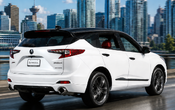
You would think, right? However, instead of fixing the glitchy usb issues (along with other glitchy electronics) they worked on animating the silly graphics when you switch driving modes.


Instructor
Joined: Sep 2019
Posts: 117
Likes: 46
From: Central Florida

'20 RDX Elite
Joined: Dec 2019
Posts: 83
Likes: 16
From: B.C.
I also have a Sandisk cruzer which I have used for updating maps, no issues with it either. I use a USB extension cable, as I have read some USB sticks run hot while in use. It is also less wear and tear, with switching btw usb stick and the phone.
Maybe the USB connection/wiring in the car has some issues, if you have inconsistency issues? I have read in some other thread about this.

Drifting
Joined: Nov 2020
Posts: 3,498
Likes: 1,318
Otherwise, the only fix is to park outside, turn off the ignition and restart the car!

Expanse me
Joined: Feb 2019
Posts: 902
Likes: 308
From: Virginia Beach, VA
To ease some of this USB pain, some of us have tried USB hubs, and even USB hubs with separate switches, etc, to just make the switch to the phone and USB easier, and the resetting of the USB port easier.
I gave up trying to fool it in this way, so I made myself a little box, tucked in the center console, with a rotary switch (3 pole, 4 throw) and three usb females inside. I plug in two USB sticks inside the box, and plugin my phone USB and run that out to the phone, then another line out to the RDX USB port. Now I just rotate the switch to switch from one USB to another, or to the phone, or to unplug (where no plug is in). On the USB's, I connected the grounds altogether, and switched the pwr, and two data lines via the rotary switch.
This saves me from unplugging and plugging USB's in and out. Working well so far.
PM me if you would like pics or schematic or parts list. Not complicated, just careful soldering. Kept me off the street for a Saturday afternoon...
I gave up trying to fool it in this way, so I made myself a little box, tucked in the center console, with a rotary switch (3 pole, 4 throw) and three usb females inside. I plug in two USB sticks inside the box, and plugin my phone USB and run that out to the phone, then another line out to the RDX USB port. Now I just rotate the switch to switch from one USB to another, or to the phone, or to unplug (where no plug is in). On the USB's, I connected the grounds altogether, and switched the pwr, and two data lines via the rotary switch.
This saves me from unplugging and plugging USB's in and out. Working well so far.
PM me if you would like pics or schematic or parts list. Not complicated, just careful soldering. Kept me off the street for a Saturday afternoon...


Thread
Thread Starter
Forum
Replies
Last Post
Desert Ridge
2G RDX Audio, Bluetooth, Electronics & Navigation
8
Sep 13, 2019 03:54 PM
acelow
3G RDX Audio, Bluetooth, Electronics & Navigation
5
Sep 21, 2018 07:55 AM
azgirl
2G RDX Audio, Bluetooth, Electronics & Navigation
3
Nov 8, 2017 05:45 PM
Masta120
2G RDX Audio, Bluetooth, Electronics & Navigation
1
Dec 5, 2016 07:43 PM