


Need help/advice on next project


Thread Starter
Banned
Joined: Sep 2006
Posts: 500
Likes: 0
From: Tampa, FL
 Need help/advice on next project
Ok guys I was browsing AZine last night and I came across this thread:
https://acurazine.com/forums/showthr...igation+system
and this one right after
https://acurazine.com/forums/showthr...3&page=1&pp=25
And here is the main toy:

http://www.airlinktek.com/english/prod_mg25.htm
I have always wanted a carputer but I got turned away when I saw just how expensive it can get. Besides I don't really need a computer in my car lol.
Anyways, I noticed he used the 3rd gen Navi system to play all the music and DVDs. He mentioned (or someone in that thread) that you could also hook this up to a double DIN kit. It needs to have RCA plugs for it to work. I was looking into the Eclipse NAV/DVD/CD set up but Im not sure if it will work with this. I want to custom fit a 6.5" DIN screen into where the original Navy screen goes.
One of the things I need help with is the transplant I want to do inside of my car My plan is to switch out the 01' dash to the 03 Navi set up. I found these pics last night, but I forgot whose car it is. Hope you dont mind me using them


Basically the piece where the screen and the AC goes. Now I know I have to buy the new AC unit:

But my question is this; After I buy everything shown above, will it hook up to the connections from my stock 01' AC cables? If not, how/where could I get this done the right way?
Also I noticed that when I order this part:

Part #4
There is a slot where the Hazards button goes. Where can I purchase the button, and will it connect to the wires that connect to my stock Hazards button? Same questions as the AC unit.
Guys I will greatly appreciate all the help I can get here. I'm not the savviest tech guy but I do LOVE new gadgets. I am still doing research on this set up and hopefully I can get it to work. The guy who started that thread I posted; he said you could get whatever laptop size hard drive you want. I believe he got the 80G? I forgot, but i'll make sure i get the 100G+ lol I got over 500 CDs to put into MP3s and a DVD collection just as big. I wont put all my DVDs in there but mainly the top 10
https://acurazine.com/forums/showthr...igation+system
and this one right after
https://acurazine.com/forums/showthr...3&page=1&pp=25
And here is the main toy:
http://www.airlinktek.com/english/prod_mg25.htm
I have always wanted a carputer but I got turned away when I saw just how expensive it can get. Besides I don't really need a computer in my car lol.
Anyways, I noticed he used the 3rd gen Navi system to play all the music and DVDs. He mentioned (or someone in that thread) that you could also hook this up to a double DIN kit. It needs to have RCA plugs for it to work. I was looking into the Eclipse NAV/DVD/CD set up but Im not sure if it will work with this. I want to custom fit a 6.5" DIN screen into where the original Navy screen goes.
One of the things I need help with is the transplant I want to do inside of my car
My plan is to switch out the 01' dash to the 03 Navi set up. I found these pics last night, but I forgot whose car it is. Hope you dont mind me using them Basically the piece where the screen and the AC goes. Now I know I have to buy the new AC unit:
But my question is this; After I buy everything shown above, will it hook up to the connections from my stock 01' AC cables? If not, how/where could I get this done the right way?
Also I noticed that when I order this part:
Part #4
There is a slot where the Hazards button goes. Where can I purchase the button, and will it connect to the wires that connect to my stock Hazards button? Same questions as the AC unit.
Guys I will greatly appreciate all the help I can get here. I'm not the savviest tech guy but I do LOVE new gadgets. I am still doing research on this set up and hopefully I can get it to work. The guy who started that thread I posted; he said you could get whatever laptop size hard drive you want. I believe he got the 80G? I forgot, but i'll make sure i get the 100G+ lol I got over 500 CDs to put into MP3s and a DVD collection just as big. I wont put all my DVDs in there but mainly the top 10
Thread Starter
Banned
Joined: Sep 2006
Posts: 500
Likes: 0
From: Tampa, FL
I'm sorry I should have posted a little more info on what exactly this set does.. Here is a copy/paste of the thread I posted earlier:
What is it?!
It is basically a USB 2.0 2.5" (Laptop) hard drive enclosure that has the ability to play music, video, and pictures straight from a hard drive without the need for another device other than a video screen with RCA inputs.
Here is a snippet of the features:
Media support: MPEG 1, 2, 4 (MPG, MPEG, AVI, M2V, VOB, etc), XviD / MP3, OGG Voris, WMA / JPEG(JPG)
Video Output: Composite, S-Video, Component video output / 480p, 720p, 1080i progressive scan
Audio Output: Audio Stereo L-R / Coaxial Digital Output / 5.1Ch (DTS, AC3)
Operating System Support: Windows 98/SE/ME/2000/XP, MAC 9.0 higher Linux 2.4 higher
Power Input: 5V/2A
What does that mean?
Basically, once you buy this enclosure, you can insert into it a 2.5" hard drive of your choice (I am going with Hitachi 80 GB ATA-6 5400 rpm), connect it to your computer via the provided USB cable, drag and drop your media files onto the drive, and play it virtually anywhere!
What is it?!
It is basically a USB 2.0 2.5" (Laptop) hard drive enclosure that has the ability to play music, video, and pictures straight from a hard drive without the need for another device other than a video screen with RCA inputs.
Here is a snippet of the features:
Media support: MPEG 1, 2, 4 (MPG, MPEG, AVI, M2V, VOB, etc), XviD / MP3, OGG Voris, WMA / JPEG(JPG)
Video Output: Composite, S-Video, Component video output / 480p, 720p, 1080i progressive scan
Audio Output: Audio Stereo L-R / Coaxial Digital Output / 5.1Ch (DTS, AC3)
Operating System Support: Windows 98/SE/ME/2000/XP, MAC 9.0 higher Linux 2.4 higher
Power Input: 5V/2A
What does that mean?
Basically, once you buy this enclosure, you can insert into it a 2.5" hard drive of your choice (I am going with Hitachi 80 GB ATA-6 5400 rpm), connect it to your computer via the provided USB cable, drag and drop your media files onto the drive, and play it virtually anywhere!
Thread Starter
Banned
Joined: Sep 2006
Posts: 500
Likes: 0
From: Tampa, FL
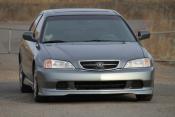
lol sorry, no OG status in this whip. :thief:
Any one else can help me out here? I read the "Non Navy to Navy" thread but I'm still not sure If i can use the wires in my car from the A/C and Hazards and just plug them right in to the Navy set up...
Any one else can help me out here? I read the "Non Navy to Navy" thread but I'm still not sure If i can use the wires in my car from the A/C and Hazards and just plug them right in to the Navy set up...

Thread
Thread Starter
Forum
Replies
Last Post
cycdaniel
1G TSX Performance Parts & Modifications
8
Dec 17, 2019 10:58 AM