


Video to Nav...




Video to Nav...
I am now looking into this mod and have read the threads here which are all fairly old or old enough for updates to have happened. The 3 units it looks like everyone has been using are;
Autotoys.com
http://www.autotoys.com/x/product.php?productid=9231
Navtool
http://www.navtool.com/acuraRL_05-08.aspx#
Ventura tech
http://venturatechnology.com.mx/prod...HONDNAVLINK-02
I have a couple of questions for anyone who's has installed or knows much about these. I would like to add watch video but also add other inputs such as tablet or dvd player. I believe these will do the trick, but I was wondering, since I already have a backup cam, do I have to disconnect and plug it into one of these devices or can it stay as is?
What is everyone's take on these? Is there one that is superior to the other or is there a better one on the market now?
Autotoys.com
http://www.autotoys.com/x/product.php?productid=9231
Navtool
http://www.navtool.com/acuraRL_05-08.aspx#
Ventura tech
http://venturatechnology.com.mx/prod...HONDNAVLINK-02
I have a couple of questions for anyone who's has installed or knows much about these. I would like to add watch video but also add other inputs such as tablet or dvd player. I believe these will do the trick, but I was wondering, since I already have a backup cam, do I have to disconnect and plug it into one of these devices or can it stay as is?
What is everyone's take on these? Is there one that is superior to the other or is there a better one on the market now?
I Drive Like A Dick 8≈
Joined: Sep 2008
Posts: 1,519
Likes: 79
From: Calgary, Alberta
The auto toys and Ventura tech are the exact same piece except that the auto toys one is unbranded. Given that, I wouldn't bother looking at the auto toys one. It comes without the domed sticker and they want $70 more for it.
It looks like the Ventura Tech will give you the expand-ability features you want, ie keeping the backup cam and adding an auxiliary video source.
I haven't done this mod yet, but I would imagine the factory back-up cam would stay plugged into where it is because they generally make a harness out of it rather than a co-ax video cable.
I can't speak to anything else about these products
It looks like the Ventura Tech will give you the expand-ability features you want, ie keeping the backup cam and adding an auxiliary video source.
I haven't done this mod yet, but I would imagine the factory back-up cam would stay plugged into where it is because they generally make a harness out of it rather than a co-ax video cable.
I can't speak to anything else about these products
I noticed that also. I looked at these a while back but wasn't ready. Since then there has been changed to some such as software and hardware (longer cables). Im wondering if the ones that say plug n play are truly that as the DIY's that I been readying prove otherwise. Also I think all the DIY's had ppl adding backup camera's. I've been trying to get in touch with each of them to get some details but looking for info from actual people who dealt with them. They will say anything to make a sale.
I Drive Like A Dick 8≈
Joined: Sep 2008
Posts: 1,519
Likes: 79
From: Calgary, Alberta
Ok, here's what I found. I'm not 100% sure where the factory camera connects or even how it connects but it doesn't matter. It doesn't matter because the wiring for this is a T-harness, which means none of the factory connections are being changed. So the factory back-up cam will continue to function as it should, I wouldn't hook up any of the reverse wires though because it may bypass the factory cam and give you a no camera signal message.
Follow steps 3 & 4 in the Navtool install guide:
Step 3: if aftermarket camera was installed, to test operation shift vehicle into reverse. Camera will display on video 2. If
no camera is connected OSD message “no camera connected” will be displayed. Parking lines can be turned on or off
with mirror switch, to return back to factory navigation/information screen press and hold push button for more than 2
seconds. If camera is to be displayed while driving please connect your camera to accessory power, and select video 2
via push button.
Step 4: if video 2 is used as an input for an external video source, set mirror switch to off in order to turn off parking
lines and using push button cycle between video 1 and video 2.
I was just thinking though, because you have a Canadian model like I do, does yours have factory XM? Mine doesn't so I would have to get the more expensive one.
Follow steps 3 & 4 in the Navtool install guide:
Step 3: if aftermarket camera was installed, to test operation shift vehicle into reverse. Camera will display on video 2. If
no camera is connected OSD message “no camera connected” will be displayed. Parking lines can be turned on or off
with mirror switch, to return back to factory navigation/information screen press and hold push button for more than 2
seconds. If camera is to be displayed while driving please connect your camera to accessory power, and select video 2
via push button.
Step 4: if video 2 is used as an input for an external video source, set mirror switch to off in order to turn off parking
lines and using push button cycle between video 1 and video 2.
I was just thinking though, because you have a Canadian model like I do, does yours have factory XM? Mine doesn't so I would have to get the more expensive one.
I don't think Canada was given the XM version. I am yet to see one anywhere. I dont know for sure if I am going to go with Navtool as I dont see the benefit with it over the others. I mainly want to use my tablet for video and or an android device. I can't stand iWhatevers. I guess I could just bybass any camera setup. I just hope it doesn't get in the way of the OEM camera.
I Drive Like A Dick 8≈
Joined: Sep 2008
Posts: 1,519
Likes: 79
From: Calgary, Alberta
That's what I thought as well about the XM
It shouldn't get in the way of the OEM camera. The unit only functions when the button is pushed and essentially it cycles you through A/V sources, two of them coming from the Ventura Tech and I bet you can turn off all camera sources with the dip switches.
It shouldn't get in the way of the OEM camera. The unit only functions when the button is pushed and essentially it cycles you through A/V sources, two of them coming from the Ventura Tech and I bet you can turn off all camera sources with the dip switches.
Last edited by Nersh7; Aug 18, 2014 at 11:05 PM. Reason: God damn XM
Trending Topics
So a new revelation. It appears that all the Vid to Nav modules need the XM module to get sound. I dont think Canadian models came with XM.
Are there any Canadians who did the nav to vid? What setup did you use?
Are there any Canadians who did the nav to vid? What setup did you use?
I Drive Like A Dick 8≈
Joined: Sep 2008
Posts: 1,519
Likes: 79
From: Calgary, Alberta
I think that auto toys may be our only solution.
They have an option when buying the module that is for non-XM vehicles. However, it costs $100 more and there is a increased lead time by 2 weeks!!
There are pro's and con's to this. The con's are pretty much stated above; being the higher cost and lead time. The pro's are that the module get's installed upfront, which means the ipod control can easily be used from the drivers seat. Ok so that's the only pro, but it's a pretty big one if you ask me! Everyone else has to hook up their ipod and leave it in the trunk.
I'm thinking this is turning into a super expensive way to have video play on the factory screen and the ipod feature can be had for $120. In all honesty I've had a few aftermarket screens and can count on one hand how often I had a DVD playing.
They have an option when buying the module that is for non-XM vehicles. However, it costs $100 more and there is a increased lead time by 2 weeks!!
There are pro's and con's to this. The con's are pretty much stated above; being the higher cost and lead time. The pro's are that the module get's installed upfront, which means the ipod control can easily be used from the drivers seat. Ok so that's the only pro, but it's a pretty big one if you ask me! Everyone else has to hook up their ipod and leave it in the trunk.
I'm thinking this is turning into a super expensive way to have video play on the factory screen and the ipod feature can be had for $120. In all honesty I've had a few aftermarket screens and can count on one hand how often I had a DVD playing.
That is pretty expensive. Upon further review of the Navtool, it looks like it doesn't use the XM feature unless I am reading wrong. I am going to contact their support and find out exactly. I read and re-read the instructions and there is no mention of XM. If they do in fact need the XM I will look into something custom. There has to be a way just as easy as if we had XM.

Pro
Joined: May 2009
Posts: 704
Likes: 53
From: MTL
Navtool only takes your video signal sources and inputs them to the oem screen. For audio, you need a separate unit like usaspec or the Grom unit which plugs to the back of the factory head unit, thus no need of xm module. The grom unit will provide you with multiple ways for inputting your audio stream. You will need to take the video signal lead (yellow connector) from your A/V source and plug it to Navtool unit and the audio lead connect it to the grom unit.
https://acurazine.com/forums/2g-rl-audio-bluetooth-electronics-navigation-90/grom-usb2p-hon1-honda-acura-usb-ipod-mp3-android-bluetooth-auxiliary-interface-via-874781/
Take a look at this thread for more info about the grom unit.
https://acurazine.com/forums/2g-rl-audio-bluetooth-electronics-navigation-90/grom-usb2p-hon1-honda-acura-usb-ipod-mp3-android-bluetooth-auxiliary-interface-via-874781/
Take a look at this thread for more info about the grom unit.
Thanks. I was slowing getting to that conclusion. So its either the Autotoys.com for an all in one solution for $500 or the Navtool+USASpec/Grom unit. Not sure how much the later is. I like the idea of Autotoys but I dont like the price. Not sure which way I will go. But I think I have my answers. Thanks.
Pro
Joined: May 2009
Posts: 704
Likes: 53
From: MTL
U've got it wrong man. U can send the audio through 3.5mm AUX jack in ur specific. You can also stream audio with Bluetooth, read audio files from a USB stick and iOS device. Check out this thread for more info.
https://acurazine.com/forums/showthread.php?t=874781
https://acurazine.com/forums/showthread.php?t=874781
I should have clarified. I mean if Im going to get the audio from the video. I would just have to send the video to the yellow on the navtool and the audio to the audio of the grom?
Pro
Joined: May 2009
Posts: 704
Likes: 53
From: MTL
Yea, let's say for example your audio/video source has 3 cables Yellow for video and Red and White for right and left audio, you plug the yellow video cable to the navtool unit and the red n white cables to the grom unit.
Pro
Joined: May 2009
Posts: 704
Likes: 53
From: MTL
I see you went the Navtool + Grom unit. Please take pictures all through your install and also check if there's a way to install the navtool box in front of the car, behind the head unit instead of the trunk at the NAV dvd unit. This would be much easier as you're already working behind the head unit to install the Grom unit.
I haven't got them yet but yes I am going to go Grom + Navtool. My heart was leaning towards Autotools.com but they are almost useless in terms of customer service/ support. I will take pics of the install. Im going to do something similar to Matt W but with a twist. Autotoys.com is the only unit that can be installed in the front behind the radio but you need to pay $100 for a custom harness, with an extended wait time. The Navtool needs to be plugged into the Nav box. Ill take a look while everything is apart and try some things.
Well for the harness, its a matter of finding out what wire needs to be where but I also believe there must be a flash of an updated ROM on the device. I cant see it possible to install behind the radio at all. Still need the ability to plug in the video cable which I don't thing the OEM Navigation has.
Pro
Joined: May 2009
Posts: 704
Likes: 53
From: MTL
Apart from the single wires for the 12V, grnd, and others, I don't see why the navtool can't be installed infront.
When plugging at Nav unit in the trunk, you plug the 20pin harness of the navtool to the port behind the nav unit and the oem harness you plug it to the other end of the navtool wire harness. Instead of intercepting the navigation video at the source, you can do the same at the other end. The plug harness is the same going from nav unit to the display unit.
When plugging at Nav unit in the trunk, you plug the 20pin harness of the navtool to the port behind the nav unit and the oem harness you plug it to the other end of the navtool wire harness. Instead of intercepting the navigation video at the source, you can do the same at the other end. The plug harness is the same going from nav unit to the display unit.
I Drive Like A Dick 8≈
Joined: Sep 2008
Posts: 1,519
Likes: 79
From: Calgary, Alberta
Apart from the single wires for the 12V, grnd, and others, I don't see why the navtool can't be installed infront.
When plugging at Nav unit in the trunk, you plug the 20pin harness of the navtool to the port behind the nav unit and the oem harness you plug it to the other end of the navtool wire harness. Instead of intercepting the navigation video at the source, you can do the same at the other end. The plug harness is the same going from nav unit to the display unit.
When plugging at Nav unit in the trunk, you plug the 20pin harness of the navtool to the port behind the nav unit and the oem harness you plug it to the other end of the navtool wire harness. Instead of intercepting the navigation video at the source, you can do the same at the other end. The plug harness is the same going from nav unit to the display unit.
This would be the ideal solution I think.
I think the harness is the same. I think there is something between the nav and the screen that needs to happen. Autotoys claims they can give a harness that installs behind the dash for non XM users but they say there is a wait time. Let me order, get this stuff and take if from there.
Pro
Joined: May 2009
Posts: 704
Likes: 53
From: MTL
I'm no expert in this but if the 20 pin wired connection (Connector A in the diagram) from the Nav unit in the trunk connects directly to the 20 pin harness behind the display unit, I don't see why it shouldn't work.
The 3rd diagram is of the audio system. The audio unit Connector C 14pin is where you will connect the grom unit.
Here's the diagrams.

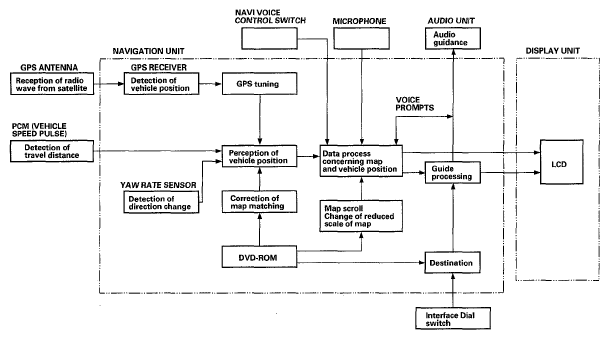

The 3rd diagram is of the audio system. The audio unit Connector C 14pin is where you will connect the grom unit.
Here's the diagrams.


Last edited by M T L T L; Aug 27, 2014 at 12:43 PM.
There must be a reason why all the units say to install in the trunk. The one that allows the install up front requires a custom harness. This is the only thing I question. To me it makes no difference where the unit is, as long as it does what I need it to do. I will however check to see if I can install everything up front.
I just got all my toys. All documentation I have looked at says that the Video hardness must be connected to the Nav unit in the trunk. I don't know why and dont want to fry anything. Can anyone think of a reason why this must be?
I Drive Like A Dick 8≈
Joined: Sep 2008
Posts: 1,519
Likes: 79
From: Calgary, Alberta
It may be that it's piggybacking off the XM interface, I don't think it would damage anything by putting it in but because we don't have the sat button it may not interface with our radio's properly.
So I got all my toys and decided to install the Gromaudio unit. I took a look at the Navtool and the connector is completely different than the back of the unit. Yes it is a 20 pin connector but the connector is completely different. That being said, you could probably depin and repin to the correct connector but I think I'll just stick to installing in the rear. Shouldn't be that bad or long of an install.

I Drive Like A Dick 8≈
Joined: Sep 2008
Posts: 1,519
Likes: 79
From: Calgary, Alberta
I just read the same question in the other thread. Where are you installing this that you would have to run something up to the front? Tapping onto the factory harness would be the best option, that way its fused on a circuit that powers the radio. Again always add a fuse anytime you pull power from anything but this way if the radio fuse pops then you lose the navtool power as well (easier for diagnosing).
So the Navtool needs to be installed in the trunk behind the nav unit. Canadian RL's don't have XM as Heavy's write up so I need to pull +12V accessory power but not sure the best place to pull it from. I am running video cable to the radio unit so I can run the power if I need to but I am not sure where the best/cleanest place to tap into (I'm no electrician)
I Drive Like A Dick 8≈
Joined: Sep 2008
Posts: 1,519
Likes: 79
From: Calgary, Alberta
There should be an 12V and a turn on wire at the factory amp. That would be the best place to do it so you don't have to run wires through the vehicle (sorry, less wires to run).
It should be a white wire at the amp (remote turn on wire).
I'll look into it more today and see if I can find anything.
It should be a white wire at the amp (remote turn on wire).
I'll look into it more today and see if I can find anything.
I Drive Like A Dick 8≈
Joined: Sep 2008
Posts: 1,519
Likes: 79
From: Calgary, Alberta
I can't download any of the manuals from work so I won't be able to check it out till later tonight. But testing should be fairly easy, all you are looking for is a white wire that shows 12V when the vehicle is on. I'm pretty sure there is a ground cluster back there that you can use to keep it factory fresh.
Pro
Joined: May 2009
Posts: 704
Likes: 53
From: MTL
The easiest way would be to tap the Nav DVD unit power source but im not sure how to add a fuse to that. Or u can run a wire from the fuse box all the way to the trunk with a "mini add-a-circuit". They sell it at Canadian Tire.