


GROM USB2P-HON1 HONDA / ACURA USB IPOD MP3 Android Bluetooth AUXILIARY INTERFACE (VIA


Thread Starter
Intermediate
Joined: Jun 2009
Posts: 28
Likes: 2
From: 303
GROM USB2P-HON1 HONDA / ACURA USB IPOD MP3 Android Bluetooth AUXILIARY INTERFACE (VIA

Instructor
Joined: Jul 2011
Posts: 197
Likes: 34
I was looking at this... it looks like the grom usb port won't charge the iPhone using the official cable... that's unfortunate, it's really making me lean pretty hard toward the Mediabridge - MLTL - let me know if you find out any different!

8th Gear
Joined: Mar 2011
Posts: 8
Likes: 0
Guys, just found out about this! In my opinion I feel this is better option for the price! I Asked my wife to get it for me for Christmas. Tell me what you think.
http://www.crutchfield.com/p_113KOSA...de-System.html
http://www.crutchfield.com/p_113KOSA...de-System.html

Racer
Joined: Aug 2012
Posts: 272
Likes: 29
Doesn't look like an elegant solution. I have the USAspec for Acura installed and it works well. The Bluetooth problems with respect to phone book and listening over the speakers before the other party picks up still exist but otherwise, I'm happy.
8th Gear
Joined: Mar 2011
Posts: 8
Likes: 0
I love customization. Hook up the screen and controller where and how you want it. You get bluetooth phone capabilities (which TL's already have...I could care less for it), iPod integration, the ability to add HD Radio (which TLs don't have), and my favorite feature...USB. We are talking browsable music through folder directories all for $50. I'd do that in a heartbeat instead of dealing with the headaches of iTunes and of organizing and sorting music. I don't have the patience for all that. I have a life to live.
Apple comes out with the newest release of products every 6 month. Yes, technology will always get better, but damn it would be nice to know I have the latest and greatest thing for a year or two before they go move on to another product.
At Apples pace, I feel played out knowing I just spent X amount of dollars on what I thought was the newest thing to find out a month later a newer version came out (and the product I paid for is $100 less...double whammy). In the end for me and maybe others, it's all about that bang for your buck. $399 for a 64GB iPhone vs $20 for 64GB thumb drive. Choose your pick.
I'm in no way affiliated with Kenwood, but to know they have created this product is a real God send. A full featured unit for $50. Just my 2 cents.
Thread Starter
Intermediate
Joined: Jun 2009
Posts: 28
Likes: 2
From: 303
I believe you have to buy their ipod cable that plugs into the aux port for it to charge. The reason I am thinking about getting this over the USA Spec unit is the ability to use it for an iphone/ipod or any android phone along with controllability through the head unit. Unlike the USA Spec with it is only the ipod/iphone that is controlled through the head unit and all is through the audio connect via headphone jack.
Trending Topics
Instructor
Joined: Jul 2011
Posts: 197
Likes: 34
Have you looked at the DICE Mediabridge? http://audiovox.diceelectronics.com/...ridge-info-avx

Pro
Joined: May 2009
Posts: 704
Likes: 53
From: MTL
Guys, just found out about this! In my opinion I feel this is better option for the price! I Asked my wife to get it for me for Christmas. Tell me what you think.
YOUTUBE: Kenwood KOS-A300
http://www.crutchfield.com/p_113KOSA...de-System.html
YOUTUBE: Kenwood KOS-A300
http://www.crutchfield.com/p_113KOSA...de-System.html


Even after reading the posts I still cant figure out how in the hell he thinks that is a better option.
And called it a "god send" at that. SMDH.
Make sure you post pics of the install Boricua
And called it a "god send" at that. SMDH.
Make sure you post pics of the install Boricua

Pro
Joined: May 2009
Posts: 704
Likes: 53
From: MTL
Finally I installed the unit OP is asking about.
Yes it does work but not the way I want it to. I bought it 120$ shipped from autotoys. They shipped it with UPS without my concent and without letting me know. I ended up paying 63$ for taxe and brokerage fees on delivery, very frustrated. With USPS it would have cost me nothing, nada.
I took my car to FutureShop (BestBuy but in Red candian colors) to have the unit installed, cost me another 50$.
Here's how it works. My unit is hooked up through the CD changer port behind the head-unit and I routed the USB cable to the center console upper compartment. You press Disc button once, the radio switches to disc function, press again for the CD-C mode to access your usb flash drive. You can arrange your music by folders on the root directory. No sub folder supported. The system supports or can read only 99 tracks per folder. Not sure wether its an Acura limitation or Grom's There is no text display, you get EXTENSION shown on the screen.
Audio is CD quality, very clear. Track and Folder changments are pretty quick. You can skip tracks by the arrow buttons or steering wheel buttons. To change Folder, press 5 to go down, 6 to go up.
All in all, its a good unit. I wish it could display folders and text on the nav screen. The 99 track limit is not a big deal. You just spread ur songs into multiple folders and name them similarly with numerical suffix, the folder changement will be seemless when playback.
Yes it does work but not the way I want it to. I bought it 120$ shipped from autotoys. They shipped it with UPS without my concent and without letting me know. I ended up paying 63$ for taxe and brokerage fees on delivery, very frustrated. With USPS it would have cost me nothing, nada.
I took my car to FutureShop (BestBuy but in Red candian colors) to have the unit installed, cost me another 50$.
Here's how it works. My unit is hooked up through the CD changer port behind the head-unit and I routed the USB cable to the center console upper compartment. You press Disc button once, the radio switches to disc function, press again for the CD-C mode to access your usb flash drive. You can arrange your music by folders on the root directory. No sub folder supported. The system supports or can read only 99 tracks per folder. Not sure wether its an Acura limitation or Grom's
There is no text display, you get EXTENSION shown on the screen. Audio is CD quality, very clear. Track and Folder changments are pretty quick. You can skip tracks by the arrow buttons or steering wheel buttons. To change Folder, press 5 to go down, 6 to go up.
All in all, its a good unit. I wish it could display folders and text on the nav screen. The 99 track limit is not a big deal. You just spread ur songs into multiple folders and name them similarly with numerical suffix, the folder changement will be seemless when playback.

Pro
Joined: May 2009
Posts: 704
Likes: 53
From: MTL
There are 2 extra ports on the unit where you can plug iPod cable and 3.5 aux jack. I only chose the usb connection which is the simplest one. There's also an option do add a bluetooth dongle (I dunno to which port, supossedly the usb) to stream music and hands free calling.

2nd Gear
Joined: Sep 2002
Posts: 2
Likes: 0
I have question if you don't mind answering I installed the grom unit and when using the iPod with special iPod cable the XM demo keeps going on its very annoying did you have this problem and if so how did you fix it ?
Instructor

Joined: Feb 2007
Posts: 181
Likes: 4
From: Bucharest
@M T L T L when you have installed the Grom unit - you have used your CD Changer port from the back of the OEM unit , correct ?
Wasn't that cable occupied by another OEM cable ? How did you connect the HON1 "Y" Grom supplied cable ?
On the Euro Honda Legend - that port is occupied by an OEM cable - which don't know where it goes, do you ?
Wasn't that cable occupied by another OEM cable ? How did you connect the HON1 "Y" Grom supplied cable ?
On the Euro Honda Legend - that port is occupied by an OEM cable - which don't know where it goes, do you ?
Pro
Joined: May 2009
Posts: 704
Likes: 53
From: MTL
Yes, you connect the Grom unit to the CD changer port behind the head-unit. I dont remember if the port is unoccupied. I installed my unit at a audio install shop. Since ur's has an oem cable plugged in, unplug that cable, connect the Y cable harness from the grom unit behind the H.U and the plug the oem cable on the other end of the Y cable.
The cable in question is vehicle specific.
Here's a diagram of all the connections
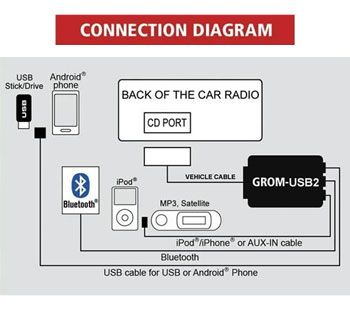
There's 1 usb2 port for connection with usb thumb drive or an Android phone.
There's 2 EXT port where u can plug ur choice between iPod, iPhone cable with control, AUX in which also gives you a 5V usb charger, and/or a bluetooth dongle for music and voice calls.
The cable in question is vehicle specific.
Here's a diagram of all the connections
There's 1 usb2 port for connection with usb thumb drive or an Android phone.
There's 2 EXT port where u can plug ur choice between iPod, iPhone cable with control, AUX in which also gives you a 5V usb charger, and/or a bluetooth dongle for music and voice calls.
Instructor
Joined: Feb 2007
Posts: 181
Likes: 4
From: Bucharest
Thanks for your reply.
Do you have OEM Navi/DVD multimedia in the trunk?
The Honda Legend (2007) does not seem to have AUX port, only a CD changer port which is occupied by an OEM cable.
But I don't know what is this cable for? Is it for the in the trunk Nav/DVD unit? Or is it a cable not used , just to install an external CD changer ?
Do you have a diagram of the OEM unit or a service manual (not sure how to find out what is that cable for) ?
If I plug all 3 ports of the Y cable (one into the Grom unit, one into the CD changer port (where the OEM cable is) and then the OEM cable on the Y cable) the GROM unit is not getting recognized/detected at all.
Do you have OEM Navi/DVD multimedia in the trunk?
The Honda Legend (2007) does not seem to have AUX port, only a CD changer port which is occupied by an OEM cable.
But I don't know what is this cable for? Is it for the in the trunk Nav/DVD unit? Or is it a cable not used , just to install an external CD changer ?
Do you have a diagram of the OEM unit or a service manual (not sure how to find out what is that cable for) ?
If I plug all 3 ports of the Y cable (one into the Grom unit, one into the CD changer port (where the OEM cable is) and then the OEM cable on the Y cable) the GROM unit is not getting recognized/detected at all.
Last edited by dinoc; Mar 11, 2014 at 12:00 PM.
Pro
Joined: May 2009
Posts: 704
Likes: 53
From: MTL
Mine is a 2005 model which came with navigation unit. It doesnt have an AUX input, only the CD changer port. Now I didnt see if my unit had a cable plugged into that port. Make sure when you plug all ends of the Y cable, have your source music attached to the grom unit. Turn on the ignition, press on radio tunner button on the head unit and then press the CD or Disc button. You will see CD-C displayed on the little LED display on top. This means the grom unit has been detected. Depending on teh type of cable you are using for your source, you can cycle through them by
1st press radio button
2nd CD or Disc button
3rd Quicky within a second, press the skip button to change through the input modes.
If you want to change to another mode example from USB to iPod,
repeat step 1 to 3 again.
You will hear a brief audible notification saying ''USB'', ''AUX'', ''iPod'' depending on the mode selected.
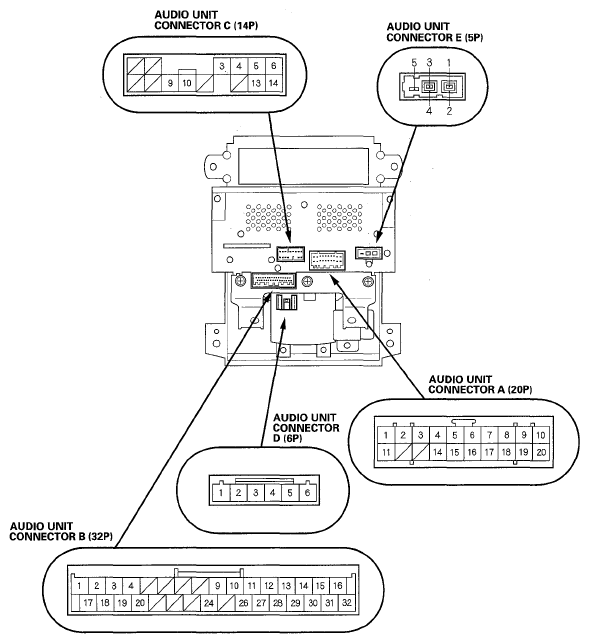
This is the diagram of the HU, to which port is that oem cable connected to ?
1st press radio button
2nd CD or Disc button
3rd Quicky within a second, press the skip button to change through the input modes.
If you want to change to another mode example from USB to iPod,
repeat step 1 to 3 again.
You will hear a brief audible notification saying ''USB'', ''AUX'', ''iPod'' depending on the mode selected.
This is the diagram of the HU, to which port is that oem cable connected to ?

Instructor
Joined: Nov 2013
Posts: 226
Likes: 58
Hi...
Could you solve the problem?
I'm from Turkey and I also could not get my radio recognized the aux box.
Even I disconnected the socket which occupied the CDC port, it didi not work.
The interesting thing is I could see "CD-D" symbol on the small display but no functions on radio button. (neither any sound also)
Looking forward to hear from you soon.
Could you solve the problem?
I'm from Turkey and I also could not get my radio recognized the aux box.
Even I disconnected the socket which occupied the CDC port, it didi not work.
The interesting thing is I could see "CD-D" symbol on the small display but no functions on radio button. (neither any sound also)
Looking forward to hear from you soon.
Instructor
Joined: Nov 2013
Posts: 226
Likes: 58
Instructor
Joined: Feb 2007
Posts: 181
Likes: 4
From: Bucharest
I'm not sure what was it, I tried to help him with the post here and he told me he missed install something.
His Legend is from 2007.
Sorry about not giving you more info.
I think you should follow the instructions and you will be fine.
Also the Grom USA have a great support, live chat also.
His Legend is from 2007.
Sorry about not giving you more info.
I think you should follow the instructions and you will be fine.
Also the Grom USA have a great support, live chat also.

Pro
Joined: May 2009
Posts: 704
Likes: 53
From: MTL
So a couple months ago, I added the Bluetooth dongle to the aforementioned unit. The system works pretty well. Skip songs with steering wheel controls. To add to my previous posts, there's a tool to arrange your file order specific for this unit when using a usb thumb drive much better than windows explorer.
I have now 3 ways of feeding my music to the car. 1 USB thumb drive or USB streaming from a supported device, ex: some Android devices. It basically streams the audio playing on ur phone through a usb cable, there's an android app for this unit. 2 Aux-in 3.5mm jack. 3 Bluetooth streaming.
I wired the USB port inside the "not an ashtray" compartment. I also installed the microphone that comes coupled with the Bluetooth dongle in the same area. I placed the Bluetooth receiver right underneath the centre console between the not an ashtray and the shift gate from optimal proximity to the pairing device.

I ran the 3.5mm aux-in cable to the centre storage area. This cable also came coupled with an extra USB charging port.

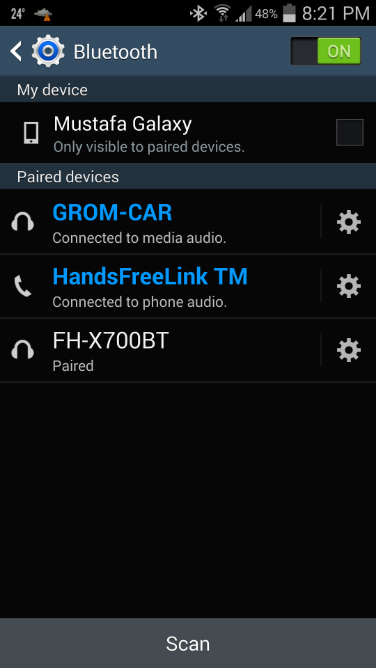
There was a little war going on with HFL and Grom unit over which unit gets to connect to my phone's Bluetooth connection whenever I entered the car. 9 times out of 10, HFL would win. So I had to disconnect it and reconnect to grom unit. I ended up unpairing the HFL and deleting my phone from its stored list of devices until recently I found the I could route the phone audio to HFL and the media audio only to grom unit both at the same time. Now my phone pairs to both HFL and Grom unit with their respective Bluetooth profiles as I enter the car, best of both worlds.
For all my fellow Canuks, this is the best and proved way of integrating mobile audio to the RL.
I have now 3 ways of feeding my music to the car. 1 USB thumb drive or USB streaming from a supported device, ex: some Android devices. It basically streams the audio playing on ur phone through a usb cable, there's an android app for this unit. 2 Aux-in 3.5mm jack. 3 Bluetooth streaming.
I wired the USB port inside the "not an ashtray" compartment. I also installed the microphone that comes coupled with the Bluetooth dongle in the same area. I placed the Bluetooth receiver right underneath the centre console between the not an ashtray and the shift gate from optimal proximity to the pairing device.
I ran the 3.5mm aux-in cable to the centre storage area. This cable also came coupled with an extra USB charging port.
There was a little war going on with HFL and Grom unit over which unit gets to connect to my phone's Bluetooth connection whenever I entered the car. 9 times out of 10, HFL would win. So I had to disconnect it and reconnect to grom unit. I ended up unpairing the HFL and deleting my phone from its stored list of devices until recently I found the I could route the phone audio to HFL and the media audio only to grom unit both at the same time. Now my phone pairs to both HFL and Grom unit with their respective Bluetooth profiles as I enter the car, best of both worlds.
For all my fellow Canuks, this is the best and proved way of integrating mobile audio to the RL.
Last edited by M T L T L; Aug 4, 2014 at 08:28 PM.

Thread Starter
Intermediate
Joined: Jun 2009
Posts: 28
Likes: 2
From: 303
How did you switch between modes? I can only get my music from the first input which is into my phone. I cannot get the aux or ipod inputs to work at all.
So a couple months ago, I added the Bluetooth dongle to the aforementioned unit. The system works pretty well. Skip songs with steering wheel controls. To add to my previous posts, there's a tool to arrange your file order specific for this unit when using a usb thumb drive much better than windows explorer.
I have now 3 ways of feeding my music to the car. 1 USB thumb drive or USB streaming from a supported device, ex: some Android devices. It basically streams the audio playing on ur phone through a usb cable, there's an android app for this unit. 2 Aux-in 3.5mm jack. 3 Bluetooth streaming.
I wired the USB port inside the "not an ashtray" compartment. I also installed the microphone that comes coupled with the Bluetooth dongle in the same area. I placed the Bluetooth receiver right underneath the centre console between the not an ashtray and the shift gate from optimal proximity to the pairing device.
I ran the 3.5mm aux-in cable to the centre storage area. This cable also came coupled with an extra USB charging port.
There was a little war going on with HFL and Grom unit over which unit gets to connect to my phone's Bluetooth connection whenever I entered the car. 9 times out of 10, HFL would win. So I had to disconnect it and reconnect to grom unit. I ended up unpairing the HFL and deleting my phone from its stored list of devices until recently I found the I could route the phone audio to HFL and the media audio only to grom unit both at the same time. Now my phone pairs to both HFL and Grom unit with their respective Bluetooth profiles as I enter the car, best of both worlds.
For all my fellow Canuks, this is the best and proved way of integrating mobile audio to the RL.
I have now 3 ways of feeding my music to the car. 1 USB thumb drive or USB streaming from a supported device, ex: some Android devices. It basically streams the audio playing on ur phone through a usb cable, there's an android app for this unit. 2 Aux-in 3.5mm jack. 3 Bluetooth streaming.
I wired the USB port inside the "not an ashtray" compartment. I also installed the microphone that comes coupled with the Bluetooth dongle in the same area. I placed the Bluetooth receiver right underneath the centre console between the not an ashtray and the shift gate from optimal proximity to the pairing device.
I ran the 3.5mm aux-in cable to the centre storage area. This cable also came coupled with an extra USB charging port.
There was a little war going on with HFL and Grom unit over which unit gets to connect to my phone's Bluetooth connection whenever I entered the car. 9 times out of 10, HFL would win. So I had to disconnect it and reconnect to grom unit. I ended up unpairing the HFL and deleting my phone from its stored list of devices until recently I found the I could route the phone audio to HFL and the media audio only to grom unit both at the same time. Now my phone pairs to both HFL and Grom unit with their respective Bluetooth profiles as I enter the car, best of both worlds.
For all my fellow Canuks, this is the best and proved way of integrating mobile audio to the RL.
Pro
Joined: May 2009
Posts: 704
Likes: 53
From: MTL
You press the radio button to get out of the CD-C mode and then press the Disc button to get back in CD-C mode. After 2 - 3 seconds, the grom unit will announce in which mode it currently is. Ex. "AUX" or "iPod". Press the track skip button within one second of hearing the audible notification and it will change to the next mode and it will announce it also once in that mode.
Repeat the steps to get to the wanted mode.

10th Gear
Joined: Mar 2014
Posts: 12
Likes: 3
You press the radio button to get out of the CD-C mode and then press the Disc button to get back in CD-C mode. After 2 - 3 seconds, the grom unit will announce in which mode it currently is. Ex. "AUX" or "iPod". Press the track skip button within one second of hearing the audible notification and it will change to the next mode and it will announce it also once in that mode.
Repeat the steps to get to the wanted mode.
Repeat the steps to get to the wanted mode.
Can you still play audio from the factory cd changer?
2nd Gear
Joined: Sep 2002
Posts: 2
Likes: 0
I have question if you don't mind answering I installed the grom unit and when using the iPod with special iPod cable the XM demo keeps going on its very annoying did you have this problem and if so how did you fix it ?
Pro
Joined: May 2009
Posts: 704
Likes: 53
From: MTL
My car is a non XM model so I wouldn't know. How is ur Grom unit hooked to the headunit and which version of the software is running on ur grom unit ? They ask you for that when you purchase the unit so they flash the correct rom from factory.
Thread Starter
Intermediate
Joined: Jun 2009
Posts: 28
Likes: 2
From: 303
Ive tried and nothing seems to work? anyway you can post a video of it?
You press the radio button to get out of the CD-C mode and then press the Disc button to get back in CD-C mode. After 2 - 3 seconds, the grom unit will announce in which mode it currently is. Ex. "AUX" or "iPod". Press the track skip button within one second of hearing the audible notification and it will change to the next mode and it will announce it also once in that mode.
Repeat the steps to get to the wanted mode.
Repeat the steps to get to the wanted mode.