


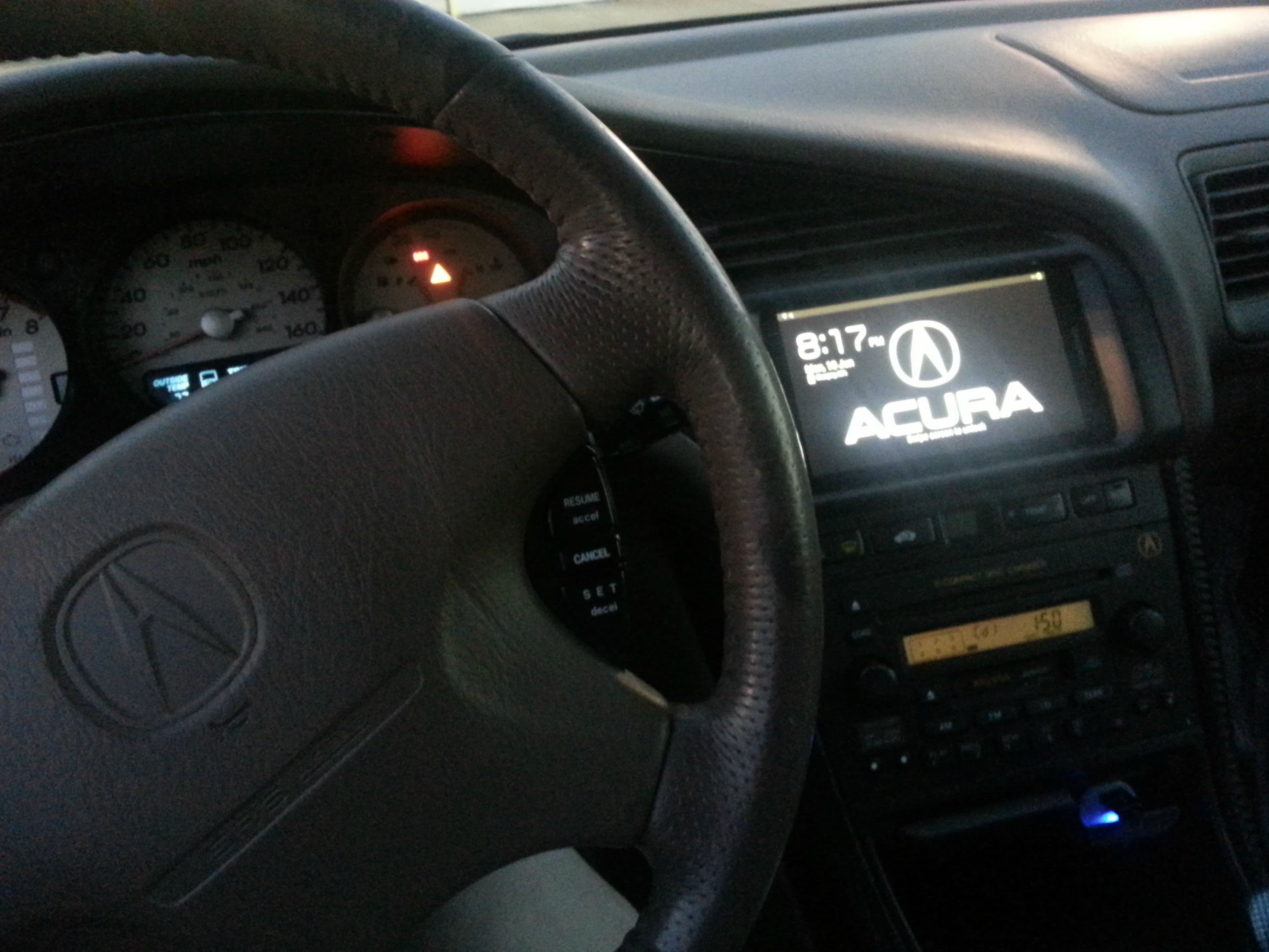
Samsung Tablet Mod Pictures!



Thread Starter
Cruisin'
Joined: Apr 2013
Posts: 22
Likes: 1
Yes, I use the navi application for androids and I get internet from tethering off my phone, works like a charm!
The sound is alright, I'm planning on buying a bluetooth add on for my grom, so I could listen to the sound off my oem radio.
My advice would be, to ask me if you run into any problems!

6mt swapped..smart
Joined: Apr 2007
Posts: 686
Likes: 88
From: CT
Great work, now let me ask.. For someone such as myself with no navi, would the navi hvac panel work in place of a non-navi hvac panel? I have a navi hvac panel along with a stock navi bezel with the cutout for a screen in the garage. If I put that in to do something like this, I would need to make sure the navi hvac controls would work (with my non navi car). I'm thinking no due to the harnesses differing, but figured i'd ask

Trending Topics

Instructor
Joined: Jun 2013
Posts: 119
Likes: 21
From: The Internet
Great work, now let me ask.. For someone such as myself with no navi, would the navi hvac panel work in place of a non-navi hvac panel? I have a navi hvac panel along with a stock navi bezel with the cutout for a screen in the garage. If I put that in to do something like this, I would need to make sure the navi hvac controls would work (with my non navi car). I'm thinking no due to the harnesses differing, but figured i'd ask
Thread Starter
Cruisin'
Joined: Apr 2013
Posts: 22
Likes: 1
You do lose a bit of A/C control when you do the installation, you can not change the fan speeds anymore. But, AUTO works like a charm.. 60 blows fast while 70's blow mid speed.
Thread Starter
Cruisin'
Joined: Apr 2013
Posts: 22
Likes: 1
Great work, now let me ask.. For someone such as myself with no navi, would the navi hvac panel work in place of a non-navi hvac panel? I have a navi hvac panel along with a stock navi bezel with the cutout for a screen in the garage. If I put that in to do something like this, I would need to make sure the navi hvac controls would work (with my non navi car). I'm thinking no due to the harnesses differing, but figured i'd ask
All you need is a navi bezel for this to work, you just have to make a mount for the tablet. (MAKE SURE THE TABLET IS 7" THOUGH)
6mt swapped..smart
Joined: Apr 2007
Posts: 686
Likes: 88
From: CT
I understand what you are saying but that is not what I was asking.. let me rephrase. I'm positive the upper dash harnesses are different for both navi & non navi cars due to the on-screen hvac functions of the navi cars. Now say you have someone with a non-navi car wanting to run the navi hvac panel and throw in a tablet above it, like you did. They would not be able to do so without swapping the upper dash harness to a navi one so the hvac panel plugs in. I'm sure theres a workaround if you're good with wiring and had access to the schematics though, but i'm not sure
Thread Starter
Cruisin'
Joined: Apr 2013
Posts: 22
Likes: 1
I understand what you are saying but that is not what I was asking.. let me rephrase. I'm positive the upper dash harnesses are different for both navi & non navi cars due to the on-screen hvac functions of the navi cars. Now say you have someone with a non-navi car wanting to run the navi hvac panel and throw in a tablet above it, like you did. They would not be able to do so without swapping the upper dash harness to a navi one so the hvac panel plugs in. I'm sure theres a workaround if you're good with wiring and had access to the schematics though, but i'm not sure
Instructor
Joined: Jun 2013
Posts: 119
Likes: 21
From: The Internet
I am considering this heavily until i read you cant control the fan speed...
Thread Starter
Cruisin'
Joined: Apr 2013
Posts: 22
Likes: 1

'03 ABP YA4-S 6MT
Joined: Mar 2007
Posts: 1,192
Likes: 18
From: Edmonton, AB



I understand what you are saying but that is not what I was asking.. let me rephrase. I'm positive the upper dash harnesses are different for both navi & non navi cars due to the on-screen hvac functions of the navi cars. Now say you have someone with a non-navi car wanting to run the navi hvac panel and throw in a tablet above it, like you did. They would not be able to do so without swapping the upper dash harness to a navi one so the hvac panel plugs in. I'm sure theres a workaround if you're good with wiring and had access to the schematics though, but i'm not sure
In order to have everything functional (fan speed, direction of where air would come out of), you can alway use the non navi ac controls, make a bracket for them to sit in the glove box. Then all you would have to do is tap the current ac control wiring back to the non navi controls goin to the glove box. You would also need an extra pig tail wire from the ac controls. (I think I have a few laying around somewhere)
End result you'll have 2 ac controls the navi one sitting under the tablet, and when you want to chance air location or fan speed just use the one on the glove box.
Just my


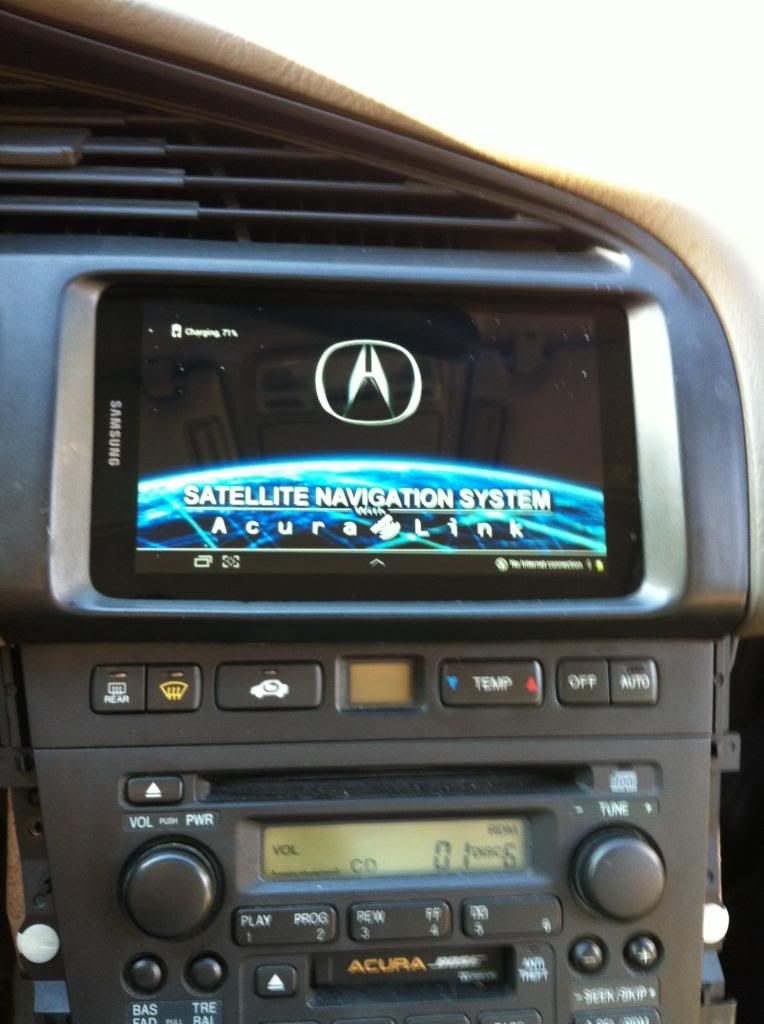
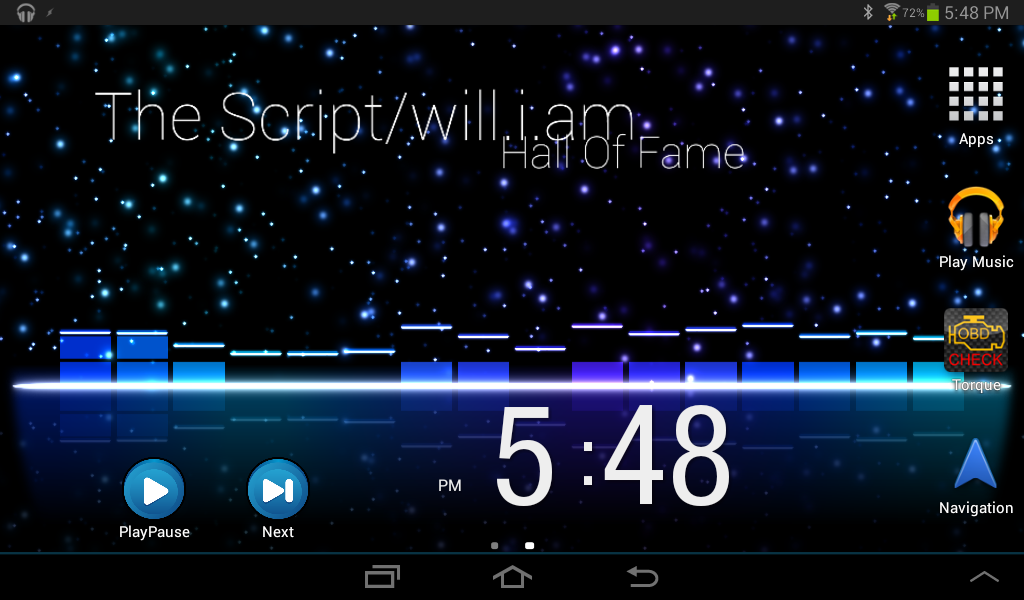
I have had mine in for just over a year now and can share some of the things i have found. First is the actual position of the tablet, I have mine flipped (opposite of OP's) just for the rare instance's of it fully draining the battery or after an update. With mine the power button (for the tablet) is just above the auto button for the HVAC. I have a small hole that a paper clip can fit through to push the power button. Next issue was the fan controls, acura_dipset_tl is right about adding the non-navi heater panel to the navi panel and hiding it in the glove box. I was worried about directing my heat in the winter time so i put my original non-navi panel in. I actually found the auto controls worked well enough that i hardly ever used the manual adjustments and have actually removed the unit from the glove box again. The rest of the stuff i have messed with is all software for android, so anyone with experience has probably used most of these. Here's the list i have as must have apps for my current setup...
Tasker
Nova Launcher
Audio Glow live Wallpaper
Torque Pro
Here's a few pictures of mine...
Tasker
Nova Launcher
Audio Glow live Wallpaper
Torque Pro
Here's a few pictures of mine...

when i looked into it and talked to sengalang it looks like any 7" tablet will work. Im waiting on the Samsung galaxy tab 3 that is getting announced today. But only for the fact that i have 10.1" tablet already and i can pull the sim card out of that and use it in the one im putting in my car. By doing this mine will probably not sit behind the bezel for the fact im gonna want it to be able to be removable.


Senior Moderator


Joined: Aug 2002
Posts: 81,385
Likes: 3,068
From: Appleton WI
Here is more info on that type of mod done on the 2nd gen TL
https://acurazine.com/forums/2g-tl-performance-parts-modifications-116/7-inch-tablet-nav-internet-mod-857257/
https://acurazine.com/forums/2g-tl-performance-parts-modifications-116/7-inch-tablet-nav-internet-mod-857257/
has anyone tried mounting the tablet on the outside of the bezel using a flat piece of plastic to cover up the opening and cradle mount so it is removable. also helps pesky thieves from wanting to break into your car to get it. Thinking about picking up a note 8 so i can use it for work and dock it when im in the car for gps. any thoughts?
Senior Moderator
Joined: Aug 2002
Posts: 81,385
Likes: 3,068
From: Appleton WI
has anyone tried mounting the tablet on the outside of the bezel using a flat piece of plastic to cover up the opening and cradle mount so it is removable. also helps pesky thieves from wanting to break into your car to get it. Thinking about picking up a note 8 so i can use it for work and dock it when im in the car for gps. any thoughts?
Especially if one were to cover up the "samsung" logo
good point. but i still would like it removable and the 8" samsungs are better then the 7s

Thread
Thread Starter
Forum
Replies
Last Post
rp_guy
Member Cars for Sale
9
Jul 16, 2017 07:33 AM
lanechanger
Member Cars for Sale
4
Oct 13, 2015 10:56 AM
