


OEM Navi install... one problem


Thread Starter
Burning Brakes
Joined: Jul 2003
Posts: 847
Likes: 0
From: Baltimore, MD
OEM Navi install... one problem
So I had the OEM Navi installed that Steve sold me, and the shop did a solid job with it. Everything fit perfectly and the screen seems to be working properly with the climate control. The only problem is the navi function itself. It's showing one of two errors depending what I do:
Navigation unit door open or DVD ROM Disc not installed. Please Check System.
OR
DVD Rom Disc reading error (unformatted). Please consult dealer.
Normally when I turn the car on, I get the first message. So of course I go to the trunk, open the navi door and eject the disc, then put it back in. That gives me the second error. I turn the car off, then back on, and I get the first message again.
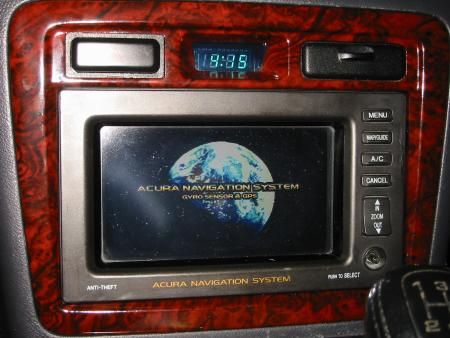
Also, the GPS is working because the clock is showing the correct time (albeit 3 hours off). Coincidently, the last person who used this system was from Cali, so could there be a reset that needs to occur? Or Reinitialization?
Any ideas?
Navigation unit door open or DVD ROM Disc not installed. Please Check System.
OR
DVD Rom Disc reading error (unformatted). Please consult dealer.
Normally when I turn the car on, I get the first message. So of course I go to the trunk, open the navi door and eject the disc, then put it back in. That gives me the second error. I turn the car off, then back on, and I get the first message again.
Also, the GPS is working because the clock is showing the correct time (albeit 3 hours off). Coincidently, the last person who used this system was from Cali, so could there be a reset that needs to occur? Or Reinitialization?
Any ideas?

CLS 6MT Navi
Joined: Mar 2003
Posts: 3,163
Likes: 27
From: AustinTX
My guess is the Navi DVD systems are programmed for each car and yours does not recognize the system. I think it needs some kind of setup up or initialization with the cars's systems, my guess. I'm sure others know more than I do.
good luck, great job so far.
good luck, great job so far.

I'm psyched it all went together nicely. I'm sure the current problem is something little that will be taken care of easily. Can't wait to see it and play around with it. 

Racer
Joined: Dec 2004
Posts: 392
Likes: 3
From: Atlanta, GA
Originally Posted by derelict
So I had the OEM Navi installed that Steve sold me, and the shop did a solid job with it. Everything fit perfectly and the screen seems to be working properly with the climate control. The only problem is the navi function itself. It's showing one of two errors depending what I do:
Navigation unit door open or DVD ROM Disc not installed. Please Check System.
OR
DVD Rom Disc reading error (unformatted). Please consult dealer.
Normally when I turn the car on, I get the first message. So of course I go to the trunk, open the navi door and eject the disc, then put it back in. That gives me the second error. I turn the car off, then back on, and I get the first message again.
Also, the GPS is working because the clock is showing the correct time (albeit 3 hours off). Coincidently, the last person who used this system was from Cali, so could there be a reset that needs to occur? Or Reinitialization?
Any ideas?
Navigation unit door open or DVD ROM Disc not installed. Please Check System.
OR
DVD Rom Disc reading error (unformatted). Please consult dealer.
Normally when I turn the car on, I get the first message. So of course I go to the trunk, open the navi door and eject the disc, then put it back in. That gives me the second error. I turn the car off, then back on, and I get the first message again.
Also, the GPS is working because the clock is showing the correct time (albeit 3 hours off). Coincidently, the last person who used this system was from Cali, so could there be a reset that needs to occur? Or Reinitialization?
Any ideas?
 I'll give Tischer a call tomorrow.
Originally Posted by 123456SPEED
My guess is the Navi DVD systems are programmed for each car and yours does not recognize the system. I think it needs some kind of setup up or initialization with the cars's systems, my guess.
Trending Topics

Senior Moderator
Joined: Jul 2003
Posts: 19,827
Likes: 1
From: Pittsburgh, PA
It's the main dvd unit in the trunk.. This is a problem for me on certain weird conditions.. Maybe you can talk to Tisher or another Acura dealership for a quick swap/troubleshoot.. But I'm about 85% sure this is your problem.. Common problem.. Also, if you do so check the navi disc before swapping the whole unit..

CL-S retired 10.17.06
Joined: Jan 2003
Posts: 1,351
Likes: 0
From: CA
I had that same error come up when I bought my car, dealer ended up replacing the unit. Could just be the disc.
<correction>..what Jonesi said. The dealer replaced the unit in the trunk, not the navi in the car.
<correction>..what Jonesi said. The dealer replaced the unit in the trunk, not the navi in the car.

Thread Starter
Burning Brakes
Joined: Jul 2003
Posts: 847
Likes: 0
From: Baltimore, MD
I appreciate the offer, if it does turn out to be the disc I'd consider buying it.
I got another message today that might help with troubleshooting the problem: after about 10 minutes of driving with just the clock showing, a screen came on saying:
"System is shutting down now to conserve battery".
Uhhh? Is it somehow not getting enough juice? using too much? Is something not hooked up properly related to power? The plot thickens! I'm hesitant to call an Acura dealer for help since this is a custom install (even though it's with OEM purchased parts). Would a dealer know (or even check) that the car originally had navi to begin with before diagnosing and/or warrantying the navi parts?
I got another message today that might help with troubleshooting the problem: after about 10 minutes of driving with just the clock showing, a screen came on saying:
"System is shutting down now to conserve battery".
Uhhh?
Is it somehow not getting enough juice? using too much? Is something not hooked up properly related to power? The plot thickens! I'm hesitant to call an Acura dealer for help since this is a custom install (even though it's with OEM purchased parts). Would a dealer know (or even check) that the car originally had navi to begin with before diagnosing and/or warrantying the navi parts?
Senior Moderator
Joined: Jul 2003
Posts: 19,827
Likes: 1
From: Pittsburgh, PA
Originally Posted by derelict
I got another message today that might help with troubleshooting the problem: after about 10 minutes of driving with just the clock showing, a screen came on saying:
"System is shutting down now to conserve battery".
"System is shutting down now to conserve battery".
From the signs you are getting plenty of juice.. This screen/error message comes on when you have the car on but not started and after about 7-10 minutes.. Sounds like it is picking up on the wrong signal (ex. remote signal).. I've never done the install but it sounds like one connection is incorrect.. If someone has the wiring diagrams/schematics I may be able to pinpoint the problem.. If someone does my email is

DIY Mad Scientist
Joined: Jan 2004
Posts: 130
Likes: 4
From: Toronto, Canada
Originally Posted by derelict
I appreciate the offer, if it does turn out to be the disc I'd consider buying it.
I got another message today that might help with troubleshooting the problem: after about 10 minutes of driving with just the clock showing, a screen came on saying:
"System is shutting down now to conserve battery".
Uhhh? Is it somehow not getting enough juice? using too much? Is something not hooked up properly related to power? The plot thickens! I'm hesitant to call an Acura dealer for help since this is a custom install (even though it's with OEM purchased parts). Would a dealer know (or even check) that the car originally had navi to begin with before diagnosing and/or warrantying the navi parts?
I got another message today that might help with troubleshooting the problem: after about 10 minutes of driving with just the clock showing, a screen came on saying:
"System is shutting down now to conserve battery".
Uhhh?
Is it somehow not getting enough juice? using too much? Is something not hooked up properly related to power? The plot thickens! I'm hesitant to call an Acura dealer for help since this is a custom install (even though it's with OEM purchased parts). Would a dealer know (or even check) that the car originally had navi to begin with before diagnosing and/or warrantying the navi parts?There is a diagnostic mode that you can enter that allows you to change the time zone. You press three of the buttons simultaneously then turn the accessory power on. You'll have to check with the service manual as I have already forgotten all of these details and have subsequently sold my service manual when I sold my car.
The DVD unit worked perfectly in my car for several months. It may have gotten damaged in shipping but I packed it the best I could. I did buy insurance but I don't think it will cover the purchase of a new unit from Acura. LMK if I can help.
Originally Posted by Jonesi
Was it a blue background with yellow message box(middle)?
From the signs you are getting plenty of juice.. This screen/error message comes on when you have the car on but not started and after about 7-10 minutes.. Sounds like it is picking up on the wrong signal (ex. remote signal).. I've never done the install but it sounds like one connection is incorrect.. If someone has the wiring diagrams/schematics I may be able to pinpoint the problem.. If someone does my email is
From the signs you are getting plenty of juice.. This screen/error message comes on when you have the car on but not started and after about 7-10 minutes.. Sounds like it is picking up on the wrong signal (ex. remote signal).. I've never done the install but it sounds like one connection is incorrect.. If someone has the wiring diagrams/schematics I may be able to pinpoint the problem.. If someone does my email is
Kevin has all the diagrams.
Thread Starter
Burning Brakes
Joined: Jul 2003
Posts: 847
Likes: 0
From: Baltimore, MD
Originally Posted by lithiumus
One of the wires that needs to be connected is a "charging signal" wire. This signal can be tapped into via the instrument cluster. You'll have to confirm which wire it is but that is where I tapped into. It lets the Nav system know that your car is running otherwise it will want to shut down.
There is a diagnostic mode that you can enter that allows you to change the time zone. You press three of the buttons simultaneously then turn the accessory power on. You'll have to check with the service manual as I have already forgotten all of these details and have subsequently sold my service manual when I sold my car.
The DVD unit worked perfectly in my car for several months. It may have gotten damaged in shipping but I packed it the best I could. I did buy insurance but I don't think it will cover the purchase of a new unit from Acura. LMK if I can help.
There is a diagnostic mode that you can enter that allows you to change the time zone. You press three of the buttons simultaneously then turn the accessory power on. You'll have to check with the service manual as I have already forgotten all of these details and have subsequently sold my service manual when I sold my car.
The DVD unit worked perfectly in my car for several months. It may have gotten damaged in shipping but I packed it the best I could. I did buy insurance but I don't think it will cover the purchase of a new unit from Acura. LMK if I can help.

Thread Starter
Burning Brakes
Joined: Jul 2003
Posts: 847
Likes: 0
From: Baltimore, MD
Originally Posted by mrsteve
Kevin, is the shop aware of the issue you are having? Are they sure everything was re-installed correctly?
Originally Posted by lithiumus
these errors sound like they are coming directly from the DVD unit. is the DVD scratched? try another DVD.

958 & 991


Joined: Dec 2000
Posts: 9,927
Likes: 1,294
From: South Florida
i added factory Navi to my first gen CL and i had the same errors and sometimes it would work The dealership thought it was cool i put one in my car so they switched out the navi units for me to try and it worked so it is probably the dvd unit I am still looking for a new one
Originally Posted by derelict
I took the DVD out and looked at it, but no scratches. Was the DVD in the player during shipping? I didn't get a chance to check before dropping off the items at the shop.
Thread Starter
Burning Brakes
Joined: Jul 2003
Posts: 847
Likes: 0
From: Baltimore, MD
Hm I tried to do a quick search on here for the navi setup sequence but no luck. Can any navi owners check their manual for which buttons to hold down before turning on the accessories to access the menu? thanks!
Diagnostic Mode
You could try running a NAVI system diagnostic on the unit. (I have a feeling you need to see the dealer too -- sorry.)
If you are glutton for punishment:
You need to start up the car in Park. Then hit the OK message on the Nav screen -- this may be impossible for you to do (if the screen is too messed up, or can't approximate where the OK would be on the screen).
You didn't say if the unit dies before or after you hit the "OK -- I understand that I can't be a moron and stare at the NAVI while driving.." screen.
If you can hit the OK button screen, then...
Press and hold down the following buttons in the order shown:
MENU
MAP
CANCEL
Hold buttons and wait from 5 - 20 seconds.
If the diags is working you will get a screen with submenus. One is a system diagnostic menu -- but it does need a working display.
The Helms manual fully documents the operation of the diagnostics.
If your LCD panel or video driver is too messed-up, there won't be a way to diagnose the unit with the brain damaged screen. If this is the case, sorry for wasting your time.
Good luck.
If you are glutton for punishment:
You need to start up the car in Park. Then hit the OK message on the Nav screen -- this may be impossible for you to do (if the screen is too messed up, or can't approximate where the OK would be on the screen).
You didn't say if the unit dies before or after you hit the "OK -- I understand that I can't be a moron and stare at the NAVI while driving.." screen.
If you can hit the OK button screen, then...
Press and hold down the following buttons in the order shown:
MENU
MAP
CANCEL
Hold buttons and wait from 5 - 20 seconds.
If the diags is working you will get a screen with submenus. One is a system diagnostic menu -- but it does need a working display.
The Helms manual fully documents the operation of the diagnostics.
If your LCD panel or video driver is too messed-up, there won't be a way to diagnose the unit with the brain damaged screen. If this is the case, sorry for wasting your time.
Good luck.

My Member is Registered
Joined: Oct 2003
Posts: 3,545
Likes: 2
From: 2678.51 miles east of California
Just my two cents here...could just be that you don't have the latest ver. disc.
The first problem: If lithiumus (or anyone else) ever installed the latest DVD it re-formatted the DVD system and any older discs will no longer work, showing the format error. Check to see if you have the latest disc- ver. 211c I think. I can't see that shipping the disc in the system would do any damage, it's designed to be bumped around.
The second problem: The clock time zone issue is easily re-programmed via the REGULAR screens once the system begins functioning properly. No three-button pressing to do.
The third problem: "System shutting down to conserve battery" is a default setting that normally shuts the system down when the ignition key is in the accessory only position. Make sure that you have the engine off but in the third or last position. This could also be from the Navi system not funtioning properly in the third position.
The first problem: If lithiumus (or anyone else) ever installed the latest DVD it re-formatted the DVD system and any older discs will no longer work, showing the format error. Check to see if you have the latest disc- ver. 211c I think. I can't see that shipping the disc in the system would do any damage, it's designed to be bumped around.
The second problem: The clock time zone issue is easily re-programmed via the REGULAR screens once the system begins functioning properly. No three-button pressing to do.
The third problem: "System shutting down to conserve battery" is a default setting that normally shuts the system down when the ignition key is in the accessory only position. Make sure that you have the engine off but in the third or last position. This could also be from the Navi system not funtioning properly in the third position.
Thread Starter
Burning Brakes
Joined: Jul 2003
Posts: 847
Likes: 0
From: Baltimore, MD
Originally Posted by Cruz_msl
The third problem: "System shutting down to conserve battery" is a default setting that normally shuts the system down when the ignition key is in the accessory only position. Make sure that you have the engine off but in the third or last position. This could also be from the Navi system not funtioning properly in the third position.
Everything about this kit is so perfectly tailored... it simply MUST work! Just need to diagnose the real problem...
Senior Moderator
Joined: Jul 2003
Posts: 19,827
Likes: 1
From: Pittsburgh, PA
Your original error is part of the navi unit in the trunk.. To be honest I have these random occurences.. Happened for a few months but now everything seems back to normal.. I'm about 95% sure it's the unit or disc..
Thread Starter
Burning Brakes
Joined: Jul 2003
Posts: 847
Likes: 0
From: Baltimore, MD
Anyone in the MD area have a navi dvd I can try? I brought my car into Tischer this morning because something under the hood took a crap on me this weekend, but I also mentioned to Brandon about the navi install hoping they could help out with diagnosing the problem. He said he would give it a shot but chances are they'd be little help since there is so much that is different between the navi and non-navi CL (even the radio is different he claims?). This was disappointing especially since the kit uses everything possible from the navi CL (a 2003 no less) - I really don't see how it would be any different for them to troubleshoot. I'm not looking to have it covered under warranty, I just want to know what the problem is 
The radio is the same in both units. I spoke with Brandon when I first bought the system and he was very skeptical about how it would all work, but other people have done it without a problem. I mean people have installed aftermarket headunits with OEM navigation without a problem. The radio doesn't matter.

Thread
Thread Starter
Forum
Replies
Last Post
handsom-hustla
Car Parts for Sale
70
Nov 13, 2015 05:04 PM
Vejey Gandier
3G TL Audio, Bluetooth, Electronics & Navigation
4
Sep 12, 2015 08:59 PM
Ny1718
Car Parts for Sale
14
Sep 11, 2015 09:21 AM
Gianni Formica
3G TL Audio, Bluetooth, Electronics & Navigation
1
Sep 7, 2015 08:28 PM
acura, door, dvd, error, factory, gps, install, navi, navigation, open, reading, rl, swjones88hotmailcom, unformatted, unit
