


KEYLESS REMOTE help please ....


Thread Starter
10th Gear
Joined: Dec 2001
Posts: 11
Likes: 0
From: Toronto, ON
KEYLESS REMOTE help please ....
I know this topis has been beaten to death guys, but I have a problem here.
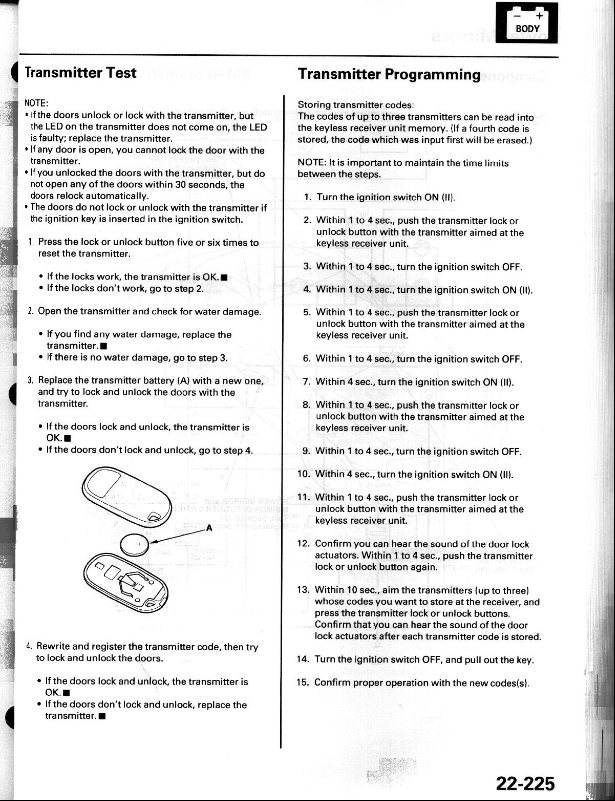
I searched and read the 15 steps to programming a remote that was posted on the forums before BUT those instructions assume you have atleast one remote that is already programmed with your car do they not......
When I bought the car I did not get any remotes with it. I bought a Acura CL-S remote from someone, BUT I CANNOT PROGRAM IT. Does anyone know how to get the car into program mode if currently do NOT have any remote programmed to work with the car.
Thanks in advance guys
I searched and read the 15 steps to programming a remote that was posted on the forums before BUT those instructions assume you have atleast one remote that is already programmed with your car do they not......
When I bought the car I did not get any remotes with it. I bought a Acura CL-S remote from someone, BUT I CANNOT PROGRAM IT. Does anyone know how to get the car into program mode if currently do NOT have any remote programmed to work with the car.
Thanks in advance guys

Red X
Joined: Apr 2001
Posts: 1,244
Likes: 0
Re: KEYLESS REMOTE help please ....
Originally posted by SupraLizard
I know this topis has been beaten to death guys, but I have a problem here.
I searched and read the 15 steps to programming a remote that was posted on the forums before BUT those instructions assume you have atleast one remote that is already programmed with your car do they not......
When I bought the car I did not get any remotes with it. I bought a Acura CL-S remote from someone, BUT I CANNOT PROGRAM IT. Does anyone know how to get the car into program mode if currently do NOT have any remote programmed to work with the car.
Thanks in advance guys
I know this topis has been beaten to death guys, but I have a problem here.
I searched and read the 15 steps to programming a remote that was posted on the forums before BUT those instructions assume you have atleast one remote that is already programmed with your car do they not......
When I bought the car I did not get any remotes with it. I bought a Acura CL-S remote from someone, BUT I CANNOT PROGRAM IT. Does anyone know how to get the car into program mode if currently do NOT have any remote programmed to work with the car.
Thanks in advance guys
Thread Starter
10th Gear
Joined: Dec 2001
Posts: 11
Likes: 0
From: Toronto, ON
Hey, all the info i am finding leads to the same solution about reprogramming IF YOU HAVE A CURRENTLY PROGRAMMED REMOTE. I did not get any remotes with the car, and have one from another 2001 cl-s.
If anyone could help me out, i owe you
Thanks Guys,
If anyone could help me out, i owe you
Thanks Guys,

Race Director
Joined: Sep 2000
Posts: 10,121
Likes: 0
From: Overland Park, Kansas
Not understanding your problem. There is only one set of programming instructions as far as I know. There isn't a different set of instructions form programming brand new remotes vs. programming remotes which are already programmed.
Have you followed these instructions exactly?
Why didn't you get remotes for your [new] car purchase? used?
Have you followed these instructions exactly?
Why didn't you get remotes for your [new] car purchase? used?
Thread Starter
10th Gear
Joined: Dec 2001
Posts: 11
Likes: 0
From: Toronto, ON
I got the car from a broken lease from Acura Canada. It was not new, and I have still not recieved the remotes which they promised me, I only recieved one key with the car.
Maye I am screwing up...... but look at thsews procedures.....
1.Turn the ignition switch on (II on the ignition)
2. W/in 1-4sec, push the transmitter lock or unlock button with the transmitter aimed at the keyless receiver unit. (Just at the steering wheel is fine)
3. W/in 1-4sec, turn the ignition switch off
4. W/in 1-4sec, turn the ignition switch on(II)
5. W/in 1-4, push the transmitter lock or unlock button w/ the transmitter aimed at the receiver again.
6. W/in 1-4sec, turn the ign. switch off
7. W/in 4sec, turn the ignition switch On(II)
8. w/in 1-4sec, push the transmitter lock or unlock again.
9. w/in 4 sec, turn the ign off
10. w/in 4 sec, turn the ign ON
11. W/in 1-4, push the transmitter again
12. Confirm you can hear the sound of the door actuators. W/in 1-4sec, push the trans lock or unlock button again.
13. W/in 10sec, aim the transmitters (up to three) whose codes you want to store at the receiver, and press the transmitter lock or unlock buttons. Confirm that you can hear the sound of the door lock actuators after each transmitter code is stored.
14. Turn the ignition switch off, and pull out the key.
15. Confirm proper operation with the new codes
Isn;t it step 13 where you actually program the new remote??
Aren;t step 2,5,8,11,12 supposed to be done with an existing remote?
As I say, maybe I am screwing this up somewhere, so if anyone could give me some input that would be great. The remote is from another 2001 CL, it is grey and has 4 buttons on it, has ACURA on the front, and has a company name "OMRON" on the back.
Thanks again.
Maye I am screwing up...... but look at thsews procedures.....
1.Turn the ignition switch on (II on the ignition)
2. W/in 1-4sec, push the transmitter lock or unlock button with the transmitter aimed at the keyless receiver unit. (Just at the steering wheel is fine)
3. W/in 1-4sec, turn the ignition switch off
4. W/in 1-4sec, turn the ignition switch on(II)
5. W/in 1-4, push the transmitter lock or unlock button w/ the transmitter aimed at the receiver again.
6. W/in 1-4sec, turn the ign. switch off
7. W/in 4sec, turn the ignition switch On(II)
8. w/in 1-4sec, push the transmitter lock or unlock again.
9. w/in 4 sec, turn the ign off
10. w/in 4 sec, turn the ign ON
11. W/in 1-4, push the transmitter again
12. Confirm you can hear the sound of the door actuators. W/in 1-4sec, push the trans lock or unlock button again.
13. W/in 10sec, aim the transmitters (up to three) whose codes you want to store at the receiver, and press the transmitter lock or unlock buttons. Confirm that you can hear the sound of the door lock actuators after each transmitter code is stored.
14. Turn the ignition switch off, and pull out the key.
15. Confirm proper operation with the new codes
Isn;t it step 13 where you actually program the new remote??
Aren;t step 2,5,8,11,12 supposed to be done with an existing remote?
As I say, maybe I am screwing this up somewhere, so if anyone could give me some input that would be great. The remote is from another 2001 CL, it is grey and has 4 buttons on it, has ACURA on the front, and has a company name "OMRON" on the back.
Thanks again.

Team Owner
Joined: Oct 2000
Posts: 20,014
Likes: 0
From: Hellertown, Pa. USA
Originally posted by SupraLizard
Isn;t it step 13 where you actually program the new remote??
Aren;t step 2,5,8,11,12 supposed to be done with an existing remote?
Isn;t it step 13 where you actually program the new remote??
Aren;t step 2,5,8,11,12 supposed to be done with an existing remote?
Shawn S
Trending Topics


I had the same problem, bought my cl w/ no remotes. when you program the new remotes it automatically erases the old ones. so it doesn't matter if comes with or without remotes. just start from scratch.

Thread
Thread Starter
Forum
Replies
Last Post
SinCityTLX
5G TLX (2015-2020)
20
Oct 7, 2015 01:24 PM
