


Backup Camera Installed

Thread Starter
Racer
Joined: Oct 2004
Posts: 448
Likes: 1
From: DC
Backup Camera Installed
I hooked up a pioneer backup camera using the aux connection in the naviation brain in the trunk.
Thanks for PhiSigBrotha's DIY for informing all of us it was possible. Even the guys at the audio shop had no idea it was possible to do it this way. SO simple for all 06+ with navigation. Al you have to do is make the pin out and run the wires.
DIY Writeup
https://acurazine.com/forums/audio-video-electronics-navigation-22/backup-camera-diy-362179/
[IMG] [/IMG]
Thanks for PhiSigBrotha's DIY for informing all of us it was possible. Even the guys at the audio shop had no idea it was possible to do it this way. SO simple for all 06+ with navigation. Al you have to do is make the pin out and run the wires.
DIY Writeup
https://acurazine.com/forums/audio-video-electronics-navigation-22/backup-camera-diy-362179/
[IMG]
[/IMG]

Instructor
Joined: Aug 2006
Posts: 160
Likes: 2
From: Goodyear, AZ
Acura probably knew the system can accomodate a backup cam. But a camera is more functional on trucks and SUVs. Thats why the MDX with similar navi has a camera and optional backup sensors.
Next time Im at the Acura dealership Ill see if they have an MDX camera harness in stock to take a look at.
Jimmy the camera looks good. Im still using my "test" camera. Its actually an indoor cam and Im surprised its held up to the elements.
Next time Im at the Acura dealership Ill see if they have an MDX camera harness in stock to take a look at.
Jimmy the camera looks good. Im still using my "test" camera. Its actually an indoor cam and Im surprised its held up to the elements.
Trending Topics
Thread Starter
Racer
Joined: Oct 2004
Posts: 448
Likes: 1
From: DC
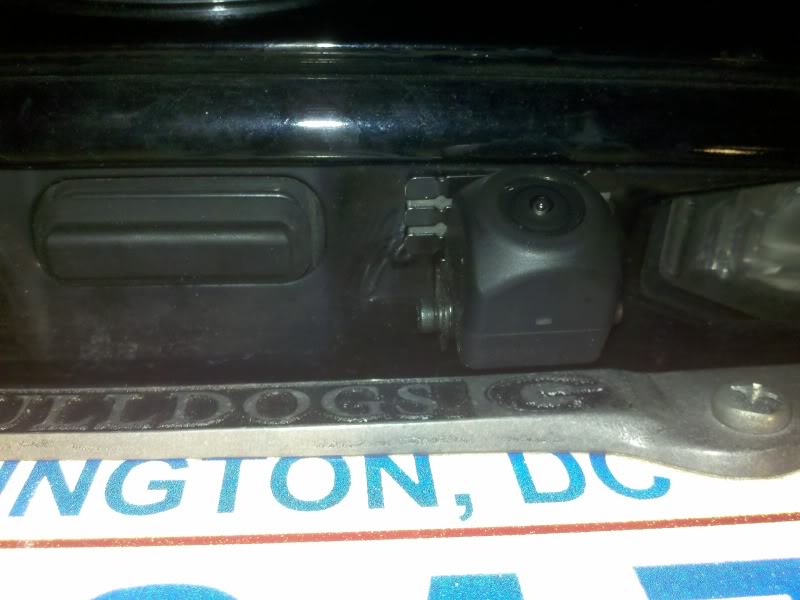
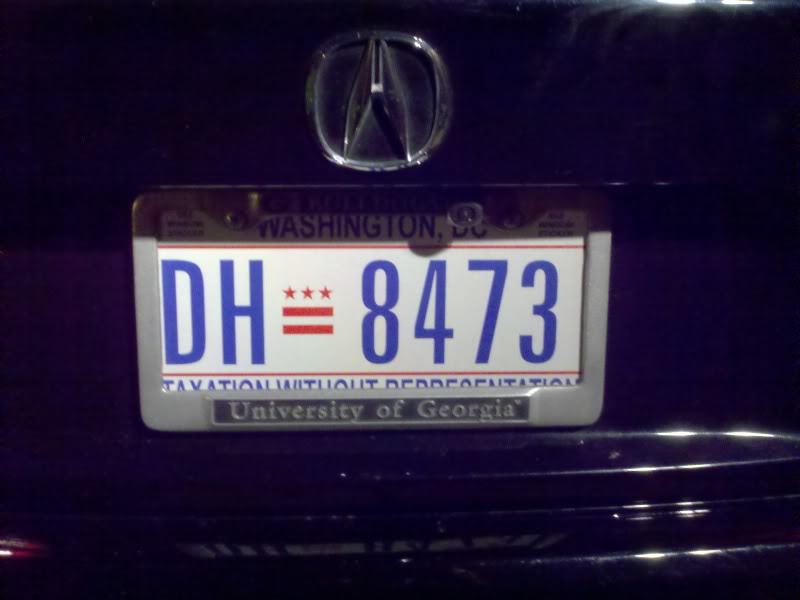
Pic of the camera its a PIONEER ND-BC4. You can get em on ebay for like 160 or something. There are plenty of cheaper cameras but this one is water proof, fully enclosed, awesome in low light and you can tilt it up and down after install to adjust the viewing angle. I wouldn't go cheap on the camera.... I was lucky and got mine for 50 bucks from a friend who owns a car audio shop......

Instructor
Joined: Jul 2009
Posts: 128
Likes: 1
I got this one, it was made to fit a 08 accord, and is weather proof, it just fits where the license plate light is.......for flush look
http://cgi.ebay.ca/Car-Reverse-Rear-...item335b91ef09


*this one is a nightshot btw


 because its fixed, no one can vandalize it or change the camera again, no drilling required and all wires are hidden.

And again thanks PhiSigBrotha
http://cgi.ebay.ca/Car-Reverse-Rear-...item335b91ef09
*this one is a nightshot btw
because its fixed, no one can vandalize it or change the camera again, no drilling required and all wires are hidden.And again thanks PhiSigBrotha
Last edited by extracrunchie; Oct 2, 2010 at 07:32 PM.
Instructor
Joined: Jul 2009
Posts: 128
Likes: 1

Moderator
Joined: Oct 2007
Posts: 3,578
Likes: 322
From: Orange County, CA
Hey guys, I think there could be a debate on this. But where did you guys hook it up for power? I chose the reverse light because if I was to have it hooked up to a constant power, that means the camera will be on ALL the time (when the car is on). I believe that even if you don't have it in reverse, the camera is still on. Correct on that if I'm wrong.
People might say that there's a slight delay if you hook it up to the reverse light, but I have yet to confirm if that's even the case. Because I don't believe there's a delay. The only delay is the navi system switching to rearview.
Any input on this?
People might say that there's a slight delay if you hook it up to the reverse light, but I have yet to confirm if that's even the case. Because I don't believe there's a delay. The only delay is the navi system switching to rearview.
Any input on this?

Advanced
Joined: Apr 2006
Posts: 75
Likes: 4
From: So. Calif.
What year TSX do you have?
In the close up picture of the backup camera there are 2 white areas on both sides of the camera - what are those? Lights for the license plate?
Thanks.
Instructor
Joined: Jul 2009
Posts: 128
Likes: 1
Its a 07.......those are actually led's so you dont lose a light for the plates.
Instructor
Joined: Jul 2009
Posts: 128
Likes: 1
Hey guys, I think there could be a debate on this. But where did you guys hook it up for power? I chose the reverse light because if I was to have it hooked up to a constant power, that means the camera will be on ALL the time (when the car is on). I believe that even if you don't have it in reverse, the camera is still on. Correct on that if I'm wrong.
People might say that there's a slight delay if you hook it up to the reverse light, but I have yet to confirm if that's even the case. Because I don't believe there's a delay. The only delay is the navi system switching to rearview.
Any input on this?
People might say that there's a slight delay if you hook it up to the reverse light, but I have yet to confirm if that's even the case. Because I don't believe there's a delay. The only delay is the navi system switching to rearview.
Any input on this?
Advanced
Joined: Apr 2006
Posts: 75
Likes: 4
From: So. Calif.
I think I'm going to order the camera you did. I'll run some tests before I install it and see how long it takes.

Three Wheelin'
Joined: Feb 2005
Posts: 1,459
Likes: 3
I got this one, it was made to fit a 08 accord, and is weather proof, it just fits where the license plate light is.......for flush look
http://cgi.ebay.ca/Car-Reverse-Rear-...item335b91ef09
*this one is a nightshot btw
because its fixed, no one can vandalize it or change the camera again, no drilling required and all wires are hidden.
And again thanks PhiSigBrotha
http://cgi.ebay.ca/Car-Reverse-Rear-...item335b91ef09
*this one is a nightshot btw
because its fixed, no one can vandalize it or change the camera again, no drilling required and all wires are hidden.And again thanks PhiSigBrotha
I had to chose between backup cam and ipod video hookup and went with the ipod since I will be using that more often.
Though the backup cam is very helpful in this car because you can't tell where the trunk ends by looking out the back.

Pro


Joined: Apr 2006
Posts: 704
Likes: 12
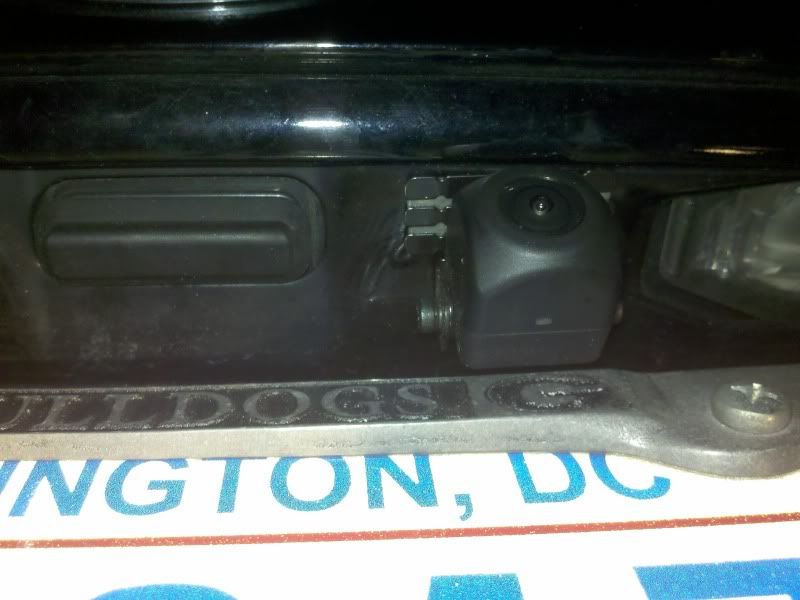
Pic of the camera its a PIONEER ND-BC4. You can get em on ebay for like 160 or something. There are plenty of cheaper cameras but this one is water proof, fully enclosed, awesome in low light and you can tilt it up and down after install to adjust the viewing angle. I wouldn't go cheap on the camera.... I was lucky and got mine for 50 bucks from a friend who owns a car audio shop......
btw people, if you want a top of the line backup camera for $$$, look for the sanyo CCA-BC200. It has the adjusted viewing lines that you actually calibrate yourself for accuracy, as well as a projected (simulated) overhead view of your bumper. It's a little more complicated to hook up as there's a control button that you can mount in your driver's side area.
Here's a link to a forum member's review: https://acurazine.com/forums/showthr...ighlight=sanyo

Advanced
Joined: Jun 2008
Posts: 51
Likes: 1
From: Salem, OR
I can see the night shot pic so i have to ask. What color are those LED's ? And do they match to say a 6k or 5k color? Do they light up the plate are well enough? Thanks depending on how it looks i will probably order one.
Instructor
Joined: Jul 2009
Posts: 128
Likes: 1
Thanks - I'm assuming the color and brightness is slightly different than the other license plate light, correct?
Do the lines actually move as you turn the wheel to project where you will end up?
I had to chose between backup cam and ipod video hookup and went with the ipod since I will be using that more often.
Though the backup cam is very helpful in this car because you can't tell where the trunk ends by looking out the back.
I had to chose between backup cam and ipod video hookup and went with the ipod since I will be using that more often.
Though the backup cam is very helpful in this car because you can't tell where the trunk ends by looking out the back.
Advanced
Joined: Apr 2006
Posts: 75
Likes: 4
From: So. Calif.
Instructor
Joined: Jul 2009
Posts: 128
Likes: 1
not sure, its the same color yet......the bulb size is 168



Advanced
Joined: Apr 2006
Posts: 75
Likes: 4
From: So. Calif.
i just ordered these http://www.dealextreme.com/details.dx/sku.34608
not sure, its the same color yet......the bulb size is 168
not sure, its the same color yet......the bulb size is 168
> Another question I have is about the LED's on the camera - what
> temperature/color are the LED's (e.g, 5k, 6k, etc.)?
and received this:> temperature/color are the LED's (e.g, 5k, 6k, etc.)?
> Thanks for your email. It is about 6000K.
Advanced
Joined: Jun 2008
Posts: 51
Likes: 1
From: Salem, OR
thanks for finding out. Im going to go ahead a order one. I already have 5k LED plate lights so i hope they match close enough.
Advanced
Joined: Apr 2006
Posts: 75
Likes: 4
From: So. Calif.
Take a look at the camera in post #12 above which shows the camera. You'll see two small white squares on either side of the camera - those are the LED's. We're attempting to figure out how to make the other license plate light match the camera's LED's so it looks balanced and about the same color.
extracrunchie: It wasn't clear to me from the ebay vendor - the LED's in the camera do connect to the current license plate light connector for power, correct? How? Out of the camera I see the wires that get connected to the reverse lights powering the camera, and the RCA jacks, but where does the LED power come from? I guess I'm making the assumption that the license plate lights in the camera are on whenever the car lights are turned on (Just like the OEM license plate lights). Or do the LED's only come on when the camera is powered on (via the reverse lights)? In which case xenonhid is correct - one of the license plate lights is lost while driving around at night.
Instructor
Joined: Jul 2009
Posts: 128
Likes: 1
+1
I didn't think so. The camera has LED's built into it which replace the one license plate light that is removed when the camera is installed.
Take a look at the camera in post #12 above which shows the camera. You'll see two small white squares on either side of the camera - those are the LED's. We're attempting to figure out how to make the other license plate light match the camera's LED's so it looks balanced and about the same color.
extracrunchie: It wasn't clear to me from the ebay vendor - the LED's in the camera do connect to the current license plate light connector for power, correct? How? Out of the camera I see the wires that get connected to the reverse lights powering the camera, and the RCA jacks, but where does the LED power come from? I guess I'm making the assumption that the license plate lights in the camera are on whenever the car lights are turned on (Just like the OEM license plate lights). Or do the LED's only come on when the camera is powered on (via the reverse lights)? In which case xenonhid is correct - one of the license plate lights is lost while driving around at night.
I didn't think so. The camera has LED's built into it which replace the one license plate light that is removed when the camera is installed.
Take a look at the camera in post #12 above which shows the camera. You'll see two small white squares on either side of the camera - those are the LED's. We're attempting to figure out how to make the other license plate light match the camera's LED's so it looks balanced and about the same color.
extracrunchie: It wasn't clear to me from the ebay vendor - the LED's in the camera do connect to the current license plate light connector for power, correct? How? Out of the camera I see the wires that get connected to the reverse lights powering the camera, and the RCA jacks, but where does the LED power come from? I guess I'm making the assumption that the license plate lights in the camera are on whenever the car lights are turned on (Just like the OEM license plate lights). Or do the LED's only come on when the camera is powered on (via the reverse lights)? In which case xenonhid is correct - one of the license plate lights is lost while driving around at night.
well the 2 bare wires power the LEDs, the red connector is not a RCA connector rather its the power cable for the camera(which he provides the black connector that will expose the bare wires) and finally the yellow connector is RCA that hooks from to the Navi drive.
and my cheap LEDs just came, so ill take a pic of it this weekend when i install it
Last edited by extracrunchie; Oct 6, 2010 at 10:45 AM.
Instructor
Joined: Jul 2009
Posts: 128
Likes: 1
+1
I didn't think so. The camera has LED's built into it which replace the one license plate light that is removed when the camera is installed.
Take a look at the camera in post #12 above which shows the camera. You'll see two small white squares on either side of the camera - those are the LED's. We're attempting to figure out how to make the other license plate light match the camera's LED's so it looks balanced and about the same color.
extracrunchie: It wasn't clear to me from the ebay vendor - the LED's in the camera do connect to the current license plate light connector for power, correct? How? Out of the camera I see the wires that get connected to the reverse lights powering the camera, and the RCA jacks, but where does the LED power come from? I guess I'm making the assumption that the license plate lights in the camera are on whenever the car lights are turned on (Just like the OEM license plate lights). Or do the LED's only come on when the camera is powered on (via the reverse lights)? In which case xenonhid is correct - one of the license plate lights is lost while driving around at night.
I didn't think so. The camera has LED's built into it which replace the one license plate light that is removed when the camera is installed.
Take a look at the camera in post #12 above which shows the camera. You'll see two small white squares on either side of the camera - those are the LED's. We're attempting to figure out how to make the other license plate light match the camera's LED's so it looks balanced and about the same color.
extracrunchie: It wasn't clear to me from the ebay vendor - the LED's in the camera do connect to the current license plate light connector for power, correct? How? Out of the camera I see the wires that get connected to the reverse lights powering the camera, and the RCA jacks, but where does the LED power come from? I guess I'm making the assumption that the license plate lights in the camera are on whenever the car lights are turned on (Just like the OEM license plate lights). Or do the LED's only come on when the camera is powered on (via the reverse lights)? In which case xenonhid is correct - one of the license plate lights is lost while driving around at night.
well the 2 bare wires power the LEDs, the red connector is not a RCA connector rather its the power cable for the camera(which he provides the black connector that will expose the bare wires) and finally the yellow connector is RCA that hooks from to the Navi drive.
and my cheap LEDs just came, so ill take a pic of it this weekend when i install it
Instructor
Joined: Jul 2009
Posts: 128
Likes: 1
But you dont lose the function of the license light, the camera has it built in so you just connect them to the existing power and ground of the license lights.
But the main problem is matching the led's lights built in on the camera to the aftermarket ones.....
Advanced
Joined: Apr 2006
Posts: 75
Likes: 4
From: So. Calif.
If you notice he has 2 bare wires, a red connector and a yellow connector.
well the 2 bare wires power the LEDs, the red connector is not a RCA connector rather its the power cable for the camera(which he provides the black connector that will expose the bare wires) and finally the yellow connector is RCA that hooks from to the Navi drive.
and my cheap LEDs just came, so ill take a pic of it this weekend when i install it
well the 2 bare wires power the LEDs, the red connector is not a RCA connector rather its the power cable for the camera(which he provides the black connector that will expose the bare wires) and finally the yellow connector is RCA that hooks from to the Navi drive.
and my cheap LEDs just came, so ill take a pic of it this weekend when i install it

I'll order the camera now.
Let us know how the cheap LED's work out.
Instructor
Joined: Jul 2009
Posts: 128
Likes: 1
