


iSimple and other Adapter folks.. Where is your iPod stored?


Thread Starter
Veeeee Tec
Joined: Sep 2009
Posts: 129
Likes: 0
From: Maryland
iSimple and other Adapter folks.. Where is your iPod stored?
Hey guys. Show me where you store your iPod. I order an iSimple this weekend that i should be installing, i want to get some ideas on where to put the iPod.
Thanks!
Thanks!


Instructor
Joined: Jun 2010
Posts: 218
Likes: 1
From: Indy
Sorry for the crappy cell phone pic, but here is my setup:
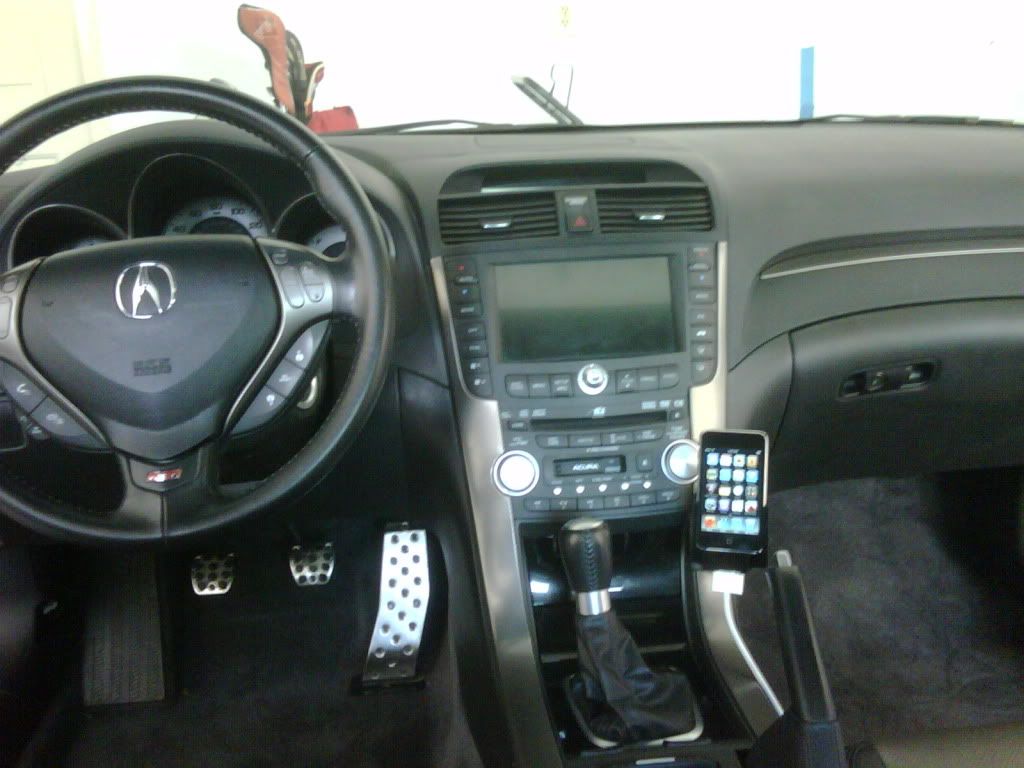
I know I spent WAY too much $ for the Pro Clip, but it has been, in my opinion, completely worth it.
Oh, and I have a white cable going to it now b/c I switch between the the black iSimple and the white Apple AV Cables for audio and video to the Navi screen.
I know I spent WAY too much $ for the Pro Clip, but it has been, in my opinion, completely worth it.
Oh, and I have a white cable going to it now b/c I switch between the the black iSimple and the white Apple AV Cables for audio and video to the Navi screen.

Trending Topics
Thread Starter
Veeeee Tec
Joined: Sep 2009
Posts: 129
Likes: 0
From: Maryland
I keep my wallet, gum and other misc things in the armrest. I want to put it in the glove box on Velcro somewhere. I wont need it since i got the iSimple w full navi controls.
Instructor
Joined: Jun 2010
Posts: 218
Likes: 1
From: Indy
Have you used the iSimple navigation yet? Just asking b/c I did not like it at all...can't skip songs with the channel skip on the steering wheel??? What gives?!?!

Racer
Joined: Mar 2004
Posts: 444
Likes: 2
From: Philadelphia Suburbs
Instructor
Joined: Jun 2010
Posts: 218
Likes: 1
From: Indy
Thread Starter
Veeeee Tec
Joined: Sep 2009
Posts: 129
Likes: 0
From: Maryland
How long does the install take average?
Any tips?
Thanks guys!

Racer
Joined: Mar 2004
Posts: 444
Likes: 2
From: Philadelphia Suburbs
 I have an 06 without the nav traffic stuff.
Joe
Instructor
Joined: Jun 2010
Posts: 218
Likes: 1
From: Indy

Try these:
https://acurazine.com/forums/showthread.php?t=90964
https://acurazine.com/forums/showthread.php?t=130713
Go through the FAQs b/c it has some good threads, and maybe even some videos on removing everything. Plus you can find the videos on youtube as well.
Good luck.
http://www.tl.acurazine.com/forums/s...d.php?t=605299
Yes, I have an '07 Type-S w/ XM Nav Traffic (Which I do not use.) I wish I could use the Ch. to skip tracks, that's half the reason I bought the damn thing ha ha
Last edited by Bucks13; Aug 3, 2010 at 12:59 PM.
Thread Starter
Veeeee Tec
Joined: Sep 2009
Posts: 129
Likes: 0
From: Maryland
Esp if gotta install in trunk.

Racer
Joined: Jul 2008
Posts: 293
Likes: 14
From: Redondo Beach, Ca.
You can skip songs with the steering wheel controls, just press and hold the button for 3-4 seconds (just like you were skipping discs for the DVD).
you dont have to install it in the trunk, and there is a DIY for installing it without removing any interior panels (although the extra 5 minutes removing one will make it go by much quicker) just search for the DIY, save yourself 50-70$
Instructor
Joined: Jun 2010
Posts: 218
Likes: 1
From: Indy
I've taken mine out twice now to reset it and it now takes me about 15 minutes to remove and reinstall.
Instructor
Joined: Jun 2010
Posts: 218
Likes: 1
From: Indy
Thanks!
Thread Starter
Veeeee Tec
Joined: Sep 2009
Posts: 129
Likes: 0
From: Maryland
I am hoping for a 45 min install.
The iSimple i have is the full unit with full controls and txt navi display.
Instructor
Joined: Jun 2010
Posts: 218
Likes: 1
From: Indy
Use that one and the second link from a few posts up. If this is your first time getting to the back of the unit, then good luck doing it in 45 mins....just saying.
Here's on where you don't have to remove everything, but I'm slightly too big (tall/hands) to feel comfortable with this method. Plus I get frustrated easily haha.
https://acurazine.com/forums/showthr...=590889&page=3
Scroll down a bit for the pictures. Good luck.
Thread Starter
Veeeee Tec
Joined: Sep 2009
Posts: 129
Likes: 0
From: Maryland
Well, my friend, you are certainly correct about holding it in to skip songs, although I only have to hold it for 1 second. Thank you. Something so simple, yet I probably wouldn't have thought to try it.
https://acurazine.com/forums/showthread.php?t=733555
Use that one and the second link from a few posts up. If this is your first time getting to the back of the unit, then good luck doing it in 45 mins....just saying.
Here's on where you don't have to remove everything, but I'm slightly too big (tall/hands) to feel comfortable with this method. Plus I get frustrated easily haha.
https://acurazine.com/forums/showthr...=590889&page=3
Scroll down a bit for the pictures. Good luck.
https://acurazine.com/forums/showthread.php?t=733555
Use that one and the second link from a few posts up. If this is your first time getting to the back of the unit, then good luck doing it in 45 mins....just saying.
Here's on where you don't have to remove everything, but I'm slightly too big (tall/hands) to feel comfortable with this method. Plus I get frustrated easily haha.
https://acurazine.com/forums/showthr...=590889&page=3
Scroll down a bit for the pictures. Good luck.
Thread Starter
Veeeee Tec
Joined: Sep 2009
Posts: 129
Likes: 0
From: Maryland

Suzuka Master


Joined: Nov 2008
Posts: 7,283
Likes: 1,272

Moderator
Joined: Aug 2006
Posts: 15,549
Likes: 6,202
From: Phoenix, AZ

I keep mine in the armrest area...no need for easy access since everything is controlled with the steering wheel and nav buttons. I have the Pac-Audio ipod/aux interface and it works like a charm! 


4th Gear
Joined: Jan 2011
Posts: 4
Likes: 0
From: Raleigh, NC
Reviving this thread with some useful (hopefully) info...
I purchased my 2007 TL-S in December and have gained a TON of knowledge from this board (the search button works! ). I installed my USA Spec unit last night with a slightly different method than most of the pictures I've seen, so I thought I'd share. Installation was super easy using the tips from you guys. Removing & reinstalling the rear seat was the biggest trouble I had. I routed the wiring from the trunk all the way to the front floorboard, then up and over the glove box. This allowed me to get the USA Spec unit itself up and off the floor, which is where most of the installs I've seen have it. With kids riding in the back seat and such, having the unit under the front seat didn't seem to be the best idea for me. Anyway, there was plenty of wiring included in the kit to make it (probably 6 inches to spare), and the unit hides nicely behind the center console paneling with some velcro and zip ties as insurance. From there I drilled a hole in the back of the largest console storage bin to run the wire for the ipod itself. This gives me easier access to the nano I use in the car, which is nice since I remove it often for loading podcasts and such. Also, I found that fiddling with the ipod from the armrest console was pretty difficult with my long arms. I stored enough ipod connection cable in the bin to allow the passenger to adjust it if desired, and it coils up nicely and leaves room for my phone or whatever. Anyway, here are the pictures...enjoy:


The ipod itself and cabling can be easily tucked in and the storage bin can be closed up. I pulled it out a bit here for the picture...

I purchased my 2007 TL-S in December and have gained a TON of knowledge from this board (the search button works!
). I installed my USA Spec unit last night with a slightly different method than most of the pictures I've seen, so I thought I'd share. Installation was super easy using the tips from you guys. Removing & reinstalling the rear seat was the biggest trouble I had. I routed the wiring from the trunk all the way to the front floorboard, then up and over the glove box. This allowed me to get the USA Spec unit itself up and off the floor, which is where most of the installs I've seen have it. With kids riding in the back seat and such, having the unit under the front seat didn't seem to be the best idea for me. Anyway, there was plenty of wiring included in the kit to make it (probably 6 inches to spare), and the unit hides nicely behind the center console paneling with some velcro and zip ties as insurance. From there I drilled a hole in the back of the largest console storage bin to run the wire for the ipod itself. This gives me easier access to the nano I use in the car, which is nice since I remove it often for loading podcasts and such. Also, I found that fiddling with the ipod from the armrest console was pretty difficult with my long arms. I stored enough ipod connection cable in the bin to allow the passenger to adjust it if desired, and it coils up nicely and leaves room for my phone or whatever. Anyway, here are the pictures...enjoy:The ipod itself and cabling can be easily tucked in and the storage bin can be closed up. I pulled it out a bit here for the picture...

Racer
Joined: Jan 2008
Posts: 384
Likes: 0
^^
I too have the same USA SPEC PA15 ACUxl unit you have in my 08 TL-S.
My question is mine is installed under the arm rest center console out of sight, (had the Acura dealer install for me, as I'm not tech savy), anyway do you think that we will have to do any firm ware updates for this unit as this could be a pain down the road not having easy access to the unit itself???
I too have the same USA SPEC PA15 ACUxl unit you have in my 08 TL-S.
My question is mine is installed under the arm rest center console out of sight, (had the Acura dealer install for me, as I'm not tech savy), anyway do you think that we will have to do any firm ware updates for this unit as this could be a pain down the road not having easy access to the unit itself???
4th Gear
Joined: Jan 2011
Posts: 4
Likes: 0
From: Raleigh, NC
^^
I too have the same USA SPEC PA15 ACUxl unit you have in my 08 TL-S.
My question is mine is installed under the arm rest center console out of sight, (had the Acura dealer install for me, as I'm not tech savy), anyway do you think that we will have to do any firm ware updates for this unit as this could be a pain down the road not having easy access to the unit itself???
I too have the same USA SPEC PA15 ACUxl unit you have in my 08 TL-S.
My question is mine is installed under the arm rest center console out of sight, (had the Acura dealer install for me, as I'm not tech savy), anyway do you think that we will have to do any firm ware updates for this unit as this could be a pain down the road not having easy access to the unit itself???
08 tl type s 6-shift
Joined: May 2010
Posts: 33
Likes: 0
From: Queens, NY
How does it come out from the middle compartment? Did you drill a hole at the deep end of the compartment?
And does the instruction tell you how to remove all those dash part before you get to connect the device?
And does the instruction tell you how to remove all those dash part before you get to connect the device?

Intermediate
Joined: Aug 2010
Posts: 32
Likes: 0
I am in the process to make a factory tape deck slot and 3g thouch ipod dock. I am taking pictures and starting work on it tonight. should be a fun project. I will have a write up on it with pictures to show how i did it. I have a Dice intagration kit and in the aux port i have the video cable.
4th Gear
Joined: Jan 2011
Posts: 4
Likes: 0
From: Raleigh, NC
And does the instruction tell you how to remove all those dash part before you get to connect the device?
Removing the glove box:Removing the center console pieces:
(the above post is actually missing most of the service manual pages you need (20-84 through 20-86 I think), and I can't find the post I used to get those pages but they're here somewhere)
Useful videos (only Steps 1, 4, 5, & 6 should apply):

Thread
Thread Starter
Forum
Replies
Last Post
4drviper
3G TL Audio, Bluetooth, Electronics & Navigation
1
Apr 23, 2025 07:13 PM
TLguy42
4G TL Audio, Bluetooth, Electronics & Navigation
0
Sep 26, 2015 11:27 AM
