


Headrest DVD Install Help

Thread Starter
Advanced
Joined: Jun 2008
Posts: 67
Likes: 1
From: East Bay, CA
Headrest DVD Install Help
Hello everyone,
A new 2008 MDX member here. I purchased a headrest DVD player for our 2 year-old. I thought it was going to be straight forward to install until I realized that I need to get the front seat-back covers off.
I did some searching for a while but could not find any info specific to the '08 MDX and I do not have access to the Service Manual. The best I got was this diagram:

The part I need to take off is #8 above. Could anyone help me with the best way to get the back off so that I can wire the headrest DVD?
Thanks so much,
Kaz
A new 2008 MDX member here. I purchased a headrest DVD player for our 2 year-old. I thought it was going to be straight forward to install until I realized that I need to get the front seat-back covers off.
I did some searching for a while but could not find any info specific to the '08 MDX and I do not have access to the Service Manual. The best I got was this diagram:
The part I need to take off is #8 above. Could anyone help me with the best way to get the back off so that I can wire the headrest DVD?
Thanks so much,
Kaz

Moderator Alumnus
Joined: Aug 2004
Posts: 10,823
Likes: 52
From: SW Connecticut
If it's anything like my TL it is held on by clips and is released by just pulling the back part off gently starting at the bottom. Not 100% sure but try to gently but firmly pull away starting at the bottom of the back cover.
Thread Starter
Advanced
Joined: Jun 2008
Posts: 67
Likes: 1
From: East Bay, CA
Hi,
Tired to pull the cover off but it seems very firmly attached. Am going to investigatre further as to how it is attached.
Any further suggestions or ideas would be much appreciated.
Thanks,
Kaz
Tired to pull the cover off but it seems very firmly attached. Am going to investigatre further as to how it is attached.
Any further suggestions or ideas would be much appreciated.
Thanks,
Kaz
Thread Starter
Advanced
Joined: Jun 2008
Posts: 67
Likes: 1
From: East Bay, CA
A quick update. Just after writing this post, I tried again and I was able to pull the back cover off. You do need to pull it quite hard but once it starts to come off the rest was very easy.
Also just a note to others that the metal parts in the seat are very sharp. I ended up cutting myself as I was threading the cables through.
Thank you!
Also just a note to others that the metal parts in the seat are very sharp. I ended up cutting myself as I was threading the cables through.
Thank you!

Thread Starter
Advanced
Joined: Jun 2008
Posts: 67
Likes: 1
From: East Bay, CA
Yes I was thinking about that. I plan to do one side and then document the other step-by-step. Then take some pics of the completed work.
Right now I am trying to figure out how best to power the units. The headrest came with just the regulator/fuse and two wires for the power. I am guessing that I will have to get the power from the center console.
Does anyone know how best to approach this? Any pointers would be much appreciated.
Right now I am trying to figure out how best to power the units. The headrest came with just the regulator/fuse and two wires for the power. I am guessing that I will have to get the power from the center console.
Does anyone know how best to approach this? Any pointers would be much appreciated.
Thread Starter
Advanced
Joined: Jun 2008
Posts: 67
Likes: 1
From: East Bay, CA
This is the unit I purchased and working to install.
Tan Pair Headrest 9" LCD Car Monitors with Region Free DVD player 2 Wireless Dual Channel Headphones Sony Laser Reader USB SD and 32 Bit & 8 Bit Game disks and 6 game controllers USB SD MP3 RCA Video input & RCA Video OutPut
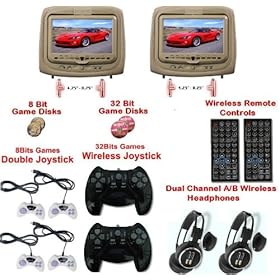
I purchased from Amazon for $350. Very reasonably priced.
Tan Pair Headrest 9" LCD Car Monitors with Region Free DVD player 2 Wireless Dual Channel Headphones Sony Laser Reader USB SD and 32 Bit & 8 Bit Game disks and 6 game controllers USB SD MP3 RCA Video input & RCA Video OutPut
I purchased from Amazon for $350. Very reasonably priced.
Trending Topics
Thread Starter
Advanced
Joined: Jun 2008
Posts: 67
Likes: 1
From: East Bay, CA
Here is the link to the Amazon list.
http://www.amazon.com/s?ie=UTF8&sear...AutoSoundSales
The exact item I purchased is out of stock but there are other similar items.
http://www.amazon.com/s?ie=UTF8&sear...AutoSoundSales
The exact item I purchased is out of stock but there are other similar items.


Thread Starter
Advanced
Joined: Jun 2008
Posts: 67
Likes: 1
From: East Bay, CA
OK Here is how I did it.
The headrest DVD unit comes pre-wired and you remove the back and run the cables and present the power and video cables at the bottom of the seat.
Since I have not found out how to dismantle the center console, plus I have a 2 year-old who couldn't wait for me to figure this out, I had to take a short cut.
So I went to RadioShack and purchased 2 items.
First is the 12V adapter to power the DVD.

Also since I have 2 units to power, I purchased a connector block

So currently the wires are all sitting under the floor mats until I can figure out how to make the final wiring routes.
FYI each headrest DVD come with both and input and output wires so the way I have it setup currently is that the right-hand-side DVD is feeding video to the left-hand-side unit. What you don't see is that the quality of the slave unit is not as good as the master for obvious reasons as the video is run through a composite feed.
It's not fancy but it got the job done for $360 all-in so not a bad deal.
The headrest DVD unit comes pre-wired and you remove the back and run the cables and present the power and video cables at the bottom of the seat.
Since I have not found out how to dismantle the center console, plus I have a 2 year-old who couldn't wait for me to figure this out, I had to take a short cut.
So I went to RadioShack and purchased 2 items.
First is the 12V adapter to power the DVD.
Also since I have 2 units to power, I purchased a connector block
So currently the wires are all sitting under the floor mats until I can figure out how to make the final wiring routes.
FYI each headrest DVD come with both and input and output wires so the way I have it setup currently is that the right-hand-side DVD is feeding video to the left-hand-side unit. What you don't see is that the quality of the slave unit is not as good as the master for obvious reasons as the video is run through a composite feed.
It's not fancy but it got the job done for $360 all-in so not a bad deal.

Instructor
Joined: Apr 2008
Posts: 106
Likes: 0
Ok, so both can't play different DVD is what your saying?
If so it sounds like the portable DVD players we bought on black friday where the 1 unit has the actual dvd drive and the other is just another monitor to feed off it.
Do they have their own built in speakers?
If so it sounds like the portable DVD players we bought on black friday where the 1 unit has the actual dvd drive and the other is just another monitor to feed off it.
Do they have their own built in speakers?
Thread Starter
Advanced
Joined: Jun 2008
Posts: 67
Likes: 1
From: East Bay, CA
They are both self contained units each with DVD player, FM transmitter, IR headphones etc. You can play 2 different DVD's but for my use, I have linked them up so that one slaves off the other. When we have child #2, then we will split so that they can watch age appropriate content.
Also they both have speakers which are loud enough for use while the car is moving.
Also they both have speakers which are loud enough for use while the car is moving.


6th Gear
Joined: Jan 2010
Posts: 6
Likes: 0
MDX Seat Panel Removal
Kazh,
I'm also installing headrest DVDs in a 2008 MDX and having the same problem removing the back panels. It doesn't seem to give an I'm afraid I'll snap something.
Did you pull from the bottom first? Also, did you grab from the sides or the center of the panel? Any detail is greatly appreciated. Many thanks. anthony_217@hotmail.com
I'm also installing headrest DVDs in a 2008 MDX and having the same problem removing the back panels. It doesn't seem to give an I'm afraid I'll snap something.
Did you pull from the bottom first? Also, did you grab from the sides or the center of the panel? Any detail is greatly appreciated. Many thanks. anthony_217@hotmail.com
Thread Starter
Advanced
Joined: Jun 2008
Posts: 67
Likes: 1
From: East Bay, CA
Right the seat backs a really firmly attached. I had to pull really hard from the bottom. You have to be super careful. The first went smoothly and I got a bit careless on the second and I broke the clips on the middle left and right. These are the key ones that keep the back in place so you do NOT want to pull too hard. You want to pry the bottom off and then carefully unclick one side and then the other and finally the top. The top comes off by gently sliding the back panel downwards and it should just slide off.
Hope that helps. (As for the pic, the weather in the Bay Area really sucks at the moment so will try and take the pic over the weekend when the weather is supposed to get better.)
Hope that helps. (As for the pic, the weather in the Bay Area really sucks at the moment so will try and take the pic over the weekend when the weather is supposed to get better.)

Backs the Pack
Joined: Aug 2008
Posts: 117
Likes: 10
From: North Carolina
Vizualogic and Rosen make DVD headrests that match the MDX factory shape, including the colors. They cost a grip though, $1200-1400.
6th Gear
Joined: Jan 2010
Posts: 6
Likes: 0

Success!! Your instructions were on the money.
I actually broke both bottom clips on both panels. It's amazing you were able to get a panel out without breaking the clips. Either way, they cost about $2 a piece online or your local dealer for about $4. Just slide on and they snap back in good as new.
Thanks again.
I actually broke both bottom clips on both panels. It's amazing you were able to get a panel out without breaking the clips. Either way, they cost about $2 a piece online or your local dealer for about $4. Just slide on and they snap back in good as new.
Thanks again.
6th Gear
Joined: Jan 2010
Posts: 6
Likes: 0
Otherwise, check out the amazing units at onfair.com for $300 or less.
Backs the Pack
Joined: Aug 2008
Posts: 117
Likes: 10
From: North Carolina
I think the Rosen comes with games but it is definitely a lot pricier.
I was going to get a system like this installed, but I think I'll just get an OEM unit with our next vehicle, whenever/whatever it will be, probably an Odyssey.
I was going to get a system like this installed, but I think I'll just get an OEM unit with our next vehicle, whenever/whatever it will be, probably an Odyssey.
Thread Starter
Advanced
Joined: Jun 2008
Posts: 67
Likes: 1
From: East Bay, CA
Success!! Your instructions were on the money.
I actually broke both bottom clips on both panels. It's amazing you were able to get a panel out without breaking the clips. Either way, they cost about $2 a piece online or your local dealer for about $4. Just slide on and they snap back in good as new.
Thanks again.
I actually broke both bottom clips on both panels. It's amazing you were able to get a panel out without breaking the clips. Either way, they cost about $2 a piece online or your local dealer for about $4. Just slide on and they snap back in good as new.
Thanks again.
Thread Starter
Advanced
Joined: Jun 2008
Posts: 67
Likes: 1
From: East Bay, CA
Probably the next thing that will come along will be iPod/iPhone integration or at least get some form of HD/SSD built into the unit so you can access more video content and not have to keep switching DVD discs.
6th Gear
Joined: Jan 2010
Posts: 6
Likes: 0
It's part 38 on your diagram above. Part# 91566-SP0-003
Website: http://www.acuraoemparts.com/delray/jsp/home.jsp
Input the part number on the home page.

1st Gear
Joined: Jan 2010
Posts: 1
Likes: 0
Center console disassembly
I am currently installing 9" headrest dvd's, and have gotten as far as routing the cables down through the seat, but cannot find a disassembly diagram for the center console anywhere online! Does anyone know where to find such a diagram, or even step-by-step disassembly steps?

2nd Gear
Joined: Feb 2010
Posts: 2
Likes: 0
Kazh,
Any update on a permanent power source? I just ordered the the 7" headrest dvd players from onfair.com and I thought about doing it the way you did but I assume the issue with that is that when you turn off the car and then back on, the movie will not start from where you stopped but rather from the beginning again since the cigarette lighter is a switched source....and my kids find this very annoying.
Any update on a permanent power source? I just ordered the the 7" headrest dvd players from onfair.com and I thought about doing it the way you did but I assume the issue with that is that when you turn off the car and then back on, the movie will not start from where you stopped but rather from the beginning again since the cigarette lighter is a switched source....and my kids find this very annoying.

2nd Gear
Joined: Feb 2010
Posts: 2
Likes: 0
Onfair
Onfair looks to have nice quality at a very reasonable price. Those who have ordered from them, can you comment if you are happy with them, which model you purchased, and specifically which color you ordered and how well it matched the Acura interior.
Thread Starter
Advanced
Joined: Jun 2008
Posts: 67
Likes: 1
From: East Bay, CA
Hi Cayman1,
No reason for concern. The DVD player should have a RESUME feature so that you start back right where you left off. The DVD player I purchased has this feature. My daughter is the same... She now tells us when the movie has ended so that we can use the remote to get back to the beginning. She is just 2 years old.
I still haven't found a permanent solution but since the MDX is a lease I may just leave it like it is as it seems to be working well. My only thing is that I need to buy the clips to put the back of the seat back on properly. keeps coming off!
Have fun!
Kaz
No reason for concern. The DVD player should have a RESUME feature so that you start back right where you left off. The DVD player I purchased has this feature. My daughter is the same... She now tells us when the movie has ended so that we can use the remote to get back to the beginning. She is just 2 years old.
I still haven't found a permanent solution but since the MDX is a lease I may just leave it like it is as it seems to be working well. My only thing is that I need to buy the clips to put the back of the seat back on properly. keeps coming off!
Have fun!
Kaz
2nd Gear
Joined: Feb 2010
Posts: 2
Likes: 0
Thanks Kazh, I will have to check for the resume function. I have the 7" screens so it may not be an option on those. I tap my power source into the fuse box by wrapping the power wire around the fuse post for the "ACC" fuse (#32 in the tsx) and it is working great. I joined the ground and power wires from both players into one so I only have one power wire and one ground. I do notice that when playing a dvd and using the built in speakers, you can barely hear it even with the volume all the way up but when playing the video game disc it is very loud..not sure what's going on.
dvrice, I have a TSX with black interior and the headrest is not an exact match and not as shiny as my interior but i will try some leather conditioner and see how that looks. On the TSX they don't come as far forward as the stock headrests so your head goes back further before touching them which is not very comfortable but i rarely use my headrest from the front seats. The kids love it and i used the promotion code "onfairrocks" and the players were $215 shipped and you can't beat the price!
dvrice, I have a TSX with black interior and the headrest is not an exact match and not as shiny as my interior but i will try some leather conditioner and see how that looks. On the TSX they don't come as far forward as the stock headrests so your head goes back further before touching them which is not very comfortable but i rarely use my headrest from the front seats. The kids love it and i used the promotion code "onfairrocks" and the players were $215 shipped and you can't beat the price!

Thread Starter
Advanced
Joined: Jun 2008
Posts: 67
Likes: 1
From: East Bay, CA
Finally purchased the clips. For everyone to note, its worth ordering these in advance so that you can replace the seat backs correctly after the install. They are only a few $ each so buy a batch.

Thread
Thread Starter
Forum
Replies
Last Post
BoricuaTL
Car Parts for Sale
138
Apr 8, 2016 01:08 PM
