


WTF??? Printer rant


Thread Starter
Administrator Alumnus
Joined: Oct 2001
Posts: 26,326
Likes: 131
From: Northwest IN
WTF??? Printer rant
So I was working quite a bit yesterday preparing for a big meeting at O'Hare this morning.
My boss calls about 8pm last night and asked if I could change something on a scorecard that I created. No problem. He also asked me to reprint the scorecards for each of the attendees. No problem.
So I turn on my printer (HP all-in-one 1210) and it says it's low on ink. Ok, no problem. I've had the printer about 16 months, so I guess I can pony up some bucks for some ink. But it's getting close to 9pm. What's open??? Walmart is!!!
So $57.24 later, I come home with a black and color cartridge. I power cycle the printer and check the ink levels, and it's still showing some left. 50% actually???!!! So I begin to print.
At the 7th page, the printer stops. The heads are all the way over on the right side? About every 30 seconds, it trys to move, but doesn't. An error comes up sayings there's an obstruction. So I remove the paper and try again. This time the heads go flying all the way over to the left and slam into the case. WTF?
So this goes on for about 30 minutes, at which time I finally come to the conclusion that the printer has died. Some how, in some way, RIGHT in the middle of printing.
So it got me thinking. Recently, I was at Costco and saw the later model number; 1315 being sold for $77. I just spent $57 on fucking ink. Initially I was pissed at the thought of having to buy another printer. But shit... $20 more gets me a new printer AND ink??? Granted it’s a very entry level printer, but who cares. I rarely print at home.
Is it me, or is there something really wrong with this? I'm wondering what HP makes on an ink cartridge? $34 for color. I bet it costs them all of $5 to make, if that.
:ghey:
Off to my meeting.
My boss calls about 8pm last night and asked if I could change something on a scorecard that I created. No problem. He also asked me to reprint the scorecards for each of the attendees. No problem.
So I turn on my printer (HP all-in-one 1210) and it says it's low on ink. Ok, no problem. I've had the printer about 16 months, so I guess I can pony up some bucks for some ink. But it's getting close to 9pm. What's open??? Walmart is!!!
So $57.24 later, I come home with a black and color cartridge. I power cycle the printer and check the ink levels, and it's still showing some left. 50% actually???!!! So I begin to print.
At the 7th page, the printer stops. The heads are all the way over on the right side? About every 30 seconds, it trys to move, but doesn't. An error comes up sayings there's an obstruction. So I remove the paper and try again. This time the heads go flying all the way over to the left and slam into the case. WTF?
So this goes on for about 30 minutes, at which time I finally come to the conclusion that the printer has died. Some how, in some way, RIGHT in the middle of printing.
So it got me thinking. Recently, I was at Costco and saw the later model number; 1315 being sold for $77. I just spent $57 on fucking ink. Initially I was pissed at the thought of having to buy another printer. But shit... $20 more gets me a new printer AND ink??? Granted it’s a very entry level printer, but who cares. I rarely print at home.
Is it me, or is there something really wrong with this? I'm wondering what HP makes on an ink cartridge? $34 for color. I bet it costs them all of $5 to make, if that.
:ghey:
Off to my meeting.

Burning Brakes
Joined: Feb 2005
Posts: 1,024
Likes: 0
New printer...
Eric, be advised that when you get a new printer, the cartridges the provide are only starter cartridges. The have very little ink in them, but should be enough to get your job done.
Before reporting to my present boss (10 years with him now), he did a study on the cost of printer ink. He came out with an average of $10 per GRAM!
Before reporting to my present boss (10 years with him now), he did a study on the cost of printer ink. He came out with an average of $10 per GRAM!


Houses Won't Depreciate?
Joined: Feb 2003
Posts: 6,238
Likes: 0
From: Weston, FL
Welcome to the world of profit for inkjet printer producers.
I got 2 printers, 1 laser, 1 color inkjet.
If I absolutely need color, I will use color inkjet. But, by default I will user Laser. Cost per page is much lower.
And for ink, check ebay for generics; they usually work fine for 1/3 of the price. Or check at costco the refill package for around 20 bucks (which lasts forever).
I got 2 printers, 1 laser, 1 color inkjet.
If I absolutely need color, I will use color inkjet. But, by default I will user Laser. Cost per page is much lower.
And for ink, check ebay for generics; they usually work fine for 1/3 of the price. Or check at costco the refill package for around 20 bucks (which lasts forever).



Sig Rho's Finest
Joined: Apr 2004
Posts: 8,471
Likes: 0
From: New Yoke City
yep its all bulshit. most printers dont even come w/ ink. some come w/ starter packs which are half the ink of normal ink packs. whenever i run out of ink i either get the generic stuff or just get a new printer. it makes no sense to pay 75% of a new printer just for ink

Senior Moderator
Joined: Apr 2003
Posts: 47,710
Likes: 801
From: Toronto, Canada
Originally Posted by Dfreder2
Eric, be advised that when you get a new printer, the cartridges the provide are only starter cartridges. The have very little ink in them, but should be enough to get your job done.
Before reporting to my present boss (10 years with him now), he did a study on the cost of printer ink. He came out with an average of $10 per GRAM!
Before reporting to my present boss (10 years with him now), he did a study on the cost of printer ink. He came out with an average of $10 per GRAM!
You sure about that. I can't speak for HP, Epson or anyone else but I have purchased several Canon inkjets printers in the last few years and all the tanks were indeed full. How do I know. The tanks are see through.
Trending Topics

Houses Won't Depreciate?
Joined: Feb 2003
Posts: 6,238
Likes: 0
From: Weston, FL
Originally Posted by Bearded Root
I think the inexpensive personal printers are the most poorly designed electronics on the market.
Now, how dumb are people; they were selling them WITH INK at less than 15 bucks on ebay. Very few were bidding. I took the ink out and sold them for $30 + shipping, and got rid of the printer without ink for $5 + shipping.
And yes, I dont keep cheap printers; they are the worst in price per page ratio.

Drifting
Joined: Mar 2002
Posts: 3,391
Likes: 3
From: Phoenix, Az
Originally Posted by Always Dirty
My problem with every HP printer I've ever used has always been when it starts sucking multiple pieces of paper in at once, eventually jamming every time you print. Garbage.
All Junk.
Burning Brakes
Joined: Feb 2005
Posts: 1,024
Likes: 0
I always end up being the one to do this, but...
My Dad goes through color ink like there is no tomorrow. My Mom has a three year old great granddaughter, and whenever new pictures come, Mom insists that 8.5x11 color glossies on photo paper be printed. I think Dad was going through $100 in printer cartridges per month.
For $25, we bought an ink refill kit, and it seems to do quite a nice job, black and the required colors included. Once you get the technique figured out, the procedure is not messy at all. No solvents are involved; you clean up with water.
And judgeing by the capacity of the refill inks, I think this will last him a year, easy.
For $25, we bought an ink refill kit, and it seems to do quite a nice job, black and the required colors included. Once you get the technique figured out, the procedure is not messy at all. No solvents are involved; you clean up with water.
And judgeing by the capacity of the refill inks, I think this will last him a year, easy.

is learning to moonwalk i
Joined: Feb 2004
Posts: 15,520
Likes: 3
From: SoCal
Originally Posted by domn
You sure about that. I can't speak for HP, Epson or anyone else but I have purchased several Canon inkjets printers in the last few years and all the tanks were indeed full. How do I know. The tanks are see through.
Senior Moderator
Joined: Apr 2003
Posts: 47,710
Likes: 801
From: Toronto, Canada
Originally Posted by moeronn
The problem with Canon (at least the CX6400) is that if one ink cartridge is empty, the printer will not print. It doesn't matter if you are only printing black, if your magenta is out, it won't print. The worst thing is, it "uses" ink every time you start it up, so you can run out of ink without ever printing that color. What kind of crap is that?
BS. There's a "Grayscale Printing" option that forces the printer to use the black ink only.
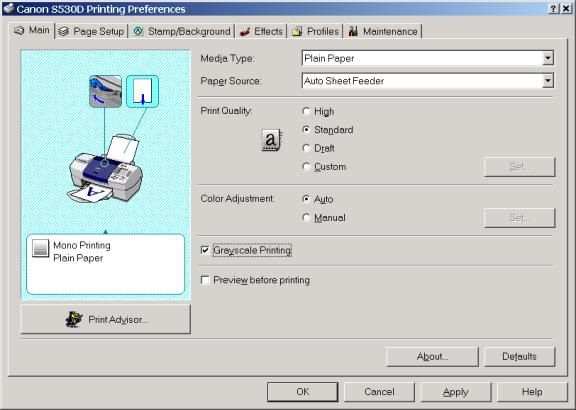
I've printed several times with the color ink not even in the printer.
Read the manual

As for ink being used on startup. Yes, but its a very, very small amount of ink. Just to be sure the heads aren't clogged.

is learning to moonwalk i
Joined: Feb 2004
Posts: 15,520
Likes: 3
From: SoCal
Originally Posted by domn
BS. There's a "Grayscale Printing" option that forces the printer to use the black ink only.
I've printed several times with the color ink not even in the printer.
Read the manual
As for ink being used on startup. Yes, but its a very, very small amount of ink. Just to be sure the heads aren't clogged.
I've printed several times with the color ink not even in the printer.
Read the manual
As for ink being used on startup. Yes, but its a very, very small amount of ink. Just to be sure the heads aren't clogged.
 My printer is an Epson, not a Canon.

Senior Moderator
Joined: Apr 2003
Posts: 47,710
Likes: 801
From: Toronto, Canada
Originally Posted by Repo1234
Do the ink cartridges dry up if you leave them in the printer for long periods of time? 
 Its pratically unavoidable.
 Mind you I've had HP's, Lexmark's and Canon's and I've never had problems with ink drying up even with the printer sitting for months.

Swift 3 B-A-N-G-E-R
Joined: Aug 2004
Posts: 4,819
Likes: 0
From: Salinas, CA ~to~ Yuma, AZ
Originally Posted by Repo1234
Do the ink cartridges dry up if you leave them in the printer for long periods of time?
 not the ink inside the cartridge... but the heads will... basicly just run them a few times and they will unclog... Had this happen to my parents old Compaq and its all in one printer... Just run it a couple times through the Allignment page... The one with all the pretty colors and different size lines... and it'll be fine...
  i wonder where that printer is...
anyways... about the ink thing... and it being 50+ dollars... look what i found at the top of your thread...
BTW: let me click it a couple times...


Pit Stop?
Joined: May 2003
Posts: 13,526
Likes: 1
From: Orlando FL
Originally Posted by Always Dirty
My problem with every HP printer I've ever used has always been when it starts sucking multiple pieces of paper in at once, eventually jamming every time you print. Garbage.
I thought mine was the only one? Anyway to fix this?

Big Block go VROOOM!
Joined: Oct 2003
Posts: 8,578
Likes: 1
From: Chicago Burbs
Originally Posted by Dfreder2
My Dad goes through color ink like there is no tomorrow. My Mom has a three year old great granddaughter, and whenever new pictures come, Mom insists that 8.5x11 color glossies on photo paper be printed. I think Dad was going through $100 in printer cartridges per month.
For $25, we bought an ink refill kit, and it seems to do quite a nice job, black and the required colors included. Once you get the technique figured out, the procedure is not messy at all. No solvents are involved; you clean up with water.
And judgeing by the capacity of the refill inks, I think this will last him a year, easy.
For $25, we bought an ink refill kit, and it seems to do quite a nice job, black and the required colors included. Once you get the technique figured out, the procedure is not messy at all. No solvents are involved; you clean up with water.
And judgeing by the capacity of the refill inks, I think this will last him a year, easy.

Houses Won't Depreciate?
Joined: Feb 2003
Posts: 6,238
Likes: 0
From: Weston, FL
Originally Posted by domn
BS. There's a "Grayscale Printing" option that forces the printer to use the black ink only.
I've printed several times with the color ink not even in the printer.
Read the manual
As for ink being used on startup. Yes, but its a very, very small amount of ink. Just to be sure the heads aren't clogged.
I've printed several times with the color ink not even in the printer.
Read the manual
As for ink being used on startup. Yes, but its a very, very small amount of ink. Just to be sure the heads aren't clogged.
Black might be full, but if one of the color cartridge is empty the printer will refuse to print (from PC or Fax), regardless of the option "grayscale" selected. That blows.
Houses Won't Depreciate?
Joined: Feb 2003
Posts: 6,238
Likes: 0
From: Weston, FL
is learning to moonwalk i
Joined: Feb 2004
Posts: 15,520
Likes: 3
From: SoCal
Originally Posted by Billiam
If they're doing that much printing it may be better to think about Costco or something similar. Seriously, it will almost certainly be cheaper in the long run. Inkjet photo printing is expensive. It's great if you either print small volumes and want immediate results, or you're into the high end fine art printing. For most places in the middle of that range, labs are usually cheaper.


Advanced
Joined: Apr 2004
Posts: 76
Likes: 0
From: PA
Originally Posted by Scrib
So I was working quite a bit yesterday preparing for a big meeting at O'Hare this morning.
My boss calls about 8pm last night and asked if I could change something on a scorecard that I created. No problem. He also asked me to reprint the scorecards for each of the attendees. No problem.
So I turn on my printer (HP all-in-one 1210) and it says it's low on ink. Ok, no problem. I've had the printer about 16 months, so I guess I can pony up some bucks for some ink. But it's getting close to 9pm. What's open??? Walmart is!!!
So $57.24 later, I come home with a black and color cartridge. I power cycle the printer and check the ink levels, and it's still showing some left. 50% actually???!!! So I begin to print.
At the 7th page, the printer stops. The heads are all the way over on the right side? About every 30 seconds, it trys to move, but doesn't. An error comes up sayings there's an obstruction. So I remove the paper and try again. This time the heads go flying all the way over to the left and slam into the case. WTF?
So this goes on for about 30 minutes, at which time I finally come to the conclusion that the printer has died. Some how, in some way, RIGHT in the middle of printing.
So it got me thinking. Recently, I was at Costco and saw the later model number; 1315 being sold for $77. I just spent $57 on fucking ink. Initially I was pissed at the thought of having to buy another printer. But shit... $20 more gets me a new printer AND ink??? Granted it’s a very entry level printer, but who cares. I rarely print at home.
Is it me, or is there something really wrong with this? I'm wondering what HP makes on an ink cartridge? $34 for color. I bet it costs them all of $5 to make, if that.
:ghey:
Off to my meeting.
My boss calls about 8pm last night and asked if I could change something on a scorecard that I created. No problem. He also asked me to reprint the scorecards for each of the attendees. No problem.
So I turn on my printer (HP all-in-one 1210) and it says it's low on ink. Ok, no problem. I've had the printer about 16 months, so I guess I can pony up some bucks for some ink. But it's getting close to 9pm. What's open??? Walmart is!!!
So $57.24 later, I come home with a black and color cartridge. I power cycle the printer and check the ink levels, and it's still showing some left. 50% actually???!!! So I begin to print.
At the 7th page, the printer stops. The heads are all the way over on the right side? About every 30 seconds, it trys to move, but doesn't. An error comes up sayings there's an obstruction. So I remove the paper and try again. This time the heads go flying all the way over to the left and slam into the case. WTF?
So this goes on for about 30 minutes, at which time I finally come to the conclusion that the printer has died. Some how, in some way, RIGHT in the middle of printing.
So it got me thinking. Recently, I was at Costco and saw the later model number; 1315 being sold for $77. I just spent $57 on fucking ink. Initially I was pissed at the thought of having to buy another printer. But shit... $20 more gets me a new printer AND ink??? Granted it’s a very entry level printer, but who cares. I rarely print at home.
Is it me, or is there something really wrong with this? I'm wondering what HP makes on an ink cartridge? $34 for color. I bet it costs them all of $5 to make, if that.
:ghey:
Off to my meeting.
What a funny read. This reminds me of when I first bought my computer system. It is all HP, everything worked fine, except the printer. I tried everything, then called HP customer support. Well to make a long story short, the customer suport representative said there must be someting wrong with my new printer, so send it back, using the enclosed label, and they would send me a new one. So I pack it up, take it to the local shippping store, and explain to the gentleman at the counter that I am returning this defective printer to HP. He laughs, and says so you got one of those possesed printers. I said what do you mean? He points to his HP printer, and says I have several HP printers, and they print very well most of the time, but they have a mind of their own. He then goes on to say that HP printers work very well most of the time, but when they go ballistic, watch out. Anyway, my new printer arrives, I hook it up, and it works. BUT! every once in a while, it does weird shit. Including printing a half page, or less and spitting it out, and printing complete gibbersh, or my favorite of all, printing nothing more tha a smilie face, and spitting out every piece of paper in it, and quitting. All I do, is shut it off, and turn it back on later, and it works fine. It is strange, and I can't help thinking, that it it is laughing at me, when it prints smilies, and nothing else. Technology is wonderful, isn't it?

The hair says it all
Joined: Dec 2002
Posts: 7,566
Likes: 0
From: Manhattan, NYC
i have a brother hl-1440 laser printer and haven't had one problem with it ever
edit: i also regard injet printers as crap in general, there might be a few well built ones here and there, but they are rare
edit: i also regard injet printers as crap in general, there might be a few well built ones here and there, but they are rare


Originally Posted by Scrib
So it got me thinking. Recently, I was at Costco and saw the later model number; 1315 being sold for $77. I just spent $57 on fucking ink. Initially I was pissed at the thought of having to buy another printer. But shit... $20 more gets me a new printer AND ink??? Granted it’s a very entry level printer, but who cares. I rarely print at home.
Is it me, or is there something really wrong with this? I'm wondering what HP makes on an ink cartridge? $34 for color. I bet it costs them all of $5 to make, if that.
:ghey:
Off to my meeting.


teh Senior Instigator
Joined: Sep 2000
Posts: 44,094
Likes: 980
From: Huntington Beach, CA -> Ashburn, VA -> Raleigh, NC -> Walnut Creek, CA
Costcos return policy is the shit. I bought a pack of socks, wore half of them, decided I didn't like them and took them back once 

Thread
Thread Starter
Forum
Replies
Last Post
