


iPhone Screen Compatability


iPhone Screen Compatability
I got the iPhone 4 when it was first released (pre pentalobe screws). It took a swim and never fully recovered. When this happened, I replaced it with a white iPhone 4 (right before the 4S was released).
Fast forward to yesterday. I dropped my phone and the screen shattered. The phone still works, but the cracks in the glass are getting annoying.
I never got rid of the iPhone I had that went swimming. I'm fairly certain the screen is OK.
My question is...is the screen from the original black iPhone 4 compatible with the white iPhone 4?
Fast forward to yesterday. I dropped my phone and the screen shattered. The phone still works, but the cracks in the glass are getting annoying.
I never got rid of the iPhone I had that went swimming. I'm fairly certain the screen is OK.
My question is...is the screen from the original black iPhone 4 compatible with the white iPhone 4?

Sanest Florida Man


Joined: Aug 2007
Posts: 46,053
Likes: 11,811
From: Florida
You can check ifixit.com repair guide for instructions and if there's a difference between the two colors it'll tell you what to do in each step that it's different for each color. But it won't because there isn't a difference
/thread
/thread

958 & 991


Joined: Dec 2000
Posts: 9,926
Likes: 1,292
From: South Florida
Should work but I would probably wipe your old screen connections with a bit of alcohol to make sure there isn't build up from when your phone dried (salt water, etc). May want to wipe all the electronic parts down actually and Stunna is correct, ifixit is great. My recommendation is to go through the instructions and on a piece of paper, box out all your screws, with info on where they came from along with the color ifixit gives you. This way you are prepared to take it apart and can go in reverse to put it back together.
This is assuming you haven't done it before, pretty easy, just stay organized and take your time.
This is assuming you haven't done it before, pretty easy, just stay organized and take your time.


Sanest Florida Man
Joined: Aug 2007
Posts: 46,053
Likes: 11,811
From: Florida
I just want to take this opportunity to once again say how great ifixit's pro tool kit is. I bring it with me everywhere and use it often
My next purchase from them will be the magnetic project mat
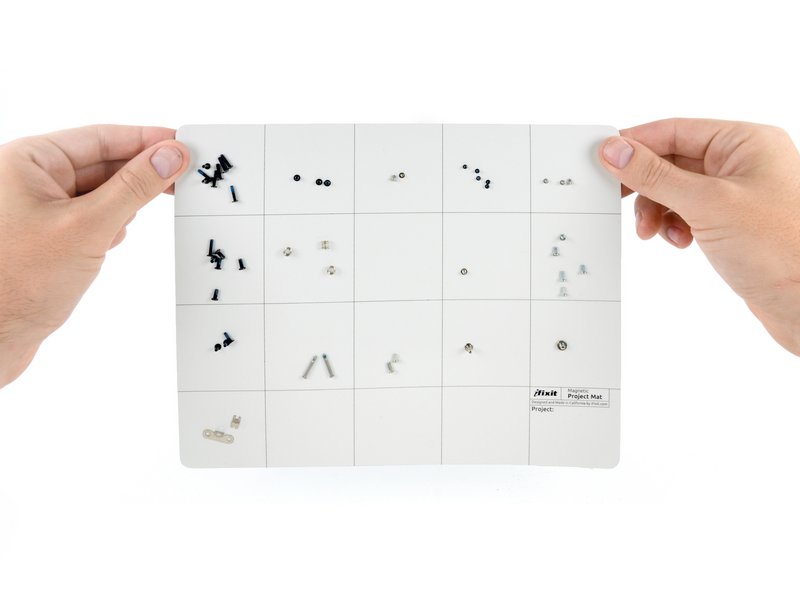
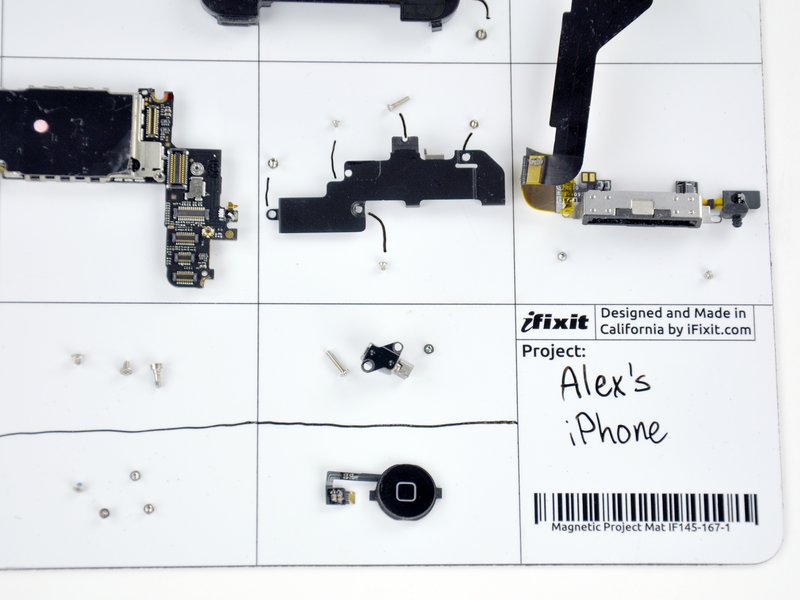
^ I need that in my life...
My next purchase from them will be the magnetic project mat
^ I need that in my life...
The wife gave me the go-ahead to buy a new phone, but I want to hold out for the iPhone 5s/6 or whatever it's going to be if possible.
Both the toolkit and project mat look cool. At work I do something like the project mat, except I use a standard sheet of paper and packing tape
Thankfully my old iPhone 4 took a swim in fresh water, so corrosion shouldn't be terrible. I did take the back off and let it dry out completely a couple days after it happened (when submerging it in rice didn't work). If it had happened at home the rice trick would've probably saved it, but it happened shortly after I arrived at a lake for a day of boating and couldn't really do anything about it until the evening.
Replacing the screen looks fairly straight forward, just tedious. I'll need to find some undivided time to do it...and the correct pentalobe screwdriver.
I wonder if it'd be worth ordering ifixit's "iPhone 4 Liberation Kit" as opposed to ordering just a screwdriver? Not that I plan on taking the phone apart again...
Both the toolkit and project mat look cool. At work I do something like the project mat, except I use a standard sheet of paper and packing tape
Thankfully my old iPhone 4 took a swim in fresh water, so corrosion shouldn't be terrible. I did take the back off and let it dry out completely a couple days after it happened (when submerging it in rice didn't work). If it had happened at home the rice trick would've probably saved it, but it happened shortly after I arrived at a lake for a day of boating and couldn't really do anything about it until the evening.
Replacing the screen looks fairly straight forward, just tedious. I'll need to find some undivided time to do it...and the correct pentalobe screwdriver.
I wonder if it'd be worth ordering ifixit's "iPhone 4 Liberation Kit" as opposed to ordering just a screwdriver? Not that I plan on taking the phone apart again...
Trending Topics
Sanest Florida Man
Joined: Aug 2007
Posts: 46,053
Likes: 11,811
From: Florida
You see those screws on other devices. For example I want to say they screws that hold in a hard drive in an MBP are pentalobe or hex, while it's normal screws on the outside.
I went "surfing" a couple weeks ago and an allen screw that was used to hold a rear fin into the board was stripped, I was able to get it working my iFixit kit.
If you're only gonna do it once then yeah get the replacement kit. I think the liberation kit is just to replace your pentalobes with phillips right? The toolkit is really good quality so if you're looking for a precision toolkit, I don't know of a better one.
I went "surfing" a couple weeks ago and an allen screw that was used to hold a rear fin into the board was stripped, I was able to get it working my iFixit kit.
If you're only gonna do it once then yeah get the replacement kit. I think the liberation kit is just to replace your pentalobes with phillips right? The toolkit is really good quality so if you're looking for a precision toolkit, I don't know of a better one.

Thread
Thread Starter
Forum
Replies
Last Post
rp_guy
Member Cars for Sale
9
Jul 16, 2017 07:33 AM
lanechanger
Member Cars for Sale
4
Oct 13, 2015 10:56 AM
adreano17
3G TL Tires, Wheels & Suspension
2
Sep 29, 2015 08:48 AM