


Excel data merging help


Thread Starter
Suzuka Master
Joined: Mar 2004
Posts: 5,682
Likes: 2
Excel data merging help
I have two excel files:
file 1:
Column 1 has ID
Column 2 has name
Column 3 has status
file 2:
Column 1 has ID
Column 2 has Type
The ID in both files are the same, I want to merge the files, so the names corresponding to the IDs appear in column 3 of the second file.
I think this can be done with vlookup; however, I'm not sure what formula to use.
Any suggestions?
file 1:
Column 1 has ID
Column 2 has name
Column 3 has status
file 2:
Column 1 has ID
Column 2 has Type
The ID in both files are the same, I want to merge the files, so the names corresponding to the IDs appear in column 3 of the second file.
I think this can be done with vlookup; however, I'm not sure what formula to use.
Any suggestions?


AZ Community Team
Joined: May 2007
Posts: 32,488
Likes: 7,771
From: N35°03'16.75", W 080°51'0.9"
Edit by Jonesi: Look two posts down for updated info..
In the 1st file, make column D "Type"
Then:
=VLOOKUP(A2,[File2.xls]Sheet1!$A$2:$B$10,2,FALSE)
And drag that down Column D
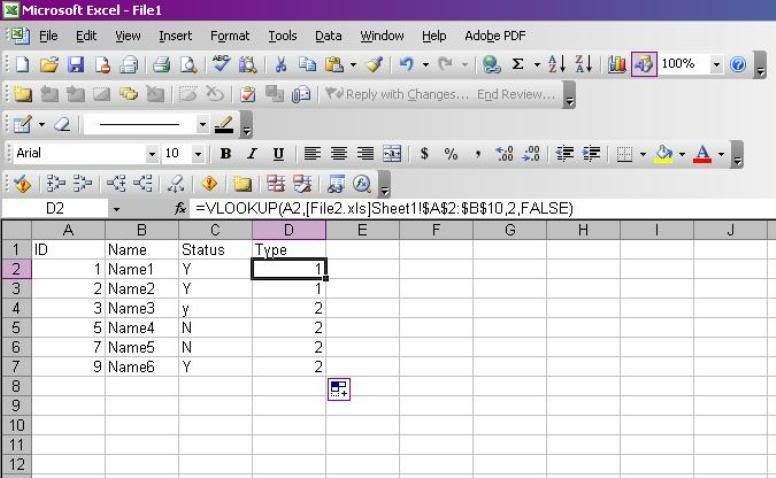
In the 1st file, make column D "Type"
Then:
=VLOOKUP(A2,[File2.xls]Sheet1!$A$2:$B$10,2,FALSE)
And drag that down Column D

Racer
Joined: Jan 2003
Posts: 292
Likes: 0
From: Delaware
Originally Posted by vp911
I have two excel files:
file 1:
Column 1 has ID
Column 2 has name
Column 3 has status
file 2:
Column 1 has ID
Column 2 has Type
The ID in both files are the same, I want to merge the files, so the names corresponding to the IDs appear in column 3 of the second file.
I think this can be done with vlookup; however, I'm not sure what formula to use.
Any suggestions?
file 1:
Column 1 has ID
Column 2 has name
Column 3 has status
file 2:
Column 1 has ID
Column 2 has Type
The ID in both files are the same, I want to merge the files, so the names corresponding to the IDs appear in column 3 of the second file.
I think this can be done with vlookup; however, I'm not sure what formula to use.
Any suggestions?
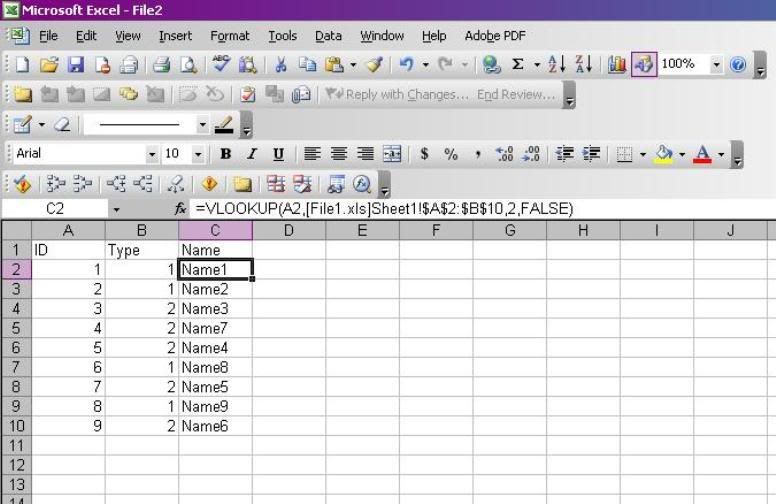
this'll return ID. if you put 2 at the end, it'll return name. likewise, 3=status. use '$' on the range values, then copy down column 3 in file 2.
Tough to describe, hope it makes sense.
Edit: don't use carrots to put things in parens, and look like a rookie compared to the previous post




Thread
Thread Starter
Forum
Replies
Last Post
08_UA7_Gr33k
Member Cars for Sale
13
Feb 11, 2016 02:17 PM
InFaMouSLink
Car Parts for Sale
6
Oct 27, 2015 06:52 PM
08_UA7_Gr33k
Member Cars for Sale
1
Sep 27, 2015 01:56 PM

