


Computer Building Thread



Team Owner


Joined: Oct 2003
Posts: 37,696
Likes: 3,892
From: Chicago
I'd uninstall all vestiges of the NVidia drivers and go to standard VGA drivers before switching cards. Then install the bone stock Radeon drivers from AMD's website instead of using the drivers packaged with the card.
That's what I do anyway, and I've had good results.

Needs more Lemon Pledge
Joined: Mar 2005
Posts: 52,768
Likes: 2,000
From: Phoenix, AZ
When I use flash or java in any capacity the driver (any version I try) crashes. Sometimes it recovers, sometimes it blue screens, sometimes it just simply restarts.
Needs more Lemon Pledge
Joined: Mar 2005
Posts: 52,768
Likes: 2,000
From: Phoenix, AZ
Well, I would say its a fluke but I bought TWO for two different machines and had the same issues on both....
Currently looking to replace the one in this machine:
• LIAN LI PC-7B plus II Black Aluminum ATX Mid Tower Computer Case
• ASUS SABERTOOTH Z77 LGA 1155 Intel Z77 HDMI SATA 6Gb/s USB 3.0 ATX Intel Motherboard
• EVGA 02G-P4-2643-KR GeForce GT 640 2GB 128-bit DDR3 PCI Express 3.0 x16 HDCP Ready Video Card
• Rosewill PCIe 1394b Card 3 Ports Model RC-506E
• CORSAIR HX Series HX850 850W ATX12V 2.3 / EPS12V 2.91 SLI Ready CrossFire Ready 80 PLUS GOLD Certified Modular Active PFC Power Supply New 4th Gen CPU Certified Haswell Ready
• Intel Core i7-3770 Ivy Bridge 3.4GHz (3.9GHz Turbo) LGA 1155 77W Quad-Core Desktop Processor Intel HD Graphics 4000 BX80637I73770
• SAMSUNG 830 Series MZ-7PC256B/WW 2.5" 256GB SATA III MLC Internal Solid State Drive (SSD)
• CORSAIR Vengeance 32GB (4 x 8GB) 240-Pin DDR3 SDRAM DDR3 1600 Desktop Memory Model CMZ32GX3M4X1600C10
• 2x Seagate SV35 Series ST1000VX000 1TB 7200 RPM 64MB Cache SATA 6.0Gb/s 3.5" Enterprise Internal Hard Drives (RAID0)
• Microsoft Windows 7 Professional SP1 64-bit
StarTech ECESATA22 2 Port ExpressCard eSATA Controller Adapter Card
Currently looking to replace the one in this machine:
• LIAN LI PC-7B plus II Black Aluminum ATX Mid Tower Computer Case
• ASUS SABERTOOTH Z77 LGA 1155 Intel Z77 HDMI SATA 6Gb/s USB 3.0 ATX Intel Motherboard
• EVGA 02G-P4-2643-KR GeForce GT 640 2GB 128-bit DDR3 PCI Express 3.0 x16 HDCP Ready Video Card
• Rosewill PCIe 1394b Card 3 Ports Model RC-506E
• CORSAIR HX Series HX850 850W ATX12V 2.3 / EPS12V 2.91 SLI Ready CrossFire Ready 80 PLUS GOLD Certified Modular Active PFC Power Supply New 4th Gen CPU Certified Haswell Ready
• Intel Core i7-3770 Ivy Bridge 3.4GHz (3.9GHz Turbo) LGA 1155 77W Quad-Core Desktop Processor Intel HD Graphics 4000 BX80637I73770
• SAMSUNG 830 Series MZ-7PC256B/WW 2.5" 256GB SATA III MLC Internal Solid State Drive (SSD)
• CORSAIR Vengeance 32GB (4 x 8GB) 240-Pin DDR3 SDRAM DDR3 1600 Desktop Memory Model CMZ32GX3M4X1600C10
• 2x Seagate SV35 Series ST1000VX000 1TB 7200 RPM 64MB Cache SATA 6.0Gb/s 3.5" Enterprise Internal Hard Drives (RAID0)
• Microsoft Windows 7 Professional SP1 64-bit
StarTech ECESATA22 2 Port ExpressCard eSATA Controller Adapter Card

Moderator

Joined: Jun 2006
Posts: 29,869
Likes: 3,489
Gonna get a Corsair SSD and RAM among other things...
Decided on an i5 4670k since an i7 doesn't offer me a real advantage for the rig's primary purpose (gaming). I saw ez12a recommended the H220, but it's been pulled off the shelves. I will stick with an H100i, again because of the Corsair connection, primarily because of the sealed system. I'm a bit paranoid about the thing leaking though...
Decided on an i5 4670k since an i7 doesn't offer me a real advantage for the rig's primary purpose (gaming). I saw ez12a recommended the H220, but it's been pulled off the shelves. I will stick with an H100i, again because of the Corsair connection, primarily because of the sealed system. I'm a bit paranoid about the thing leaking though...

Thread Starter
Banned
Joined: Mar 2009
Posts: 18,761
Likes: 960
From: Kennesaw, GA

This is my budget build from last year.
- i5 2500K
- ASRock Z77 Extreme4
- 16GB DDR3 1333
- HD 6570
- Hyper 212
I had to replace the motherboard last week due to a lightning strike through the network. Added a 128GB 840 Pro SSD the week before, and I have dual 20" Acer LCDs that I do my work on. The case is a CM690 II Advanced.




a friend gave me a computer with an I7 in it.
only thing, it blue screens...
dont have extra hardware to troubleshoot, and ive already bought memory for it...
still blue screens.
not sure if its the motherboard or processor....
only thing, it blue screens...
dont have extra hardware to troubleshoot, and ive already bought memory for it...
still blue screens.
not sure if its the motherboard or processor....


the overexplainer
Joined: Feb 2011
Posts: 3,287
Likes: 385
From: OC, CA

before the remodel my bedroom was the "networking closet" and had cables that i hand crimped everywhere. Looked gross.
i love the way cables can be organized between patch panels and switches.

I work in IT, so i'm not too typical

Why? I'm with you, I do a lot too. If you're folding or mining or occasionally throw a LAN party that works.
But how many machines do you really have going in the house at one time that require 16 ports yet alone a rack unit... Lol
Especially if "parents" and said parents couldn't do the rack themselves, I can't imagine they are utilizing it... I'm sure I'm wrong though.
Edit: A complete home network nuked in. That I'll believe. Ahh the 21st century.
But how many machines do you really have going in the house at one time that require 16 ports yet alone a rack unit... Lol
Especially if "parents" and said parents couldn't do the rack themselves, I can't imagine they are utilizing it... I'm sure I'm wrong though.
Edit: A complete home network nuked in. That I'll believe. Ahh the 21st century.
the overexplainer
Joined: Feb 2011
Posts: 3,287
Likes: 385
From: OC, CA
i figure the popularity of home servers is increasing. Backups to a NAS or similar device will definitely take advantage of the speeds. As SSDs or fast storage continue to proliferate, backups will take only a short amount of time, also transferring media back and forth between computers will be WAY faster than something based off of 100BaseT. Transferring a 4k video around the newtork? no problem now.
All our desktop computers have gigabit already (late model intel Macs), a few other custom PCs. I already had the thing "converted" to gigabit with a cheapy 5 port netgear. This will make it part of the house remodel in 2013. In a modern house with ethernet drops, it only makes sense to use a patch panel. It makes even more sense to put it in a rack for organizational purposes.
It's not the final product of course, since only 10 drops are actually being used. The rest will be for future expansion.
plus it's my gift to them.
Reset the BIOS/CMOS. did you already try reinstalling Windows? I'd just blow the thing away for good measure since nothing you have is on it yet. Disconnect any peripherals that you dont need if any (card readers, PCI sound cards, etc.)
All our desktop computers have gigabit already (late model intel Macs), a few other custom PCs. I already had the thing "converted" to gigabit with a cheapy 5 port netgear. This will make it part of the house remodel in 2013. In a modern house with ethernet drops, it only makes sense to use a patch panel. It makes even more sense to put it in a rack for organizational purposes.
It's not the final product of course, since only 10 drops are actually being used. The rest will be for future expansion.
plus it's my gift to them.
Reset the BIOS/CMOS. did you already try reinstalling Windows? I'd just blow the thing away for good measure since nothing you have is on it yet. Disconnect any peripherals that you dont need if any (card readers, PCI sound cards, etc.)
Last edited by ez12a; Oct 30, 2013 at 01:29 PM.
the overexplainer
Joined: Feb 2011
Posts: 3,287
Likes: 385
From: OC, CA
yup, bought all the keystone jacks and wall plates with a punch down tool.
I've done this prior to the remodel where my dad went into the crawlspace and fished wires up for me to punch down. worked really well and looked pro. The contractors for the remodel already ran all the cat6 and installed the electrical boxes to each room. it's pretty easy from here on out. Already bought a tone finder/probe.
It could look like this if I didnt go through any of the effort:
i dunno, just looks amateur/terrible to me in what is essentially a new house.
I've done this prior to the remodel where my dad went into the crawlspace and fished wires up for me to punch down. worked really well and looked pro. The contractors for the remodel already ran all the cat6 and installed the electrical boxes to each room. it's pretty easy from here on out. Already bought a tone finder/probe.
It could look like this if I didnt go through any of the effort:
i dunno, just looks amateur/terrible to me in what is essentially a new house.
Last edited by ez12a; Oct 30, 2013 at 01:49 PM.
Team Owner
Joined: Oct 2003
Posts: 37,696
Likes: 3,892
From: Chicago
I just put a wall-mount rack like that in my house, with a 24-port rack mount switch. That replaced two eight-port switches that were connected to jacks in my (too small) structured wiring cabinet.
Instead of a shelf with the cable modem, router, and switches sitting on it with a bunch of cables over to the wiring cabinet, I have the house CAT6 going to the punch-downs on the rack, the switch on top of that, and a shelf on top of that with just the cable modem and the router.
I no longer need to worry about what computer is connected to what switch since everything is on the same backplane there.
i've got a home server, X-box, Wii, 2 desktops, a wireless access point, two Apple TVs, a network printer and probably a couple of other things I'm forgetting attached to the network, plus open jacks that anyone can connect to if they need when in my house.
The end result is much better than the old setup.
Instead of a shelf with the cable modem, router, and switches sitting on it with a bunch of cables over to the wiring cabinet, I have the house CAT6 going to the punch-downs on the rack, the switch on top of that, and a shelf on top of that with just the cable modem and the router.
I no longer need to worry about what computer is connected to what switch since everything is on the same backplane there.
i've got a home server, X-box, Wii, 2 desktops, a wireless access point, two Apple TVs, a network printer and probably a couple of other things I'm forgetting attached to the network, plus open jacks that anyone can connect to if they need when in my house.
The end result is much better than the old setup.
the overexplainer
Joined: Feb 2011
Posts: 3,287
Likes: 385
From: OC, CA
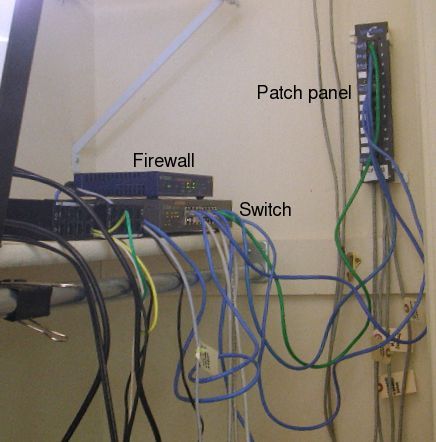
not really a hardware firewall but i did run pfsense on a spare box for a time with the IDS/IPS component. worked pretty well actually. Detected many a port scans attempts at FTP from china and the like.
Last edited by ez12a; Oct 30, 2013 at 03:06 PM.
How many of you actively use dDNS? I really want to grab one of those new Airport Extremes and get rid of my Buffalo unit. But man, no dDNS kills it! I use it all the time!


_
Joined: Nov 2006
Posts: 19,208
Likes: 3,404
Possibilities: motherboard, processor, RAM, GPU, PSU, HDD, OS,....


i got the 2nd computer running for my brother, but when playing games the vid card doesnt display at all.
I'm thinking the PSU isnt powerful enough to power the gtx 550.
its a Dell XPS 8500 and I added the GTX550.
I'll swap power supplies with the 1st "broken" computer
I'm thinking the PSU isnt powerful enough to power the gtx 550.
its a Dell XPS 8500 and I added the GTX550.
I'll swap power supplies with the 1st "broken" computer

Senior Moderator
Joined: May 2003
Posts: 45,641
Likes: 2,335
From: Better Neighborhood, Arizona
That's a possibility. You might want to do a clean uninstall/reinstall of the graphics drivers as well. Oh and all the DirectX crap.
Does it work in 'windowed' mode at all? Crashes in full screen?
Does it work in 'windowed' mode at all? Crashes in full screen?
^yep, fresh install of windows and all drivers.
havent tried in "windowed" mode.
for not spending a dime, i dont mind trouble shooting.
i'm glad he gave me the 2nd computer, cuz i sure as hell wasnt going to buy parts for it.
havent tried in "windowed" mode.
for not spending a dime, i dont mind trouble shooting.
i'm glad he gave me the 2nd computer, cuz i sure as hell wasnt going to buy parts for it.