


PS3 Component output help


Thread Starter
Safety Car


Joined: Feb 2004
Posts: 4,389
Likes: 490
From: Houston, Texas
PS3 Component output help
Not really a video game question but an AV question. This one's got me stumped.
Ok so my friend has an older HDTV at her house. I brought my PS3 over to watch Blu-Ray movies. At home I use HDMI. Her TV only has component so I brought along the PS3 component cable.
I've switched the PS3 from HDMI to component. I plug in the components to the TV (color inputs matched and verified correct). The video is a jumbled mess that slowly rolls upwards.
If I plug the component cable into the TV's "CVI" input, which is a standard def input, I get a picture except I am stuck in 480i.
Her DVD player is a progressive scan model and connects to the TV with component cables. I disconnected this to plug the PS3 in. To test that the inputs on the TV worked, I plugged the DVD player back in and I get a 480P picture.
So I believe I've verified the component inputs on the TV and the PS3 cable work. So what's the problem? I can't even get 480i over the components unless I plug into the "CVI" jack.
I'm here at her house right now, watching Blu-Ray movies in standard def. Any help or suggestions would be appreciated.
Ok so my friend has an older HDTV at her house. I brought my PS3 over to watch Blu-Ray movies. At home I use HDMI. Her TV only has component so I brought along the PS3 component cable.
I've switched the PS3 from HDMI to component. I plug in the components to the TV (color inputs matched and verified correct). The video is a jumbled mess that slowly rolls upwards.
If I plug the component cable into the TV's "CVI" input, which is a standard def input, I get a picture except I am stuck in 480i.
Her DVD player is a progressive scan model and connects to the TV with component cables. I disconnected this to plug the PS3 in. To test that the inputs on the TV worked, I plugged the DVD player back in and I get a 480P picture.
So I believe I've verified the component inputs on the TV and the PS3 cable work. So what's the problem? I can't even get 480i over the components unless I plug into the "CVI" jack.
I'm here at her house right now, watching Blu-Ray movies in standard def.
Any help or suggestions would be appreciated.




Sanest Florida Man


Joined: Aug 2007
Posts: 46,053
Likes: 11,811
From: Florida
Could be a problem with the green cable for the PS3. That's the y cable. Also make sure the component is in the right mode on the PS3. I think YPbPr is the most common the other option is RGB

Trending Topics
Thread Starter
Safety Car
Joined: Feb 2004
Posts: 4,389
Likes: 490
From: Houston, Texas
Thanks for the responses guys. I'm just about to give up at this point. Out of sheer curiosity, I borrowed a friend's upconverting DVD player with DVI out. There's a DVI jack on the TV. The TV is now showing 720P and 1080i from the upconverting DVD player. So the TV is working in HD. Still no idea why it won't accept any kind of signal from the PS3 via component.

Team Owner
Joined: Jun 2007
Posts: 23,451
Likes: 54
I don't own a PS3 so I could say for certain, but I know at least for X360, there's also a selection in the "home" screen area of the console where you chose which output you want (480/720/1080). The switch on the cable connecting to the box only specifies Standard def and HD. You select which one you want, but you also have to specify which level of HD in the home screen menus. You said it's a 1080i TV so not sure what could be the problem...but that's all I could think of.... 

Moderator
Joined: Oct 2004
Posts: 64,122
Likes: 3,374
From: Not Las Vegas (SF Bay Area)
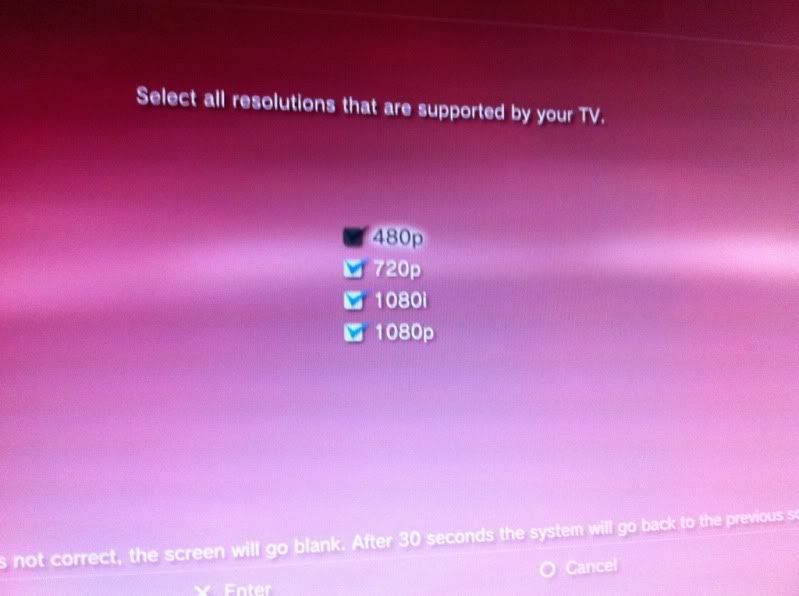
also are you sure you have a component cable (green blue red + red and white)?
the ps3 doesnt come with a component cable, it comes with a COMPOSITE cable (red white and yellow)
the ps3 doesnt come with a component cable, it comes with a COMPOSITE cable (red white and yellow)

Thread Starter
Safety Car
Joined: Feb 2004
Posts: 4,389
Likes: 490
From: Houston, Texas
Hi Miz,
I have a PS3 component cable. It has RGB and two audio connectors. I've used it with my older TV before I got one that had HDMI inputs.
Also, I only have standard resolution (NTSC) selected. Thanks for taking the time and posting the screen shot.
Thanks everybody for the responses. I'm going to be going home soon. Spent well over an hour fiddling with it and no luck. I'll be back next weekend so I'll be picking up a DVI cable of some kind in the meanwhile.
I have a PS3 component cable. It has RGB and two audio connectors. I've used it with my older TV before I got one that had HDMI inputs.
Also, I only have standard resolution (NTSC) selected. Thanks for taking the time and posting the screen shot.
Thanks everybody for the responses. I'm going to be going home soon. Spent well over an hour fiddling with it and no luck. I'll be back next weekend so I'll be picking up a DVI cable of some kind in the meanwhile.

Thread
Thread Starter
Forum
Replies
Last Post
navtool.com
5G TLX Audio, Bluetooth, Electronics & Navigation
31
Nov 16, 2015 08:30 PM
navtool.com
1G RDX Audio, Bluetooth, Electronics & Navigation
1
Sep 25, 2015 05:15 PM
