


Ok, what graphics card is worthwhile getting?


Thread Starter
No pics w/thread= garbage
Joined: Jun 2003
Posts: 773
Likes: 0
From: In the desert... Cali
Ok, what graphics card is worthwhile getting?
Allright people, I picked up a dell 8400 series, and would like to purchase a graphics card, but have no effin clue what to buy.  Here is what I plan on doing, I will be playing Warcraft, and maybe Half Life 2, not sure about the last one.
I want to spend somewhere between 150-200 max. So just throw out some good cards, n discuss so I can get an idea what I should look for, thanks. Not no hunk a shit ones, some good quality ones that will do the job please.
BTW, I did look n search, but just found some threads about a bunch of cards w/ different opinions.
Here is what I plan on doing, I will be playing Warcraft, and maybe Half Life 2, not sure about the last one.I want to spend somewhere between 150-200 max. So just throw out some good cards, n discuss so I can get an idea what I should look for, thanks. Not no hunk a shit ones, some good quality ones that will do the job please.
BTW, I did look n search, but just found some threads about a bunch of cards w/ different opinions.


Thread Starter
No pics w/thread= garbage
Joined: Jun 2003
Posts: 773
Likes: 0
From: In the desert... Cali
Originally Posted by sixgearcl
what interface do you have??
 I've got the paperwork in front of me, but no idea as to which or what it is. Can you throw some things out, so I can pin point it exactly what it is?
  Sorry if it sounds stupid, I'm not much of a pc guru like you guys.
Teg, sorry to hear about that, but I just want a graphics card so I can play games.
Trending Topics

Big Block go VROOOM!
Joined: Oct 2003
Posts: 8,578
Likes: 1
From: Chicago Burbs
Teg aside, you're going to find lots of fans and detractors on both sides. It's best to do your own research and make up your own mind. There are others here with far more expertise than me that would likely be happy to assist you.
I'll give three pieces of advice. First, save your original card. That's a perfectly acceptable spare or card for a second machine (assuming it has a proper PCI-E slot). Second, when I built my current machine back in February, NVidia based PCI-E cards were nearly impossible to find. I would assume that the PCI-E supply level has evened out, but I would poke around to be sure. Lastly, if you go for anything in the mid-to-high end range, be sure to check the power requirements againt the power supply that came with your Dell.
I'll give three pieces of advice. First, save your original card. That's a perfectly acceptable spare or card for a second machine (assuming it has a proper PCI-E slot). Second, when I built my current machine back in February, NVidia based PCI-E cards were nearly impossible to find. I would assume that the PCI-E supply level has evened out, but I would poke around to be sure. Lastly, if you go for anything in the mid-to-high end range, be sure to check the power requirements againt the power supply that came with your Dell.

Moderator Alumnus


Joined: Mar 2002
Posts: 64,160
Likes: 14,307
umm.. just to give you a little idea of how your current card stacks up.... yeah I think you need something better if you wanna do any serious gaming and not pull your hair out doing it...  wow... the Radeons are pwning... even over the almighty "SLI" GeForce configurations... wtf???
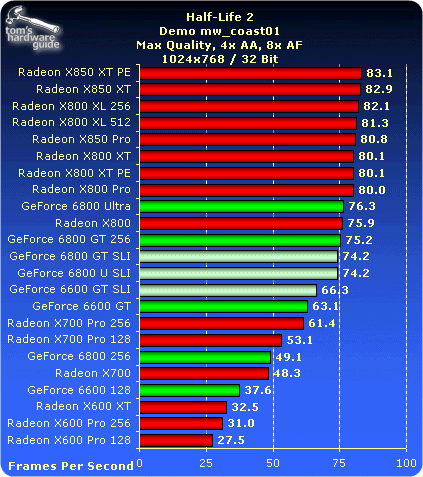
wow... the Radeons are pwning... even over the almighty "SLI" GeForce configurations... wtf???
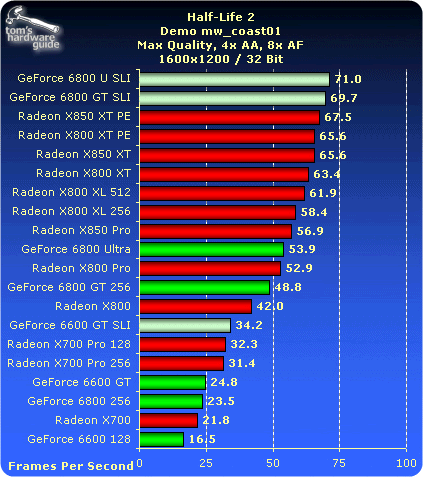
Big Block go VROOOM!
Joined: Oct 2003
Posts: 8,578
Likes: 1
From: Chicago Burbs
Originally Posted by srika
wow... the Radeons are pwning... even over the almighty "SLI" GeForce configurations... wtf???

IMO it will never end as long as there are new (continually improving) versions of DX and a few hot titles per year that take advantage of them. You just have to decide at what point you're going to pull out your wallet and dive into the empty pool. Otherwise it's classic "paralysis by analysis" and you'll never end up with anything.
Moderator Alumnus
Joined: Mar 2002
Posts: 64,160
Likes: 14,307
oh yeah got those charts from this review:
http://graphics.tomshardware.com/gra...524/index.html
and - the SLI's don't show their true selves until you get into the crazier graphics modes coupled with AA and AF... as you can see in the 2nd chart above.
http://graphics.tomshardware.com/gra...524/index.html
and - the SLI's don't show their true selves until you get into the crazier graphics modes coupled with AA and AF... as you can see in the 2nd chart above.
Thread Starter
No pics w/thread= garbage
Joined: Jun 2003
Posts: 773
Likes: 0
From: In the desert... Cali
Yeah, tell me about it Srika. In no way I'm sayin the card I have is that good, it gets by, but I know if I was to play Half life 2, or something else, it'd get pwned bad!
Moderator Alumnus
Joined: Mar 2002
Posts: 64,160
Likes: 14,307
Originally Posted by Doc Holiday
Yeah, tell me about it Srika. In no way I'm sayin the card I have is that good, it gets by, but I know if I was to play Half life 2, or something else, it'd get pwned bad!


Banned
Joined: Mar 2004
Posts: 4,994
Likes: 0
From: S Florida
just picked up a ATI (Power Color) Radeon 9800 Pro 128MB DDR/8x-AGP/TV-Out/DVI (Retail Box), retail version, for $115, shipped for FREE!
Its 2nd from the top, not bad for $115. Card normally sells for $300+

Its 2nd from the top, not bad for $115. Card normally sells for $300+
Moderator Alumnus
Joined: Mar 2002
Posts: 64,160
Likes: 14,307
Originally Posted by F900
just picked up a ATI (Power Color) Radeon 9800 Pro 128MB DDR/8x-AGP/TV-Out/DVI (Retail Box), retail version, for $115, shipped for FREE!
Its 2nd from the top, not bad for $115. Card normally sells for $300+
Its 2nd from the top, not bad for $115. Card normally sells for $300+
 damnit

Moderator


Joined: Oct 2004
Posts: 64,122
Likes: 3,376
From: Not Las Vegas (SF Bay Area)
whoa WTF....  i dunno thou if you screen captured that it might not be your video card.. cause the video card only fucks up what is displayed on the monitor.. if you're screen capturing it maybe its something else?
i dunno thou if you screen captured that it might not be your video card.. cause the video card only fucks up what is displayed on the monitor.. if you're screen capturing it maybe its something else?
Moderator Alumnus
Joined: Mar 2002
Posts: 64,160
Likes: 14,307
Originally Posted by Mizouse
whoa WTF.... i dunno thou if you screen captured that it might not be your video card.. cause the video card only fucks up what is displayed on the monitor.. if you're screen capturing it maybe its something else?
i dunno thou if you screen captured that it might not be your video card.. cause the video card only fucks up what is displayed on the monitor.. if you're screen capturing it maybe its something else? But yeah I just went and looked at some cards... why are the ones I want so expensive??
X800 XL 256mb was $349... the 6800 was $399. Insane - I think I'm gonna try to wait it out - I also have an OOOOld 32mb GeForce1 DDR that has DVI - that I think I am gonna try to get by with in the meantime... I will just have to play the crazy games on my other machine.oh yeah thankfully this isn't my main machine - the main one is trooping along with a 9800 Pro.
Moderator Alumnus
Joined: Mar 2002
Posts: 64,160
Likes: 14,307
Originally Posted by Ken1997TL
Are you overclocking your card at all??
Moderator Alumnus
Joined: Mar 2002
Posts: 64,160
Likes: 14,307
Originally Posted by Ken1997TL
I have a 9800 SE which can be turned into a 9800 Pro with a simple upgrade.
Basically, the stock SE has 4 pipe lines shutdown and is underclocked. Fixed!
Basically, the stock SE has 4 pipe lines shutdown and is underclocked. Fixed!
 I heard you can do that.

Senior Moderator
Joined: May 2003
Posts: 45,641
Likes: 2,335
From: Better Neighborhood, Arizona
Originally Posted by srika
no. the other thing is I notice if I let the computer rest for a bit (like Standby mode) - when I turn it back on, the video is fine. It only starts to jazz up like you see above after I've been using it for maybe an hour... so I am thinking heat is the culprit. Maybe a fan went bad? I guess I need to poke around in it to see what exactly is going on... I could also try reinstalling the drivers.

Moderator Alumnus
Joined: Mar 2002
Posts: 64,160
Likes: 14,307
Well I opened the case with the computer on and took a look at the video card... sure enough, the fan is stopped. So I really think that is the only issue going on. Sux that I would have to get a new card just for that - I wonder if I could just get the fan part of it replaced...... hmm time to do some checking.
Senior Moderator
Joined: May 2003
Posts: 45,641
Likes: 2,335
From: Better Neighborhood, Arizona
Originally Posted by srika
Well I opened the case with the computer on and took a look at the video card... sure enough, the fan is stopped. So I really think that is the only issue going on. Sux that I would have to get a new card just for that - I wonder if I could just get the fan part of it replaced...... hmm time to do some checking.
If concerned, call up the company and you'll get a replacement.

Moderator Alumnus
Joined: Mar 2002
Posts: 64,160
Likes: 14,307
Well, the card was fine for a period of about a month (or whever I posted last about it) - it was fine. But then 2 days ago it started acting up again. And tonight I just could not use it anymore. So I finally swapped it out with a GeForce MX440 64mb card.... I am going to see about sending the 9700 in for warranty service. I should be covered since it was not OEM and it is a true ATI card (i.e. not Sapphire, Chaintech, etc) - cards are not covered unless both of those scenarios are met. We'll see.


Moderator Alumnus
Joined: Mar 2002
Posts: 64,160
Likes: 14,307
 my card is on its way back home
************************************************** ********************************************
This is an automatic response confirming your shipment. Please do not
respond to this message.
************************************************** ********************************************
This is to confirm that your replacement RMA Number CSCxxxxxx has been
shipped.
Below are the details of your shipment:
Ship Date : 08/08/2005
Courier: FEDEX
Service: FedEx Standard Overnight (3 pm) - USA
Waybill: 7xxxxxxxxxx33
ITEM/DESCRIPTION REQD SHIPPED B/O
---------------------------------- ------- ------- ------
102A0752101 1 1 0
R350 128MB BGA V-VO-DI HY-(338M/378E)
To reach one of our Customer Care representatives you may contact us by
email or telephone. Contact information can be found at
http://www.ati.com/support/contact.html.
We look forward to assisting you. Thank you for choosing ATI and have
a great day.
Regards,
Customer Care
ATI Technologies, Inc.
http://www.ati.com
This is an automatic response confirming your shipment. Please do not
respond to this message.
************************************************** ********************************************
This is to confirm that your replacement RMA Number CSCxxxxxx has been
shipped.
Below are the details of your shipment:
Ship Date : 08/08/2005
Courier: FEDEX
Service: FedEx Standard Overnight (3 pm) - USA
Waybill: 7xxxxxxxxxx33
ITEM/DESCRIPTION REQD SHIPPED B/O
---------------------------------- ------- ------- ------
102A0752101 1 1 0
R350 128MB BGA V-VO-DI HY-(338M/378E)
To reach one of our Customer Care representatives you may contact us by
email or telephone. Contact information can be found at
http://www.ati.com/support/contact.html.
We look forward to assisting you. Thank you for choosing ATI and have
a great day.
Regards,
Customer Care
ATI Technologies, Inc.
http://www.ati.com
 - I overnighted it, they are overnighting back...
Moderator Alumnus
Joined: Mar 2002
Posts: 64,160
Likes: 14,307
ok... so I got the card back a few weeks ago. Upon initial inspection, I noticed it was VERY clean - i.e. looking new. SO I figured, they probably cleaned it up with an industrial-strength vacuum or something, or maybe replaced the whole fan, or whatever. Because when I sent it to em it was pretty beat up and dusty - I mean it was 3 years old.
Since I didn't have any urgent need to swap the old one out of my machine, I didn't do it until today. So I do the swap, and boot up...... yeah.... I thought they were just gonna replace the fan - but they sent me a brand new 9800 Pro. guess they don't carry 9700's anymore and wanted to make sure they won't be hearing back from me anytime soon.
hmm... well the 9700 pro is still listed at their website under products, its not discontinued.... so wow... maybe they made a mistake, but I doubt it.
ATI rocks!!!!
Since I didn't have any urgent need to swap the old one out of my machine, I didn't do it until today. So I do the swap, and boot up...... yeah.... I thought they were just gonna replace the fan - but they sent me a brand new 9800 Pro.
guess they don't carry 9700's anymore and wanted to make sure they won't be hearing back from me anytime soon. hmm... well the 9700 pro is still listed at their website under products, its not discontinued.... so wow... maybe they made a mistake, but I doubt it.
ATI rocks!!!!