


Anyone shoot HDR?


Thread Starter
Photography Nerd
Joined: Sep 2003
Posts: 21,489
Likes: 11
From: Toronto
Anyone shoot HDR?
http://www.flickr.com/photos/acurazinedan/254552963/
Just playing around with a new HDR technique...
This is 9 exposures blended to make a 15-bit TIFF, then developed in Photoshop. All you do in the field is compose the scene and take about 9 shots ranging from 4 stops under to 4 stops over. Once you have the blended image in Photoshop, you then get to chose the exposure for each part of the scene. It's a radically different approach than conventional photography. Not only is this technique more forgiving than a single exposure, it allows you to create otherwise impossible shots. You can extract detail from the brightest clouds and darkest shadows in the same scene. Detail that would otherwise be lost in a conventional photograph.
It takes hours to process a shot this way, but it can make for an interesting effect. The resulting 275MB file is extremely noise-free and has a fine art look. I feel confident that this file could be enlarged to any size I could possibly desire. It may not have the detail that a MF back can produce, but there are no artifacts to detract from the picture.
So has anyone else here done any HDR exposures before? If so, what was your technique?
Just playing around with a new HDR technique...
This is 9 exposures blended to make a 15-bit TIFF, then developed in Photoshop. All you do in the field is compose the scene and take about 9 shots ranging from 4 stops under to 4 stops over. Once you have the blended image in Photoshop, you then get to chose the exposure for each part of the scene. It's a radically different approach than conventional photography. Not only is this technique more forgiving than a single exposure, it allows you to create otherwise impossible shots. You can extract detail from the brightest clouds and darkest shadows in the same scene. Detail that would otherwise be lost in a conventional photograph.
It takes hours to process a shot this way, but it can make for an interesting effect. The resulting 275MB file is extremely noise-free and has a fine art look. I feel confident that this file could be enlarged to any size I could possibly desire. It may not have the detail that a MF back can produce, but there are no artifacts to detract from the picture.
So has anyone else here done any HDR exposures before? If so, what was your technique?
Thread Starter
Photography Nerd
Joined: Sep 2003
Posts: 21,489
Likes: 11
From: Toronto
You should! If anything, it would be an excuse to go and take some pictures. 
I think I will use it for B&W shots more than color because the lack of noise and beautiful tonality make for a fantastic B&W print.
I think I will use it for B&W shots more than color because the lack of noise and beautiful tonality make for a fantastic B&W print.
Thread Starter
Photography Nerd
Joined: Sep 2003
Posts: 21,489
Likes: 11
From: Toronto
I only took 3 HDR shots last night because of the stormy weather, but here's an example of the tonality you can in a B&W:
http://www.flickr.com/photos/acurazinedan/254504299/
Admitedly, I did a rush job of this conversion, but you can still get an idea of the quality in the dark tones.
http://www.flickr.com/photos/acurazinedan/254504299/
Admitedly, I did a rush job of this conversion, but you can still get an idea of the quality in the dark tones.

Senior Moderator
Joined: Jul 2003
Posts: 21,672
Likes: 1
From: Toronto
Originally Posted by Dan Martin
I only took 3 HDR shots last night because of the stormy weather, but here's an example of the tonality you can in a B&W:
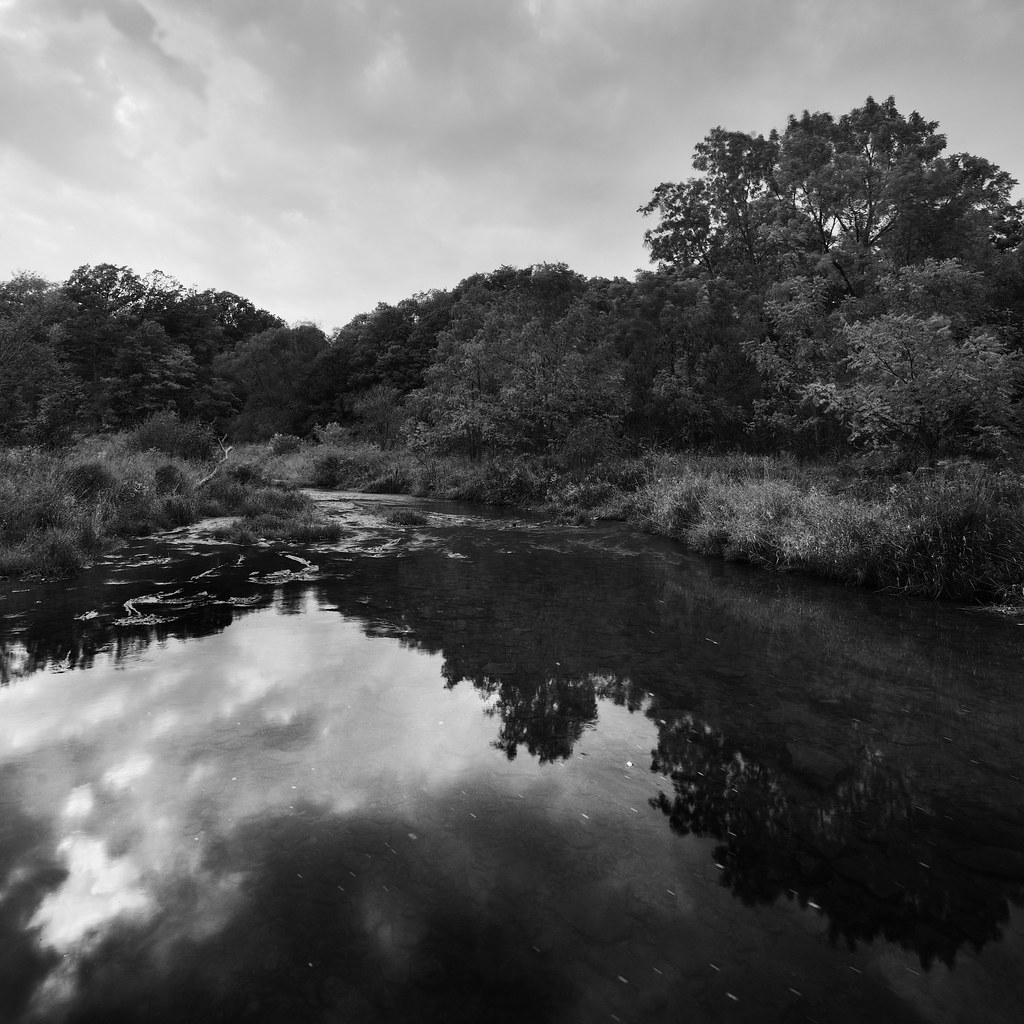
Admitedly, I did a rush job of this conversion, but you can still get an idea of the quality in the dark tones.
Admitedly, I did a rush job of this conversion, but you can still get an idea of the quality in the dark tones.
thats awesome. I personally prefer it to the first shot.
Trending Topics
Thread Starter
Photography Nerd
Joined: Sep 2003
Posts: 21,489
Likes: 11
From: Toronto
Originally Posted by fdl
can u post the same shot without employing this procedure? just curious how differnt it will be.
I could make a single shot look similar to that, but it would be very noisy in the shadow areas and there wouldn't be nearly the same amount of detail in the clouds or waves. That's the main difference and it wouldn't show well at this resolution.
Timothy Farrar is a master of this technique, and he has shown the kind of noise you get from a single exposure vs HDR in his blog: http://www.farrarfocus.com/ffdd/blog20060926.htm
Thread Starter
Photography Nerd
Joined: Sep 2003
Posts: 21,489
Likes: 11
From: Toronto
Originally Posted by ALPHSTER
Isn't this like the digital version of the zone system that Ansel Adams used?

Yes, you could certainly think of it that way. Ansel would definitely love this technique if he were around today.
Thread Starter
Photography Nerd
Joined: Sep 2003
Posts: 21,489
Likes: 11
From: Toronto
Originally Posted by fdl
thats awesome. I personally prefer it to the first shot.
This was really just a test for the technique, but I'm glad you liked it.
I'll post more once I find something a little more interesting to shoot. I'm heading to Algonquin next weekend, so I'm sure I'll have more from that trip.
Thread Starter
Photography Nerd
Joined: Sep 2003
Posts: 21,489
Likes: 11
From: Toronto
Originally Posted by ALPHSTER
D,
I want to make sure I'm reading this right. Take 9 separate shot at different exposures and then merge them in photoshop?
I want to make sure I'm reading this right. Take 9 separate shot at different exposures and then merge them in photoshop?

You can see the technique here: http://www.farrarfocus.com/ffdd/bracket.htm
Timothy sells an action for $90 that does the merging work for you, but you could also just use the HDR merge built into CS2.
The merged files will create a fairly dull image, but then you apply brightness and contrast layers to expose the image and bring it to life. You can go very aggressive with the brightness and contrast without any negative effects because you're working with 15 bits of data for every color versus the typical 8 bits you would get from a JPG.

Advanced
Joined: May 2004
Posts: 91
Likes: 0
From: Central New Jersey
Originally Posted by Dan Martin
You can see the technique here: http://www.farrarfocus.com/ffdd/bracket.htm
Timothy sells an action for $90 that does the merging work for you, but you could also just use the HDR merge built into CS2.
The merged files will create a fairly dull image, but then you apply brightness and contrast layers to expose the image and bring it to life. You can go very aggressive with the brightness and contrast without any negative effects because you're working with 15 bits of data for every color versus the typical 8 bits you would get from a JPG.
This link explains HDR in more detail. If you look at the photos of the bearings you can really see how the details of the clouds show up in the under exposed bearing. You don't see that detail in the other exposures. merge the 3 and you get you cake and eat it too.
link

Moderator
Regional Coordinator (Southeast)
Regional Coordinator (Southeast)


Joined: Dec 2003
Posts: 44,121
Likes: 4,431
From: Mooresville, NC
I took 4 pictures the other day when I went and took pictures of my parents new Lexus GS350 so that I could do an HDR picture however I havent gotten around to editing them yet.
Have camera, will travel
Joined: Jan 2004
Posts: 7,783
Likes: 0
From: Federal Way, WA
Nice technique, Dan.
Any one familiar with this sort-of HDR technique: Take one broad dynamic range RAW photo, copy it, then adjust the exposure in each so that one is exposed for the sky, say, and the other for the foreground. They are then blended, by using a layer mask IIRC, resulting in a pseudo HDR image. I got this from a Scott Kelby book, and it's a way for PSE users to go HDR.
I'm pretty sure I don't have all the details exact, but the results he showed were very good. I'll try to post specifics later.
Any one familiar with this sort-of HDR technique: Take one broad dynamic range RAW photo, copy it, then adjust the exposure in each so that one is exposed for the sky, say, and the other for the foreground. They are then blended, by using a layer mask IIRC, resulting in a pseudo HDR image. I got this from a Scott Kelby book, and it's a way for PSE users to go HDR.
I'm pretty sure I don't have all the details exact, but the results he showed were very good. I'll try to post specifics later.
Thread Starter
Photography Nerd
Joined: Sep 2003
Posts: 21,489
Likes: 11
From: Toronto
Originally Posted by waTSX
Nice technique, Dan.
Any one familiar with this sort-of HDR technique: Take one broad dynamic range RAW photo, copy it, then adjust the exposure in each so that one is exposed for the sky, say, and the other for the foreground. They are then blended, by using a layer mask IIRC, resulting in a pseudo HDR image. I got this from a Scott Kelby book, and it's a way for PSE users to go HDR.
I'm pretty sure I don't have all the details exact, but the results he showed were very good. I'll try to post specifics later.
Any one familiar with this sort-of HDR technique: Take one broad dynamic range RAW photo, copy it, then adjust the exposure in each so that one is exposed for the sky, say, and the other for the foreground. They are then blended, by using a layer mask IIRC, resulting in a pseudo HDR image. I got this from a Scott Kelby book, and it's a way for PSE users to go HDR.
I'm pretty sure I don't have all the details exact, but the results he showed were very good. I'll try to post specifics later.
1) noise: multiple exposures layered on top of eachother will cancel out much of the noise. However, multiple exposures from a single file will actually amplify the noise since the pixels are in the same location.
2) limited range: most raw files are 12-bit which gives about 2 stops of dynamic range over a single JPG. That's good, but a 15-bit image in a 16-bit working environment will have about 5 stops of range over a standard JPG.
3) Although you have about two stops of extended range when shooting RAW, there's no guarantee that the colors will be accurate in those extended stops. Every sensor will suffer from a hue shift just before the highlights are blown or the shadows are crushed. By using the "sweet spot" of the sensor's dynamic range, you eliminate most of that hue shift.
The HDR from a single file is still a good technique that has saved my butt in the past. It's great for recovering some detail in blown highlights.

Wars not make one great
Joined: Aug 2005
Posts: 129
Likes: 0
From: Seattle WA
Originally Posted by Dan Martin
You can certainly create an HDR image from one RAW file, but there few a couple issues:
1) noise: multiple exposures layered on top of eachother will cancel out much of the noise. However, multiple exposures from a single file will actually amplify the noise since the pixels are in the same location.
2) limited range: most raw files are 12-bit which gives about 2 stops of dynamic range over a single JPG. That's good, but a 15-bit image in a 16-bit working environment will have about 5 stops of range over a standard JPG.
3) Although you have about two stops of extended range when shooting RAW, there's no guarantee that the colors will be accurate in those extended stops. Every sensor will suffer from a hue shift just before the highlights are blown or the shadows are crushed. By using the "sweet spot" of the sensor's dynamic range, you eliminate most of that hue shift.
The HDR from a single file is still a good technique that has saved my butt in the past. It's great for recovering some detail in blown highlights.
1) noise: multiple exposures layered on top of eachother will cancel out much of the noise. However, multiple exposures from a single file will actually amplify the noise since the pixels are in the same location.
2) limited range: most raw files are 12-bit which gives about 2 stops of dynamic range over a single JPG. That's good, but a 15-bit image in a 16-bit working environment will have about 5 stops of range over a standard JPG.
3) Although you have about two stops of extended range when shooting RAW, there's no guarantee that the colors will be accurate in those extended stops. Every sensor will suffer from a hue shift just before the highlights are blown or the shadows are crushed. By using the "sweet spot" of the sensor's dynamic range, you eliminate most of that hue shift.
The HDR from a single file is still a good technique that has saved my butt in the past. It's great for recovering some detail in blown highlights.
-Cozmo

Thread Starter
Photography Nerd
Joined: Sep 2003
Posts: 21,489
Likes: 11
From: Toronto
Originally Posted by Cozmo
That sounds pretty sweet. Do you have any good links to tutorials that explain how this works in greater detail? Sounds like I might be able to put my digital rebel to some good use for a change.
-Cozmo
-Cozmo
Have camera, will travel
Joined: Jan 2004
Posts: 7,783
Likes: 0
From: Federal Way, WA
^That and 275 MB files are huge and not very practical, but it is cool how you can now do this with Photoshop, and storage space is cheap these days. I would guess you'd use it more for landscape type shots, where you'd likely have a tripod anyway.
Now about those 15 stop sensors...
Now about those 15 stop sensors...
Thread Starter
Photography Nerd
Joined: Sep 2003
Posts: 21,489
Likes: 11
From: Toronto
Originally Posted by ChodTheWacko
I just got a Graduated filter today to help out a bit with those bright skys.
Multiple exposures is only practical if you have a tripod.
Multiple exposures is only practical if you have a tripod.

Post your results when you try out the GND!
I find they're very tricky to use with a 1.6x crop. I have a full set that I hardly use because they're so difficult to position correctly (even with a tripod). Now with HDR's, it's unlikely I'll ever use them again. In my opinion, it's far easier to take a bracketed exposure in the field than it is to fiddle with the filter and calculate the correct exposure for a GND shot. I'd rather get the shot and spend more time developing it on my computer than miss a shot because my filter wasn't aligned correctly or the exposure was off.


Team Owner
Joined: Oct 2003
Posts: 37,706
Likes: 3,904
From: Chicago
Playing around with HDR on some sunset shots using my D200 and 70-200mm f/2.8 in aperture priority mode. Camera on my crappy tripod, remote release, continuous exposures of a 9-frame bracket - trying to go -3 to +3 but only got -1 to +3 because I had the lens too far open.
Original exposure:

HDR:

Definitely more range out of it, seems to get some weird color banding around the sun. No PP other than reduction of bit depth and resize.
Original exposure:
HDR:
Definitely more range out of it, seems to get some weird color banding around the sun. No PP other than reduction of bit depth and resize.

Moderator Alumnus
Joined: May 2001
Posts: 4,295
Likes: 121
From: Ronkonkoma, NY
This page came up recently, worth a read - lots of other links to HDR pages too:
http://petemc.net/hdr-guide/#tools
http://petemc.net/hdr-guide/#tools

Thread
Thread Starter
Forum
Replies
Last Post
CaliAtenza
5G TLX Photograph Gallery
11
Sep 9, 2015 06:48 PM
Trplezero
Car Parts for Sale
1
Sep 3, 2015 10:25 PM