


TL: My radio is locked.....NEED HELP


Thread Starter
Intermediate
Joined: Jan 2008
Posts: 33
Likes: 0
From: San Francisco
My radio is locked.....NEED HELP
i know that i hold down the 1-6 presets then turn on the radio but i have no clue what to do with that code....i have a 03 TL. im not trying to steal anyones radio, this is seriously a problem. just replaced my battery. anyone plz help.


I couldn't find my code anywhere on my 03 TL but that code is your radio serial number. You have to call Acura (not dealer) but the 1800 number and tell them that you need your radio code because you changed battery or whatever and they will pull up your radio code with the serial number that you get from holding down 1 and 6 and then power. Then put it in and if it doesn't work, go to an underground garage and then try it again.

1st Gear
Joined: Sep 2010
Posts: 1
Likes: 0
I have the same problem. I have double-checked my radio code and I have the right one. In fact, I've used it in the past when my battery has gone low and it's worked. I left the headlights on, got a jump start, the radio asked for the code, I put it in and it gave me an error reading. I've tried disconneting the battery, waiting and trying again. I've tried pulling out the "back-up" fuse under the hood and trying it again. Also, tried it 10 times to get it to the max, then leaving the radio off for 1 hour then trying the code again and no luck. This code used to work and now the radio isn't accepting it. Any suggestions?

10th Gear
Joined: Mar 2010
Posts: 12
Likes: 0
yes,i have same problem once in a while:you need to take a side panel off(buy your right side on the driver's side) and then disconnect the antena-the jack at the bottom of the radio) put the radio back on and put the code in. once the radio accepts the code plug the jack back in and put everything back together same way you took it apart. enjoy. ps did it this morning.

7th Gear
Joined: Jul 2010
Posts: 7
Likes: 0
Same thing happened to me. I went to the dealer and the Manager just tolt me to look around the car for a sticker with six numbers, and that should be it. I found mine in the trunk on the Trunk cover bracket. Good luck with it.
Trending Topics


https://radio-navicode.acura.com/
or call the dealer with your radio's serial number (can be retrieved my holding down 1 and 6, no need to pull radio) and VIN. Proof of registration maybe required.
or call the dealer with your radio's serial number (can be retrieved my holding down 1 and 6, no need to pull radio) and VIN. Proof of registration maybe required.

Instructor
Joined: Feb 2009
Posts: 109
Likes: 0
From: Miami
yes,i have same problem once in a while:you need to take a side panel off(buy your right side on the driver's side) and then disconnect the antena-the jack at the bottom of the radio) put the radio back on and put the code in. once the radio accepts the code plug the jack back in and put everything back together same way you took it apart. enjoy. ps did it this morning.
Instructor
Joined: Feb 2009
Posts: 109
Likes: 0
From: Miami
alright i got it to work. here are some pics for those who are having the same problems.
this is how it should look when u take the panels off. check the DIY section of the 2nd gen forum to see how u take the panels off. pretty easy. next time it should only take me 5 minutes to do everything
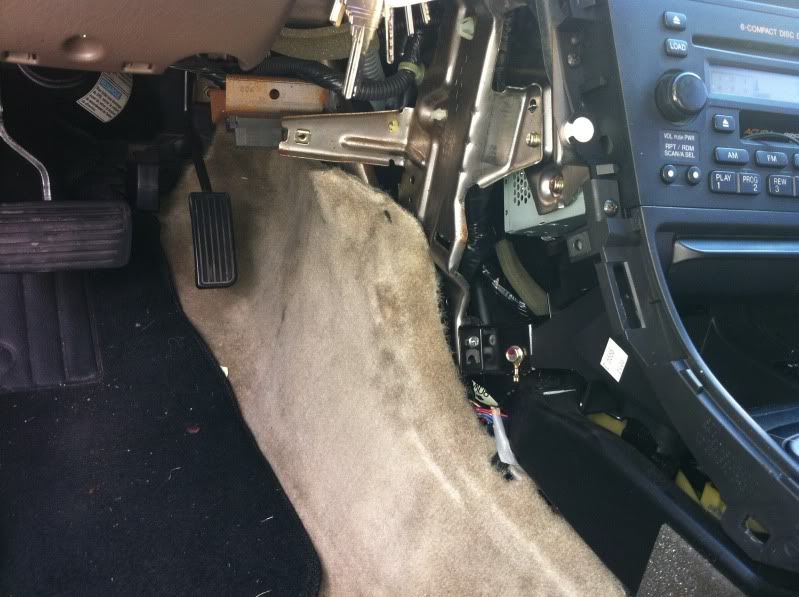
what ur looking for is the cable with the foam wrapped around it
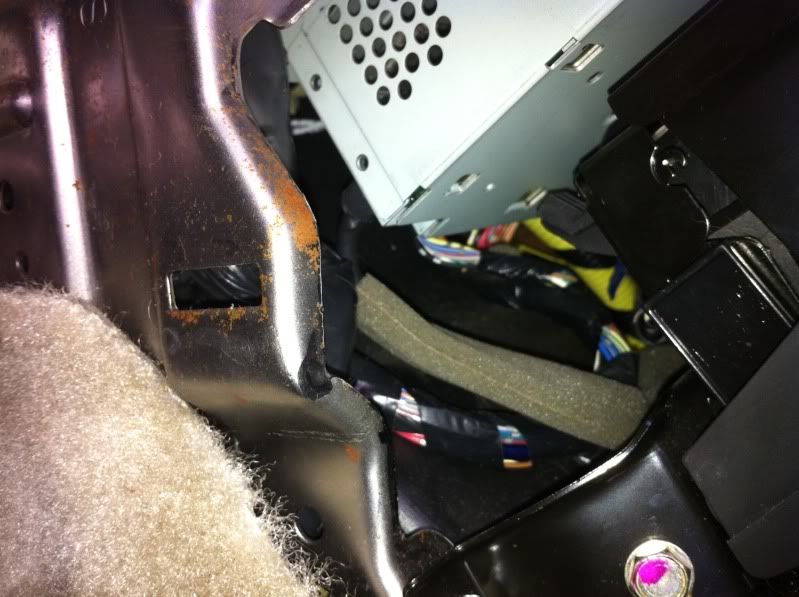
closeup
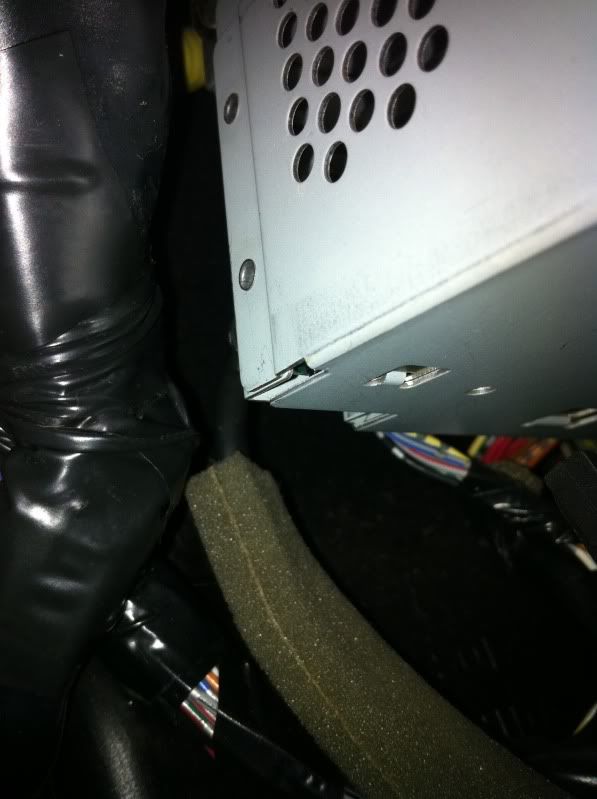
just push it back, put the code it and itll work. putting back the cable is tricky since u dont have space to work with. be patient and ull be able to put it in the hole (thats what she said).
hope this helps
BTW
for those who dont have the code for ur car, u can register ur car here http://owners.acura.com/. once u do that, theyll give u 2 codes for ur radio. u will need the serial number for your radio. there are instructions on the website that tell u how to find it.
do all this and ur radio will work
this is how it should look when u take the panels off. check the DIY section of the 2nd gen forum to see how u take the panels off. pretty easy. next time it should only take me 5 minutes to do everything
what ur looking for is the cable with the foam wrapped around it
closeup
just push it back, put the code it and itll work. putting back the cable is tricky since u dont have space to work with. be patient and ull be able to put it in the hole (thats what she said).
hope this helps
BTW
for those who dont have the code for ur car, u can register ur car here http://owners.acura.com/. once u do that, theyll give u 2 codes for ur radio. u will need the serial number for your radio. there are instructions on the website that tell u how to find it.
do all this and ur radio will work
Last edited by younggunz88; Oct 7, 2010 at 06:38 PM.

Thread
Thread Starter
Forum
Replies
Last Post
dirleton
2G RDX (2013-2018)
11
Aug 6, 2024 08:19 PM
Puma Jim
2G RDX Audio, Bluetooth, Electronics & Navigation
20
Oct 20, 2016 11:59 AM
SinCityTLX
5G TLX Audio, Bluetooth, Electronics & Navigation
20
Oct 19, 2015 11:23 AM
jdmaszfcuk
2G TSX Audio, Bluetooth, Electronics & Navigation
16
Oct 19, 2015 12:31 AM
