


Fixed - Radio refuses to take radio code


Regional Coordinator (SoCal)
iTrader: (1)
Joined: Nov 2008
Posts: 2,462
Likes: 89
From: SoCal SGV 626
The fuse for the radio is located on the passenger side. Open the passenger door and you will see it to the right of the glove box. Pull the cover and find the right fuse to pull (checking the manual of course). Hope this helped!

alright, i kinda skimmed through this.. I had the same problem too, went to Acura, and all the told me to do was disconnect the antenna from the back window.. There's a little plastic thing on the top of back windshield, disconnect that, and then put the code. done. worked perfectly fine, no need to do all the work you guys are doing.....or you can always just drive into an underground garage too...

Instructor
Joined: Oct 2008
Posts: 171
Likes: 0
From: CT
cool ill try that now.
also i have been pulling the radio fuse instead of disconnecting batt and that works just as well (the radio fuse is located near your left foot when driving- pull the cover and see the fuses)
also i have been pulling the radio fuse instead of disconnecting batt and that works just as well (the radio fuse is located near your left foot when driving- pull the cover and see the fuses)
Instructor
Joined: Oct 2008
Posts: 171
Likes: 0
From: CT
gfrg88-
can you be more specific?
what panel are you talking about?
i pulled the panel on the top in the middle of back windsheild but thats for the rear brake light.
the side panels were impossible for me to take off-
how do they come off? seems like the seat is in the way.
please help
can you be more specific?
what panel are you talking about?
i pulled the panel on the top in the middle of back windsheild but thats for the rear brake light.
the side panels were impossible for me to take off-
how do they come off? seems like the seat is in the way.
please help
gfrg88-
can you be more specific?
what panel are you talking about?
i pulled the panel on the top in the middle of back windsheild but thats for the rear brake light.
the side panels were impossible for me to take off-
how do they come off? seems like the seat is in the way.
please help
can you be more specific?
what panel are you talking about?
i pulled the panel on the top in the middle of back windsheild but thats for the rear brake light.
the side panels were impossible for me to take off-
how do they come off? seems like the seat is in the way.
please help

2nd Gear
Joined: Oct 2009
Posts: 2
Likes: 0
Tried all of this
I have a 1999 Acura 3.0 CL 2dr I replaced my starter once fixed my stero ask for the security code. I went to the dealership and they gave me the correct code for the serial number found on my Boss stero that came with the car. I made 3 attempts to enter the code got Code E like the rest of you... Tried taking out the antenna not a difficult task on the 99 radio pops right out but still does not work ....when I enter the code I enter the first 3 digits and the screen reveals another letter of the word "code" I get to COD ... and then every number punched in shows a negitive symbol before the number not sure if it means annything but &^%&^ just need the radio to work let me know if you guys have any other ideas on how to fix it I going to try retriving the code from https://radio-navicode.acura.com/ to see if I get any other codes let me know thanks

1st Gear
Joined: Dec 2009
Posts: 1
Likes: 0
I've tried every trick except removing the panels to unplug the antenna. Had hard time removing the panels so will either I'll drive to an underground garage (which I don't have any in a 50 miles radius of my house) or get it fixed at the dealership. None good choices.
Spoke to my dealer and escalated to manager. No luck getting it fixed without paying at least a few hundred bucks. Called Acura and filed a complaint.
I am very disappointed with Acura. This is a design defect and Acura should fix it for free.
Spoke to my dealer and escalated to manager. No luck getting it fixed without paying at least a few hundred bucks. Called Acura and filed a complaint.
I am very disappointed with Acura. This is a design defect and Acura should fix it for free.
Last edited by lastAcura03; Dec 29, 2009 at 01:19 PM. Reason: spelling

1st Gear
Joined: Jan 2010
Posts: 1
Likes: 0
How to get Radio code for free Ok, so I was having the same problem with my radio code.
I installed a new battery and my radio code didn't work.
I read up on some tips that people posted here.
1. I wasn't about to take apart my dash. I'm sure I could take apart my dashboard to unplug the antenna, but I doubt I could put it back properly. (so i didn't)
2. Some advised to take it to an underground garage. I tried this and it didn't work for me.
3. I'm not going to take it to a dealership and pay those guys $100+ bucks to fix it.
Here is the easiest and FREE way to fix it!!!!!
1. GET THE SERIAL #
- here's how:
Turn the key (dont start car)
hold 1 and 6 simultaneously
turn radio on
it will display two 4 digit numbers. Write those down. That is your serial #.
2. Call toll free (this is an authorized ACURA help line) its safe
1-800-382-2238
3. Give them your VIN # and your serial number. They will then give you your radio code.
I just did it and its working fine!!!!!!!
Reply if this helps or not. GOOD LUCK!!!!
I installed a new battery and my radio code didn't work.
I read up on some tips that people posted here.
1. I wasn't about to take apart my dash. I'm sure I could take apart my dashboard to unplug the antenna, but I doubt I could put it back properly. (so i didn't)
2. Some advised to take it to an underground garage. I tried this and it didn't work for me.
3. I'm not going to take it to a dealership and pay those guys $100+ bucks to fix it.
Here is the easiest and FREE way to fix it!!!!!
1. GET THE SERIAL #
- here's how:
Turn the key (dont start car)
hold 1 and 6 simultaneously
turn radio on
it will display two 4 digit numbers. Write those down. That is your serial #.
2. Call toll free (this is an authorized ACURA help line) its safe
1-800-382-2238
3. Give them your VIN # and your serial number. They will then give you your radio code.
I just did it and its working fine!!!!!!!
Reply if this helps or not. GOOD LUCK!!!!

^^^ I don't think that's the problem; the problem is having the right code & the radio still won't take it.
But glad I found this thread. I wanted to try the underground garage thing but amazed at how hard it is to find one. I disconnected the antenna amp in the trunk but that didn't work. I guess the cable that runs from the radio to the trunk is still picking up stations. Would hate to have to pull panels off just to get the radio working!
The dealer would've charged me about 100 bucks because they say they would have to uninstall the radio & "reprogram" it, whatever that means.
But glad I found this thread. I wanted to try the underground garage thing but amazed at how hard it is to find one. I disconnected the antenna amp in the trunk but that didn't work. I guess the cable that runs from the radio to the trunk is still picking up stations. Would hate to have to pull panels off just to get the radio working!
The dealer would've charged me about 100 bucks because they say they would have to uninstall the radio & "reprogram" it, whatever that means.

2nd Gear
Joined: Mar 2010
Posts: 2
Likes: 0
Possible fix
Hi yall,
I have a 98 3.2 Tl. Not sure if this applies to other models but the concept should hold. There are two fuses which control the radio. the main is interior and the back-up is under the hood. If you remove both this should reset the radio. When you re-insert both the radio should ask for the code and if entered correctly should work. Hope this helps.
I have a 98 3.2 Tl. Not sure if this applies to other models but the concept should hold. There are two fuses which control the radio. the main is interior and the back-up is under the hood. If you remove both this should reset the radio. When you re-insert both the radio should ask for the code and if entered correctly should work. Hope this helps.
Hi yall,
I have a 98 3.2 Tl. Not sure if this applies to other models but the concept should hold. There are two fuses which control the radio. the main is interior and the back-up is under the hood. If you remove both this should reset the radio. When you re-insert both the radio should ask for the code and if entered correctly should work. Hope this helps.
I have a 98 3.2 Tl. Not sure if this applies to other models but the concept should hold. There are two fuses which control the radio. the main is interior and the back-up is under the hood. If you remove both this should reset the radio. When you re-insert both the radio should ask for the code and if entered correctly should work. Hope this helps.

1st Gear
Joined: Feb 2006
Posts: 1
Likes: 0
From: Northern VA
Unplugging the antenna from the rear window worked for me. I figured that if I had to go through the motions, I may as well try them in the order of simplest to the most complex! If disonnecting the glass antenna didnt work, I was going to find an underground garage, and then if both options failed, I would go through with the fix recommended. I have to note that even with the antenna unplugged, I could still hear quite a few radio stations (they were noisy as hell, but then I live out in the DC suburbs).
My guess is that if you are close to radio stations, unplugging the glass antenna lead might not help because the leads connecting the head unit to the glass antenna is long enough to act as a good antenna; some RF interference indeed!
My guess is that if you are close to radio stations, unplugging the glass antenna lead might not help because the leads connecting the head unit to the glass antenna is long enough to act as a good antenna; some RF interference indeed!
I tried 'em all:
1) unplugging antenna wire from back of radio
2) unplugging the other end of that wire (coil / antenna amp under rear deck)
3) unplugging glass antenna connector (top rear-right at rear windshield/roof junction)
4) setting radio to AM before killing power
...and only #1 worked.
I'm within a 15 mile radius of the Sears Tower where a lot of high power stations transmit from. Methods 2 & 3 did practically nothing in terms of the quality of the radio reception (be it AM or FM). Only #1 gave me full static. The antenna wire is probably poorly shielded combined with a very sensitive RF input stage. Only true way to kill the reception in these cases is full isolation.
I was gonna try some experiments with aluminum foil....cause even though method #1 works, it sucks sticking my fat hands in there.
1) unplugging antenna wire from back of radio
2) unplugging the other end of that wire (coil / antenna amp under rear deck)
3) unplugging glass antenna connector (top rear-right at rear windshield/roof junction)
4) setting radio to AM before killing power
...and only #1 worked.
I'm within a 15 mile radius of the Sears Tower where a lot of high power stations transmit from. Methods 2 & 3 did practically nothing in terms of the quality of the radio reception (be it AM or FM). Only #1 gave me full static. The antenna wire is probably poorly shielded combined with a very sensitive RF input stage. Only true way to kill the reception in these cases is full isolation.
I was gonna try some experiments with aluminum foil....cause even though method #1 works, it sucks sticking my fat hands in there.

I think they know (or at least the techs do). One dealership I called said that what they have to do is take out the radio & reprogram it....yeah, right.
However, another dealership gave me the suggestion over the phone to try entering the code while in an underground parking lot (which looks to be a proven alternative based on posts on the forum). Otherwise, I would have to take it in if it didn't work, where they would probably do the antenna thing.
However, another dealership gave me the suggestion over the phone to try entering the code while in an underground parking lot (which looks to be a proven alternative based on posts on the forum). Otherwise, I would have to take it in if it didn't work, where they would probably do the antenna thing.

1st Gear
Joined: Jun 2010
Posts: 1
Likes: 0
I am new to Acurazine and have been stuggling with the radio code issue for sometime. The first time the radio would not take the code(s) I paid Acura $80 to fix it by pulling the antenna plug. I tried the underground garage trick yesterday and it worked like a charm. Thanks!

1st Gear
Joined: Jul 2010
Posts: 1
Likes: 1
Even much easier way than go to under ground garage!
Hi, guys. I just want to let you all know that there is a much easier way for doing that. You just need to cover your rear glass (where your antenna is) with two layers of foil. That way you can block the signal quite well. I did this and reachieved my radio like a miracle.
This approach is really working for me. I don't have under ground garage in my area. And I can do this just in my own garage. This approach is taught by my bf who was a physics. So credit is to him .
.
This approach is really working for me. I don't have under ground garage in my area. And I can do this just in my own garage. This approach is taught by my bf who was a physics. So credit is to him
.

Car junkie
Joined: Dec 2008
Posts: 26
Likes: 1
From: Los Angeles, CA
alright, i kinda skimmed through this.. I had the same problem too, went to Acura, and all the told me to do was disconnect the antenna from the back window.. There's a little plastic thing on the top of back windshield, disconnect that, and then put the code. done. worked perfectly fine, no need to do all the work you guys are doing.....or you can always just drive into an underground garage too...


1st Gear
Joined: Aug 2010
Posts: 1
Likes: 0
Hey guys, my battery tanked after 7+ years... not bad, got a new one, changed it myself, and of course the radio code did not work. I am the original owner with the original radio card and it still did not work. I was pretty pissed. Did some searching over here, was a bit lazy to pull the side panel to unplug the antenna, so I tried a few other things first. Here is what worked for me:
I dont take credit, I saw it on another post, but I figure it may help someone searching for this problem in the future:
(this is for a 2002 typeS)
turn the key (dont start car)
hold 1 and 6 simultaneously
turn radio on
it displayed 2 4 didgit codes (I wrote them down, but didnt need them)
display then read "err4" ("4" b/c thats how many times I tried entering my code before I assume)
then I input my code from my radio card,
radio turned on like magic
sweeeeeeeeeet
thanks to everyone's help on this board
- Nick
I dont take credit, I saw it on another post, but I figure it may help someone searching for this problem in the future:
(this is for a 2002 typeS)
turn the key (dont start car)
hold 1 and 6 simultaneously
turn radio on
it displayed 2 4 didgit codes (I wrote them down, but didnt need them)
display then read "err4" ("4" b/c thats how many times I tried entering my code before I assume)
then I input my code from my radio card,
radio turned on like magic
sweeeeeeeeeet
thanks to everyone's help on this board
- Nick

1st Gear
Joined: Aug 2010
Posts: 1
Likes: 0
The underground parking works for me.
Radio fuse blew up yesterday and the radio didn't take the code anymore. The holding 1-6 approach didn't work for me. Decided to drive to 2 level down basement parking and it worked perfectly.
Thanks all!!
Radio fuse blew up yesterday and the radio didn't take the code anymore. The holding 1-6 approach didn't work for me. Decided to drive to 2 level down basement parking and it worked perfectly.
Thanks all!!


Intermediate
Joined: Nov 2010
Posts: 39
Likes: 0
From: HondaLand, South Florida
THE ANTENNA CAN BE PULLED FROM THE REAR WINDOW... NO NEED TO REACH BEHIND THE HEAD UNIT!
its a harness, sorta like the one that connects the speakers to the head unit.
just pop that little black cover off, its on the passenger side, on the top of the rear window. and pull the plug.. input your code and it should work.
if you are getting an "err1" message, don't bother trying until it goes back to "code"
err1 means its locked itself out for an hour. . part of the anti theft thing..
if you're getting "code" unplug the antenna from the back window, put in code, then plug it back in once it accepts it.
(2nd gen tl's)_
its a harness, sorta like the one that connects the speakers to the head unit.
just pop that little black cover off, its on the passenger side, on the top of the rear window. and pull the plug.. input your code and it should work.
if you are getting an "err1" message, don't bother trying until it goes back to "code"
err1 means its locked itself out for an hour. . part of the anti theft thing..
if you're getting "code" unplug the antenna from the back window, put in code, then plug it back in once it accepts it.
(2nd gen tl's)_
THE ANTENNA CAN BE PULLED FROM THE REAR WINDOW... NO NEED TO REACH BEHIND THE HEAD UNIT!
its a harness, sorta like the one that connects the speakers to the head unit.
just pop that little black cover off, its on the passenger side, on the top of the rear window. and pull the plug.. input your code and it should work.
if you are getting an "err1" message, don't bother trying until it goes back to "code"
err1 means its locked itself out for an hour. . part of the anti theft thing..
if you're getting "code" unplug the antenna from the back window, put in code, then plug it back in once it accepts it.
(2nd gen tl's)_
its a harness, sorta like the one that connects the speakers to the head unit.
just pop that little black cover off, its on the passenger side, on the top of the rear window. and pull the plug.. input your code and it should work.
if you are getting an "err1" message, don't bother trying until it goes back to "code"
err1 means its locked itself out for an hour. . part of the anti theft thing..
if you're getting "code" unplug the antenna from the back window, put in code, then plug it back in once it accepts it.
(2nd gen tl's)_

1st Gear
Joined: May 2011
Posts: 1
Likes: 0
From: Chicago, IL
It works!!
Soooo happy to have found this forum! My radio was reading err-1 so I disconnected the battery, radio then asks for code, I entered in the code as I have done in the past and the radio wouldn't take it! Found this site and thank goodness, the antenna trick really works! I tried the underground garage trick, tried disconnecting the antenna in the rear window and still it didn't work. Finally as a last resort I got the nerve up to get to the back of the radio and disconnect the main antenna after reading past threads! Took me less than 30 minutes total for success! Thanks to all for the instructions! It's nice to have tunes again, I got tired of singing to myself for entertainment

2nd Gear
Joined: Jan 2012
Posts: 2
Likes: 0
Here's what worked for me...I bought my '03 TL used, and the previous (original) owner could not get the code to take. I tried unsuccessfully also, and then found this site.
I didn't want to tear off the console trim to remove the antenna connector, so I tried one of the other suggestions.
Turn off the radio, and start the car. Drive a few minutes to warm up, then pull over (I just drove 10 minutes in the neighborhood). Leave the car in drive, and set the parking brake.
Turn on the radio (it should display COdE and the error number) then punch in the code quickly. That did the trick for me (after many other failed attempts), without an underground garage, and without taking the car apart.
Good luck.
I didn't want to tear off the console trim to remove the antenna connector, so I tried one of the other suggestions.
Turn off the radio, and start the car. Drive a few minutes to warm up, then pull over (I just drove 10 minutes in the neighborhood). Leave the car in drive, and set the parking brake.
Turn on the radio (it should display COdE and the error number) then punch in the code quickly. That did the trick for me (after many other failed attempts), without an underground garage, and without taking the car apart.
Good luck.

Last night my car alarm went off and i was not able to turn it off with my remote so i had to disconnect the battery and now I am also not able to enter in my code.
During my lunch break today im going to try the underground parking garage trick to see if that works.
Just to be clear, i drive to the garage and just enter in the code and thats it?
During my lunch break today im going to try the underground parking garage trick to see if that works.
Just to be clear, i drive to the garage and just enter in the code and thats it?
Last edited by Skunkworks; Feb 6, 2012 at 01:00 PM.


Advanced
Joined: Oct 2007
Posts: 57
Likes: 2
Symptom: After disconnecting the battery the factory radio refuses to take the dealer provided radio code. Radio cycles through codes Err1-9 continuously.
Fix: Disconnect the FM/AM antenna from the radio and then re-enter the code.
...
DISCLAIMER: I am not responsible for any damage you may cause to your vehicle when performing the DIY steps. Please use your better judgment when bending and removing interior pieces.
DIY Steps:
1. Remove burlwood trim piece from center console by popping it out using a small flat head screw driver. Start at the edge nearest the rear of the car.
2. Remove the 3 philips head screws holding the side panel in place.
Questions, comments and suggestions are welcomed!
Fix: Disconnect the FM/AM antenna from the radio and then re-enter the code.
...
DISCLAIMER: I am not responsible for any damage you may cause to your vehicle when performing the DIY steps. Please use your better judgment when bending and removing interior pieces.
DIY Steps:
1. Remove burlwood trim piece from center console by popping it out using a small flat head screw driver. Start at the edge nearest the rear of the car.
2. Remove the 3 philips head screws holding the side panel in place.
Questions, comments and suggestions are welcomed!
The results: radio code is accepted by the bloody radio at the expense of a broken prong of the side panel and many scrapes of the right hand.
To step 2: on my 2003 TL there are 4 screws not 3. I broke the prong pulling the panel off with the 4th screw still on, which is near the dash piece.
This method works but is a pita. Anyway my thanks to death.

1st Gear
Joined: Sep 2012
Posts: 1
Likes: 0
Did you solve this issue and if so, how? I am in the same boat. Pulled the antenna from behind the head unit and still no luck.
I guess the next stop is the local steelership.

Thank you to all the posters with the details..i followed them diligently.

1st Gear
Joined: Dec 2012
Posts: 1
Likes: 0
Just did the "garage trick" (12/12/12) to enter a recalcitrant code. I was actually on error9 (meaning I had failed eight or nine times in effort to input code) Only one chance left before having to wait an hour for another set of ten tries.) Had already previously gone through three sets of ten since yesterday--grrrrr.
Lowest floor in my office garage is actually first floor, but there are four floors of concete above. I parked in a place where part of building blocks view of outdoors, and backed into a corner with concrete on two sides. I entered code and SHAZAMM! It worked. I am SO relieved--did not want to disassemble dash/pay stupid dealer to fart around with this.
Lowest floor in my office garage is actually first floor, but there are four floors of concete above. I parked in a place where part of building blocks view of outdoors, and backed into a corner with concrete on two sides. I entered code and SHAZAMM! It worked. I am SO relieved--did not want to disassemble dash/pay stupid dealer to fart around with this.

10th Gear
Joined: Jan 2008
Posts: 11
Likes: 0
Here is another way to make it easier... I got tired of having to partially disassemble the dash etc to get the antenna wire disconnected and I had not heard of the garage method. (Besides - that method needs a garage nearby). So...I bought a couple extension pieces and bascially lengthened the antenna cord so it reached over to the fuse box area, with the two pieces joining right there. That way, when we have to do the disconnect and enter the CODE thing, I can just open the fuse box cover, disconnect to the extensions from each other, and TA DA! all done in just a couple minutes.

Intermediate
Joined: Oct 2012
Posts: 27
Likes: 0
From: From San Antonio, TX. Live in Sac, CA
Symptom: After disconnecting the battery the factory radio refuses to take the dealer provided radio code. Radio cycles through codes Err1-9 continuously.
Fix: Disconnect the FM/AM antenna from the radio and then re-enter the code.
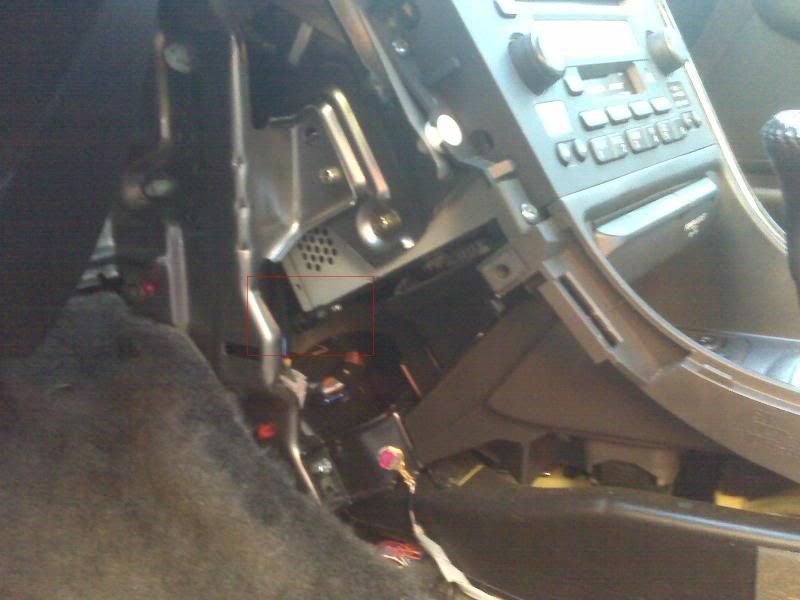
Pics:
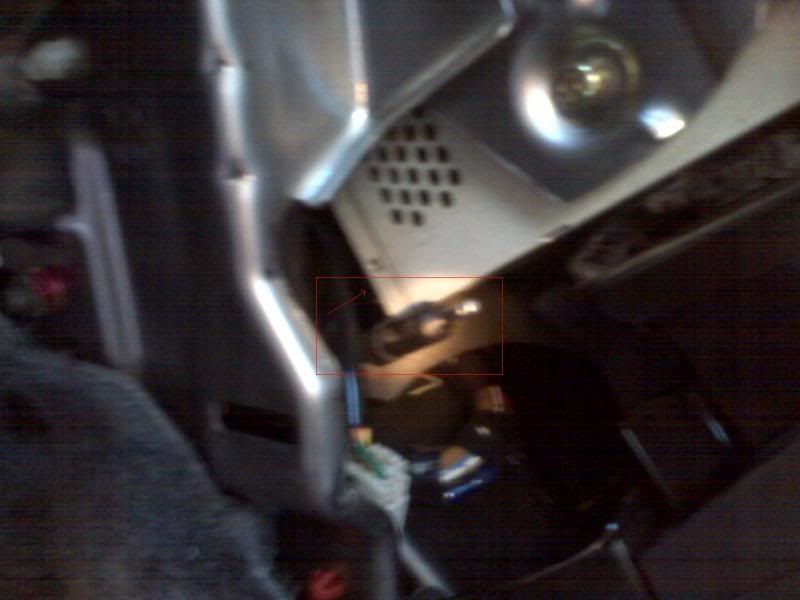
Required Tools:
1 small flat head screw driver
1 small philips head screw driver
1 pair of needle nose pliers, the smaller the better (optional)
DISCLAIMER: I am not responsible for any damage you may cause to your vehicle when performing the DIY steps. Please use your better judgment when bending and removing interior pieces.
DIY Steps:
1. Remove burlwood trim piece from center console by popping it out using a small flat head screw driver. Start at the edge nearest the rear of the car.
2. Remove the 3 philips head screws holding the side panel in place.
3. Pop the lower dash piece (found bellow the steering wheel) towards you starting with the piece with intersects with the side panel under the dash. It should pop off and hang.
Before performing step 4 you may want to warm up your car. This will ensure that the plastic interior piece is less brittle.
4. Gently bend the side piece and wiggle it until the two prongs pointing toward the rear of the car are free. Once the two prongs are free pull the side panel straight up and out towards the driver side door.
5. You should now be able to see the left side of the factory radio. In the small hole bellow the radio you will see a black cable wrapped in foam. This is the AM/FM antenna line. Gently reach in and pull or push the cable away from the radio. It should pop out quite easily. You can also use a pair in needle nose pliers to pop it out.
6. Place your keys in the ignition and turn to the on position. Turn the radio on and enter the unlock code (5 digit code). The radio should come on but have all static. This is due to the fact that at this point it no longer has an antenna.
7. Turn the key to the off position.
8. Follow the above mentioned steps in reverse order. First attach the radio antenna and confirm that it works.
Questions, comments and suggestions are welcomed!
Fix: Disconnect the FM/AM antenna from the radio and then re-enter the code.
Pics:
Required Tools:
1 small flat head screw driver
1 small philips head screw driver
1 pair of needle nose pliers, the smaller the better (optional)
DISCLAIMER: I am not responsible for any damage you may cause to your vehicle when performing the DIY steps. Please use your better judgment when bending and removing interior pieces.
DIY Steps:
1. Remove burlwood trim piece from center console by popping it out using a small flat head screw driver. Start at the edge nearest the rear of the car.
2. Remove the 3 philips head screws holding the side panel in place.
3. Pop the lower dash piece (found bellow the steering wheel) towards you starting with the piece with intersects with the side panel under the dash. It should pop off and hang.
Before performing step 4 you may want to warm up your car. This will ensure that the plastic interior piece is less brittle.
4. Gently bend the side piece and wiggle it until the two prongs pointing toward the rear of the car are free. Once the two prongs are free pull the side panel straight up and out towards the driver side door.
5. You should now be able to see the left side of the factory radio. In the small hole bellow the radio you will see a black cable wrapped in foam. This is the AM/FM antenna line. Gently reach in and pull or push the cable away from the radio. It should pop out quite easily. You can also use a pair in needle nose pliers to pop it out.
6. Place your keys in the ignition and turn to the on position. Turn the radio on and enter the unlock code (5 digit code). The radio should come on but have all static. This is due to the fact that at this point it no longer has an antenna.
7. Turn the key to the off position.
8. Follow the above mentioned steps in reverse order. First attach the radio antenna and confirm that it works.
Questions, comments and suggestions are welcomed!
Worked like a charm thanks!! Listening to my tunes

Banned
Joined: Mar 2013
Posts: 1
Likes: 0
I just had the error code problem and was successful with the "underground garage trick". But I'm puzzled as to why it worked! I had made numerous tries to set the code over several days, all ending in failure. After reading this thread I went to the second underground level of a garage and drove as far away as possible from the entrance, I turned on the radio and entered my code. The radio immediately came on and I was able to listen to it. But if the purpose of going underground is to isolate the radio from any external signals, then obviously I hadn't done that since the radio played. So how come the garage trick worked for me??!! (Not complaining--just curious.)


1st Gear
Joined: Jun 2013
Posts: 1
Likes: 0
From: Sacramento CA
Same here, popped out the antenna wire on the back of the radio and then popped in the code with no issues... Wish I would have seen this thread before I tore the center console and dash apart tho I would have disconnected the antenna at the back window instead.

1st Gear
Joined: Aug 2013
Posts: 1
Likes: 0
I had the same problem with an Acura TL 2003. I had the correct code for the radio but the radio wouldn't take it. I verified the code by getting the serial number of the radio (press 1 and 6 simultaneously while powering on the radio) and using the acura online radio code retrieval site. I read about the antenna disconnect method in this forum and was dreading going through those steps when I saw the post about entering the code in an under ground garage. I tried that and it worked in the first attempt. So definitely try that first.