


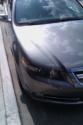
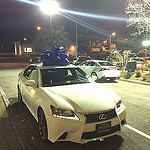
Picking up my Type-S tuesday


Racer
Joined: Mar 2010
Posts: 357
Likes: 16
From: SOCAL 626
maybe the 09 tsx didnt have an auxiliary input so he had to convert it. but the tl-s already has a auxiliary input soo all you need is just a 3.5mm cable. also dont get a cheap ass cord that costs like $2. there is actually a difference in quality. you can get a monster 3.5mm cable for $15.
maybe the 09 tsx didnt have an auxiliary input so he had to convert it. but the tl-s already has a auxiliary input soo all you need is just a 3.5mm cable. also dont get a cheap ass cord that costs like $2. there is actually a difference in quality. you can get a monster 3.5mm cable for $15.
 I guess you buy Monster Cable HDMI's too... lmfao!!!


cables are cables. I bought a 70 dollar monster HDMI cable then returned it and got a 6 dollar cable from monoprice. Same thing.
DID further research and found out it's all the same. The cable either works or it doesn't.
monoprice has good/cheap stuff there. i recommend them and would never buy monster, because they rip you a new one everytime.
DID further research and found out it's all the same. The cable either works or it doesn't.
monoprice has good/cheap stuff there. i recommend them and would never buy monster, because they rip you a new one everytime.
Trending Topics

Advanced
Joined: Mar 2010
Posts: 74
Likes: 5
From: BC, Canada

LIES!!! At least partially. I don't have to argue, I just have to show you pictures that prove the issue. (with Video, not sure about audio)
I used to think the same thing until I ran into this problem. Purchased a PS/3 and connecting to a 1080P 52" using the cheap 6$ HDMI cable right away I was WTF Is this!? Tried different ports, same thing everywhere. Bought a rocketfish HDMI Cable and problem went away, so then I took photos. The next three are just 3 random shots showing the issue, white specks flicking all over the screen. The final shot just shows the setup used to grab the pictures.
Click on the LINKs not the images to make em big and you'll see the problem on screen on #2,3,4 - White dots, they were flashing all over the whole screen. You can see them in #5 too.
 1http://img.photobucket.com/albums/v3...bleTest-01.jpg
 2http://img.photobucket.com/albums/v3...bleTest-02.jpg
 3http://img.photobucket.com/albums/v3...bleTest-03.jpg
 4http://img.photobucket.com/albums/v3...bleTest-04.jpg
 5http://img.photobucket.com/albums/v3...bleTest-05.jpg
The four close up photos were all taken in manual with same camera settings.
As soon as I plugged in the Rocketfish ($~40$) cable it resolved the problem so I decided to take pictures. First photo is with the Rocketfish Cable in place. Next three photos are three random photos using the 6$ superstore cable. Final photo is just a shot showing how it was setup to grab the images.
As a note, the 6$ cable seemed to work just fine if I set it to 720p but not 1080p.
Do you need to buy 100$ monster cable cables? Probably not, but be aware that there are issues when you try to push too much data through cheaper cables that have either little or no shielding or substandard components that can cause problems.
Does this happen for audio? Poor audio from cheap cables? I can't say for certain there myself but take the info as you will.
Grats on the incoming Type-S Kenni!
I used to think the same thing until I ran into this problem. Purchased a PS/3 and connecting to a 1080P 52" using the cheap 6$ HDMI cable right away I was WTF Is this!? Tried different ports, same thing everywhere. Bought a rocketfish HDMI Cable and problem went away, so then I took photos. The next three are just 3 random shots showing the issue, white specks flicking all over the screen. The final shot just shows the setup used to grab the pictures.
Click on the LINKs not the images to make em big and you'll see the problem on screen on #2,3,4 - White dots, they were flashing all over the whole screen. You can see them in #5 too.
 1http://img.photobucket.com/albums/v3...bleTest-01.jpg
 2http://img.photobucket.com/albums/v3...bleTest-02.jpg
 3http://img.photobucket.com/albums/v3...bleTest-03.jpg
 4http://img.photobucket.com/albums/v3...bleTest-04.jpg
 5http://img.photobucket.com/albums/v3...bleTest-05.jpg
The four close up photos were all taken in manual with same camera settings.
As soon as I plugged in the Rocketfish ($~40$) cable it resolved the problem so I decided to take pictures. First photo is with the Rocketfish Cable in place. Next three photos are three random photos using the 6$ superstore cable. Final photo is just a shot showing how it was setup to grab the images.
As a note, the 6$ cable seemed to work just fine if I set it to 720p but not 1080p.
Do you need to buy 100$ monster cable cables? Probably not, but be aware that there are issues when you try to push too much data through cheaper cables that have either little or no shielding or substandard components that can cause problems.
Does this happen for audio? Poor audio from cheap cables? I can't say for certain there myself but take the info as you will.
Grats on the incoming Type-S Kenni!
Last edited by Marmbo; Oct 23, 2010 at 09:13 AM.



3.5mm audio cables are analog and can be subject to loss of quality due to poor cables.
HDMI cables are digital and they either work or they don't.
Last edited by skd2k1; Oct 23, 2010 at 10:32 AM.

Advanced
Joined: Apr 2010
Posts: 76
Likes: 0
From: Wisconsin
Marmbo, I agree. I don't think Monster is ever necessary but getting too cheap of cables will bite you in the rear. Typically a good $15-30 6' HDMI cable will work great. I've gotten all of mine from cablewholesale.com and haven't had any issues and I'm pushing 3D games over the PS3.
Wasn't trying to start a debate. I'm simply saying there is NO reason to over pay for cables. However if you feel it's necessary or makes a difference, well then go ahead. My home theater is set up using 5 HDMI cables purchased from monoprice and I have had absolutely no problems. And I have the cable in the link I provided above, no problems with that either!
LIES!!! At least partially. I don't have to argue, I just have to show you pictures that prove the issue. (with Video, not sure about audio)
I used to think the same thing until I ran into this problem. Purchased a PS/3 and connecting to a 1080P 52" using the cheap 6$ HDMI cable right away I was WTF Is this!? Tried different ports, same thing everywhere. Bought a rocketfish HDMI Cable and problem went away, so then I took photos. The next three are just 3 random shots showing the issue, white specks flicking all over the screen. The final shot just shows the setup used to grab the pictures.
Click on the LINKs not the images to make em big and you'll see the problem on screen on #2,3,4 - White dots, they were flashing all over the whole screen. You can see them in #5 too.
1http://img.photobucket.com/albums/v3...bleTest-01.jpg
2http://img.photobucket.com/albums/v3...bleTest-02.jpg
3http://img.photobucket.com/albums/v3...bleTest-03.jpg
4http://img.photobucket.com/albums/v3...bleTest-04.jpg
5http://img.photobucket.com/albums/v3...bleTest-05.jpg
The four close up photos were all taken in manual with same camera settings.
As soon as I plugged in the Rocketfish ($~40$) cable it resolved the problem so I decided to take pictures. First photo is with the Rocketfish Cable in place. Next three photos are three random photos using the 6$ superstore cable. Final photo is just a shot showing how it was setup to grab the images.
As a note, the 6$ cable seemed to work just fine if I set it to 720p but not 1080p.
Do you need to buy 100$ monster cable cables? Probably not, but be aware that there are issues when you try to push too much data through cheaper cables that have either little or no shielding or substandard components that can cause problems.
Does this happen for audio? Poor audio from cheap cables? I can't say for certain there myself but take the info as you will.
Grats on the incoming Type-S Kenni!
I used to think the same thing until I ran into this problem. Purchased a PS/3 and connecting to a 1080P 52" using the cheap 6$ HDMI cable right away I was WTF Is this!? Tried different ports, same thing everywhere. Bought a rocketfish HDMI Cable and problem went away, so then I took photos. The next three are just 3 random shots showing the issue, white specks flicking all over the screen. The final shot just shows the setup used to grab the pictures.
Click on the LINKs not the images to make em big and you'll see the problem on screen on #2,3,4 - White dots, they were flashing all over the whole screen. You can see them in #5 too.
1http://img.photobucket.com/albums/v3...bleTest-01.jpg2http://img.photobucket.com/albums/v3...bleTest-02.jpg3http://img.photobucket.com/albums/v3...bleTest-03.jpg4http://img.photobucket.com/albums/v3...bleTest-04.jpg5http://img.photobucket.com/albums/v3...bleTest-05.jpgThe four close up photos were all taken in manual with same camera settings.
As soon as I plugged in the Rocketfish ($~40$) cable it resolved the problem so I decided to take pictures. First photo is with the Rocketfish Cable in place. Next three photos are three random photos using the 6$ superstore cable. Final photo is just a shot showing how it was setup to grab the images.
As a note, the 6$ cable seemed to work just fine if I set it to 720p but not 1080p.
Do you need to buy 100$ monster cable cables? Probably not, but be aware that there are issues when you try to push too much data through cheaper cables that have either little or no shielding or substandard components that can cause problems.
Does this happen for audio? Poor audio from cheap cables? I can't say for certain there myself but take the info as you will.
Grats on the incoming Type-S Kenni!

Thread
Thread Starter
Forum
Replies
Last Post
Sarlacc
Console & Computer Gaming
5
Sep 30, 2015 02:15 PM
Joe Avesyan
3G TL Performance Parts & Modifications
9
Sep 29, 2015 03:57 PM