


Install Guidelines for Peripheral PXAMG with PGHHD2


Thread Starter
Former Sponsor
iTrader: (3)
Joined: Jun 2003
Posts: 2,376
Likes: 54
From: Gig Harbor, WA.
Install Guidelines for Peripheral PXAMG with PGHHD2
Some of you lucky dogs have acquired a PGHHD2 harness from a very special place. Thank you to Peripheral for giving us exclusive access to this unreleased harness.
These pre-release harnesses do not come with instructions. Because of that I have put together a few simple guidelines. These are not installation instructions. As always we recommend that this install be completed by a professional installer.
STEP 1
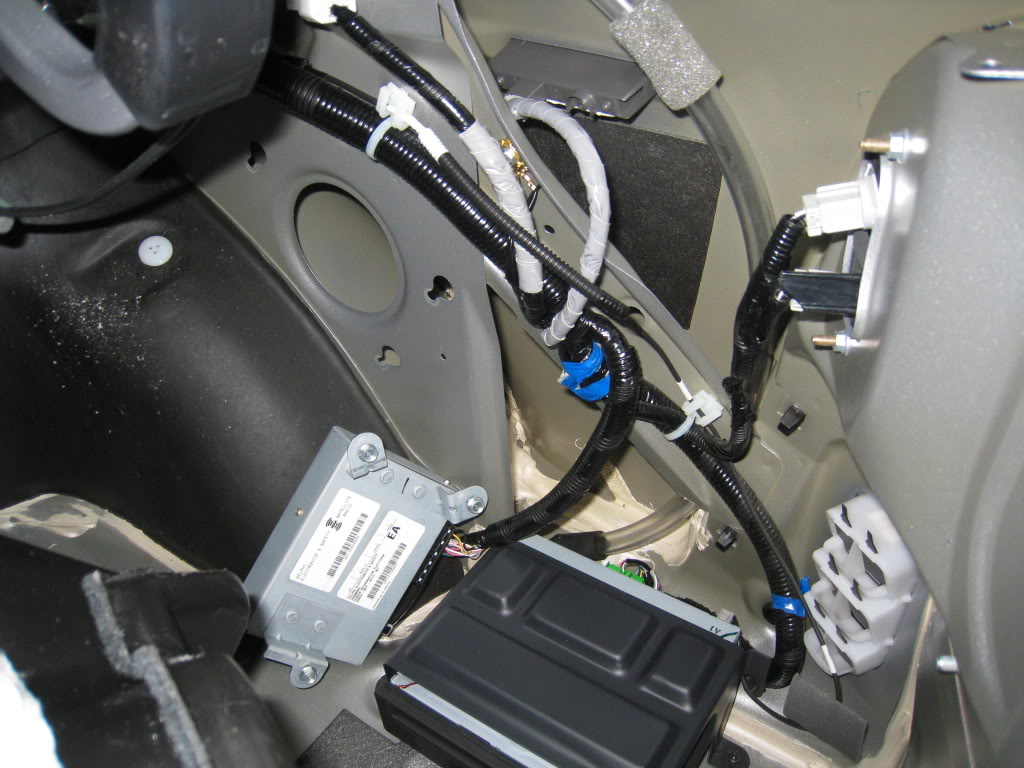
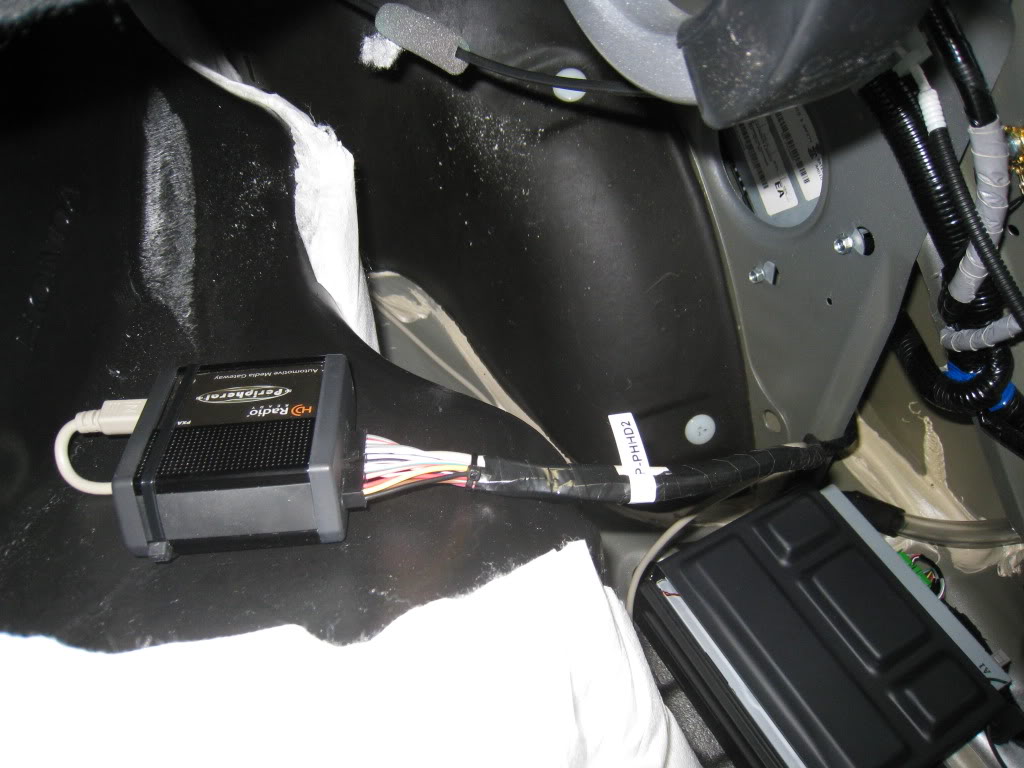
Locate your XM/NavTraffic tuner in the trunk of your TL. It will be behind the carpet liner on the passenger side. It is held in by three 10mm bolts. Loosen the bolts and pull the tuner box out so that you can see the harness plugs. This picture below shows the tuner box unmounted.....
STEP 2
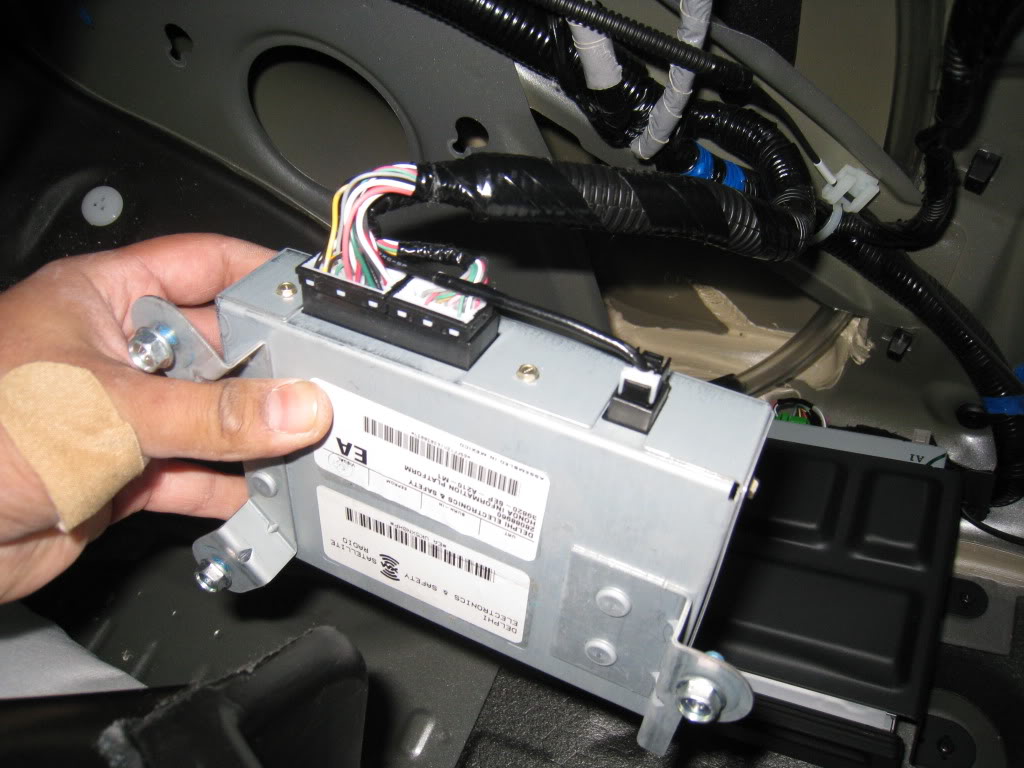
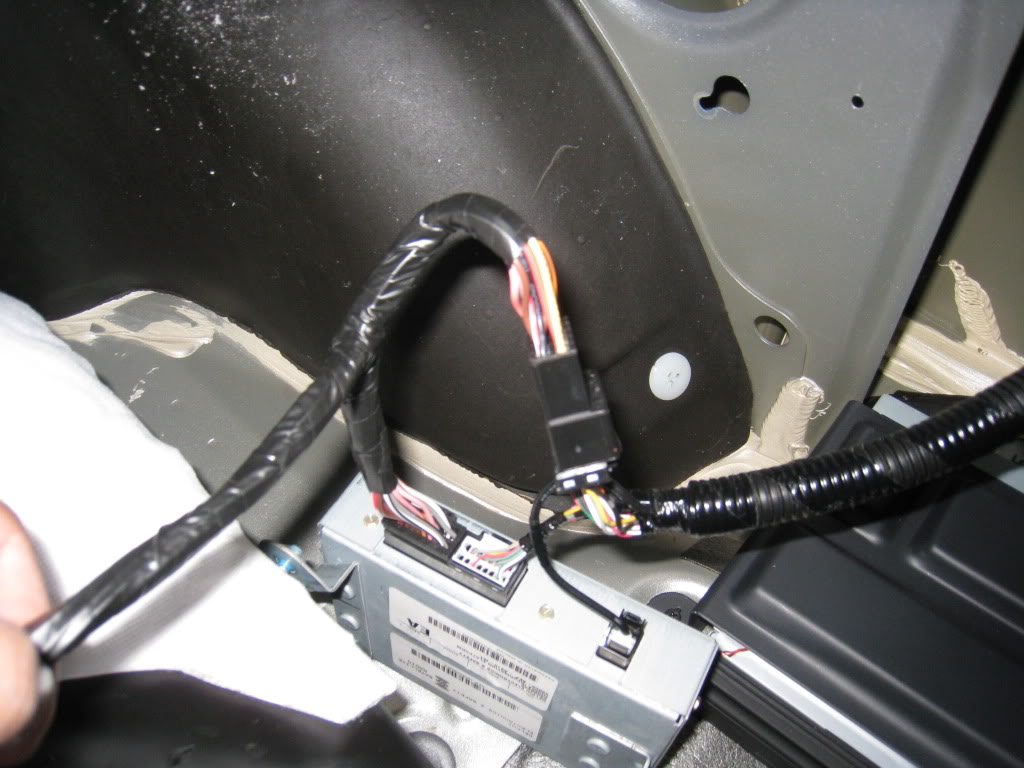
Unplug the bigger of the two black plugs. Insert your Peripheral PGHHD2 harness in line with this plug. Meaning that the female side of your PGHHD2 plugs into the male harness on the car and the male side of your PGHHD2 plugs into the XM/NavTraffic tuner box.
STEP 3
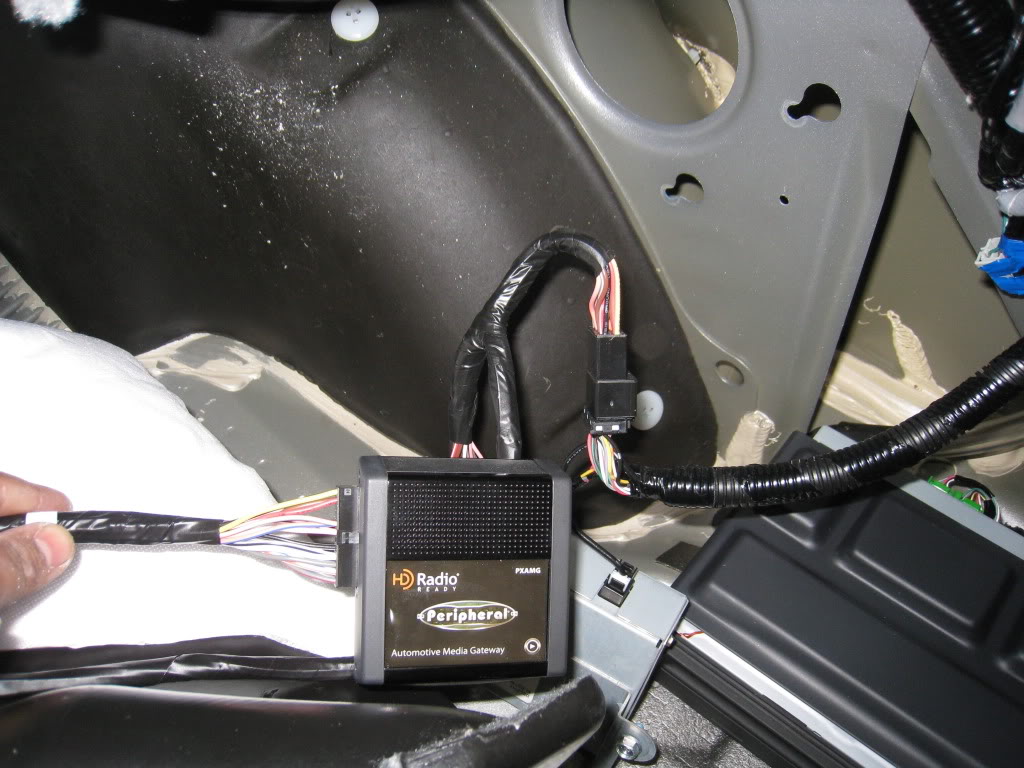
There are 4 numbered dip switches on your PXAMG module. They should all be in the UP or OFF position when the PXAMG is shipped. Flip dip switch two DOWN to the ON position. Plug in your Peripheral PXAMG to the corresponding plug on your PGHHD2 harness.
STEP 4
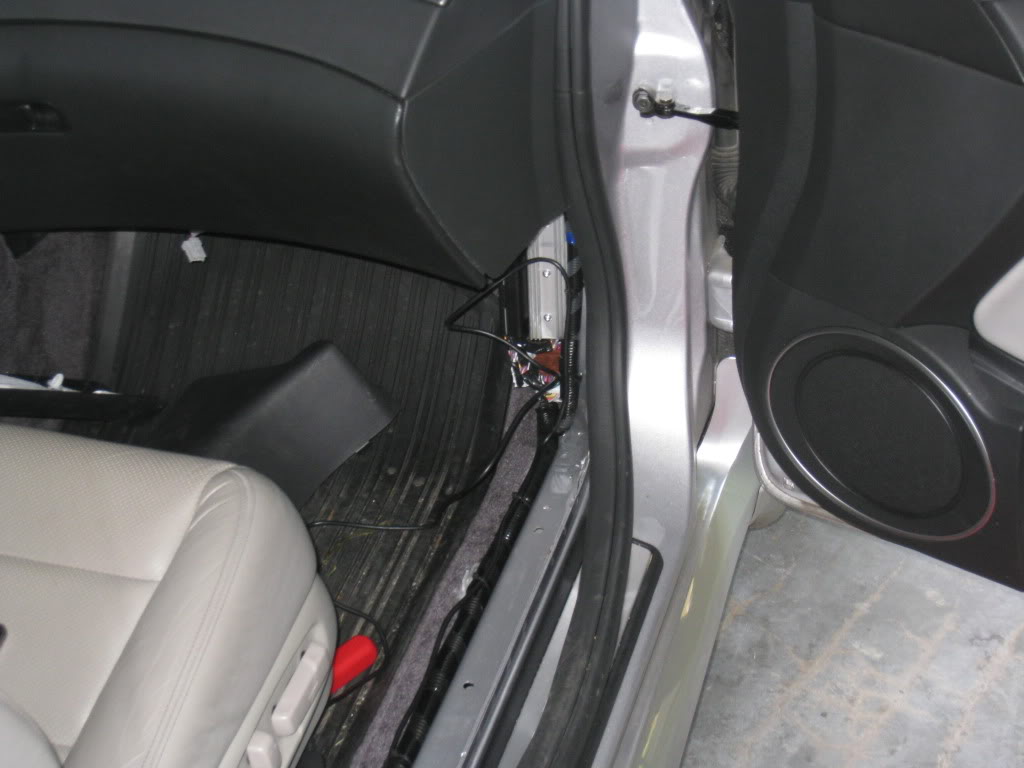
Place the iPod end of your Peripheral iPod cable where you want it. Be sure you have enough slack. Working your way toward the trunk, and your PXAMG, run the length of the cable down the passenger side of the car. Be sure to use plentiful quality zip ties and bob them with Snap On flush cutters.
STEP 5
At some point in running your iPod cable to the trunk you will need to plug in your gray iPod cable extension. You will want to secure this connection with quality electrical tape or an appropriate length of heat shrink. Remove your lower rear seat cushion. Run the cable into the trunk and grab it from the trunk side. Pull it through but leave enough slack so that it's not tight.
STEP 6
Plug your gray iPod cable into the outer 8 pin receptacle on the PXAMG. Secure the cable so that the plug does not pull out. For this a larger zip tie is proper. Snip snip again with your Snap On EP145A flush cutters, made in Sweden, patent number 9.400.878-6. Secure the PXAMG to a solid surface of your preference. Return your XM/NavTaffic tuner to it's home and tighten the 10mm bolts. Return the trunk liner to it's former residence.
Your installation is complete. Turn your car on and enjoy. The operators manual for the Peripheral Media Gateway with PGHHD2 is not available yet. However here is a link to the PGHHD1 manual in PDF format..... http://peripheralelectronics.com/per...HD1_manual.pdf
DO NOT follow the install instructions in the PGHHD1 manual.
Please think about your questions at least 8 times before you post it. If your question is nonsense I will make a video about it and post it on YouTube like this video here.....
http://www.xtranormal.com/watch?e=20090528121357715
These pre-release harnesses do not come with instructions. Because of that I have put together a few simple guidelines. These are not installation instructions. As always we recommend that this install be completed by a professional installer.
STEP 1
Locate your XM/NavTraffic tuner in the trunk of your TL. It will be behind the carpet liner on the passenger side. It is held in by three 10mm bolts. Loosen the bolts and pull the tuner box out so that you can see the harness plugs. This picture below shows the tuner box unmounted.....
STEP 2
Unplug the bigger of the two black plugs. Insert your Peripheral PGHHD2 harness in line with this plug. Meaning that the female side of your PGHHD2 plugs into the male harness on the car and the male side of your PGHHD2 plugs into the XM/NavTraffic tuner box.
STEP 3
There are 4 numbered dip switches on your PXAMG module. They should all be in the UP or OFF position when the PXAMG is shipped. Flip dip switch two DOWN to the ON position. Plug in your Peripheral PXAMG to the corresponding plug on your PGHHD2 harness.
STEP 4
Place the iPod end of your Peripheral iPod cable where you want it. Be sure you have enough slack. Working your way toward the trunk, and your PXAMG, run the length of the cable down the passenger side of the car. Be sure to use plentiful quality zip ties and bob them with Snap On flush cutters.
STEP 5
At some point in running your iPod cable to the trunk you will need to plug in your gray iPod cable extension. You will want to secure this connection with quality electrical tape or an appropriate length of heat shrink. Remove your lower rear seat cushion. Run the cable into the trunk and grab it from the trunk side. Pull it through but leave enough slack so that it's not tight.
STEP 6
Plug your gray iPod cable into the outer 8 pin receptacle on the PXAMG. Secure the cable so that the plug does not pull out. For this a larger zip tie is proper. Snip snip again with your Snap On EP145A flush cutters, made in Sweden, patent number 9.400.878-6. Secure the PXAMG to a solid surface of your preference. Return your XM/NavTaffic tuner to it's home and tighten the 10mm bolts. Return the trunk liner to it's former residence.
Your installation is complete. Turn your car on and enjoy. The operators manual for the Peripheral Media Gateway with PGHHD2 is not available yet. However here is a link to the PGHHD1 manual in PDF format..... http://peripheralelectronics.com/per...HD1_manual.pdf
DO NOT follow the install instructions in the PGHHD1 manual.
Please think about your questions at least 8 times before you post it. If your question is nonsense I will make a video about it and post it on YouTube like this video here.....
http://www.xtranormal.com/watch?e=20090528121357715

Thread Starter
Former Sponsor
iTrader: (3)
Joined: Jun 2003
Posts: 2,376
Likes: 54
From: Gig Harbor, WA.
Thread Starter
Former Sponsor
iTrader: (3)
Joined: Jun 2003
Posts: 2,376
Likes: 54
From: Gig Harbor, WA.



Trending Topics
Thread Starter
Former Sponsor
iTrader: (3)
Joined: Jun 2003
Posts: 2,376
Likes: 54
From: Gig Harbor, WA.
Thank you fellas. Much appreciated. I updated the video link so that you don't have to sign up to watch it. I've watched it too many times. So funny.
http://www.xtranormal.com/watch?e=20090528121357715
http://www.xtranormal.com/watch?e=20090528121357715


abacon
Joined: Dec 2007
Posts: 73
Likes: 0
In installed mine two nights ago. Everything was fairly easy to install and a few hours later I had music playing out of my ipod. Thanks Travis for all your help in making this happen. Also, just as a side note, I have an older ipod (4th gen when they first came out with the click wheel) and the 5V cable is charging it when the ipod is not being used. I wasn't really expecting that but it was a good suprise. It dosn't charge when the ipod is playing music though, but thats ok.


Thread Starter
Former Sponsor
iTrader: (3)
Joined: Jun 2003
Posts: 2,376
Likes: 54
From: Gig Harbor, WA.
Ha ha! Yeah... a Z06 Vette bit me the day before. It's been a while since an American gashed me. It's usually imports with their sharp incisors.
Hells yeah! I love that video. Watched it too many times. Always makes me laugh. Hell... I'm gonna watch it now.
Originally Posted by Trew
LMFAO!
Uncald4 is the "shit man"! @ 41 seconds in the video
Uncald4 is the "shit man"! @ 41 seconds in the video

nice.
my DIY is pretty helpful as well
https://acurazine.com/forums/3g-tl-audio-bluetooth-electronics-navigation-94/i-058-playa4reals-peripheral-pxamg-install-3g-type-s-698771/
my DIY is pretty helpful as well
https://acurazine.com/forums/3g-tl-audio-bluetooth-electronics-navigation-94/i-058-playa4reals-peripheral-pxamg-install-3g-type-s-698771/
Thread Starter
Former Sponsor
iTrader: (3)
Joined: Jun 2003
Posts: 2,376
Likes: 54
From: Gig Harbor, WA.

EDIT: But I have the cool video!


2008 NBP Base is in
Joined: Mar 2009
Posts: 96
Likes: 0
From: Charlton, MA
Got mine installed in under 1 hour, but I have issues and/or questions, posted in the other thread.
https://acurazine.com/forums/showpos...&postcount=197
https://acurazine.com/forums/showpos...&postcount=197
Thread Starter
Former Sponsor
iTrader: (3)
Joined: Jun 2003
Posts: 2,376
Likes: 54
From: Gig Harbor, WA.
Got mine installed in under 1 hour, but I have issues and/or questions, posted in the other thread.
https://acurazine.com/forums/showpos...&postcount=197
https://acurazine.com/forums/showpos...&postcount=197
2008 NBP Base is in
Joined: Mar 2009
Posts: 96
Likes: 0
From: Charlton, MA
Travis,
One more question - I'm using an iPhone 3G and as I said iPod functionality is working but how about other media playback. For example, can I play music via Pandora thru this same connection....? I think not because the screen of the device itself does not display the normal screen but one that shows it's under another systems control.
One more question - I'm using an iPhone 3G and as I said iPod functionality is working but how about other media playback. For example, can I play music via Pandora thru this same connection....? I think not because the screen of the device itself does not display the normal screen but one that shows it's under another systems control.
Thread Starter
Former Sponsor
iTrader: (3)
Joined: Jun 2003
Posts: 2,376
Likes: 54
From: Gig Harbor, WA.
Travis,
One more question - I'm using an iPhone 3G and as I said iPod functionality is working but how about other media playback. For example, can I play music via Pandora thru this same connection....? I think not because the screen of the device itself does not display the normal screen but one that shows it's under another systems control.
One more question - I'm using an iPhone 3G and as I said iPod functionality is working but how about other media playback. For example, can I play music via Pandora thru this same connection....? I think not because the screen of the device itself does not display the normal screen but one that shows it's under another systems control.
Thread Starter
Former Sponsor
iTrader: (3)
Joined: Jun 2003
Posts: 2,376
Likes: 54
From: Gig Harbor, WA.
The rest of the pre-ordered PGHHD2 harnesses and kits will be shipping next week. Peripheral was kind enough to send me enough of this new harness to fill all the orders for AZ members.
Thread Starter
Former Sponsor
iTrader: (3)
Joined: Jun 2003
Posts: 2,376
Likes: 54
From: Gig Harbor, WA.
A bunch of the PGHHD2 harnesses were shipped Friday. The rest will be shipped tomorrow.
Many people have ordered the new kit without the iPod cable extension. It can be installed without the extension by running the given 11 ft cable up the center hump into the console. But if you plan on running the cable up the kick panel be sure to order the extension cable. Otherwise it will not reach.
Many people have ordered the new kit without the iPod cable extension. It can be installed without the extension by running the given 11 ft cable up the center hump into the console. But if you plan on running the cable up the kick panel be sure to order the extension cable. Otherwise it will not reach.

Thread Starter
Former Sponsor
iTrader: (3)
Joined: Jun 2003
Posts: 2,376
Likes: 54
From: Gig Harbor, WA.

Is this in the garage? i was looking for it yesterday when i was doing install but couldnt find it. Took a really long time searching to find this thread.
All is well now though, got it working flawlessly, no lag or anythinng its amazing.
All is well now though, got it working flawlessly, no lag or anythinng its amazing.
Thread Starter
Former Sponsor
iTrader: (3)
Joined: Jun 2003
Posts: 2,376
Likes: 54
From: Gig Harbor, WA.
Perfect! I'll have to make this thread easier to find.

Racer
Joined: Jul 2008
Posts: 293
Likes: 14
From: Redondo Beach, Ca.
After all that waiting now there is a glut of cables on the market....
My install went off without a hitch. Thanks Travis.
The only thing that I have a question about is with the steering wheel controls, I have to hold down the controls until the beep is heard. It would be more convenient for me if the PXAMG responded to the short control press. Can this be reconfigured or is this a feature?
My install went off without a hitch. Thanks Travis.
The only thing that I have a question about is with the steering wheel controls, I have to hold down the controls until the beep is heard. It would be more convenient for me if the PXAMG responded to the short control press. Can this be reconfigured or is this a feature?
Thread Starter
Former Sponsor
iTrader: (3)
Joined: Jun 2003
Posts: 2,376
Likes: 54
From: Gig Harbor, WA.
After all that waiting now there is a glut of cables on the market....
My install went off without a hitch. Thanks Travis.
The only thing that I have a question about is with the steering wheel controls, I have to hold down the controls until the beep is heard. It would be more convenient for me if the PXAMG responded to the short control press. Can this be reconfigured or is this a feature?
My install went off without a hitch. Thanks Travis.
The only thing that I have a question about is with the steering wheel controls, I have to hold down the controls until the beep is heard. It would be more convenient for me if the PXAMG responded to the short control press. Can this be reconfigured or is this a feature?
It's your radio that needs to be set differently. Some people have their up/down settings on category up/down instead of station for XM. Switch it back to station instead of category.

How do you change that setting? I cant think of what button will do it.
Thread Starter
Former Sponsor
iTrader: (3)
Joined: Jun 2003
Posts: 2,376
Likes: 54
From: Gig Harbor, WA.
FYI... all 3 off the available PGHHD2 kits are sold.
Racer
Joined: Jul 2008
Posts: 293
Likes: 14
From: Redondo Beach, Ca.
I don't know how to change that. I tried to figure it out on my wife's Accord yesterday. No luck. I had installed this on a 2007 Civic Si w/NAVI and the steering wheel buttons did the same but I was able to switch it. Don't remember how.
FYI... all 3 off the available PGHHD2 kits are sold.
FYI... all 3 off the available PGHHD2 kits are sold.
I tried everything with regards to XM Modes but no luck. I guess the short control press selects the next preset and the long control press selects the next XM channel. The PXAMG must map the IPOD next song the same as selecting the next XM channel. This is probably a feature.

I was playing with it at lunch today, it seems that when you push the CH- on the steering wheel, it goes into browse mode. CH+ did absolutely nothing. I forgot which XM mode I was on, but it doesnt work how we want either way.
I'm having some trouble figuring out the removal of the wire routing cover for the interior. Is it just a matter of brute force pulling this thing up so I can hide the cable underneath?
From what I've read so far I only know that there are some pins holding it down and too much force can break them. Any tips?
From what I've read so far I only know that there are some pins holding it down and too much force can break them. Any tips?
Thread Starter
Former Sponsor
iTrader: (3)
Joined: Jun 2003
Posts: 2,376
Likes: 54
From: Gig Harbor, WA.
I always plan on getting more soon. When they show up is always a surprise. The people that have pre-ordered are always first in line.

Instructor
Joined: Mar 2008
Posts: 100
Likes: 0
From: Harrisburg, NC
I got it in today and had it installed in about 1 hour. I need to figure out how to run the wire better so it is longer.
You mentioned aux1 mode, is there a way I can have both hooked up so switching is easy.
I'd like to know how to switch the steering wheel behavior too.
You mentioned aux1 mode, is there a way I can have both hooked up so switching is easy.
I'd like to know how to switch the steering wheel behavior too.

Advanced
Joined: Jul 2009
Posts: 66
Likes: 0
From: Denver, CO
Awesome! I am going to order today, but wanted to ask one quick question.... I called peripheral, and they said that the new iSimple's are shipping with the cord that charges iPhone 3G and iPod Touch 2G. Do you have any info regarding this? Let me know so I can order appropriately. Thanks!
Thread Starter
Former Sponsor
iTrader: (3)
Joined: Jun 2003
Posts: 2,376
Likes: 54
From: Gig Harbor, WA.
I got it in today and had it installed in about 1 hour. I need to figure out how to run the wire better so it is longer.
You mentioned aux1 mode, is there a way I can have both hooked up so switching is easy.
I'd like to know how to switch the steering wheel behavior too.
You mentioned aux1 mode, is there a way I can have both hooked up so switching is easy.
I'd like to know how to switch the steering wheel behavior too.
Originally Posted by Big Green
Awesome! I am going to order today, but wanted to ask one quick question.... I called peripheral, and they said that the new iSimple's are shipping with the cord that charges iPhone 3G and iPod Touch 2G. Do you have any info regarding this? Let me know so I can order appropriately. Thanks!