


HFL Module Replacement - '06 TL

Drifting


Joined: Jul 2008
Posts: 3,473
Likes: 190
From: Dallas
I have never disconnected mine. It still doesn't work. I wonder if I should disconnect it since you all have been having these battery issues? Not sure about that, but I do know the Acura batteries fail like at 35k miles. Like 3 yrs. bam it's gone. Like clock work. haha

6th Gear
Joined: Jun 2012
Posts: 6
Likes: 0
From: Toronto, Canada
Hey MGS,
Sorry for the late reply, I fell off the website and been busy with many other things. Anyway, glad to hear that the US model works on your Canadian RDX. Hopefully, it will too for my TL. Regards.
Sorry for the late reply, I fell off the website and been busy with many other things. Anyway, glad to hear that the US model works on your Canadian RDX. Hopefully, it will too for my TL. Regards.

3rd Gear
Joined: Jan 2013
Posts: 3
Likes: 0
HFL Mic issue?
Hi friends, i spent a lot of time on this forum trying to trouble shoot a problem with my HFL on my 2005 TL w/ navigation.
I just got this car last week. The HFL button was non-responsive. After reading tall the replies on here i thought i would just replace it. I found the part new from Acura of del-ray for $160 shipped. I got it today, installed it easily. Now, the buttons respond, but it seems the mic is not picking up my voice. The same issue happens with the nav buttons. It just does not recognize what im saying.
I called the hands free helpline and they told me to take it to the dealer.
I came back here to see if i could figure out where the mic is and how easy or hard it is to replace. Im getting mixed info. I have read that the mic is overhead if non-navigation and in the navigation unit if equipped. I do not see a slot or hole in the nav unit for a mic. I have also read in this very thread that the mic is in the HFL unit itself.
Can anyone out here comment on where the mic is actually located and if not part of the replacement unit i just installed comment on the difficulty of installation.
Any other related feedback or tips would be greatly appreciated.
thanks to all that selflessly take the time to help people like me out!
Joey
I just got this car last week. The HFL button was non-responsive. After reading tall the replies on here i thought i would just replace it. I found the part new from Acura of del-ray for $160 shipped. I got it today, installed it easily. Now, the buttons respond, but it seems the mic is not picking up my voice. The same issue happens with the nav buttons. It just does not recognize what im saying.
I called the hands free helpline and they told me to take it to the dealer.
I came back here to see if i could figure out where the mic is and how easy or hard it is to replace. Im getting mixed info. I have read that the mic is overhead if non-navigation and in the navigation unit if equipped. I do not see a slot or hole in the nav unit for a mic. I have also read in this very thread that the mic is in the HFL unit itself.
Can anyone out here comment on where the mic is actually located and if not part of the replacement unit i just installed comment on the difficulty of installation.
Any other related feedback or tips would be greatly appreciated.
thanks to all that selflessly take the time to help people like me out!
Joey


1st Gear
Joined: Mar 2013
Posts: 1
Likes: 0
Thanks so much for posting this. I purchased the part for $200 and spent 30 min and it's replaced and working great in my '07 TL type S. I love this car and really wanted to get the HFL working again. Thanks to your post, I'm golden!!


Advanced
Joined: Dec 2012
Posts: 75
Likes: 3
I think that plug connects to the homelink and roof opening button where the microphone is actually located. If you unplug the blue connector the hfl won't receive your voice commands. And you don't need to disconnect it, just unplug the big black connector that directly connects to the hfl.

4th Gear
Joined: Apr 2013
Posts: 4
Likes: 0
I think that plug connects to the homelink and roof opening button where the microphone is actually located. If you unplug the blue connector the hfl won't receive your voice commands. And you don't need to disconnect it, just unplug the big black connector that directly connects to the hfl.
4th Gear
Joined: Apr 2013
Posts: 4
Likes: 0

Instructor
Joined: Feb 2011
Posts: 145
Likes: 15
From: Long Island
I'm purchased a module for my 07 TLS 39770-SEP-A12ZB… I plugged it in, it worked for a minute but then went out again..now its telling me that "there is no information available" and the phone buttons on the steering wheel aren't working..anyone experience this problem?
Advanced
Joined: Mar 2007
Posts: 93
Likes: 6
From: San Jose
I'm purchased a module for my 07 TLS 39770-SEP-A12ZB… I plugged it in, it worked for a minute but then went out again..now its telling me that "there is no information available" and the phone buttons on the steering wheel aren't working..anyone experience this problem?
i had issues with the phone buttons a 2nd time. its an easy fix. there are directions somewhere on this forum (look for steering wheel/air bag removal), you disconnect your battery for 10 minutes, remove the air bag, a few other screws and replace.
if that's the case, save your old bluetooth a12zb since it might be good. and chances are that it will eventually go out anyways.
so in all i have had the buttons replaced twice and the Bluetooth module replaced at least once. cant remember if the BT module was replaced under warranty one time.


Registered but harmless

Joined: Aug 2005
Posts: 14,889
Likes: 1,164
From: Los Angeles, CA
Go to oemacuraparts.com or acuraoemparts.com (both are vendors here) and search for the "hands free telephone assembly." The HFL should be $180 or less. Check your dealer to see if it will price match, if you have a dealer nearby.

Registered but harmless
Joined: Aug 2005
Posts: 14,889
Likes: 1,164
From: Los Angeles, CA
 See below...
The HFL part number will vary based on the specific color of your vehicle's interior, as it comes with a colored bezel installed behind the interior rear-view mirror.
Cruisin'
Joined: Mar 2010
Posts: 19
Likes: 3
From: St. Louis, MO
There are a few HFL threads talking about replacing the unit and ran into one (I'll look for the other links)... either way... through all of the posts it was similar, but working in the IT field I know that solder points can be broken or fail... taking the advice of others (which I'd done prior with laptop motherboards and video cards) you remove the device from its black cover, separate the daughter card and motherboard... make little stands from crumbled tin foil (make them look like hershey's kisses) and have the point hold each board on a cookie sheet... I placed them in my oven... set the temp for 385 and when it hit temp I set the timer for 9 minutes... after 9 minutes I turned the oven off... let some heat out, closed the door for a few more minutes... basically given it a few minutes again after letting more heat out... and finally taking the cookie sheet out of the oven and letting everything cool for 30-45 minutes. I installed the HFL back in the car in reverse order and everything worked fine. My phone was still paired.
Good luck... if this saves you a few bucks pass the success story on... I know so far it's held off a $200 bill I'd rather not spend on bluetooth...
Been working now for 1 week.
Good luck... if this saves you a few bucks pass the success story on... I know so far it's held off a $200 bill I'd rather not spend on bluetooth...
Been working now for 1 week.


Advanced
Joined: Jan 2012
Posts: 55
Likes: 1
From: DC
Mine died in my 04. Can I swap it with an 05-06? I know some of the newer models have different connectors. But I'm assuming 04-06 are same parts and ordering a newer one would be better. Thanks.
Last edited by 04desertmist; Oct 16, 2013 at 03:22 PM.

Advanced
Joined: Jan 2012
Posts: 55
Likes: 1
From: DC
Had to repost...I'm being told by the dealership that the 05-06 HFL unit is not compatible with my vehicle and the 04 replacement part costs $700 as opposed to $200 for the 05-06 part.
I don't have anything to lose, true, but I'm not 100% sure I want to 'cook' my HFL. I think I'll wait till I can get my uncle who's an electrician to give it a once over and solder it .
I don't have anything to lose, true, but I'm not 100% sure I want to 'cook' my HFL. I think I'll wait till I can get my uncle who's an electrician to give it a once over and solder it .
Advanced
Joined: Jan 2012
Posts: 55
Likes: 1
From: DC
Actually just did some more research and a good dealership found me the 'NEW' part # for 2004 TL HFL. It is 39770-SEP-305ZB. DelRay (acuraoempartsDOTcom) cost is $190 brand new.
So I'll go bake mine now this weekend and see what happens since I've got one in the mail.
So I'll go bake mine now this weekend and see what happens since I've got one in the mail.

Cruisin'
Joined: Aug 2010
Posts: 21
Likes: 0
From: Ohio
My battery died this past Monday suddenly after no issues and sitting from Friday after work until Monday morning. Took to dealer for new battery at $129 but after checking it they said battery tested good (502cca vs the rated 550cca?) and the bluetooth was on and wouldn't turn off so the module must be bad.
Quoted me $375 for a new module plus labor or they could just unhook it for $60 bucks. I chose the unhook as I rarely used it anyway. But, when pushing my homelink button at home afterwards nothing was working, not the homelink or lights. I called them and they responded with saying they might have missed or not plugged in the homelink clip/plug all the way as they needed to unplug it to get to the bluetooth plug??
Seeing where it's located here, it seems they may have not plugged it in correctly or not at all like they said, but they sure didn't NEED to unplug it to GET TO the homelink plug it doesn't seem.
Anyway, which plug is the homelink and which is the bluetooth? as I'll just pop it off and do it/check it myself vs. taking it back to them.
The battery while starting the car still doesn't act like before though. It was put in service 2/10 so obviously the second battery as I bought it 8/10 as CPO, and for one "rated" 100 months that's pretty piss poor to be needing a third in 6-7 years. Hell I just replaced the battery in wife's 05' Trailblazer last month and it was the original battery for crap sakes and never died once.
Anyway....if someone could tell me which plug of the two is homelink it'd be much appreciated.
Quoted me $375 for a new module plus labor or they could just unhook it for $60 bucks. I chose the unhook as I rarely used it anyway. But, when pushing my homelink button at home afterwards nothing was working, not the homelink or lights. I called them and they responded with saying they might have missed or not plugged in the homelink clip/plug all the way as they needed to unplug it to get to the bluetooth plug??
Seeing where it's located here, it seems they may have not plugged it in correctly or not at all like they said, but they sure didn't NEED to unplug it to GET TO the homelink plug it doesn't seem.
Anyway, which plug is the homelink and which is the bluetooth? as I'll just pop it off and do it/check it myself vs. taking it back to them.
The battery while starting the car still doesn't act like before though. It was put in service 2/10 so obviously the second battery as I bought it 8/10 as CPO, and for one "rated" 100 months that's pretty piss poor to be needing a third in 6-7 years. Hell I just replaced the battery in wife's 05' Trailblazer last month and it was the original battery for crap sakes and never died once.
Anyway....if someone could tell me which plug of the two is homelink it'd be much appreciated.

Instructor
Joined: Apr 2002
Posts: 152
Likes: 26
From: NE Ohio
Once you pop the lower unit (contains homelink/lights) off you'll be able to see 4 screws. You'll have to unscrew the 4 screws above once this is off to actually see the black HFL unit (in the section closest to the windshield) and the plug that should now be disconnected goes right into this unit. All the other plugs should stay connected once reassembled. Hope this helps.

Advanced
Joined: Aug 2012
Posts: 56
Likes: 4
I have a 2006 Acura TL with NAVI with Royal Blue Pearl exterior and gray interior
I have a problem with my bluetooth because when i try to PAIR my phone , the unit does not find any phone and my cellphone cant find the HandsFreeLink either... so i want to REPLACE the UNIT.. ok.. but how can i be sure that the unit what i want to buy is the right one??
I dont think it is a capacitor because all buttons ARE OK.. Talk Button, End Button, Female Voice everything WORKS FINE except the PAIRING... i dont have a problem on buying a new one but..
I want just to know if i need to change the all unit or not
Thank you..
I have a problem with my bluetooth because when i try to PAIR my phone , the unit does not find any phone and my cellphone cant find the HandsFreeLink either... so i want to REPLACE the UNIT.. ok.. but how can i be sure that the unit what i want to buy is the right one??
I dont think it is a capacitor because all buttons ARE OK.. Talk Button, End Button, Female Voice everything WORKS FINE except the PAIRING... i dont have a problem on buying a new one but..
I want just to know if i need to change the all unit or not
Thank you..
Registered but harmless
Joined: Aug 2005
Posts: 14,889
Likes: 1,164
From: Los Angeles, CA
I have a problem with my bluetooth because when i try to PAIR my phone , the unit does not find any phone and my cellphone cant find the HandsFreeLink either... so i want to REPLACE the UNIT.. ok.. but how can i be sure that the unit what i want to buy is the right one??
Check the Acura Owner website for compatibility, and check for firmware Bluetooth issues on the phone maker's website.
B) Did you put your phone in "search" mode immediately beginning the pairing?
C) If yes to A and B, see post #61 above to find specific HFL part numbers.
Advanced
Joined: Aug 2012
Posts: 56
Likes: 4
A) Is your cell phone compatible with the HFL?
Check the Acura Owner website for compatibility, and check for firmware Bluetooth issues on the phone maker's website.
B) Did you put your phone in "search" mode immediately beginning the pairing?
C) If yes to A and B, see post #61 above to find specific HFL part numbers.
Check the Acura Owner website for compatibility, and check for firmware Bluetooth issues on the phone maker's website.
B) Did you put your phone in "search" mode immediately beginning the pairing?
C) If yes to A and B, see post #61 above to find specific HFL part numbers.
Thanks for the answer Will..
My cellphone is compatible with HFL because 2 weeks ago it worked perfectly.
I know how to use the HFL because i have 1 year and a half with my car and i had a blackberry and a galaxy nexus before this cellphone that worked perfectly..
One thing ... today it paired successfully but disconnected after 5 minutes.. so i think it is the unit itself
Registered but harmless
Joined: Aug 2005
Posts: 14,889
Likes: 1,164
From: Los Angeles, CA
If you've got tan or some light parchment colored plastic instead, then there's another HFL part color description that matches.
However, you can buy the cheapest HFL replacement, unbolt the new HFL unit and install it in your existing bezel if your TL has the more expensive part number.

Advanced
Joined: Aug 2012
Posts: 56
Likes: 4
The difference in part numbers is due to the color of the plastic surround/bezel around the HFL. If the plastic bezel(in front of the sunroof switch console) on your car is gray, that is the correct part description.
If you've got tan or some light parchment colored plastic instead, then there's another HFL part color description that matches.
However, you can buy the cheapest HFL replacement, unbolt the new HFL unit and install it in your existing bezel if your TL has the more expensive part number.
If you've got tan or some light parchment colored plastic instead, then there's another HFL part color description that matches.
However, you can buy the cheapest HFL replacement, unbolt the new HFL unit and install it in your existing bezel if your TL has the more expensive part number.
Where can i find just the unit? i want to keep my bezel.. it would be the best for saving some money..
Chepeast HFL Replacement could be on ebay?
Registered but harmless
Joined: Aug 2005
Posts: 14,889
Likes: 1,164
From: Los Angeles, CA
Buy the HFL only if baking doesn't work. The OEM HFL units all come with the bezel; IDK if you can get the HFL unit separately or if you can get the right part number using e-bay.
I purchased my HFL replacement a couple of years ago from oemacuraparts.com (AZ vendor Tim @ Acura of Peoria) for @$160, just before baking became a known fix.
G/L.

Registered but harmless
Joined: Aug 2005
Posts: 14,889
Likes: 1,164
From: Los Angeles, CA

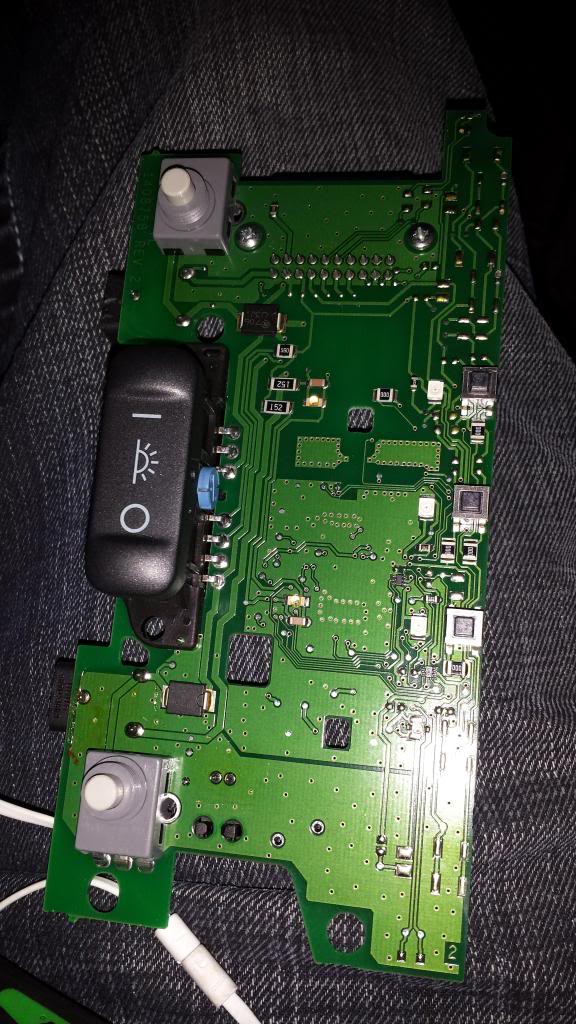
 That's not the HFL unit board, and yes, baking will not help those buttons!
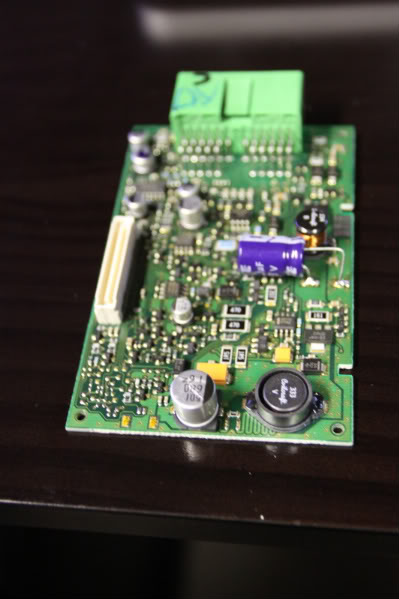
The HFL module is the rectangular metal box set in the bezel attached by 4 bolts to the car in front of the Homelink unit and dome lights.
Unbolt and open up the HFL module and you should be able to remove the board (there may be 2 boards; I don't recall which year TL HFL had 2 boards).
Here's a photo of an HFL board, borrowed from member jda123 in the "Bluetooth Fails" thread:
Registered but harmless
Joined: Aug 2005
Posts: 14,889
Likes: 1,164
From: Los Angeles, CA

