


Hack Your Navi Summarized! (Change pics and remove nag screen)


Thread Starter
Safety Car
Joined: Jan 2006
Posts: 4,171
Likes: 39
From: San Diego, CA
My other guess then would be if your image has been optimized. If you are using photoshop, here are the tips from my summary.
Thanks for the tip. I will try that next time. 
- If using Photoshop, one way to meet the pictures specs is to convert the picture from RGB to Indexed (Image > Mode > Indexed Color). Once inside the indexed color dialog box, chose Local (Perceptual) from the Palette drop down menu. Then input 173 in the Colors field. This will alter your colors in your image because you are limiting the palette, so you might have to make some sacrifices or changes to the image. Then save as bitmap, 8 bit. Another way is to crop the image on the sides a bit (I haven't tried that yet).
- DO NOT use Bitmap compression (RLE)

Intermediate
Joined: Feb 2006
Posts: 46
Likes: 0
I am really confused... i don't know where to start. I just got my TL a week ago and i want to do this hack but don't know where to start.
I can put any bmp pic i want on this navi screen?
How will this new pic show up on my screen? This pic will show in the background at all times while i am uing the navi or its just a welcome screen pic?
Does anybody have any problems with their navi after uploading this pic?
Help me with the process.. what i need to start with?
I can put any bmp pic i want on this navi screen?
How will this new pic show up on my screen? This pic will show in the background at all times while i am uing the navi or its just a welcome screen pic?
Does anybody have any problems with their navi after uploading this pic?
Help me with the process.. what i need to start with?
Thread Starter
Safety Car
Joined: Jan 2006
Posts: 4,171
Likes: 39
From: San Diego, CA
Start by reading the first page 

Then you can ask any questions you are confused about.
The bmp you use need to meet a certain spec (see first post).
The picture you are replacing is the welcome screen picture.
The "hack" is pretty safe since it is pretty simple to revert back to factory.
Then you can ask any questions you are confused about.
The bmp you use need to meet a certain spec (see first post).
The picture you are replacing is the welcome screen picture.
The "hack" is pretty safe since it is pretty simple to revert back to factory.

Racer
Joined: Nov 2004
Posts: 283
Likes: 0
From: Clearwater, Florida
This is pretty sweet.
Thanks for compiling all this in one place.
Just one question.
Anyway that we can get another screen for AFTER the Acura Navigation part where the text is? I would love to get rid of that text there and have another screen there instead.
Thanks
Ryan
Thanks for compiling all this in one place.
Just one question.
Anyway that we can get another screen for AFTER the Acura Navigation part where the text is? I would love to get rid of that text there and have another screen there instead.
Thanks
Ryan
Thread Starter
Safety Car
Joined: Jan 2006
Posts: 4,171
Likes: 39
From: San Diego, CA
Currently, none that I know of. There are plenty of requests to remove that "nag screen." Now if there is someone out there is willing to try to hack the binary files again, it might be possible. 
ttliang's tip (post #118) really does work! thanks again!!
ttliang's tip (post #118) really does work! thanks again!!

Weather Watcher
Joined: Jul 2004
Posts: 319
Likes: 0
From: Nairobi, Kenya
Originally Posted by SCADAczar
I ran the TSX navi software for about 6 months so I could have the trip computer/instantaneous fuel meter. Have you noticed that there is a difference between the elasped timer in the TSX trip computer and the TL MID? I finally reverted back to the TL software at the end of October because that was the only way I could get the dashboard clock to fall back an hour with the time change.
 the send button wasn't there and the voice command wasn't recognized either. Don't the 06 TSXs have HFL in them now - anyone gonna hack it soon? That would mean I'd need to buy the latest NAV DVD right?
Weather Watcher
Joined: Jul 2004
Posts: 319
Likes: 0
From: Nairobi, Kenya
Originally Posted by sriteja
SSM6MTNAVI, can you post some pics/screenshots of what you did? i am interested in running the tsx software on my tl.
sriteja - My dig camera is on the blitz right now - but I just bought a new one last night and am gonna go thru the process again this evening coz the clock on my AC display above the NAVI didn't update with the NAV when the daylight savings change took place Sunday/Sat morning. I'm trying to look for the instructions I used to burn the NAV edit CD. I'll post that up as well by tonight.
Originally Posted by datmrman
I thought the clock adjusted via XM?


4th Gear
Joined: Oct 2004
Posts: 4
Likes: 0
From: brookfield, il
just an update. i changed the splash screen on an 06 accord. the files are callen 06tough2.bin. the nag screen is still there though. darn. well its a start. ne1 have any questions email me at nuprules@ameritech.net

Superman
Joined: Mar 2006
Posts: 66
Likes: 0
 Anyone willing to invest anything in this?
If we could collect only a few hundreds of dollars, I know where to find a hardcore programmer willing and capable of doing (almost) anything with the disassembled code. Donations as small as a few dollars would quickly add up (or so we hope)and this thing could be finally channeled to someone who actually knows what to do, instead of us, mere Honda enthusiasts.

'04 TL w/Navi SSM
Joined: Apr 2006
Posts: 90
Likes: 0
From: Montreal, Canada
Long time lurker, first time poster here.
I've been lurking around the forums for over a year now and just recently i've gathered enough courage to start fooling around. This thread delivered my first mod if you will : @)
All went smooth the first try, i suggest using a slower burn speed when burning the modifed bin files to either a cd or dvd (i used a cheap-o CD brand at 16x burn) i love the new splash screen - though it seems to be a bit darker - maybe it was just me viewing it for the first time.
Id like to thank everyone for their input within the thread, especially the OP.
I've been lurking around the forums for over a year now and just recently i've gathered enough courage to start fooling around. This thread delivered my first mod if you will : @)
All went smooth the first try, i suggest using a slower burn speed when burning the modifed bin files to either a cd or dvd (i used a cheap-o CD brand at 16x burn) i love the new splash screen - though it seems to be a bit darker - maybe it was just me viewing it for the first time.
Id like to thank everyone for their input within the thread, especially the OP.
Thread Starter
Safety Car
Joined: Jan 2006
Posts: 4,171
Likes: 39
From: San Diego, CA
This is community is filled with great people willing to help. I'm glad things went smoothly for you.
If you have some photoshoping skills or find some good splash screens, please share them in this thread:
https://acurazine.com/forums/ramblings-12/i-have-video-camera-college-campus-my-disposal-129948/
If you have some photoshoping skills or find some good splash screens, please share them in this thread:
https://acurazine.com/forums/ramblings-12/i-have-video-camera-college-campus-my-disposal-129948/

5th Gear
Joined: Oct 2005
Posts: 5
Likes: 0
From: United States
Originally Posted by stanekfelix
If we could collect only a few hundreds of dollars, I know where to find a hardcore programmer willing and capable of doing (almost) anything with the disassembled code. Donations as small as a few dollars would quickly add up (or so we hope)and this thing could be finally channeled to someone who actually knows what to do, instead of us, mere Honda enthusiasts.
Looking at a disassembled code and figuring out where the OK button is being called is not easy and not hard, but bypassing the code and reassembling the executable or a library is another thing
Since TL's computer runs Windows CE, version ???, and we know that message (i.e. disclamer message) is being displayed in a dialog box with a timer running in a background. If timer expires and you don't press OK button within a timeout period, Windows CE running goes into suspend mode (i.e. screen goes blank).
Couple of questions I have so far:
1) did somebody manage to dissasemble code?
2) where you able to step though the code in a debugger?
Regards ....

4th Gear
Joined: Apr 2006
Posts: 4
Likes: 0
Originally Posted by guicide
I have a 2006 Civic Hybrid.
The file 06AVN2.bin is the one you want.
Bysin's program (dumpnavi) AssUMed that there would be a maximum of 128 modules and 128 files in 06AVN2.bin.
It turns out that there are 101 files but 1613 modules. Since Bysin didn't check for >128 when he loaded the modules, they over-write other variables in memory with the usual consequences.
I increased the maxium number of each to 500 and 4000 (but I don't check for excess either ) and I can now list what is in 06AVN2.bin.
Info, source code and executable are here:
http://guicide.com/cars/2006civic/nav/hacks/
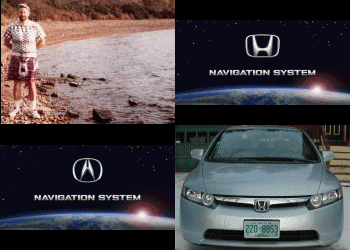
The Honda startup screen is Opening1.bmp.
The Acura startup screen is Opening3.bmp.
Both screens are 16 bit!
Paint Shop Pro can not display the Opening screen, but MS Paint and Internet Explorer can.
The file 06AVN2.bin is the one you want.
Bysin's program (dumpnavi) AssUMed that there would be a maximum of 128 modules and 128 files in 06AVN2.bin.
It turns out that there are 101 files but 1613 modules. Since Bysin didn't check for >128 when he loaded the modules, they over-write other variables in memory with the usual consequences.
I increased the maxium number of each to 500 and 4000 (but I don't check for excess either
) and I can now list what is in 06AVN2.bin.Info, source code and executable are here:
http://guicide.com/cars/2006civic/nav/hacks/
The Honda startup screen is Opening1.bmp.
The Acura startup screen is Opening3.bmp.
Both screens are 16 bit!
Paint Shop Pro can not display the Opening screen, but MS Paint and Internet Explorer can.
I saw the website and I CAN NOT UNDERSTAND what you are talking about
could you put it in a form I can understand?
i understoof the Bysins method but of course me having 06 civic with navi, it doesn't work
If I could get a comeplete step by step instructions on just how to make the CD that woudl be great.(extracting files, modifying files, buring files, and loading them to the nav unit)
please do post them on www.8thcivic.com/forums we're waiting for you


5th Gear
Joined: Apr 2006
Posts: 5
Likes: 0
 photoshop question...
just curious about making the .bmp file.
if i use Photoshop to get my dimensions to 240x117 and then change the mode to Index w/117 colors and then save as a 8-bit bmp, is my file ready to be dumped back into the bin or do i need to run 8to16 ?
i notice that when i do run my images w/8to16.exe they get an error
?Surprise: input file 'test.bmp' is not exactly 113,398 bytes.
palette starts at 00000036
data starts at 00000436
?Error 0 Reading data from 'test.bmp'. Read 27754 bytes.
the file is only 28kb in size.
thanks!
(just wanna be sure my images are good before i try w/my new 06 civic si's navi!)
if i use Photoshop to get my dimensions to 240x117 and then change the mode to Index w/117 colors and then save as a 8-bit bmp, is my file ready to be dumped back into the bin or do i need to run 8to16 ?
i notice that when i do run my images w/8to16.exe they get an error
?Surprise: input file 'test.bmp' is not exactly 113,398 bytes.
palette starts at 00000036
data starts at 00000436
?Error 0 Reading data from 'test.bmp'. Read 27754 bytes.
the file is only 28kb in size.
thanks!
(just wanna be sure my images are good before i try w/my new 06 civic si's navi!)
Justa 'nother nerd
Joined: Jan 2006
Posts: 3
Likes: 0
From: Southern New Hampshire
Originally Posted by seamonkey420
if i use Photoshop to get my dimensions to 240x117 and then change the mode to Index w/117 colors and then save as a 8-bit bmp, is my file ready to be dumped back into the bin or do i need to run 8to16 ?

5th Gear
Joined: Apr 2006
Posts: 5
Likes: 0
guicide, is it ok if i add a link on my site to yours? i avg some good traffic and had over 100K unique visitors last year; its at http://seamonkey420.tech-recipes.com
i might do up the software part of your guide w/even more detailed screenshots if thats ok (of course giving you mad props on the whole guide.. )
thanks!
i might do up the software part of your guide w/even more detailed screenshots if thats ok (of course giving you mad props on the whole guide.. )
thanks!

1st Gear
Joined: Apr 2006
Posts: 1
Likes: 0
Archive the DVD
I just want to make a backup of the Nav DVD in case something happens to the original. I know it's a double layer DVD, but can I copy the files over from the hard drive (after first saving to the hard drive from the original), or do I need to make a clone?
Thread Starter
Safety Car
Joined: Jan 2006
Posts: 4,171
Likes: 39
From: San Diego, CA
Xero2xero, if you want to make a backup copy of your navi DVD, follow this thread:
https://acurazine.com/forums/car-parts-sale-361/wtb-lowering-springs-134190/
You can follow their attempts there.
https://acurazine.com/forums/car-parts-sale-361/wtb-lowering-springs-134190/
You can follow their attempts there.


Superman
Joined: Mar 2006
Posts: 66
Likes: 0
 Can be done, quite expensively...
I posted this as a gig on different specialty sites and I did get a handful of replies from a few hardcore programmers. Unfortunately, the lowest bid was around $3000 - for removing the OK button and maybe extending the time of the bitmap display until the system is fully loaded. Trying to negotiate led me nowhere, they all say it's a lot of work involved to disassemble the code, trying to figure out the inner workings and eventually modifying what has to be modified, and I agree.
I personally am willing to pay approx 20$, maybe 30$ for this "hack". If there would be another 100-150 people like me out there, we could get it started. There is also a great potential for future improvements once there is someone who knows what's going on in that navi's guts.
Note that the money will be held in an escrow account until final delivery and testing is done. So there is basically no risk on our part. If they can't do it, in time, they don't get paid - it's that simple. For more info on the process, check out http://www.rentacoder.com/
and let us all know you opinions.
I personally am willing to pay approx 20$, maybe 30$ for this "hack". If there would be another 100-150 people like me out there, we could get it started. There is also a great potential for future improvements once there is someone who knows what's going on in that navi's guts.
Note that the money will be held in an escrow account until final delivery and testing is done. So there is basically no risk on our part. If they can't do it, in time, they don't get paid - it's that simple. For more info on the process, check out http://www.rentacoder.com/
and let us all know you opinions.


Superman
Joined: Mar 2006
Posts: 66
Likes: 0


4th Gear
Joined: May 2006
Posts: 4
Likes: 0
Okay I am having a few problems
I turn the car on and get the nag screen and I hold down the Map/Guide, Menu, Cancel button and then brings up the diagnostics screen and I click Version and then hold down the Menu for 5 seconds and the next screen nowhere does it say "Loading filename" doesnt have any .bin files anywhere...
But anyway I copied all the .bin files from the dvd but when I use the dumpnavi tool on the files I get a error message...
I turn the car on and get the nag screen and I hold down the Map/Guide, Menu, Cancel button and then brings up the diagnostics screen and I click Version and then hold down the Menu for 5 seconds and the next screen nowhere does it say "Loading filename" doesnt have any .bin files anywhere...
But anyway I copied all the .bin files from the dvd but when I use the dumpnavi tool on the files I get a error message...