


anyone using a TomTom?


Thread Starter
Racer
Joined: Dec 2007
Posts: 380
Likes: 2
anyone using a TomTom?
I had the opportunity to use a Magellan 4000-something today and didn't really care for it. After poking around a bit, I think the TomTom series of carnav products seem to appeal to me. I'll have to check one out at a store but wanted opinions from happy or unhappy owners in here (thinking of the GO 720 at this point in time). Fire away guys and thanks.


3rd Gear
Joined: May 2007
Posts: 3
Likes: 0
Originally Posted by darksky
I had the opportunity to use a Magellan 4000-something today and didn't really care for it. After poking around a bit, I think the TomTom series of carnav products seem to appeal to me. I'll have to check one out at a store but wanted opinions from happy or unhappy owners in here (thinking of the GO 720 at this point in time). Fire away guys and thanks.

DESI miern
Joined: Feb 2002
Posts: 988
Likes: 1
From: Atlanta, GA
Originally Posted by jeffgoetz1
Got a 720 for XMAS. Trying to sync Crackberry Pearl with Acura Bluetooth and the TomTom Bluetooth. No luck so far. the 720 is awesome, just wish/think there is a way to get the audio to blay through the factory radio.

Instructor
Joined: Nov 2007
Posts: 135
Likes: 0
From: Brew City, WI
I was using a Magellan Maestro 4250, and I returned it after two weeks. The suction cup mount is not as nice as the Garmin's. It's too bulky. However, the nice thing about the Magellan is that it has AAA built-in complete with roadside assistance. It also has live time traffic but you need to have the cigarette adaptor cable plugged in for it to work. I prefer to run off battery as it looks better w/o cords.
Check out www.gpsmagazine.com for some serious in-depth reviews. I have a non-navi TL and I want to mount my portable GPS in front of the clock, but I can't figure out the best way to do this. Someone on this site used the cradle that comes with their TomTom but Garmin and Magellan units don't have cradles. I tried velcro, but it didn't really work.
Check out www.gpsmagazine.com for some serious in-depth reviews. I have a non-navi TL and I want to mount my portable GPS in front of the clock, but I can't figure out the best way to do this. Someone on this site used the cradle that comes with their TomTom but Garmin and Magellan units don't have cradles. I tried velcro, but it didn't really work.
Trending Topics

Instructor
Joined: Nov 2006
Posts: 161
Likes: 0
From: Yonkers, NY
here the link to the TomTom install using the craddle
https://acurazine.com/forums/showthread.php?t=170372
https://acurazine.com/forums/showthread.php?t=170372

3rd Gear
Joined: May 2007
Posts: 3
Likes: 0
yes, but...
Originally Posted by NoLimitDeC
i just got a GO 720 today and im liking it so far.. if you go to Menu, Change Preferences, Speaker Preferences: FM to your car radio. you can set the TomTom to play music through ur factory stereo.. just find an unused station on ur radio with no signal and set it on the TomTom and ur good to go..
Full of water...
Joined: Mar 2007
Posts: 2,284
Likes: 11
From: Michigan
i have the 920 and i really like it. i haven't used it for any long trips yet, but i have used it on my daily trips and it is pretty accurate and really easy to use. and mine came with a remote which really helps to keep the screen clean.
i installed it in front of my clock too. i used velcro to hold the base to the car. that way i can remove the whole thing and still have use of the clock. here is a pic
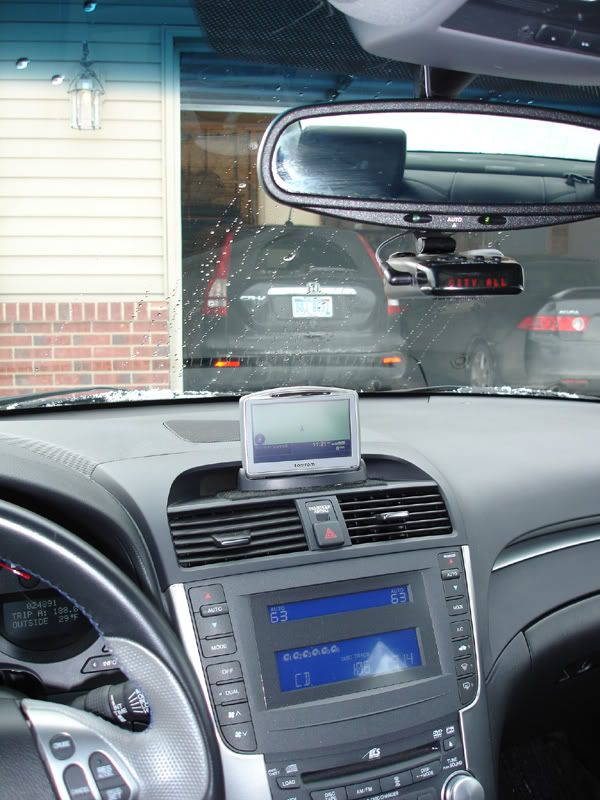
i installed it in front of my clock too. i used velcro to hold the base to the car. that way i can remove the whole thing and still have use of the clock. here is a pic

Cruisin'
Joined: Jan 2008
Posts: 24
Likes: 0
From: Albuquerque, NM...formerly Boston, MA
TT 720 Now accepts voice input.
If you have a 720, be sure to get the latest FW update and Map NA710. This FW update now allows you to speak to the 720 to input destinations.....Very slick.
I updated on Saturday and couldn't be happier.
I updated on Saturday and couldn't be happier.
Cruisin'
Joined: Jan 2008
Posts: 24
Likes: 0
From: Albuquerque, NM...formerly Boston, MA
Voice Input on 720
Here's more info on updating your 720 to accept voice input:
You need the following:
1) NA Map version 7.10
2) Firmware version 7.221
3) A text file called support_asr.dat that contains the value '1' (without quotes) and place this file in the ASR folder on your unit. Make sure when you create the file (using Notepad, I suspect) that you save it as 'all files' and NOT as a text file or you could wind up with a file really named support_asr.dat.txt, which is not what you want.
Should be good to go; simply, Navigate to-->Address-->Spoken Address (dialogue).
You need the following:
1) NA Map version 7.10
2) Firmware version 7.221
3) A text file called support_asr.dat that contains the value '1' (without quotes) and place this file in the ASR folder on your unit. Make sure when you create the file (using Notepad, I suspect) that you save it as 'all files' and NOT as a text file or you could wind up with a file really named support_asr.dat.txt, which is not what you want.
Should be good to go; simply, Navigate to-->Address-->Spoken Address (dialogue).

291hp & 245 tq @ 3.5psi
Joined: Apr 2003
Posts: 2,147
Likes: 4
From: The O.C
Go here and you will know everything you need to know about tomtom including some very neat add on program and custom POIs: http://www.tomtomforums.com/index.php


Thread
Thread Starter
Forum
Replies
Last Post
luv phoness
2G TL (1999-2003)
2
May 27, 2008 01:26 PM
hershey1000
3G TL Audio, Bluetooth, Electronics & Navigation
4
Jan 2, 2008 02:00 PM