


Alaska question


Thread Starter
2nd Gear
Joined: Apr 2009
Posts: 2
Likes: 0
Alaska question
I am new to this but I'll ask anyway. I have an 07 TL with navigation. I was trasferred to Alaska where there is not a database so I no longer have nav. With no nav the car does not know where it is so I can't do things like set the clock. I have contacted acura client services and just get the runaround. Before I take my loyalties elsewhere does anyone know of a solution?
R
R

Someday, an RS6 Avant+


Joined: Sep 2005
Posts: 4,807
Likes: 1,291
From: Japan
Wow. I thought this would be a noob asking about what tires he should buy.
Damn, try asking around (forums like this) for a software person who could somehow import an Alaskan map or know the file format so it could be burned onto a new factory disk.
Or, if you know anyone with a Honda that has factory nav that works, you could ask for their disk. Just a thought.
Damn, try asking around (forums like this) for a software person who could somehow import an Alaskan map or know the file format so it could be burned onto a new factory disk.
Or, if you know anyone with a Honda that has factory nav that works, you could ask for their disk. Just a thought.



Burning Brakes
Joined: May 2007
Posts: 867
Likes: 37
From: Anchorage, Alaska
Welcome to AK. I too have contacted Acura on this. For people that have never experienced it, it doesn't make sense. Let me explain. Most would assume if you go out of the contiguous 48 states, your navigation system would show an arrow in the middle of a huge field with no streets around. This isn't the case, it's worse. When the system realizes that you are no longer in the service area, it locks down the navigation system and many of the features, settings and menus. The screen instantly beeps a few times puts up this on the screen:
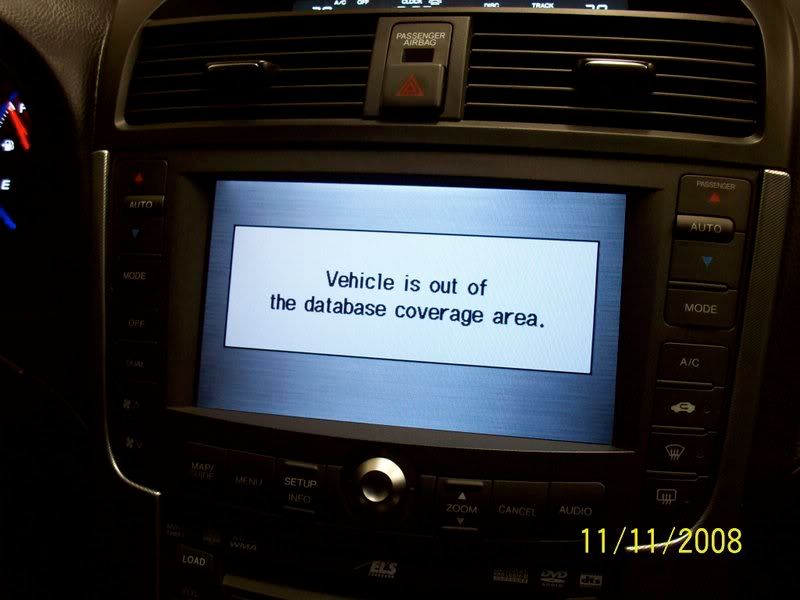
I'd be ok with that if it paused on that screen and went back to the navi map (arrow in the middle of a field of nothing). However, it doesn't. It just stays on that screen. Luckily, it does allow you to view the audio screen. And that screen, as most of you know, will remain displayed until you press the "map" button. Unless you live in Alaska, that button just makes it beep and put up the lockdown screen just to tease you.
In addition, if you use a voice command that doesn't register, the lockdown screen also comes up. The only way out of it is to press the "Audio" button, or turn the screen off. If the screen is off and a voice command doesn't register, screen of death pops up beeping. Absolutely no reason for this.
The day light savings time issue is a problem for people out of the service area. As seen below, there is no way to change the time setting once the navi goes into lockdown. The greyed out "More" button in the top right hand corner of the screen is where manual time change menu is.

It's frustrating because if the programmers just let you back into the navi screen, many of the other features would then be available. Since I've only been in there a few times, I think it has a calendar, a calculator, etc. None of those work for us.
Luckily, mine works in my driveway. So I'm able to manually set my time. I have to perform a sequence of events just right to get it to work. Open garage door and wait for it to open all the way. Start engine and pull out right away. Then sit in the driveway for it to boot up. Then I'm in. If anyone with this issue in Anchorage needs to set their clock, let me know!
I'd be ok with that if it paused on that screen and went back to the navi map (arrow in the middle of a field of nothing). However, it doesn't. It just stays on that screen. Luckily, it does allow you to view the audio screen. And that screen, as most of you know, will remain displayed until you press the "map" button. Unless you live in Alaska, that button just makes it beep and put up the lockdown screen just to tease you.
In addition, if you use a voice command that doesn't register, the lockdown screen also comes up. The only way out of it is to press the "Audio" button, or turn the screen off. If the screen is off and a voice command doesn't register, screen of death pops up beeping. Absolutely no reason for this.
The day light savings time issue is a problem for people out of the service area. As seen below, there is no way to change the time setting once the navi goes into lockdown. The greyed out "More" button in the top right hand corner of the screen is where manual time change menu is.
It's frustrating because if the programmers just let you back into the navi screen, many of the other features would then be available. Since I've only been in there a few times, I think it has a calendar, a calculator, etc. None of those work for us.
Luckily, mine works in my driveway. So I'm able to manually set my time. I have to perform a sequence of events just right to get it to work. Open garage door and wait for it to open all the way. Start engine and pull out right away. Then sit in the driveway for it to boot up. Then I'm in. If anyone with this issue in Anchorage needs to set their clock, let me know!

Thread
Thread Starter
Forum
Replies
Last Post
navtool.com
5G TLX Audio, Bluetooth, Electronics & Navigation
31
Nov 16, 2015 08:30 PM
DerrickW
3G TL Performance Parts & Modifications
9
Nov 15, 2015 05:52 PM
