


View MP3 folders....


Thread Starter
Cruisin'
Joined: Oct 2006
Posts: 16
Likes: 0
 View MP3 folders....
I noticed that the 2007 MDX and 2007 TL, when playing MP3 cds, both now show the name of the folder on the navigation screen while the song is playing. 
The RL only shows the static cd name.
The TL and MDX also let you toggle the artist, album, song, on the mini upper display on the TL (lower display on the MDX).
On the RL it just says MP3.
Since the navigation system is similar to that in the RL, is there anyway to get that to work in our RLs? Is this possible thru a firmware upgrade or replacing the dvd unit with an MDX or TL one? I think it would be a very easy fix thru firmware. I think the 2007 RL doesn't even have these new features, I would be pretty mad if they can have it on the TL and MDX but not the RL. Hoping to hear any answers. Thanks.
The RL only shows the static cd name.
The TL and MDX also let you toggle the artist, album, song, on the mini upper display on the TL (lower display on the MDX).
On the RL it just says MP3.
Since the navigation system is similar to that in the RL, is there anyway to get that to work in our RLs? Is this possible thru a firmware upgrade or replacing the dvd unit with an MDX or TL one? I think it would be a very easy fix thru firmware. I think the 2007 RL doesn't even have these new features, I would be pretty mad if they can have it on the TL and MDX but not the RL. Hoping to hear any answers.
Thanks.

10th Gear
Joined: Dec 2006
Posts: 14
Likes: 0
Are you talking about the screen in audio mode? If so, pressing the multi-function knob moves you into the selected MP3 directory and shows the file name. If you saved the MP3 with artist and song name, it will show and the system will read the title as you move from one to another. Typically, I'll save them with a track number (so it sorts correctly), then artist and title.
Thread Starter
Cruisin'
Joined: Oct 2006
Posts: 16
Likes: 0
Pictures of what I mean
This is the current situation:
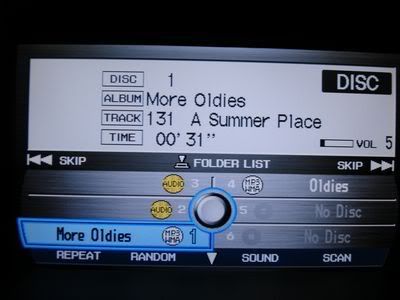
Where now it shows
DISC 1
ALBUM More Oldies
TRACK 131 A Summer Place
TIME 00' 31''
the new MDX and TL would show
DISC 1
FOLDER Percy Faith
TRACK 131 A Summer Place
TIME 00' 31''
Right now the Album always stays static on which cd you play.
The new MDXs and TL would change the folder depending on the song.
Where now it shows
DISC 1
ALBUM More Oldies
TRACK 131 A Summer Place
TIME 00' 31''
the new MDX and TL would show
DISC 1
FOLDER Percy Faith
TRACK 131 A Summer Place
TIME 00' 31''
Right now the Album always stays static on which cd you play.
The new MDXs and TL would change the folder depending on the song.
Thread Starter
Cruisin'
Joined: Oct 2006
Posts: 16
Likes: 0
One More Pic
As for the upper display:
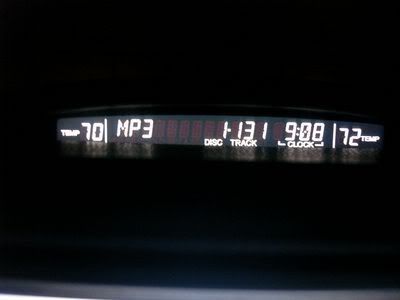
While the RL just shows MP3 like above,
the MDX and TL would show the Artist, Song, Album
in this case it would be Percy Faith, A Summer Place, Theme from A Sum
which you can toggle like toggling with XM radio.
While the RL just shows MP3 like above,
the MDX and TL would show the Artist, Song, Album
in this case it would be Percy Faith, A Summer Place, Theme from A Sum
which you can toggle like toggling with XM radio.

Instructor


Joined: Jun 2004
Posts: 176
Likes: 1
From: Gatineau, Canada
 Not in the RL
Are you talking about the screen in audio mode? If so, pressing the multi-function knob moves you into the selected MP3 directory and shows the file name. If you saved the MP3 with artist and song name, it will show and the system will read the title as you move from one to another. Typically, I'll save them with a track number (so it sorts correctly), then artist and title.
Instructor
Joined: Jun 2004
Posts: 176
Likes: 1
From: Gatineau, Canada
Getting to Folder List Painful
travman, I am using your picture to ask a related question. I have a CD with a bunch of MP3 folders (30-40 maybe) and when I am exactly at the menu seen in your picture I have to hit the "enter" button about 5 times before I can get to my list of folders. That is really annoying. Is there anything we can do to fix that (other than not using folders of course). Thanks.
Trending Topics
Instructor
Joined: Jun 2004
Posts: 176
Likes: 1
From: Gatineau, Canada
travman, I am using your picture to ask a related question. I have a CD with a bunch of MP3 folders (30-40 maybe) and when I am exactly at the menu seen in your picture I have to hit the "enter" button about 5 times before I can get to my list of folders. That is really annoying. Is there anything we can do to fix that (other than not using folders of course). Thanks.

Instructor
Joined: Jun 2004
Posts: 176
Likes: 1
From: Gatineau, Canada
Instructor
Joined: Nov 2008
Posts: 128
Likes: 0
From: Massachusetts
I notice the same problem. I think there is some sort of cache time between pushes, like it's reading the folders into memory before they show on the screen. The more folders on the CD, the longer the wait.
Instructor
Joined: Jun 2004
Posts: 176
Likes: 1
From: Gatineau, Canada

 I find that Acura is a bit behind in the handling of MP3 material. They could've dropped the rear shade and a couple of things like that and, instead, provide better MP3 handling (such as displaying artist/song info) I can only assume that the more recent models have all that...

Thread
Thread Starter
Forum
Replies
Last Post
ITSJESTER
4G TL Audio, Bluetooth, Electronics & Navigation
17
Dec 6, 2018 02:29 AM
lanechanger
Member Cars for Sale
4
Oct 13, 2015 10:56 AM
