


iPhone 5s Text Messaging


Thread Starter
Instructor
Joined: Jun 2013
Posts: 120
Likes: 2
iPhone 5s Text Messaging
I have the 2013 RDX Tech and I used to have the iPhone 4s where getting text messages onto the nav screen never worked. I just assumed that my phone hardware was outdated even with iOS 7
Now I have the iPhone 5s and it still doesn't work. I am unable to receive or send texts. I have SPRINT as my carrier..
Anybody else having these issues?
I called my local dealer and they told me to call Johnson Controls...
Now I have the iPhone 5s and it still doesn't work. I am unable to receive or send texts. I have SPRINT as my carrier..
Anybody else having these issues?
I called my local dealer and they told me to call Johnson Controls...

Cruisin'
Joined: Jul 2013
Posts: 22
Likes: 3
Hi Deals,
I have a 2014 base so not sure if it matters (although i would assume it doesn't)
I had the same issue but realized the settings are on the Phone. When you're in the car, make sure the bluetooth settings for the pairing on your phone are to show notifications or text messages. Once I did that, the RDX can now show who sent me a message and read the message for me over bluetooth. I think for the message to show on the screen, you have to have the car in park...
Hope this helps!
I have a 2014 base so not sure if it matters (although i would assume it doesn't)
I had the same issue but realized the settings are on the Phone. When you're in the car, make sure the bluetooth settings for the pairing on your phone are to show notifications or text messages. Once I did that, the RDX can now show who sent me a message and read the message for me over bluetooth. I think for the message to show on the screen, you have to have the car in park...
Hope this helps!

AcurAdmirer
Joined: Jul 2004
Posts: 3,004
Likes: 352
From: Dallas/Ft. Worth, TX

Pro
Joined: Oct 2012
Posts: 723
Likes: 71
From: Austin, TX

Thread Starter
Instructor
Joined: Jun 2013
Posts: 120
Likes: 2
Hi Deals,
I have a 2014 base so not sure if it matters (although i would assume it doesn't)
I had the same issue but realized the settings are on the Phone. When you're in the car, make sure the bluetooth settings for the pairing on your phone are to show notifications or text messages. Once I did that, the RDX can now show who sent me a message and read the message for me over bluetooth. I think for the message to show on the screen, you have to have the car in park...
Hope this helps!
I have a 2014 base so not sure if it matters (although i would assume it doesn't)
I had the same issue but realized the settings are on the Phone. When you're in the car, make sure the bluetooth settings for the pairing on your phone are to show notifications or text messages. Once I did that, the RDX can now show who sent me a message and read the message for me over bluetooth. I think for the message to show on the screen, you have to have the car in park...
Hope this helps!
that's exactly what was happening to me..turn notifications off and on again to make it work

Trending Topics

Cruisin'
Joined: Jul 2013
Posts: 22
Likes: 3


Instructor
Joined: Aug 2008
Posts: 216
Likes: 15
From: NY
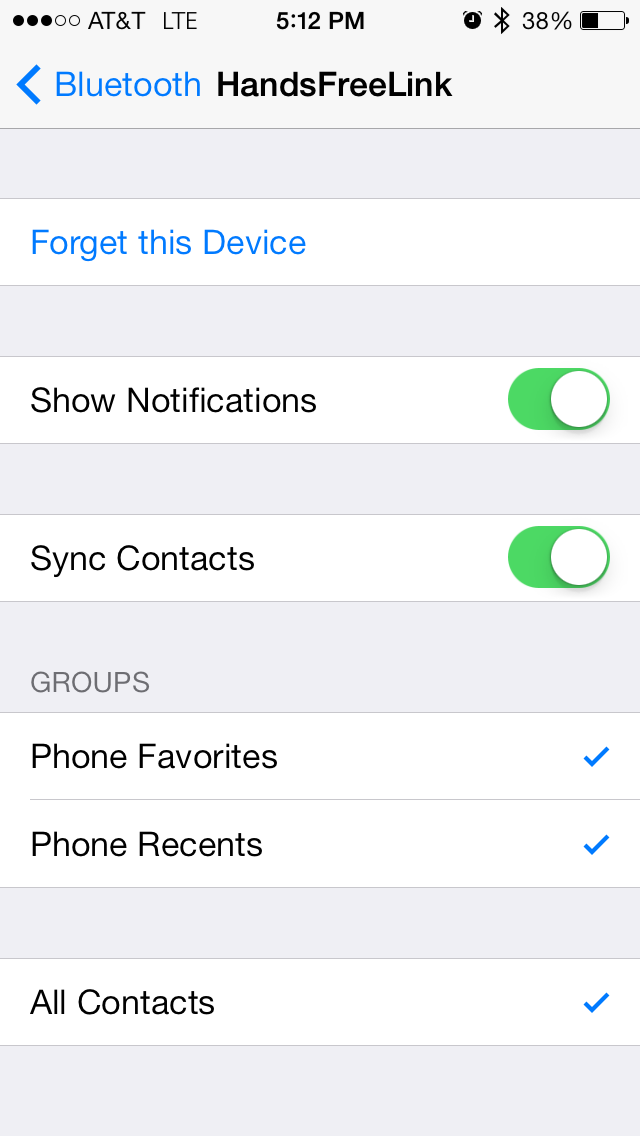
Check your phone settings. Settings>Bluetooth>HandFreeLink.
Here's a screen shot from my phone. See if it matches.


OG
Joined: Dec 2004
Posts: 708
Likes: 165
From: New Jersey
did my settings last night and voila , worked.
Salesman told me when we bought our 14 tech that iphone wasn't supported so not sure if this is tied into the Siri eyes free update..
Either way i'm SUPER HYPED.
Salesman told me when we bought our 14 tech that iphone wasn't supported so not sure if this is tied into the Siri eyes free update..
Either way i'm SUPER HYPED.


Advanced
Joined: Oct 2012
Posts: 98
Likes: 13
From: Naperville IL
I also have a 4s, and also found that turning notifications off and on again got it working. I thought it was the phone, but now see that it really wasn't.
Anyone ever watch a show called "The IT Crowd"? (A UK comedy series about a corporate IT department.) The suggestion "have you tried turning it off and on again" was a running joke in the show.
Anyone ever watch a show called "The IT Crowd"? (A UK comedy series about a corporate IT department.) The suggestion "have you tried turning it off and on again" was a running joke in the show.
OG
Joined: Dec 2004
Posts: 708
Likes: 165
From: New Jersey
You can read by button of voice if cars in motion, you can only reply if the car is in PARK OR verbally if you use (have installed) Siris Eyes Free
When the car is in motion it will play the text over speakers ifyou're parked it will read it AND show it on the screen
When the car is in motion it will play the text over speakers ifyou're parked it will read it AND show it on the screen

Thread
Thread Starter
Forum
Replies
Last Post
InFaMouSLink
Car Parts for Sale
6
Oct 27, 2015 06:52 PM
lanechanger
Member Cars for Sale
4
Oct 13, 2015 10:56 AM
