


06 TSX Serial # 1-6 Preset help-

Thread Starter
Advanced
Joined: Aug 2008
Posts: 79
Likes: 0
06 TSX Serial # 1-6 Preset help-
Hi,
i read this post
"If your vehicle’s battery is disconnected or goes dead, the audio system will disable itself. If this happens, you will see ‘‘CODE’’ in the frequency display the next time you turn on the system. Use the preset buttons (icons on vehicles with
navigation system) to enter the fivedigit code. The code is on the radio code card included in your owner’s manual kit. When it is entered correctly, the radio will start playing. If you make a mistake entering the code, do not start over; complete the five-digit sequence, then enter the correct code. You have 10 tries to
enter the correct code. If you are unsuccessful in 10 attempts, you must then leave the system on for 1 hour before trying again. If the code card is lost, a dealer can access your code with your radio’s serial number. To access the serial number, turn the radio on. It must display ‘‘CODE’’, then turn the radio off. Push the preset 1, preset 6, and power buttons at the same time, then quickly release.
You will have to store your favorite stations on each side of the preset buttons (1 6) after the system begins working. Your original settings were lost when power was disconnected."
You can power off the system by pulling the #7 (10A) fuse in the under-dash box and start over again. If the power was off long enough it may take some time for the GPS system to initialize.


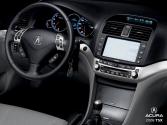
But i have a question, i am going to disconnect my batter to get rid of the CRAZY tighten fuel cap light that is driving me insane, i have my Navi code but not my radio code. I called the service guy and he said hold down presets 1 and 6, but i have a navi and i dont have those unless im in the audio mode,in which case when i press those 2 together, it sets my channel to that AND it pushes number 5 and not 1 and 6. Any advice?
i read this post
"If your vehicle’s battery is disconnected or goes dead, the audio system will disable itself. If this happens, you will see ‘‘CODE’’ in the frequency display the next time you turn on the system. Use the preset buttons (icons on vehicles with
navigation system) to enter the fivedigit code. The code is on the radio code card included in your owner’s manual kit. When it is entered correctly, the radio will start playing. If you make a mistake entering the code, do not start over; complete the five-digit sequence, then enter the correct code. You have 10 tries to
enter the correct code. If you are unsuccessful in 10 attempts, you must then leave the system on for 1 hour before trying again. If the code card is lost, a dealer can access your code with your radio’s serial number. To access the serial number, turn the radio on. It must display ‘‘CODE’’, then turn the radio off. Push the preset 1, preset 6, and power buttons at the same time, then quickly release.
You will have to store your favorite stations on each side of the preset buttons (1 6) after the system begins working. Your original settings were lost when power was disconnected."
You can power off the system by pulling the #7 (10A) fuse in the under-dash box and start over again. If the power was off long enough it may take some time for the GPS system to initialize.
But i have a question, i am going to disconnect my batter to get rid of the CRAZY tighten fuel cap light that is driving me insane, i have my Navi code but not my radio code. I called the service guy and he said hold down presets 1 and 6, but i have a navi and i dont have those unless im in the audio mode,in which case when i press those 2 together, it sets my channel to that AND it pushes number 5 and not 1 and 6. Any advice?

Advanced
Joined: Nov 2008
Posts: 68
Likes: 0
For that 1-6 reset, i did it and it worked, however, about 5 min later, the radio turned off by itself and the "Err#" message shows up again. I did the reset about 3 times in 20 min. Did anyone ever get that?
Btw, I couldn't find my sound system code, is that why it resets itself every now and then??
Thanks
Btw, I couldn't find my sound system code, is that why it resets itself every now and then??
Thanks
Thread Starter
Advanced
Joined: Aug 2008
Posts: 79
Likes: 0
I have the navi so it wasn't going to work and the dealership my car is from is in new York and I'm in Chicago so what I did was I called my local acura dealer and be gave me the numbe of where my car was bought originally so I gave the dealer in new York a call and they gave me both codes.
JDM Addict
Joined: Dec 2007
Posts: 2,189
Likes: 1
From: Arizona Bay
a lot of times the codes are in the car.
look at the inside and sides of the glovebox when it is open.
pop your hood and take off the cover to the fuse box.
a lot of times the codes are on a sticker stuck there.
on the inside of the lid to the fuse box.
or in the glove box on the outer side, or something like that.
some stick them on the front or back cover of the manual.
look at the inside and sides of the glovebox when it is open.
pop your hood and take off the cover to the fuse box.
a lot of times the codes are on a sticker stuck there.
on the inside of the lid to the fuse box.
or in the glove box on the outer side, or something like that.
some stick them on the front or back cover of the manual.

Thread
Thread Starter
Forum
Replies
Last Post
Biggie_B
5G TLX (2015-2020)
13
May 27, 2025 05:51 PM
dirleton
2G RDX (2013-2018)
11
Aug 6, 2024 08:19 PM
Puma Jim
2G RDX Audio, Bluetooth, Electronics & Navigation
20
Oct 20, 2016 11:59 AM
GWEEDOspeedo
Car Parts for Sale
4
Jan 15, 2016 10:39 PM
