


Software/Tip of the Week


Big Block go VROOOM!
Joined: Oct 2003
Posts: 8,578
Likes: 1
From: Chicago Burbs
Probably common knowledge, but just in case it's not....
Firefox add-on to disable tear off tabs
https://addons.mozilla.org/en-US/firefox/addon/12276
From what I can tell this is the only way to disable them. I did a quick search in about:config to see if a setting had been added in there, but I came up empty. I could have missed it though.
Firefox add-on to disable tear off tabs
https://addons.mozilla.org/en-US/firefox/addon/12276
From what I can tell this is the only way to disable them. I did a quick search in about:config to see if a setting had been added in there, but I came up empty. I could have missed it though.


Thread Starter
Sanest Florida Man


Joined: Aug 2007
Posts: 45,850
Likes: 11,669
From: Florida
Ok well I hope it's not too late for you to use this next tip. This week it's ninite.com! This site is a way to drastically simplify the install process of your common programs. If you're like me and you're reinstalling OSes often you have to go through that initial setup phase where you install your browser, AV, java, flash, torrent, adobe reader, itunes, vlc, and various other utilities. Well this site is pretty much a bunch of check boxes and you check which apps you want to install and then you download a single customized exe file that then goes and downloads and automatically installs the most current version of all your apps for you with very few if any dialog boxes to choose. So you can run it in the background and it's pretty much hands off from there. It installs with the default settings and DOESN'T install any of the junk toolbars or any other crapware!!!! Use this in conjunction (ooo, big word) with the filehippo.com update and you got a simplified install and update process for a lot of your apps!
www.ninite.com

www.ninite.com


Thread Starter
Sanest Florida Man
Joined: Aug 2007
Posts: 45,850
Likes: 11,669
From: Florida
This weeks tip comes from shnee420 in Maryland, USA home of the Oriole and the black-eyed susan. His tip is Sandboxie. A neat little program that runs your programs in an isolated space which prevents them from making permanent changes to other programs and data in your computer. So if you were running IE in sandboxie and got some nasty virii it would be unable to install successfully cause it is kept within the "sandbox" and doesn't have access to system files or user data. Another way to use this program is a way to demo software without installing it in your system. You can install said software into sandboxie and try it out and if you don't like it it's very simple to empty the sandbox and therefore delete the program without having to worry about if it deleted correctly and cleared out all instances of itself from the registry or if something went wrong during deletion and now your system is fuXored.
For XP users Sandboxie is probably a real good idea for Vista or 7 users it's not as important at least for security reasons. That's cause Vista and 7 already have a builtin "sandbox" feature for IE7 and IE8. It's called protected mode and it does pretty much the same thing as Sandboxie. however Sandboxie would still be a good idea if you plan on running firefox as it doesn't have a sandbox mode (google chrome along with the aforementioned IE do though).
So if you know someone who's always getting virii this would be a good program for them.
http://www.sandboxie.com/
There are some big caveats though first it does NOT run on 64 bit Windows. Due to Windows patchguard kernel protection technology and that it also requires signed drivers. Also after 30 days it will nag you to pay the registration fee.
So I'd recommend this for XP users but it's not a big deal for Vista or 7 users. If you're running 64 bit then it's definitely a no go.
For XP users Sandboxie is probably a real good idea for Vista or 7 users it's not as important at least for security reasons. That's cause Vista and 7 already have a builtin "sandbox" feature for IE7 and IE8. It's called protected mode and it does pretty much the same thing as Sandboxie. however Sandboxie would still be a good idea if you plan on running firefox as it doesn't have a sandbox mode (google chrome along with the aforementioned IE do though).
So if you know someone who's always getting virii this would be a good program for them.
http://www.sandboxie.com/
There are some big caveats though first it does NOT run on 64 bit Windows. Due to Windows patchguard kernel protection technology and that it also requires signed drivers. Also after 30 days it will nag you to pay the registration fee.
So I'd recommend this for XP users but it's not a big deal for Vista or 7 users. If you're running 64 bit then it's definitely a no go.




Ok well I hope it's not too late for you to use this next tip. This week it's ninite.com! This site is a way to drastically simplify the install process of your common programs. If you're like me and you're reinstalling OSes often you have to go through that initial setup phase where you install your browser, AV, java, flash, torrent, adobe reader, itunes, vlc, and various other utilities. Well this site is pretty much a bunch of check boxes and you check which apps you want to install and then you download a single customized exe file that then goes and downloads and automatically installs the most current version of all your apps for you with very few if any dialog boxes to choose. So you can run it in the background and it's pretty much hands off from there. It installs with the default settings and DOESN'T install any of the junk toolbars or any other crapware!!!! Use this in conjunction (ooo, big word) with the filehippo.com update and you got a simplified install and update process for a lot of your apps!
www.ninite.com
www.ninite.com



Thread Starter
Sanest Florida Man
Joined: Aug 2007
Posts: 45,850
Likes: 11,669
From: Florida
This weeks software is Handbrake 0.9.4! It's a small version bump from 0.9.3 that was released a year ago but the new version still has some great new features. Most importantly is the live preview feature that allows you to preview a short clip of your video to make sure everything's up to par. Before you'd have to encode the whole video which can take over and hour only to discover that you had one setting wrong and you now have to do it all over again. So this is a great improvement in efficiency. There's over a thousand changes/bug fixes between the this version and the last and I highly recommend this software for the live preview alone. Plus there's all sorts of settings for you to  out over.
www.handbrake.fr
out over.www.handbrake.fr
Thread Starter
Sanest Florida Man
Joined: Aug 2007
Posts: 45,850
Likes: 11,669
From: Florida
Alright this weeks tip is NameBench. It's a program you download that runs a benchmark test on a bunch of DNS servers to find which one is fastest for you. It will look at your browser history and I guess visit your common sites so that results are personalized for you. It than makes an HTML report with charts and graphs telling you the results. That look something like this


In my case there was a DNS server that was 43% faster than the one I was using. Now this won't make my whole interwebs speed 43% just this server was 43% faster at resolving domain names into IP addresses.
You can get namebench here and it works with Linux, Mac and PC!
http://code.google.com/p/namebench/
In my case there was a DNS server that was 43% faster than the one I was using. Now this won't make my whole interwebs speed 43% just this server was 43% faster at resolving domain names into IP addresses.
You can get namebench here and it works with Linux, Mac and PC!
http://code.google.com/p/namebench/


Thought I'd share some software a buddy of mine told me about the other day. I've been looking for this software ever since I got my mac.
The two pieces of software are SizeUp (http://www.irradiatedsoftware.com/sizeup/) and Cinch (http://www.irradiatedsoftware.com/cinch/)
They do what NVidia's software has been doing for years, but for the mac. In a nutshell, SizeUp allows you to create grids on your screen which you use to maximize windows to and much more. Cinch simply creates hotzones on the four edges of your screen. Drag a window to that hotzone and hte window maximizes to that side of the screen.
Been using it for a few days now and love them both. And buying a license for them is very cheap.
The two pieces of software are SizeUp (http://www.irradiatedsoftware.com/sizeup/) and Cinch (http://www.irradiatedsoftware.com/cinch/)
They do what NVidia's software has been doing for years, but for the mac. In a nutshell, SizeUp allows you to create grids on your screen which you use to maximize windows to and much more. Cinch simply creates hotzones on the four edges of your screen. Drag a window to that hotzone and hte window maximizes to that side of the screen.
Been using it for a few days now and love them both. And buying a license for them is very cheap.



Thread Starter
Sanest Florida Man
Joined: Aug 2007
Posts: 45,850
Likes: 11,669
From: Florida
Thought I'd share some software a buddy of mine told me about the other day. I've been looking for this software ever since I got my mac.
The two pieces of software are SizeUp (http://www.irradiatedsoftware.com/sizeup/) and Cinch (http://www.irradiatedsoftware.com/cinch/)
They do what NVidia's software has been doing for years, but for the mac. In a nutshell, SizeUp allows you to create grids on your screen which you use to maximize windows to and much more. Cinch simply creates hotzones on the four edges of your screen. Drag a window to that hotzone and hte window maximizes to that side of the screen.
Been using it for a few days now and love them both. And buying a license for them is very cheap.
The two pieces of software are SizeUp (http://www.irradiatedsoftware.com/sizeup/) and Cinch (http://www.irradiatedsoftware.com/cinch/)
They do what NVidia's software has been doing for years, but for the mac. In a nutshell, SizeUp allows you to create grids on your screen which you use to maximize windows to and much more. Cinch simply creates hotzones on the four edges of your screen. Drag a window to that hotzone and hte window maximizes to that side of the screen.
Been using it for a few days now and love them both. And buying a license for them is very cheap.
<object width="853" height="505"><param name="movie" value="http://www.youtube.com/v/xO_7sbFEJrE&hl=en_US&fs=1&"></param><param name="allowFullScreen" value="true"></param><param name="allowscriptaccess" value="always"></param><embed src="http://www.youtube.com/v/xO_7sbFEJrE&hl=en_US&fs=1&" type="application/x-shockwave-flash" allowscriptaccess="always" allowfullscreen="true" width="853" height="505"></embed></object>
http://lifehacker.com/5432194/cinch-...nap-to-the-mac
That's a ripoff of Aero Snap in Windows 7. Why get a more expensive mac to then pay for software to emulate features that come included on the cheaper PC?
http://lifehacker.com/5432194/cinch-...nap-to-the-mac
http://lifehacker.com/5432194/cinch-...nap-to-the-mac
And in any case, I was simply sharing something to help. Nice of you to continue to bash apple. Way to go fanboy.
And to beat you to the punch, I ain't no apple fanboy, I hate MANY things that Apple does in Snow Leopard, on the iPhone and iPod, but i share my comments, concerns, and software tips to help people, not to incite snobbish remarks.


Thread Starter
Sanest Florida Man
Joined: Aug 2007
Posts: 45,850
Likes: 11,669
From: Florida
Not really since you have been able to do what aero snap does since Windows 95! they just made it a lot easier to do. and yeah I was trollin a little bit in the post, don't get all worked up.
http://malektips.com/95wta0020.html
http://brockangelo.com/2008/10/20/ho...ws-vertically/
http://malektips.com/95wta0020.html
http://brockangelo.com/2008/10/20/ho...ws-vertically/

Thread Starter
Sanest Florida Man
Joined: Aug 2007
Posts: 45,850
Likes: 11,669
From: Florida
This time around I have TWO tips for you! Are you excited!?!? You should be! (not really)
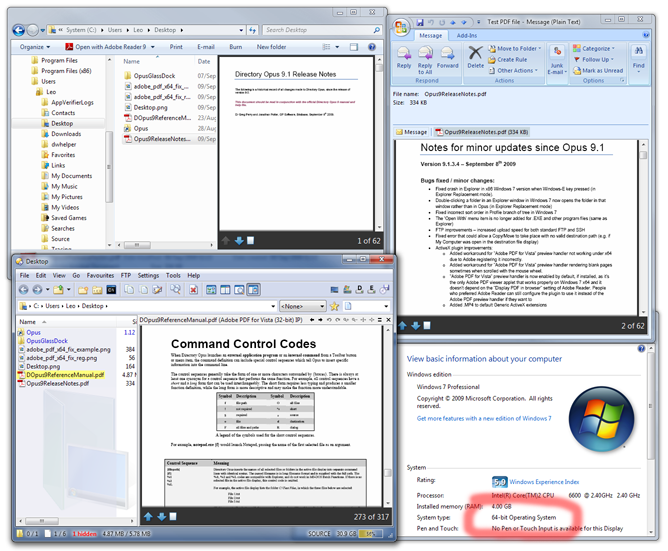
First is a fix to PDF previews in Office2007/2010 on Vista/7 x64 versions. Apparently Adobe has not made a way to preview PDF files in 64 bit versions of Windows, this little registry fix quickly takes care of that. This will allow you to see preview of the PDF as the thumbnail and allow you to preview the entire PDF in explorer and Outlook 2007/2010 just like you can do in 32bit versions of Vista/7. Apparently it's as simple as a registry tweak yet Adobe hasn't done it themselves.

http://www.pretentiousname.com/adobe...dex.html#downl
2nd tip is an extension for Google Chrome/Firefox (do people actually still use firefox? ) It's called Invisible hand.
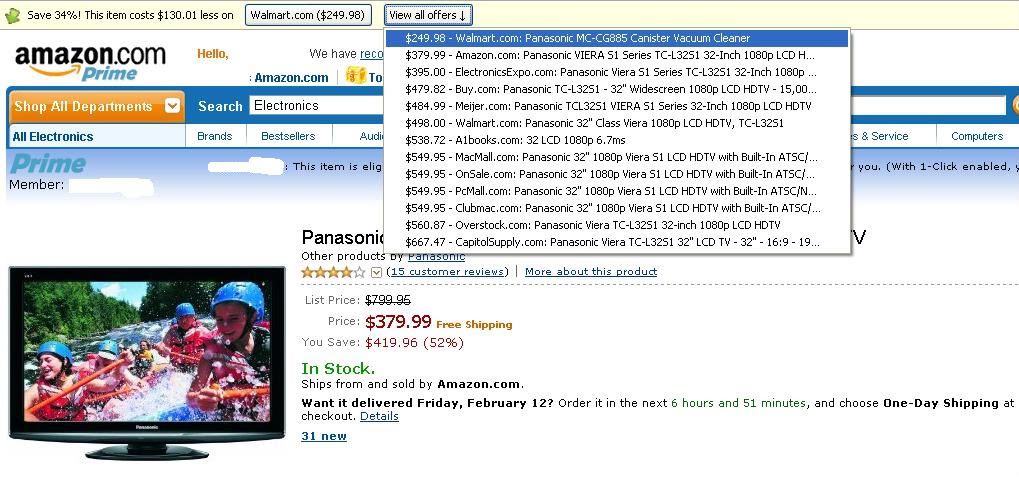
InvisibleHand shows a discreet notification when the product you're browsing can be bought for a lower price elsewhere. It gives you a link directly to the product page at the competing retailer and it also work in Google search results
You won't even know you have it until a little yellow "information bar" pops up at the top of the page giving you links to other places that have the same item for a cheaper price.

http://www.getinvisiblehand.com/?locale=en
First is a fix to PDF previews in Office2007/2010 on Vista/7 x64 versions. Apparently Adobe has not made a way to preview PDF files in 64 bit versions of Windows, this little registry fix quickly takes care of that. This will allow you to see preview of the PDF as the thumbnail and allow you to preview the entire PDF in explorer and Outlook 2007/2010 just like you can do in 32bit versions of Vista/7. Apparently it's as simple as a registry tweak yet Adobe hasn't done it themselves.
http://www.pretentiousname.com/adobe...dex.html#downl
2nd tip is an extension for Google Chrome/Firefox (do people actually still use firefox?
) It's called Invisible hand.InvisibleHand shows a discreet notification when the product you're browsing can be bought for a lower price elsewhere. It gives you a link directly to the product page at the competing retailer and it also work in Google search results
It stays out of your way
InvisibleHand remains invisible until it finds a deal on a product you're shopping for.
Real-time prices
Unlike price comparison sites, InvisibleHand refreshes its prices every single time you use it.
It works with Google
When you google a product, InvisibleHand will automatically show the lowest real-time prices.
Reveal hidden prices
InvisibleHand knows the price even when the retailer tries to hide it (US only).
It learns as you use it
InvisibleHand will search for deals, even when you browse a product it hasn't seen before.
InvisibleHand remains invisible until it finds a deal on a product you're shopping for.
Real-time prices
Unlike price comparison sites, InvisibleHand refreshes its prices every single time you use it.
It works with Google
When you google a product, InvisibleHand will automatically show the lowest real-time prices.
Reveal hidden prices
InvisibleHand knows the price even when the retailer tries to hide it (US only).
It learns as you use it
InvisibleHand will search for deals, even when you browse a product it hasn't seen before.
http://www.getinvisiblehand.com/?locale=en

 Thanks for the invisiblehand extension.
Big Block go VROOOM!
Joined: Oct 2003
Posts: 8,578
Likes: 1
From: Chicago Burbs
Now if someone could just get Adobe Reader to recognize the Windows printer shares in my computer labs at work, the world would be a nicer place. I have one server with four printer shares that Adobe Reader does not see at all on the network. Every other application sees and uses the printer shares just fine. As far as Adobe Reader is concerned, they don't even exist. Share the same printers off of another server with identical OS and driver versions and everything is OK. Unfortunately, I have 800+ students with these printer shares setup on their laptops so I can't just move them.
 $249 for a 32" TV

