


Computer Building Thread


Race Director
Joined: Jun 2003
Posts: 10,497
Likes: 279
Reason I'm asking this is that $150-200 is actually a nice video card, those usually require juice.


Race Director
Joined: Jun 2003
Posts: 10,497
Likes: 279
Race Director
Joined: Jun 2003
Posts: 10,497
Likes: 279
if you don't have your PC yet, I'd wait, so you can open it up and see the power supply. I can't recommend you a video card without knowing the wattage. I don't want to screw you with something :/
And I'm a huge fan of EVGA cards, they give you more plus a nice tuning app. But now it's a battle between ATI and Nvidia
And I'm a huge fan of EVGA cards, they give you more plus a nice tuning app. But now it's a battle between ATI and Nvidia

Some other guy I talked to also said he recommends anything Nvidia. He showed me a card on newegg but one of the reviews said it takes up quite a lot of space.
Also, remember I got the slim case so there will probably be even less space than a normal case so I need to make sure the card isn't huge.
Also, remember I got the slim case so there will probably be even less space than a normal case so I need to make sure the card isn't huge.
But I'm so excited!
Btw, I found some info on Dell's site. The 620 Slim Tower has a 250 Watt TFX12V Power Supply so I am pretty limited to graphics cards.
And it's dimensions are
Height: 37.79cm (14.9")
Width: 10.6cm (4.2")
Depth: 43.31cm (17.01")
Btw, I found some info on Dell's site. The 620 Slim Tower has a 250 Watt TFX12V Power Supply so I am pretty limited to graphics cards.
And it's dimensions are
Height: 37.79cm (14.9")
Width: 10.6cm (4.2")
Depth: 43.31cm (17.01")

Sanest Florida Man


Joined: Aug 2007
Posts: 45,850
Likes: 11,669
From: Florida
If it's a slim case you're going to probably need a half height (low profile) video card. No real powerful GPU comes in that form, so probably not worth it, IMO.
Choose from this list if you want, though....
http://www.newegg.com/Product/Produc...NG&PageSize=20
Choose from this list if you want, though....
http://www.newegg.com/Product/Produc...NG&PageSize=20

_


Joined: Nov 2006
Posts: 19,208
Likes: 3,404

250 watt for an i5 processor is kinda pushing it already. Dell's really cheapening out on the PSU now.
 No way will that be enough for a good GPU.
So you are saying it probably isn't worth it to spend money on a graphics card since the best graphics card my computer could handle won't be that good anyways?
I could just try and see how everything goes with the integrated card and then if need be get one that fits. I asked on tomshardware.com and they said that since I'm not using it for any special games and that the one game I do play isn't a demanding game, I should just try using the integrated card. They also recommended http://www.newegg.ca/Product/Product...82E16814127611 or http://www.newegg.com/Product/Produc...=1qksb3mkhez7h
I could just try and see how everything goes with the integrated card and then if need be get one that fits. I asked on tomshardware.com and they said that since I'm not using it for any special games and that the one game I do play isn't a demanding game, I should just try using the integrated card. They also recommended http://www.newegg.ca/Product/Product...82E16814127611 or http://www.newegg.com/Product/Produc...=1qksb3mkhez7h
Race Director
Joined: Jun 2003
Posts: 10,497
Likes: 279
tomshardware is pulling your leg  your rig is perfect as a work horse. Work, play, browse. It is not a gaming system, but you will have all the joys of using it. See how it does with the internal card, I'm sure you'd like it.
Enjoy!
P.S. for slims they usually go between 150-180-250.. 250 you got the high end one Your system will use every watt of it...and 250, probably produces a clean stable 180-200, this is why you see Corsair PSU of same wattage costing twice as much as the rest, reliable, uninterrupted as advertized wattage.
your rig is perfect as a work horse. Work, play, browse. It is not a gaming system, but you will have all the joys of using it. See how it does with the internal card, I'm sure you'd like it.Enjoy!
P.S. for slims they usually go between 150-180-250.. 250 you got the high end one
Your system will use every watt of it...and 250, probably produces a clean stable 180-200, this is why you see Corsair PSU of same wattage costing twice as much as the rest, reliable, uninterrupted as advertized wattage.
Last edited by TeknoKing; Mar 27, 2012 at 08:25 AM.
Sanest Florida Man
Joined: Aug 2007
Posts: 45,850
Likes: 11,669
From: Florida
So you are saying it probably isn't worth it to spend money on a graphics card since the best graphics card my computer could handle won't be that good anyways?
I could just try and see how everything goes with the integrated card and then if need be get one that fits. I asked on tomshardware.com and they said that since I'm not using it for any special games and that the one game I do play isn't a demanding game, I should just try using the integrated card. They also recommended http://www.newegg.ca/Product/Product...82E16814127611 or http://www.newegg.com/Product/Produc...=1qksb3mkhez7h
I could just try and see how everything goes with the integrated card and then if need be get one that fits. I asked on tomshardware.com and they said that since I'm not using it for any special games and that the one game I do play isn't a demanding game, I should just try using the integrated card. They also recommended http://www.newegg.ca/Product/Product...82E16814127611 or http://www.newegg.com/Product/Produc...=1qksb3mkhez7h
Sorry, one last question lol.
Do you think the Intel® HD Graphics IHD2000 integrated card would be fine to play Counter-Strike? That is the only game I still play and I figure since it is an old game it wouldn't demand a good graphics card.
Do you think the Intel® HD Graphics IHD2000 integrated card would be fine to play Counter-Strike? That is the only game I still play and I figure since it is an old game it wouldn't demand a good graphics card.

Senior Moderator

Joined: May 2003
Posts: 45,641
Likes: 2,335
From: Better Neighborhood, Arizona

I don't think I will ever run out of questions
The monitor I'm getting has HDMI, DVI, and VGA ports, but comes only with the VGA cable. I think using an HDMI cable would be pointless in my case but based on my specs, should I just use the VGA cable or get a DVI cable cable? I also noticed there are 3 or 4 different types of DVI cables.
The monitor I'm getting has HDMI, DVI, and VGA ports, but comes only with the VGA cable. I think using an HDMI cable would be pointless in my case but based on my specs, should I just use the VGA cable or get a DVI cable cable? I also noticed there are 3 or 4 different types of DVI cables.

the overexplainer
Joined: Feb 2011
Posts: 3,287
Likes: 385
From: OC, CA
DVI-D to be specific, but any "common" dvi cable should do the trick. The other pins determine dual link capability and an analog signal. Your video card DVI port will probably have analog pins (to allow a DVI to VGA adapter). You can ignore those pins and just get a DVI-D cable.
my 2-3 year old build:
-Cooler Master 922
-Corsair TX750
-Phenom II x2 550 (Unlocked to X4 B50) overclocked to 3.71GHz
-8GB DDR2 RAM
-Sapphire reference 5850
-Gigabyte 790X-UD4P
-Corsair H50 w/ push/pull Gentle Typhoon AP-15s
an old pic:

still plays the latest games bf3, diablo 3 (of course), ME3 without a hitch.

my 2-3 year old build:
-Cooler Master 922
-Corsair TX750
-Phenom II x2 550 (Unlocked to X4 B50) overclocked to 3.71GHz
-8GB DDR2 RAM
-Sapphire reference 5850
-Gigabyte 790X-UD4P
-Corsair H50 w/ push/pull Gentle Typhoon AP-15s
an old pic:
still plays the latest games bf3, diablo 3 (of course), ME3 without a hitch.
Last edited by ez12a; Mar 27, 2012 at 06:25 PM.

I've got spurs...
Joined: Jan 2007
Posts: 1,499
Likes: 6
From: Gainesville, FL
[QUOTE=ez12a;13657864]DVI-D to be specific, but any "common" dvi cable should do the trick. The other pins determine dual link capability and an analog signal. Your video card DVI port will probably have analog pins (to allow a DVI to VGA adapter). You can ignore those pins and just get a DVI-D cable.
my 2-3 year old build:
-Cooler Master 922
-Corsair TX750
-Phenom II x2 550 (Unlocked to X4 B50) overclocked to 3.71GHz
-8GB DDR2 RAM
-Sapphire reference 5850
-Gigabyte 790X-UD4P
-Corsair H50 w/ push/pull Gentle Typhoon AP-15s
an old pic:
still plays the latest games bf3, diablo 3 (of course), ME3 without a hitch.[/QUOTE
How do you like your Corsair H50?
It's really hot in my room and air cooling doesn't seem to be cutting it any more. My (stock) i7 920 is idling at about 60 C and gets dangerously hot during gaming.
I haven't looked too much into it but I'm thinking of picking up a H60. From what I hear it can be a pain to install and the stock thermal paste sucks. Can you confirm?
my 2-3 year old build:
-Cooler Master 922
-Corsair TX750
-Phenom II x2 550 (Unlocked to X4 B50) overclocked to 3.71GHz
-8GB DDR2 RAM
-Sapphire reference 5850
-Gigabyte 790X-UD4P
-Corsair H50 w/ push/pull Gentle Typhoon AP-15s
an old pic:
still plays the latest games bf3, diablo 3 (of course), ME3 without a hitch.[/QUOTE
How do you like your Corsair H50?
It's really hot in my room and air cooling doesn't seem to be cutting it any more. My (stock) i7 920 is idling at about 60 C and gets dangerously hot during gaming.
I haven't looked too much into it but I'm thinking of picking up a H60. From what I hear it can be a pain to install and the stock thermal paste sucks. Can you confirm?
Last edited by Lightus; Mar 30, 2012 at 12:46 AM.
the overexplainer
Joined: Feb 2011
Posts: 3,287
Likes: 385
From: OC, CA
How do you like your Corsair H50?
It's really hot in my room and air cooling doesn't seem to be cutting it any more. My (stock) i7 920 is idling at about 60 C and gets dangerously hot during gaming.
I haven't looked too much into it but I'm thinking of picking up a H60. From what I hear it can be a pain to install and the stock thermal paste sucks. Can you confirm?
It's really hot in my room and air cooling doesn't seem to be cutting it any more. My (stock) i7 920 is idling at about 60 C and gets dangerously hot during gaming.
I haven't looked too much into it but I'm thinking of picking up a H60. From what I hear it can be a pain to install and the stock thermal paste sucks. Can you confirm?
I havent read too much about a H60 (i know there's an H80 and H100 or something), but for a 920 you should be OK. my friend is running a H50 on his i7 920 rig without problems.
I've read differently about the included thermal paste. It's shin etsu which is considered to be one of the better ones (at least on the H50).
installation isnt too bad, just remember to torque down the bolts in an alternating pattern a bit at a time, just like working on a car. It helps if your case has a cutout in the mobo tray under the CPU for a bracket. Otherwise you'll have to pull the mother board out to get the bracket installed. This was a pain on my friend's Antec 900 case.
but in terms of ambient temp, i'm not sure an H series cooler can help. Every degree higher the ambient temp is, it will take away a degree of effectiveness. What also helps is making sure you have positive pressure inside hte case. basically, you're intake is greater than your exhaust. This will also help keep the dust from building up inside.
Last edited by ez12a; Mar 30, 2012 at 01:35 AM.
I've got spurs...
Joined: Jan 2007
Posts: 1,499
Likes: 6
From: Gainesville, FL
Thanks for all the info!
I'll have to do more research before I buy one. My case is an Antec p183. It only has two exhaust fans in the rear, no intake. I may end up getting a few intake fans and install them in the front instead.
I'll have to do more research before I buy one. My case is an Antec p183. It only has two exhaust fans in the rear, no intake. I may end up getting a few intake fans and install them in the front instead.
Well I got all my stuff already and only took 5 days, 9 days ahead of the estimated delivery date.
Already installed my programs and transferred my data.
OMFG insanely fast. Now I really now how slow and old my computer was before this. What an upgrade. An so far the Intel HD card is working just fine. I'm so
Now I want to donate my old computer to goodwill or something, but I don't feel like reinstallin WinXP because it takes about an hour. Would deleting my files and then the partitions be enough? Maybe use a program like eraser to get rid of the data?
Already installed my programs and transferred my data.
OMFG insanely fast. Now I really now how slow and old my computer was before this. What an upgrade. An so far the Intel HD card is working just fine. I'm so
Now I want to donate my old computer to goodwill or something, but I don't feel like reinstallin WinXP because it takes about an hour. Would deleting my files and then the partitions be enough? Maybe use a program like eraser to get rid of the data?

I miss my 03 CL-S :(
Joined: Feb 2002
Posts: 7,140
Likes: 445
From: Washington, DC
I always take my old HDDs to a recycling center and watch them shred it in front of me for $10.
I hadn't seen this thread before... I just built a new HTPC a few weeks ago:
I wanted to build a new HTPC under $500 and I pretty much hit that with great specials on the CPU and SSD at a local store (Microcenter) and specials/rebates from Newegg.
No video card - only using onboard video. No fans except the PSU and OEM heatsink/fan on the CPU. The thing runs very cool, which was a must for me since I'm pretty sure the heat was what killed the other HTPC after 4 years inside an entertainment cabinet with little ventilation. You open the cabinet door with this one and no heat can be felt. With the previous one it felt like you were opening the oven door
I hadn't seen this thread before... I just built a new HTPC a few weeks ago:
- ASRock H61M-GE LGA 1155 Intel H61 HDMI Micro ATX Intel Motherboard
- Intel Core i3-2100 Sandy Bridge 3.1GHz LGA 1155
- OCZ Petrol 120GB SSD
- Win7 OEM
I wanted to build a new HTPC under $500 and I pretty much hit that with great specials on the CPU and SSD at a local store (Microcenter) and specials/rebates from Newegg.
No video card - only using onboard video. No fans except the PSU and OEM heatsink/fan on the CPU. The thing runs very cool, which was a must for me since I'm pretty sure the heat was what killed the other HTPC after 4 years inside an entertainment cabinet with little ventilation. You open the cabinet door with this one and no heat can be felt. With the previous one it felt like you were opening the oven door
Last edited by einsatz; Mar 31, 2012 at 05:32 PM.
Race Director
Joined: Jun 2003
Posts: 10,497
Likes: 279
So I'm building a system, in the range of 2K tops.
CPU:Intel® Core™ i7-3820 Quad-Core 3.60 GHz 10MB Intel Smart Cache LGA2011
still can't decide if I should spend more on the 3930K
(4 cores vs 6 cores.. both can be overclocked on x79 to stable 4.6-4.7Ghz)
MOTHERBOARD:* (3-Way SLI Support) Gigabyte X79-UD5 Intel X79 Chipset Quad Channel DDR3 ATX Mainboard w/ UEFI DualBIOS, Dolby Home Theater 7.1 Audio, GbLAN, USB3.0, SATA-III RAID, 3 Gen3 PCIe X16, 2 PCIe X1 & 1 PCI
POWERSUPPLY:* 850 Watts - Corsair CMPSU-850TXV2 80 Plus Power Supply - Quad SLI Ready
MEMORY:32GB (4GBx8) DDR3/1600MHz Quad Channel Memory (Corsair Vengeance)
VIDEO:NVIDIA GeForce GTX 680 2GB 16X PCIe 3.0 Video Card (EVGA Superclocked
HDD:120GB Corsair Force GT Series SATA-III 6.0Gb/s SSD - 555MB/s Read & 515MB/s Write
HDD2:2TB (2TBx1) SATA-III 6.0Gb/s 64MB Cache 7200RPM HDD
I'm hoping this sytem will last me for 3+ years of moderate modern gaming and mostly Adobe workload. What do you guys think?
CPU:Intel® Core™ i7-3820 Quad-Core 3.60 GHz 10MB Intel Smart Cache LGA2011
still can't decide if I should spend more on the 3930K
(4 cores vs 6 cores.. both can be overclocked on x79 to stable 4.6-4.7Ghz)
MOTHERBOARD:* (3-Way SLI Support) Gigabyte X79-UD5 Intel X79 Chipset Quad Channel DDR3 ATX Mainboard w/ UEFI DualBIOS, Dolby Home Theater 7.1 Audio, GbLAN, USB3.0, SATA-III RAID, 3 Gen3 PCIe X16, 2 PCIe X1 & 1 PCI
POWERSUPPLY:* 850 Watts - Corsair CMPSU-850TXV2 80 Plus Power Supply - Quad SLI Ready
MEMORY:32GB (4GBx8) DDR3/1600MHz Quad Channel Memory (Corsair Vengeance)
VIDEO:NVIDIA GeForce GTX 680 2GB 16X PCIe 3.0 Video Card (EVGA Superclocked
HDD:120GB Corsair Force GT Series SATA-III 6.0Gb/s SSD - 555MB/s Read & 515MB/s Write
HDD2:2TB (2TBx1) SATA-III 6.0Gb/s 64MB Cache 7200RPM HDD
I'm hoping this sytem will last me for 3+ years of moderate modern gaming and mostly Adobe workload. What do you guys think?
Sanest Florida Man
Joined: Aug 2007
Posts: 45,850
Likes: 11,669
From: Florida
So I'm building a system, in the range of 2K tops.
CPU:Intel® Core™ i7-3820 Quad-Core 3.60 GHz 10MB Intel Smart Cache LGA2011
still can't decide if I should spend more on the 3930K
(4 cores vs 6 cores.. both can be overclocked on x79 to stable 4.6-4.7Ghz)
MOTHERBOARD:* (3-Way SLI Support) Gigabyte X79-UD5 Intel X79 Chipset Quad Channel DDR3 ATX Mainboard w/ UEFI DualBIOS, Dolby Home Theater 7.1 Audio, GbLAN, USB3.0, SATA-III RAID, 3 Gen3 PCIe X16, 2 PCIe X1 & 1 PCI
POWERSUPPLY:* 850 Watts - Corsair CMPSU-850TXV2 80 Plus Power Supply - Quad SLI Ready
MEMORY:32GB (4GBx8) DDR3/1600MHz Quad Channel Memory (Corsair Vengeance)
VIDEO:NVIDIA GeForce GTX 680 2GB 16X PCIe 3.0 Video Card (EVGA Superclocked
HDD:120GB Corsair Force GT Series SATA-III 6.0Gb/s SSD - 555MB/s Read & 515MB/s Write
HDD2:2TB (2TBx1) SATA-III 6.0Gb/s 64MB Cache 7200RPM HDD
I'm hoping this sytem will last me for 3+ years of moderate modern gaming and mostly Adobe workload. What do you guys think?
CPU:Intel® Core™ i7-3820 Quad-Core 3.60 GHz 10MB Intel Smart Cache LGA2011
still can't decide if I should spend more on the 3930K
(4 cores vs 6 cores.. both can be overclocked on x79 to stable 4.6-4.7Ghz)
MOTHERBOARD:* (3-Way SLI Support) Gigabyte X79-UD5 Intel X79 Chipset Quad Channel DDR3 ATX Mainboard w/ UEFI DualBIOS, Dolby Home Theater 7.1 Audio, GbLAN, USB3.0, SATA-III RAID, 3 Gen3 PCIe X16, 2 PCIe X1 & 1 PCI
POWERSUPPLY:* 850 Watts - Corsair CMPSU-850TXV2 80 Plus Power Supply - Quad SLI Ready
MEMORY:32GB (4GBx8) DDR3/1600MHz Quad Channel Memory (Corsair Vengeance)
VIDEO:NVIDIA GeForce GTX 680 2GB 16X PCIe 3.0 Video Card (EVGA Superclocked
HDD:120GB Corsair Force GT Series SATA-III 6.0Gb/s SSD - 555MB/s Read & 515MB/s Write
HDD2:2TB (2TBx1) SATA-III 6.0Gb/s 64MB Cache 7200RPM HDD
I'm hoping this sytem will last me for 3+ years of moderate modern gaming and mostly Adobe workload. What do you guys think?
Senior Moderator
Joined: May 2003
Posts: 45,641
Likes: 2,335
From: Better Neighborhood, Arizona
the overexplainer
Joined: Feb 2011
Posts: 3,287
Likes: 385
From: OC, CA
Download and run DBAN : http://www.dban.org/
Sanest Florida Man
Joined: Aug 2007
Posts: 45,850
Likes: 11,669
From: Florida
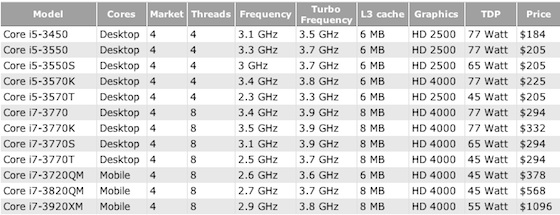
I paid almost $300 for my i7 860 in 09 and it was middle of the road quad core.
Last edited by #1 STUNNA; Mar 31, 2012 at 08:37 PM.