


Navi Hack Walkthrough: For 2004 TL with Upgraded 3.7 Disc



Navi Hack Walkthrough: For 2004 TL with Upgraded 3.7 Disc
First of all, special thanks to AngryDad, Kynnyc, datmrman, zeppelin77.
After doing extensive research yesterday for about 8hrs I finally figured it out how to hack 2004 TL Navi using upgraded 3.7 disc.
Here are the instruction I used but edited for 2004 TL with 3.7 disc:
https://acurazine.com/forums/showpos...9&postcount=27
http://www.vistabug.com/bb/viewtopic.php?id=58
Also do everything at your own risk. I am not responsible if something happened.
-------------------------------------------------------
Step 1: Create a folder name <Hack> (case sensitive) on your Desktop then download following files and put them ALL in <Hack> folder:

(By now you should have: BNHH401A.BIN, BN2HH12C.BIN, BN2HHMLD.BIN, HMIManager-401A-370, Navi-OK-401A-370b, Back.bmp and dumpnavi.exe in your <Hack> folder and they are case sensitive so don't change anything)
-------------------------------------------------------------
Step 2: Creating Custom Image and Required Size: Instruction from zeppelin77:
----------------------------------------------------------------
Step 3: Extract HMIManager.exe amd navi.exe from BNHH401A.BIN and patch them using AD's patch.
On your Windows click Start>Run>type "cmd" click "OK":
It should look like this:

--------------------------------------------------------
Step 4: Apply AD's patches to extracted files (HMIManager.exe & navi.exe).
----------------------------------------------------------
Step 5: Pack Modified HMIManager.exe & navi.exe and Back.bmp (image file) to BN2HH12C.BIN using "Command Prompt".
Now you are set! Now close everything and go to next step to finish up.
------------------------------------------------------
Step 6: Copy, Burn, and Hack Navi:
I spent a lot of time writing it I hope it helps at least some of you. If you have any question please post it here. 
After doing extensive research yesterday for about 8hrs I finally figured it out how to hack 2004 TL Navi using upgraded 3.7 disc.
Here are the instruction I used but edited for 2004 TL with 3.7 disc:
https://acurazine.com/forums/showpos...9&postcount=27
http://www.vistabug.com/bb/viewtopic.php?id=58
Also do everything at your own risk. I am not responsible if something happened.
-------------------------------------------------------
Step 1: Create a folder name <Hack> (case sensitive) on your Desktop then download following files and put them ALL in <Hack> folder:
- Go here and Download the following: http://www.vistabug.com/bb/viewtopic.php?id=58
- Then Copy Following Files from Your 3.7 Orange Disc: BNHH401A.BIN, BN2HH12C.BIN and BN2HHMLD.BIN
- If you want create your own custom image go to (Step 2) or else go to following link and copy an image you want (but make sure step 2's sizes are met) and name the image file to <Back.bmp> (case sensitive):
Link: https://acurazine.com/forums/3g-tl-audio-bluetooth-electronics-navigation-94/navi-hack-bmps-images-589562/
(By now you should have: BNHH401A.BIN, BN2HH12C.BIN, BN2HHMLD.BIN, HMIManager-401A-370, Navi-OK-401A-370b, Back.bmp and dumpnavi.exe in your <Hack> folder and they are case sensitive so don't change anything)
-------------------------------------------------------------
Step 2: Creating Custom Image and Required Size: Instruction from zeppelin77:
Create custom bmp (pulled from kennyc's instructions)
1. Create image of size 480x234 and save it to your designated folder.
2. Save it as "Back.bmp" - make sure your photo editing software converts the picture from RGB to Indexed (img->mode->indexed color in photoshop) and enter 173 in the colors field. Also make sure it is saved as 8-bit bitmap. So your wallpaper will be the same size as the original. (113,068 bytes, 114688 bytes on disk) Make sure your wallpaper is the same size or smaller than those numbers, or else it will not work!
1. Create image of size 480x234 and save it to your designated folder.
2. Save it as "Back.bmp" - make sure your photo editing software converts the picture from RGB to Indexed (img->mode->indexed color in photoshop) and enter 173 in the colors field. Also make sure it is saved as 8-bit bitmap. So your wallpaper will be the same size as the original. (113,068 bytes, 114688 bytes on disk) Make sure your wallpaper is the same size or smaller than those numbers, or else it will not work!
Step 3: Extract HMIManager.exe amd navi.exe from BNHH401A.BIN and patch them using AD's patch.
On your Windows click Start>Run>type "cmd" click "OK":
It should look like this:
- Now type anything you see in "BLUE" font and then press enter (again, case sensitive):
Microsoft Windows XP [Version 5.1.2600]
(C) Copyright 1985-2001 Microsoft Corp.
C:\Documents and Settings\Owner>cd Desktop\Hack
C:\Documents and Settings\Owner\Desktop\Hack>dumpnavi.exe BNHH401A.BIN extract
Extracting nk.exe ...
Extracting coredll.dll ...
Extracting filesys.exe ...
Extracting gwes.exe ...
Extracting device.exe ...
Extracting fatfs.dll ...
Extracting shell.exe ...
Extracting toolhelp.dll ...
Extracting atadisk.dll ...
Extracting sramdisk.dll ...
Extracting waveapi.dll ...
Extracting gsm610.acm ...
Extracting ceddk.dll ...
Extracting ppp.dll ...
Extracting asyncmac.dll ...
Extracting cxport.dll ...
Extracting winsock.dll ...
Extracting secur32.dll ...
Extracting schannel.dll ...
Extracting ntlmssp.dll ...
Extracting afd.dll ...
Extracting ndis.dll ...
Extracting dhcp.dll ...
Extracting tcpstk.dll ...
Extracting tapi.dll ...
Extracting unimodem.dll ...
Extracting dqd.dll ...
Extracting lgd.dll ...
Extracting logdef.dll ...
Extracting pwr.dll ...
Extracting wtd.dll ...
Extracting vpd.dll ...
Extracting wavedev.dll ...
Extracting wavedev2.dll ...
Extracting dvd.dll ...
Extracting srd.dll ...
Extracting can.dll ...
Extracting sra.dll ...
Extracting drf.dll ...
Extracting gps.dll ...
Extracting pcmcia.dll ...
Extracting iod.dll ...
Extracting serial.dll ...
Extracting pck.dll ...
Extracting dmm.dll ...
Extracting hft.dll ...
Extracting ipd.dll ...
Extracting JitDbgr.EXE ...
Extracting wince.nls ...
Extracting initobj.dat ...
Extracting default.fdf ...
Extracting rsabase.dll ...
Extracting ClassLib.dll ...
Extracting HMBLib.dll ...
Extracting IPI.dll ...
Extracting IPI_Opening.dll ...
Extracting IPI_Navigation.dll ...
Extracting IPI_AVUnit.dll ...
Extracting IPI_AirCon.dll ...
Extracting IPI_Diagnosis.dll ...
Extracting IPI_TripComputer.dll ...
Extracting IPI_PIM.dll ...
Extracting VersionInfo.dll ...
Extracting cls_init.exe ...
Extracting HMIManager.exe ...
Extracting Opening.exe ...
Extracting navi.exe ...
Extracting AVUnit.exe ...
Extracting AirCon.exe ...
Extracting Diag.exe ...
Extracting TripComputer.exe ...
Extracting PIM.exe ...
Extracting ISOMap.mbf ...
Extracting ISOMedium.mbf ...
Extracting ISOSmall.mbf ...
Extracting ISONarrow.mbf ...
Extracting ISOStreet.mbf ...
Extracting ISOStreetR30.mbf ...
Extracting ISOStreetR45.mbf ...
Extracting ISOStreetR60.mbf ...
Extracting RDSSmall.mbf ...
Extracting RDSMedium.mbf ...
Extracting RDSNarrow.mbf ...
Extracting Back.bmp ...
Extracting FLVoice.dat ...
Extracting vc_pon.pcm ...
Extracting TSW_Beep.pcm ...
Extracting EDATA_US.bin ...
Extracting COM_USEN.bin ...
Extracting ecienus.syn ...
Extracting tts_enus1.txt ...
Extracting EDATA_FR.bin ...
Extracting COM_CAFR.bin ...
Extracting ecifrca.syn ...
Extracting tts_cafr1.txt ...
Extracting Beep.pcm ...
Extracting pipi_pon.pcm ...
Extracting 1khz.pcm ...
Extracting mute.pcm ...
C:\Documents and Settings\Owner\Desktop\Hack>copy .\BNHH401A\HMIManager.exe .\
1 file(s) copied.
C:\Documents and Settings\Owner\Desktop\Hack>copy .\BNHH401A\navi.exe .\
1 file(s) copied.
C:\Documents and Settings\Owner\Desktop\Hack>
--------------------------------------------------------
Step 4: Apply AD's patches to extracted files (HMIManager.exe & navi.exe).
----------------------------------------------------------
Step 5: Pack Modified HMIManager.exe & navi.exe and Back.bmp (image file) to BN2HH12C.BIN using "Command Prompt".
- Type anything in BLUE font (Back.bmp, HMIManager.exe & navi.exe) case sensitive:
C:\Documents and Settings\Owner\Desktop\Hack>dumpnavi BN2HH12C.BIN update Back.bmp
Updating Back.bmp ...
C:\Documents and Settings\Owner\Desktop\Hack>dumpnavi BN2HH12C.BIN update HMIManager.exe
Updating HMIManager.exe ...
C:\Documents and Settings\Owner\Desktop\Hack>dumpnavi BN2HH12C.BIN update navi.exe
Updating navi.exe ...
C:\Documents and Settings\Owner\Desktop\Hack>
Now you are set! Now close everything and go to next step to finish up.
------------------------------------------------------
Step 6: Copy, Burn, and Hack Navi:
1. Burn your custom bin (BN2HH12C.BIN) and the loader (BN2HHMLD.BIN) onto a blank CD or DVD.
2. Go to your car.
3. Turn your car's ignition to ACC
4. Open the trunk and pop out the NAVI disk (if it's in there)
5. Insert your newly burned CD.
6. Go back to the driver seat, the display will show some dvd read error, now press and hold "GUIDE" "MENU" and "CANCEL" for approx 5 seconds to bring up the diagnostic menu.
7. Wait another 5 seconds to let it load up completely. Press "version" button on the screen
8. Press "LOAD DISC" to load your custom bin into the navigation.
9. Wait until it's completely done and it will then display another error message about can't read the navi dvd, now take out your bin CD and insert your Navigation disc and you are done!
2. Go to your car.
3. Turn your car's ignition to ACC
4. Open the trunk and pop out the NAVI disk (if it's in there)
5. Insert your newly burned CD.
6. Go back to the driver seat, the display will show some dvd read error, now press and hold "GUIDE" "MENU" and "CANCEL" for approx 5 seconds to bring up the diagnostic menu.
7. Wait another 5 seconds to let it load up completely. Press "version" button on the screen
8. Press "LOAD DISC" to load your custom bin into the navigation.
9. Wait until it's completely done and it will then display another error message about can't read the navi dvd, now take out your bin CD and insert your Navigation disc and you are done!
Last edited by smsTL; Jan 24, 2009 at 05:43 PM.


Thanks.
For 3.8 I am sure image file will be the same. So you could use the same steps to reload your own image. As far as the rest of the mods I am not sure if any one of these will work. Maybe AD will post something soon.
For 3.8 I am sure image file will be the same. So you could use the same steps to reload your own image. As far as the rest of the mods I am not sure if any one of these will work. Maybe AD will post something soon.

6th Gear
Joined: Jan 2005
Posts: 6
Likes: 0
The Ok patches are no longer being hosted at Vistabug or the links are broken - I'm getting an error every time I try to download them. Anyone else have a copy of these and would be able to e-mail them to me or know where they might be located? Tried unsuccessfully to download them for 3 days.
'05 6MT w/Nav A-Spec
Joined: May 2007
Posts: 109
Likes: 0
From: Orlando, FL
The Ok patches are no longer being hosted at Vistabug or the links are broken - I'm getting an error every time I try to download them. Anyone else have a copy of these and would be able to e-mail them to me or know where they might be located? Tried unsuccessfully to download them for 3 days.
Trending Topics
For Upgraded Navi Disc 3.7: OK button removal, adds dignostic menu, trip computer, and custom load image.
here is a few pics from one of the member:
https://acurazine.com/forums/members/rob-ril-263117-albums-navi-hacks-1562/
here is a few pics from one of the member:
https://acurazine.com/forums/members/rob-ril-263117-albums-navi-hacks-1562/
OREO
Joined: Nov 2008
Posts: 217
Likes: 1
From: NYC/PA
For Upgraded Navi Disc 3.7: OK button removal, adds dignostic menu, trip computer, and custom load image.
here is a few pics from one of the member:
https://acurazine.com/forums/album.php?albumid=1562
here is a few pics from one of the member:
https://acurazine.com/forums/album.php?albumid=1562




Advanced
Joined: Dec 2007
Posts: 79
Likes: 0
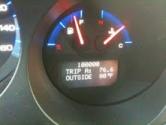
For Upgraded Navi Disc 3.7: OK button removal, adds dignostic menu, trip computer, and custom load image.
here is a few pics from one of the member:
https://acurazine.com/forums/album.php?albumid=1562
here is a few pics from one of the member:
https://acurazine.com/forums/album.php?albumid=1562
I still never figured out what to do to get the nag screen ok button removed. I gave up moding the navi when i realized i could mod so many other parts of the car! haha.
The axeman Cometh
Joined: Jun 2002
Posts: 200
Likes: 0
From: Leesburg, VA
Has anyone gotten the files needed?
I tried to PM SalemsTL but he cannot be PM'd...strange
I wanna give this a try so if anyone could grab the files, and hit me up on a PM I can hand out my email addy for you to send them to me.
Thanks a bunch!!
Axe
I wanna give this a try so if anyone could grab the files, and hit me up on a PM I can hand out my email addy for you to send them to me.
Thanks a bunch!!
Axe

Advanced
Joined: May 2009
Posts: 72
Likes: 1
I think Selim is banned for some reason, email: PictureCharms@yahoo.com

10th Gear
Joined: Apr 2009
Posts: 10
Likes: 1
From: Houston, TX
Does anybody have the 3.70 files to add the Trip Computer, A/C Controls and remove the OK button? The links are broken on vistabug.
I tried to follow this thread: https://acurazine.com/forums/3g-tl-audio-bluetooth-electronics-navigation-94/navi-hack-walkthrough-2004-tl-upgraded-3-7-disc-706843/#post10435448
I tried to follow this thread: https://acurazine.com/forums/3g-tl-audio-bluetooth-electronics-navigation-94/navi-hack-walkthrough-2004-tl-upgraded-3-7-disc-706843/#post10435448
Advanced
Joined: May 2009
Posts: 72
Likes: 1
Does anybody have the 3.70 files to add the Trip Computer, A/C Controls and remove the OK button? The links are broken on vistabug.
I tried to follow this thread: https://acurazine.com/forums/showthread.php?p=10435448
I tried to follow this thread: https://acurazine.com/forums/showthread.php?p=10435448
Advanced
Joined: May 2009
Posts: 72
Likes: 1
Email Sent! Btw, gmail doesn't accept .exe & .zip file so i had to use .rar file or else my emails keep bouncing back. You will have to download winRAR to open it. Here: http://www.rarsoft.com/rar/wrar39b1.exe


Intermediate
Joined: Sep 2007
Posts: 48
Likes: 1
From: Phoenix

09 tl-sh
Joined: Oct 2008
Posts: 26
Likes: 0
From: NJ
Can someone please send me the files.
lfigueroa402@hotmail.com thx
lfigueroa402@hotmail.com thx


Intermediate
Joined: Sep 2007
Posts: 48
Likes: 1
From: Phoenix

2nd Gear
Joined: May 2009
Posts: 2
Likes: 0
Ya tried it and get CRC errors when running the .exe which i knew was no good. Tried loading back in navi anyway and it just loops, looks like the splash screen is the only thing you can change right now. i am digging inside of the code and looking at what it would take to get the 3.7 hack to work in 3.8, no promises but looking, does anyone have any idea which file in BNHH401A has the content for the okay nag screen? I have looked at numerous .dll files and haven't come across it yet, any help pointing me in the right direction would be aweswome.
Master Tasker
Joined: May 2008
Posts: 66
Likes: 1
From: South by Southeast

1st Gear
Joined: May 2009
Posts: 1
Likes: 0
need files
I am also looking for the 3.50 files.
trip computer and ok bypass
why doesn't anyone post them?
hardrocksr@hotmail.com
thanks!
trip computer and ok bypass
why doesn't anyone post them?
hardrocksr@hotmail.com
thanks!