When you click on links to various merchants on this site and make a purchase, this can result in this site earning a commission. Affiliate programs and affiliations include, but are not limited to, the eBay Partner Network.
How to remove trackers and other features from my 2015 Acura TLX v6 sh-awd
I want to remove the microphones, bluetooth and any gps trackers/antennas used by AcuraLink. Does anyone have any experience doing this to their TLX? any suggestions are welcomed.
The new Tuner Unit have 3 Connectors, thats correct.
In the 2015-2017 TLX there is a external XM Receiver Unit behind the right rear seat back assy. The 2018+ TLX has the XM Tuner in the other tuner Unit included. So you only have to plug in the XM Antenna from the old unit into the new unit.
The old XM Unit you can disconnect from your car.
How to secure your 2015 Acura TLX and protect your privacy.
Here are 4 things you should to do if you are privacy oriented and don’t want your car, Acura or the government snooping on you. This is not an exhaustive list and are just the main things I have seen brought up by others voicing their privacy concerns. Of course, depending on your threat level you may need to do more or less.
1a. Disable Acuralink by disabling the XM radio
1b. and the Telematic Control Unit (TCU). This is the most important step
2. Disabling the Mics
3. Disabling the Hands Free Link (HFL)
4. Disabling the GPS antenna
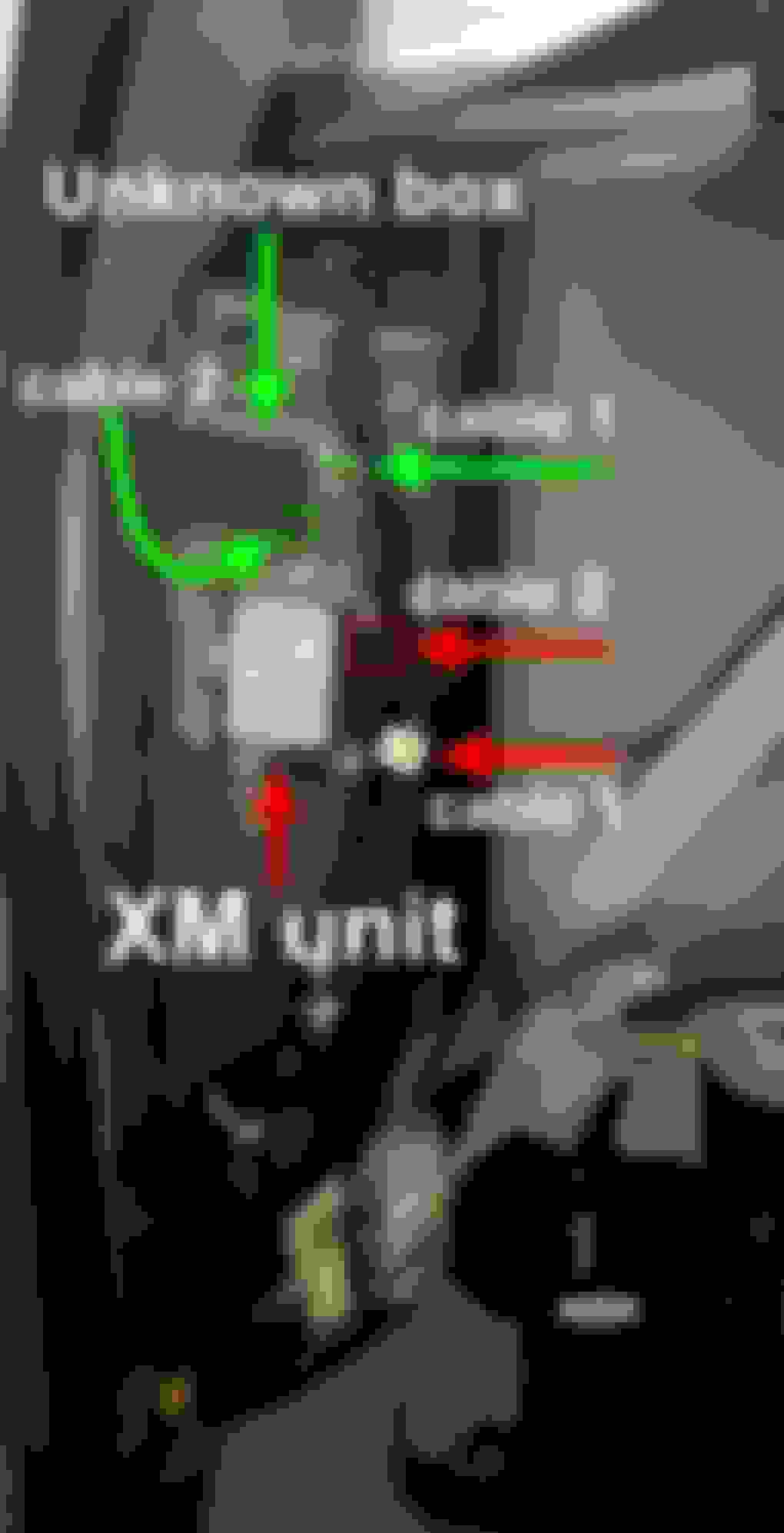
1a. According to some users Acura tracks and stores your cars precise location even if you don’t have AcuraLink on. See the link below. I believe that to stop this feature from working you have to disconnect all wires connecting to the XM unit black box located behind the right rear seat back assy. This is because the XM radio uses a similar frequency as AcuraLink. See the link below for more information.
When removing the assy you have to push and wiggle it upwards. It is connected to the car by 2 plastic pieces with cerated edges that extend from the car into a styrofoam layer on the back of the assy.
Next, locate the XM Unit blackbox (marked in red below) and disable the two wires that are connected to it (marked in red below) This will disable the XM radio. You can verify this via the debug menu by simultaneously holding down the back, navigation and menu buttons on the center console.
Even though the XM radio is disabled, the TCU is still on and this can allow Acura locate your vehicle.
1b-3. Disable the TCU by locating the box above the XM unit (marked as ‘Unknown box’) and disconnecting both wires (marked in green) connected to the box. The green wire is kind of tricky to disconnect, make sure you don’t break it. Doing this will also disable the HFL and Mics. You can verify this via the debug menu.
4. Remove the GPS antenna. I would assume this is pretty important. Your car might internally store a list of locations you have been. I am not sure. Ideally you would want to erase this list and disable the GPS antenna to prevent your car from knowing where you go. I’ve seen some people say the GPS antenna is behind the dashboard or behind the glove box on the right/left side. I’m not sure where it is. However, once disabled this should be evident from the debug menu.
After doing these things your car should be significantly more secure.
If you found this helpful or have any comments or additional privacy suggestions please let me know below . Also if anyone knows more about where the GPS antenna is on the 2015 TLX and how to remove it please post a comment.
Thanks to Callie17 for giving me the idea about disconnecting the TCU, Mic, XM radio and HFU:
4. Remove the GPS antenna. I would assume this is pretty important. Your car might internally store a list of locations you have been. I am not sure. Ideally you would want to erase this list and disable the GPS antenna to prevent your car from knowing where you go. I’ve seen some people say the GPS antenna is behind the dashboard or behind the glove box on the right/left side. I’m not sure where it is.However, once disabled this should be evident from the debug menu.
After doing these things your car should be significantly more secure.
If you found this helpful or have any comments or additional privacy suggestions please let me know below . Also if anyone knows more about where the GPS antenna is on the 2015 TLX and how to remove it please post a comment.
The red horizontal arrow points to its location.
My best guess, & from what appears on the graphic below, is the GPS antenna assembly location is central to the car's dash.
If it was located nearer to the glove box, the graphic would reflect its corresponding image more to the left side dash area?
With that said, the probability is high that it is buried behind the central dash?
Perhaps, if you can 'get lucky' by pulling the carpet back & away (on either side of the under dash center console) / easily find the location of the gray 'connector' shown below, it can then be traced back to its buried 'home' for possible removal / disconnection?
The red horizontal arrow points to its location.
My best guess, & from what appears on the graphic below, is the GPS antenna assembly location is central to the car's dash.
If it was located nearer to the glove box, the graphic would reflect its corresponding image more to the right side dash area?
Here's a question how many threads does it take to find all the black boxes?
Are you sure no one left air tag(s) in some random spot? Better yet, are you sure the dealer didn't hardwire the car with lo-jack?
I would get a notification if they did. And sure someone could put a different tracker somewhere but I’m absolutely positive no individual would want to track me lol
The red horizontal arrow points to its location.
My best guess, & from what appears on the graphic below, is the GPS antenna assembly location is central to the car's dash.
If it was located nearer to the glove box, the graphic would reflect its corresponding image more to the left side dash area?
With that said, the probability is high that it is buried behind the central dash?
Perhaps, if you can 'get lucky' by pulling the carpet back & away (on either side of the under dash center console) / easily find the location of the gray 'connector' shown below, it can then be traced back to its buried 'home' for possible removal / disconnection?
Thanks for the suggestion. Yeah I think its buried somewhere there 😬😬
Yes I should’ve done that. Realized its not the TCU or anything like that now. TCU HFL and Mics showed as disabled so I figured I got lucky. The keyless start did as well so I found out later it is actually a transceiver.
I want to remove the microphones, bluetooth and any gps trackers/antennas used by AcuraLink. Does anyone have any experience doing this to their TLX? any suggestions are welcomed.
^
I agree, that pdf is very helpful & well illustrated.
Though, you can also expeditiously find a 'general' location and component description by incorporating an OEM 'type' parts website into any future research repertoire.
Thanks for the suggestion. Yeah I think its buried somewhere there 😬😬
So.. I found one on the drivers side after removing the glovebox. Can’t seem to find the other. Only evidence I have that there are 2 is some random guys reddit comment lmao. But GPS still working as usual and GPS Ant. still green. .
It appears that the only thing you can 'somewhat' rely on (while laying on your back on the floor), to distinguish the two dash buried GPS antenna, are the unique placement of the harness foam and the gray connectors?
That is, of course, if the ebay lister example used above has his specific item representative 'data' straight?
I should have been more specific. I can see how its misleading without clearly labeling it. The other wires go to the TCU but the circled blue wire definitely goes to the GPS antenna. I put my arm all the way up the crevice and felt the distinct parts of the the device sitting on top of the navigation console. The wire comes down lower and connects to a larger bunch that all feed into the TCU
This is the only image online I can find showing potentially two antennas sitting next to each other. Other images show only one. Looks like the only way to get back there is to completely remove the center console or something... In the image of the car it shows two antennas?
This is the only image online I can find showing potentially two antennas sitting next to each other. Other images show only one. Looks like the only way to get back there is to completely remove the center console or something... In the image of the car it shows two antennas?
Well done.
Based on your recent picture above and the looks of the harness 'foam', it appears you found 'joy' in disconnecting the #3 - 39838-TZ3-H01; Antenna Assembly, Gps (TCU).
Now you have to get to & disconnect the #2 - 39835-TZ3-A01; Antenna Assembly,Gps (NAVI)
I think I'm gonna give up at this point lmao. I used a wire camera to find the second one from under the steering wheel but its far up there and plugs directly into the back of the navigation. It's gonna require an insane amount of effort to get to. Thanks for the help.
I'd probably prefer to keep all of that connected rather than disconnected because, let's face it, you don't look like a gangster driving a TLX. Plus, having everything connected is better for an alibi. Unless you're up to something illegal, I don't see why you'd care if someone's tracking you. What's someone going to do with that information anyway? There are probably hundreds of millions of connected cars on the road in the USA alone. It's impossible to listen to every car and track everybody's location. Nobody cares about that. And if you're doing something illegal, you probably shouldn't be driving a car with fuel injection anyway.
I'm not necessarily trying to do something illegal. Everyone knows what you do when you use the bathroom, but that doesn't mean you leave the door open and broadcast it in 4k. Take a look a this article for some reasons I want to minimize what Acura can know about me. https://foundation.mozilla.org/en/pr...d-for-privacy/
Honestly, I couldn't care less about what they know about me. If I did, I'd have to ditch credit cards, bank accounts, phones – pretty much everything that makes modern life tick. But then again, when you really think about it, all those things together have actually brought down crime rates worldwide. A lot of folks have stopped doing shady stuff 'cause now they're easier to track. I mean, everyone's got their smartphone out, recording something all the time. So even the bad guys know they might end up on camera, which makes them think twice. Just something to mull over.
Honestly, I couldn't care less about what they know about me. If I did, I'd have to ditch credit cards, bank accounts, phones – pretty much everything that makes modern life tick. But then again, when you really think about it, all those things together have actually brought down crime rates worldwide. A lot of folks have stopped doing shady stuff 'cause now they're easier to track. I mean, everyone's got their smartphone out, recording something all the time. So even the bad guys know they might end up on camera, which makes them think twice. Just something to mull over.
I agree with some of what you said. If your goal is to erase any existence of yourself online and make yourself impossible to track or know any information about you would have to take drastic steps like you mentioned. However, speaking from my limited experience with people focused on their privacy, most of us acknowledge that that level of privacy is not something easily attainable and not something they really desire either. I think that limiting which companies know what about you is something worth doing. Most people don’t read privacy policies carefully and realize how vast the range of things companies collect. In that link I sent previously there was a car company (Nissan I think) who’s privacy policy explicitly said they collected information about people’s “sex lives”.
I would be fine if my doctor knew about any intimate medical conditions I have, but not if Google, Target, Amazon etc did as well.
Just regarding the last half of your message, letting data brokers know intimate details about your live isn’t necessary for a more crime free society. Nor is having all of your information one google search away for any random Joe.
Have you tried googling yourself? Or going to any of the hundreds of people finder websites? It might surprise you to know that your entire family including yourself will be listed on there complete with their addresses (past and current), phone numbers, emails, DOB and more.
You can pick your battles. Like by focusing on limiting what identifiable data companies have about you such as your name, email, work, address, phone numbers, family etc. Rather than focusing too much about data that can’t be linked to your identity. I was focusing a lot on removing the TCU because that’s tied directly to my person because the car has a VIN and I am registered as the owner of that vehicle. Unlike some weather app on my phone that knows my location but that’s about it.
I agree with some of what you said. If your goal is to erase any existence of yourself online and make yourself impossible to track or know any information about you would have to take drastic steps like you mentioned. However, speaking from my limited experience with people focused on their privacy, most of us acknowledge that that level of privacy is not something easily attainable and not something they really desire either. I think that limiting which companies know what about you is something worth doing. Most people don’t read privacy policies carefully and realize how vast the range of things companies collect. In that link I sent previously there was a car company (Nissan I think) who’s privacy policy explicitly said they collected information about people’s “sex lives”.
I would be fine if my doctor knew about any intimate medical conditions I have, but not if Google, Target, Amazon etc did as well.
Just regarding the last half of your message, letting data brokers know intimate details about your live isn’t necessary for a more crime free society. Nor is having all of your information one google search away for any random Joe.
Have you tried googling yourself? Or going to any of the hundreds of people finder websites? It might surprise you to know that your entire family including yourself will be listed on there complete with their addresses (past and current), phone numbers, emails, DOB and more.
You can pick your battles. Like by focusing on limiting what identifiable data companies have about you such as your name, email, work, address, phone numbers, family etc. Rather than focusing too much about data that can’t be linked to your identity. I was focusing a lot on removing the TCU because that’s tied directly to my person because the car has a VIN and I am registered as the owner of that vehicle. Unlike some weather app on my phone that knows my location but that’s about it.
Something really easy I do that makes a big difference is using nextDNS which is a dns filter and using a vpn. Those 2 alone block a ton of google/amazon trackers and ads in other apps and on the web while browsing. Making a big dent in what companies have about you doesn’t have to be as hard as what I’ve been doing to my car 😅😅
I mean I don't really get it how they're going to collect information about my sex life in what way shape or form ?
Neither do I. But the fact they explicitly say that they can makes me think there’s some way 🤷♂️. Maybe through carplay with apps on your phone? What would be the point of saying so if they couldn’t?
Neither do I. But the fact they explicitly say that they can makes me think there’s some way 🤷♂️. Maybe through carplay with apps on your phone? What would be the point of saying so if they couldn’t?
If you choose to bang in the car they probably want to protect themselves from lawsuits so they just give you everything I could possibly happened











 . Also if anyone knows more about where the GPS antenna is on the 2015 TLX and how to remove it please post a comment.