


Nexus 7 (2012) Dash Install - my experience, links, parts list, and pictures!

Man i really want to do this but I have some questions....
I have stock navi, aux, rear back up cam. Will aux, back up back still work?
Should i replace the back up cam to a better one?
How will i upload more music to the tablet?
Do i need a data plan so the tablet nav and other internet base programs to work?
Im leaning more to the N7 2013 but I dont want to cut into stock stuff? Which parts exactly would i be cutting?
I may have more questions I will post if I do.
Thanks for this thread and all the help OP
I have stock navi, aux, rear back up cam. Will aux, back up back still work?
Should i replace the back up cam to a better one?
How will i upload more music to the tablet?
Do i need a data plan so the tablet nav and other internet base programs to work?
Im leaning more to the N7 2013 but I dont want to cut into stock stuff? Which parts exactly would i be cutting?
I may have more questions I will post if I do.
Thanks for this thread and all the help OP

1. AUX: this will still work fine, as it’s a direct connection to the stereo and you’re not changing anything there. You will be using this port for the Nexus, so it won’t be available for anything else.
2. Back-Up: I recommend a new camera. If you’re comfortable with taking apart wiring harnesses, you could probably figure out how to map this to the adapter (which converts the analog video camera to digital for the Nexus), but it would be work.
3. Upload Music: put your music (or video) on a thumb drive and attach it to the USB hub, which is attached to the Nexus via the micro-USB port.
4. Data: yes, I would recommend having a data plan. Most people create wifi hotspots, either with their phone or a freedompop type hub, which allows the table to access Pandora or Google Maps+Traffic. The tablet works fine without a data connection as a music jukebox, but it’s better with data!
5. Cutting into OEM: if you have a 2012 Nexus, you won’t need to cut into the car. You will need to cut into the back case of the Nexus to connect the USB port. For the 2013 Nexus, you would need to cut into the A/C plastic housing behind the bezel – not a huge process, but the fit is so tight back there, the Nexus+cable needs some more space.
As I said – I rate this install a 6 out of 10. It’s not easy, but not ridiculously complicated. Patience is key. If you’re not comfortable taking apart your car’s dash, I would not recommend taking this project on. Maybe someone in LA might be able to help you?
Otherwise, I suggest reading the threads I linked to, and maybe re-reading them. After that, I’ll be happy to help with clarifications. Good luck!
2. Back-Up: I recommend a new camera. If you’re comfortable with taking apart wiring harnesses, you could probably figure out how to map this to the adapter (which converts the analog video camera to digital for the Nexus), but it would be work.
3. Upload Music: put your music (or video) on a thumb drive and attach it to the USB hub, which is attached to the Nexus via the micro-USB port.
4. Data: yes, I would recommend having a data plan. Most people create wifi hotspots, either with their phone or a freedompop type hub, which allows the table to access Pandora or Google Maps+Traffic. The tablet works fine without a data connection as a music jukebox, but it’s better with data!
5. Cutting into OEM: if you have a 2012 Nexus, you won’t need to cut into the car. You will need to cut into the back case of the Nexus to connect the USB port. For the 2013 Nexus, you would need to cut into the A/C plastic housing behind the bezel – not a huge process, but the fit is so tight back there, the Nexus+cable needs some more space.
As I said – I rate this install a 6 out of 10. It’s not easy, but not ridiculously complicated. Patience is key. If you’re not comfortable taking apart your car’s dash, I would not recommend taking this project on. Maybe someone in LA might be able to help you?
Otherwise, I suggest reading the threads I linked to, and maybe re-reading them. After that, I’ll be happy to help with clarifications. Good luck!
1. AUX: this will still work fine, as it’s a direct connection to the stereo and you’re not changing anything there. You will be using this port for the Nexus, so it won’t be available for anything else.
2. Back-Up: I recommend a new camera. If you’re comfortable with taking apart wiring harnesses, you could probably figure out how to map this to the adapter (which converts the analog video camera to digital for the Nexus), but it would be work.
3. Upload Music: put your music (or video) on a thumb drive and attach it to the USB hub, which is attached to the Nexus via the micro-USB port.
4. Data: yes, I would recommend having a data plan. Most people create wifi hotspots, either with their phone or a freedompop type hub, which allows the table to access Pandora or Google Maps+Traffic. The tablet works fine without a data connection as a music jukebox, but it’s better with data!
5. Cutting into OEM: if you have a 2012 Nexus, you won’t need to cut into the car. You will need to cut into the back case of the Nexus to connect the USB port. For the 2013 Nexus, you would need to cut into the A/C plastic housing behind the bezel – not a huge process, but the fit is so tight back there, the Nexus+cable needs some more space.
As I said – I rate this install a 6 out of 10. It’s not easy, but not ridiculously complicated. Patience is key. If you’re not comfortable taking apart your car’s dash, I would not recommend taking this project on. Maybe someone in LA might be able to help you?
Otherwise, I suggest reading the threads I linked to, and maybe re-reading them. After that, I’ll be happy to help with clarifications. Good luck!
2. Back-Up: I recommend a new camera. If you’re comfortable with taking apart wiring harnesses, you could probably figure out how to map this to the adapter (which converts the analog video camera to digital for the Nexus), but it would be work.
3. Upload Music: put your music (or video) on a thumb drive and attach it to the USB hub, which is attached to the Nexus via the micro-USB port.
4. Data: yes, I would recommend having a data plan. Most people create wifi hotspots, either with their phone or a freedompop type hub, which allows the table to access Pandora or Google Maps+Traffic. The tablet works fine without a data connection as a music jukebox, but it’s better with data!
5. Cutting into OEM: if you have a 2012 Nexus, you won’t need to cut into the car. You will need to cut into the back case of the Nexus to connect the USB port. For the 2013 Nexus, you would need to cut into the A/C plastic housing behind the bezel – not a huge process, but the fit is so tight back there, the Nexus+cable needs some more space.
As I said – I rate this install a 6 out of 10. It’s not easy, but not ridiculously complicated. Patience is key. If you’re not comfortable taking apart your car’s dash, I would not recommend taking this project on. Maybe someone in LA might be able to help you?
Otherwise, I suggest reading the threads I linked to, and maybe re-reading them. After that, I’ll be happy to help with clarifications. Good luck!
great info thanks!
I like taking stuff apart. So no problem there. Hmm i will definitely do a great amount of research before anything. Thanks again
This would either need to happen (1) at the DAC or (2) with a secondary/equalizer amplifier after the headunit, just like any normal aftermarket stereo system. The Fiio E17 has an equalizer function:


Instructor
Joined: Jun 2010
Posts: 111
Likes: 2
I had a question regarding the HVAC controls. I have a 05 non navi vehicle. Could I just install a navi sub screen with the clock from a navi TL? I have all the parts from a navi 04 TL from a recent tear down of a wrecked TL.
Hey - unfortunately I don't have a clear answer for you. I know the install for cars with Navi, but don't know how non-Navi cars process the digital display for the A/C controls. I suggest you PM the owners of these threads, as they have done the non-Navi install:
https://acurazine.com/forums/audio-b...on-nav-921239/
https://acurazine.com/forums/audio-b...nstall-902876/ - pics are removed, but mzilvar is an expert!
https://acurazine.com/forums/audio-b...on-nav-921239/
https://acurazine.com/forums/audio-b...nstall-902876/ - pics are removed, but mzilvar is an expert!
Stumbled onto this as a handsfree way to access features on a tablet. $50 for the bluetooth controller, if you preorder:
YOUR APPS · ON YOUR SMARTPHONE · IN YOUR CAR
YOUR APPS · ON YOUR SMARTPHONE · IN YOUR CAR

For the non nav setups the only way to go is to relocate the HVAC screen and extend the wiring on the controls, otherwise it's really cost prohibitive to try to get the navi sub screen to work. You'd be looking at pretty much a non-nav to nav conversion and then adding the tablet just to get that little screen to work.
The app your car thing looks pretty cool, hopefully it picks up looks like it's still a start-up. lol it's basically a wireless Joycon EXR without all the wiring and configuration that would be needed for the JEXR. I hope the software it uses to integrate and give you control of apps through the wireless controller actually works well, sometimes their interfaces can be hokey or not really work very well but be really good concepts.
I still have a FiiO E17 and it's nice, but the only drawback is having to turn it on everytime you get into the car. Some of the little ones like the Behringer 202 you just plug in and forget about it there's no need to turn it off or on and no battery in it that needs to charge.
Last edited by mzilvar; Jan 2, 2015 at 11:37 PM.
lol I pre-ordered an appyourcar controller after seeing that site and then found this one:
https://www.navdy.com/
https://www.navdy.com/
I still have a FiiO E17 and it's nice, but the only drawback is having to turn it on everytime you get into the car. Some of the little ones like the Behringer 202 you just plug in and forget about it there's no need to turn it off or on and no battery in it that needs to charge.
The Navdy has received some good press - I feel like it may make the Nexus 7 functions a little redundant with my cell phone, as the Navdy could just link to my phone and show everything on it's own display? It couldn't play music through my stereo (maybe it could through bluetooth+blackberry gateway?).
PC Magazine: http://www.pcmag.com/article2/0,2817,2462039,00.asp
CNET: http://www.cnet.com/news/startup-nav...s-in-your-car/
MSN Video: http://www.msn.com/en-us/video/watch...ure/vi-BB305Es
Last edited by triax37; Jan 3, 2015 at 10:08 AM.

6th Gear
Joined: Jan 2015
Posts: 6
Likes: 0
Triax -
Thanks for the great thread i'm in the process of trying a similar install in my '04 TL and suddenly had a thought about the power button being inaccessible and the tablet freezing. Have you had any issue with this? Is there any way to restart the tablet if it hard locks? Thanks again for putting all this information together.
Thanks for the great thread i'm in the process of trying a similar install in my '04 TL and suddenly had a thought about the power button being inaccessible and the tablet freezing. Have you had any issue with this? Is there any way to restart the tablet if it hard locks? Thanks again for putting all this information together.
Triax -
Thanks for the great thread i'm in the process of trying a similar install in my '04 TL and suddenly had a thought about the power button being inaccessible and the tablet freezing. Have you had any issue with this? Is there any way to restart the tablet if it hard locks? Thanks again for putting all this information together.
Thanks for the great thread i'm in the process of trying a similar install in my '04 TL and suddenly had a thought about the power button being inaccessible and the tablet freezing. Have you had any issue with this? Is there any way to restart the tablet if it hard locks? Thanks again for putting all this information together.
Occasionally the tablet will have a hiccup, but I just restart the operating system by typing two commands into the Terminal Emulator app:
> su (allows you to become a "superuser")
> restart
You could also make a task with tasker to reboot the tablet and then add it to a homescreen somewhere or a task bar and use that to reboot the tablet with a single press. I used the term emulator method for a while and then switched to a tasker button.
I'm working on a setup for my 2012 Accord now lol .. going to be a bit different but very similar .. I really hope I actually get that appyourcar thing later this year.
Thanks for the info on the FiiO E10 I may pick one of those up for my accord. I wonder if the E18 works, it's a lot more expensive though and has a battery but it'll stay on since the power button is in the volume switch. So maybe when the car is started it'll just start charging and turn on if it was left on?
I think that Navdy thing won't have audio in the speakers, but it looks interesting.
I'm working on a setup for my 2012 Accord now lol .. going to be a bit different but very similar .. I really hope I actually get that appyourcar thing later this year.
Thanks for the info on the FiiO E10 I may pick one of those up for my accord. I wonder if the E18 works, it's a lot more expensive though and has a battery but it'll stay on since the power button is in the volume switch. So maybe when the car is started it'll just start charging and turn on if it was left on?
I think that Navdy thing won't have audio in the speakers, but it looks interesting.
6th Gear
Joined: Jan 2015
Posts: 6
Likes: 0
I figured I might as well ask about this before I have to tear apart my dash again. I installed the tablet and it was working great for a month and then I took my car into the dealer who replaced the air conditioning field coil. After I got it back the tablet was dead and somehow the power adapter I was using to power it was also dead. The tablet once I put a charge to it simply shows the charge icon but doesn't turn on.
I've looked into it a bit and found some people that said if you had debugging mode on (which I did) you should be able to send an ADB reboot command to turn the tablet on. I tried this with my laptop but it couldn't find the device. My last ditch effort is to drag my desktop out to the car that I used to install Timurs kernel with since it has all of the drivers correctly installed. I don't really have very high hopes though.
So does anyone know of a way to turn on a tablet that died from complete battery drain without using the power button?
I've looked into it a bit and found some people that said if you had debugging mode on (which I did) you should be able to send an ADB reboot command to turn the tablet on. I tried this with my laptop but it couldn't find the device. My last ditch effort is to drag my desktop out to the car that I used to install Timurs kernel with since it has all of the drivers correctly installed. I don't really have very high hopes though.
So does anyone know of a way to turn on a tablet that died from complete battery drain without using the power button?
After I got it back the tablet was dead and somehow the power adapter I was using to power it was also dead. The tablet once I put a charge to it simply shows the charge icon but doesn't turn on.
So does anyone know of a way to turn on a tablet that died from complete battery drain without using the power button?
So does anyone know of a way to turn on a tablet that died from complete battery drain without using the power button?

Advanced
Joined: Oct 2014
Posts: 59
Likes: 19
From: Greenville, North Carolina
Let me know if you want to go that route and need help.

Cruisin'
Joined: Oct 2005
Posts: 22
Likes: 1
If you're going to tear everything apart in order to get the tablet on, you should really think about soldering the power button to an external button. It's pretty easy and definitely comes in handy. I did mine to the "Map" button from the navigation buttons.
Let me know if you want to go that route and need help.
Let me know if you want to go that route and need help.
I soldered the power/vol+/vol- and connected them to Map/Zoom Up/Zoom Down. I really like how it turned out and it gives me a way to get into bootloader in the future if I want to drop a new kernel/rom on the tablet.
I wasn't 'easy' for me because of tight spot, but I was able to eventually do it without cutting into the button strip.b
Cruisin'
Joined: Oct 2005
Posts: 22
Likes: 1
- Navigation brain – for those with OEM navigation, I believe you still need the “brain" to control air conditioning, etc., so remove that from the OEM bezel, and find a way to stash it behind the Nexus.
- Tip: Be patient. This process took me ~1 hour and caused some frustration, but everything will fit. The OEM bezel attaches to a metal bracket that houses the brain. I tried install the metal bracket+brain to the Nexus together (see picture), but it wouldn’t fit in the dash, so I ended up removing the metal bracket surrounding the brain and then everything fit…barely.


Racer
Joined: Dec 2014
Posts: 360
Likes: 42
From: Pleasanton, CA
This could be completely wrong, but I believe with Android phones that die completely from the battery, you need to charge it up to at least 5-10% before you can actually turn it on.
Thanks for adding to the thread!


great thread and very well written! i just came across this thread because my gps is acting funky (position locator just moves in a circle and doesn't move relative to my car), so after troubleshooting it myself, with a dealer, and with a private local company, they all said i should send it back to alpine and just get it overhauled for 358. but now i'm thinking, well should i put in a tablet and get graphics that aren't 7 years old haha.
i have a few questions i was hoping you could answer:
1. do you still retain xm functionality? if you don't have an xm subscription, could you try going to the preview channel to let me know if it works? I just bought a year so i would like to retain that.
2. did you ever figure out a way to make the camera come on automatically? i have the oem camera and would want it to come on automatically. i'm sure i can figure out how to wire it to the nexus
3. is the dac necessary if i'm not going to stream music? i already have an ipod docked in the car to an isimple or i listen to xm. i wouldn't want to stream.
4. will unlocking an iphone allow it to be used as a hot spot? i want the google maps traffic for sure, and seems like you don't have any data issues (that was my biggest worry since i'm on a family plan).
5. for power did you just run a wire from the cigarette adapter below the console? or did you run it under the carpet from the center arm rest one? i was thinking about tapping into a fuse that comes on with the accessories
overall thanks for your write up! even if i don't go this route i love seeing stuff like this
i have a few questions i was hoping you could answer:
1. do you still retain xm functionality? if you don't have an xm subscription, could you try going to the preview channel to let me know if it works? I just bought a year so i would like to retain that.
2. did you ever figure out a way to make the camera come on automatically? i have the oem camera and would want it to come on automatically. i'm sure i can figure out how to wire it to the nexus
3. is the dac necessary if i'm not going to stream music? i already have an ipod docked in the car to an isimple or i listen to xm. i wouldn't want to stream.
4. will unlocking an iphone allow it to be used as a hot spot? i want the google maps traffic for sure, and seems like you don't have any data issues (that was my biggest worry since i'm on a family plan).
5. for power did you just run a wire from the cigarette adapter below the console? or did you run it under the carpet from the center arm rest one? i was thinking about tapping into a fuse that comes on with the accessories
overall thanks for your write up! even if i don't go this route i love seeing stuff like this
Last edited by sockr1; Feb 18, 2015 at 09:46 AM.
1. do you still retain xm functionality? if you don't have an xm subscription, could you try going to the preview channel to let me know if it works? I just bought a year so i would like to retain that.
2. did you ever figure out a way to make the camera come on automatically? i have the oem camera and would want it to come on automatically. i'm sure i can figure out how to wire it to the nexus
3. is the dac necessary if i'm not going to stream music? i already have an ipod docked in the car to an isimple or i listen to xm. i wouldn't want to stream.
4. will unlocking an iphone allow it to be used as a hot spot? i want the google maps traffic for sure, and seems like you don't have any data issues (that was my biggest worry since i'm on a family plan).
5. for power did you just run a wire from the cigarette adapter below the console? or did you run it under the carpet from the center arm rest one? i was thinking about tapping into a fuse that comes on with the accessories
2. did you ever figure out a way to make the camera come on automatically? i have the oem camera and would want it to come on automatically. i'm sure i can figure out how to wire it to the nexus
3. is the dac necessary if i'm not going to stream music? i already have an ipod docked in the car to an isimple or i listen to xm. i wouldn't want to stream.
4. will unlocking an iphone allow it to be used as a hot spot? i want the google maps traffic for sure, and seems like you don't have any data issues (that was my biggest worry since i'm on a family plan).
5. for power did you just run a wire from the cigarette adapter below the console? or did you run it under the carpet from the center arm rest one? i was thinking about tapping into a fuse that comes on with the accessories
1. XM is still available. Using the iSimple allows for multiple "inputs" through the XM button. Almost like "Inputs" on your TV. The stock radio's right-side knob allows you to cycle through XM and the iSimple input, which would be the tablet.
2. Camera - haven't figured out how to make it turn on automatically, but using the Joycon is probably the correct route.
3. The DAC isn't necessary for your music, apparently. To hear the N7's navigation voice instructions through your speakers, you can route a 3.5mm audio cable from the tablet to the AUX input in your center console. The quality will be lower if you do want to play music - the DAC in the tablet isn't as good as the Fii0 DAC, but for navigation instructions it will be fine.
4. An unlocked iPhone works great as a hotspot, and that's what I've used for the past 9 months. You need to buy MiWi for $20. It uses about 1 mb per minute, as far as I can tell. Google Traffic is awesome! I don't use it everything I drive, but am thankful that I can access it when needed.
5. Power - for the N7 itself, I have a cable running to a USB power adapter in the cigarette lighter near the front right of the shifter. For the other peripherals, I have another USB power adapter in the center console armrest.
Happy to answer any other questions - let me know!

Cruisin'
Joined: Feb 2014
Posts: 22
Likes: 0
I had a quick question, and sorry if its been asked/answered but its late and im still trying to process all 63 posts. Where does the audio from google maps play if you are listening to XM or just the plain radio? I assume it doesn't go through the speakers but im not entirely sure what all the FiiO thing does? Thanks in advance

Instructor
Joined: Oct 2011
Posts: 148
Likes: 31
From: North East, USA
I had a quick question, and sorry if its been asked/answered but its late and im still trying to process all 63 posts. Where does the audio from google maps play if you are listening to XM or just the plain radio? I assume it doesn't go through the speakers but im not entirely sure what all the FiiO thing does? Thanks in advance
On the tablet you have three options to hear sound:
- The tablet's built-in speakers
- Headphone Jack
- USB DAC (Digital to Analog Converter)
There is room to plug a wire into the USB port, though. Audio gets routed via USB into the DAC, and we plug the DAC into the car stereo. A nice bonus is a USB DAC such as one from FiiO will provide a significantly higher sound quality than the tablet's headphone jack.

Advanced
Joined: May 2013
Posts: 82
Likes: 14
Here is what mine looks like. If you haven't seen it yet, I'm using the Automate app, basically replicates Android Auto. It's still in beta, but seems to work flawlessly. You can read the details and sign up here:
https://plus.google.com/u/0/communit...88212710276577
I think it's pretty awesome.
Quick video of backup cam below. You can see the little screen I get when I shift, but other than that, all issues seem to have gone away and it works very well.
https://plus.google.com/u/0/communit...88212710276577
I think it's pretty awesome.
Quick video of backup cam below. You can see the little screen I get when I shift, but other than that, all issues seem to have gone away and it works very well.
Last edited by jateelover; Jul 17, 2015 at 03:38 PM.

This is all great info.. I am really contemplating doing this...
Question about the versions of Nexus 7 tablets...
How do you know what version you have if you bought it used?
Did the 2012 version only come in 8GB and 16GB?
Did the 2013 version come in 32GB only?
Just curious. I found on craiglist locally someone is selling there's for 40 bucks for a 1st gen 8gb... thats why.
Thanks!
Question about the versions of Nexus 7 tablets...
How do you know what version you have if you bought it used?
Did the 2012 version only come in 8GB and 16GB?
Did the 2013 version come in 32GB only?
Just curious. I found on craiglist locally someone is selling there's for 40 bucks for a 1st gen 8gb... thats why.
Thanks!

Registered Bunny
Joined: Nov 2014
Posts: 8,307
Likes: 1,073
From: Montreal
This is all great info.. I am really contemplating doing this...
Question about the versions of Nexus 7 tablets...
How do you know what version you have if you bought it used?
Did the 2012 version only come in 8GB and 16GB?
Did the 2013 version come in 32GB only?
Just curious. I found on craiglist locally someone is selling there's for 40 bucks for a 1st gen 8gb... thats why.
Thanks!
Question about the versions of Nexus 7 tablets...
How do you know what version you have if you bought it used?
Did the 2012 version only come in 8GB and 16GB?
Did the 2013 version come in 32GB only?
Just curious. I found on craiglist locally someone is selling there's for 40 bucks for a 1st gen 8gb... thats why.
Thanks!
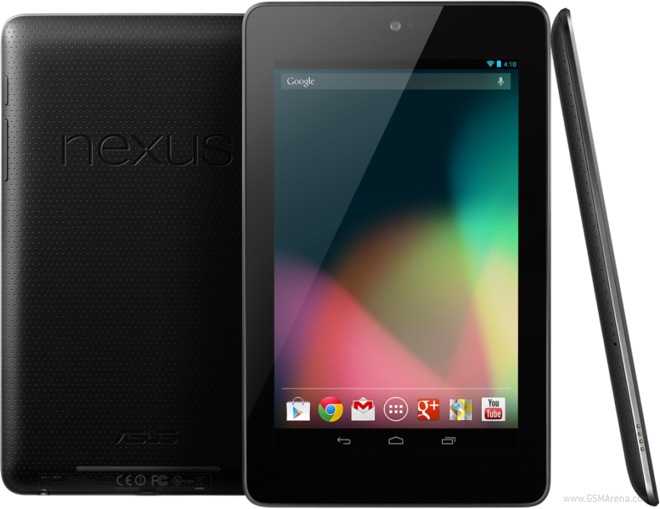
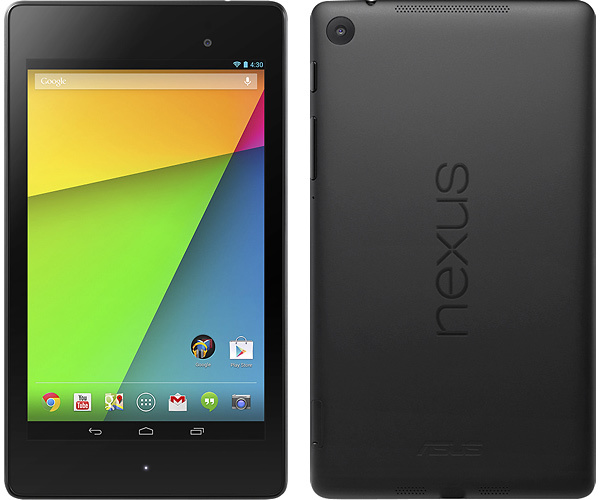
Easily you can see 1st gen from 2nd gen looking at the back writing and the front camera location:
Nexus 7 2012
Nexus 7 2013


To get it to come out the back..
- Remove the tablet back cover
- Disconnect and remove the nexus 7 battery (it's held in by some glue)
- Peel up the copper shield that was under the battery, no need to tear it
- Unscrew the 3.5mm jack and usb jack from the nexus 7
- Route the ribbon cable with the USB & 3.5mm jack out from under the copper shield and it should go out of the tablet by where the WiFi antenna is located (see the back cover that was removed)
- I cut a slot in the back cover with an exacto knife so it doesn't pinch the cable
- I also cut off the 3.5mm audio jack and covered the ribbon cable and USB connector in a piece of heat shrink to help hold it together and protect it
- Pop the battery and back cover back on..
If you google it you can find some photos or probably a video of the nexus 7 disassembly pretty easily.
Yep, the hub will power other devices. FYI, when I plug in my iphone to the hub, the Nexus 7 thinks it's an external storage unit and wants to download pictures. It's a minor annoyance, but wanted to share. Good luck!

Intermediate
Joined: Nov 2015
Posts: 30
Likes: 0
Thanks, little stuff like that is exactly why I asked! I'll probably hardwire the power for the nexus to an acc wire anyways. One last question to make sure I got it right in my head before any of my products arrive in the mail. The OTG connects to the Nexus via micro usb, then charger female end to hardwired acc wires, and the usb to the Hub, which the hub will allow me to access the Nexus to update it or make changes without removing it correct? Like to plan ahead.
Thanks, little stuff like that is exactly why I asked! I'll probably hardwire the power for the nexus to an acc wire anyways. One last question to make sure I got it right in my head before any of my products arrive in the mail. The OTG connects to the Nexus via micro usb, then charger female end to hardwired acc wires, and the usb to the Hub, which the hub will allow me to access the Nexus to update it or make changes without removing it correct? Like to plan ahead.
My only edit to simplify would be having the OTG cable charger female plug into the original USB cable that came with the Nexus, and the USB plug into the cigarette lighter (and USB adapter) in front of the shifter. Not sure if this is what you were referring to already, but thought I would clarify. Happy to take a picture if you would like.
I also have the USB hub externally powered by the power port in the lower glove box, on the odd chance that makes everything work more smoothly. 1.5 years in, working great!

Intermediate
Joined: Nov 2015
Posts: 30
Likes: 0
Yes, your method should work fine.
My only edit to simplify would be having the OTG cable charger female plug into the original USB cable that came with the Nexus, and the USB plug into the cigarette lighter (and USB adapter) in front of the shifter. Not sure if this is what you were referring to already, but thought I would clarify. Happy to take a picture if you would like.
I also have the USB hub externally powered by the power port in the lower glove box, on the odd chance that makes everything work more smoothly. 1.5 years in, working great!
My only edit to simplify would be having the OTG cable charger female plug into the original USB cable that came with the Nexus, and the USB plug into the cigarette lighter (and USB adapter) in front of the shifter. Not sure if this is what you were referring to already, but thought I would clarify. Happy to take a picture if you would like.
I also have the USB hub externally powered by the power port in the lower glove box, on the odd chance that makes everything work more smoothly. 1.5 years in, working great!
...Still kind of stuck on which roots to go with


4th Gear
Joined: Dec 2015
Posts: 4
Likes: 0
Hey triax37. I have a question in regards to the backup camera. I bought those cheap $20 camera off eBay n got the febon100. My question is how did u wire the camera n febon to have it working and what app are u using for the camera? Here's how I wired my set up:
Tapped the wire leads of the camera power plug into one of the reverse light
Connected the power plug into the camera
Connected the yellow rca plug of camera into the febon yellow rca input
Plugged the febon into USB hub connected to the otg cable
Its as simple as that am I correct? For some reason when I put the car into reverse, there's no video feed. Does the febon need its own power source? The led light doesn't turn on when I put it in reverse
Tapped the wire leads of the camera power plug into one of the reverse light
Connected the power plug into the camera
Connected the yellow rca plug of camera into the febon yellow rca input
Plugged the febon into USB hub connected to the otg cable
Its as simple as that am I correct? For some reason when I put the car into reverse, there's no video feed. Does the febon need its own power source? The led light doesn't turn on when I put it in reverse
Hey triax37. I have a question in regards to the backup camera. I bought those cheap $20 camera off eBay n got the febon100. My question is how did u wire the camera n febon to have it working and what app are u using for the camera? Here's how I wired my set up:
Tapped the wire leads of the camera power plug into one of the reverse light
Connected the power plug into the camera
Connected the yellow rca plug of camera into the febon yellow rca input
Plugged the febon into USB hub connected to the otg cable
Its as simple as that am I correct? For some reason when I put the car into reverse, there's no video feed. Does the febon need its own power source? The led light doesn't turn on when I put it in reverse
Tapped the wire leads of the camera power plug into one of the reverse light
Connected the power plug into the camera
Connected the yellow rca plug of camera into the febon yellow rca input
Plugged the febon into USB hub connected to the otg cable
Its as simple as that am I correct? For some reason when I put the car into reverse, there's no video feed. Does the febon need its own power source? The led light doesn't turn on when I put it in reverse
Q1: Are other devices plugged into the USB Hub drawing power? If so, then that's a good sign and unplug+plug the FebOn USB connector to a few different USB ports. If not, you need to check the settings.
Q2: Which ROM are you using?
4th Gear
Joined: Dec 2015
Posts: 4
Likes: 0
Hey - so it looks like you're pretty close. I'm using the Dashcam app from the Google Play store. The only problem I can diagnose over the internet is that the FebOn LED isn't turning on - it doesn't need it's own power source and should be drawing power from the USB hub.
Q1: Are other devices plugged into the USB Hub drawing power? If so, then that's a good sign and unplug+plug the FebOn USB connector to a few different USB ports. If not, you need to check the settings.
Q2: Which ROM are you using?
Q1: Are other devices plugged into the USB Hub drawing power? If so, then that's a good sign and unplug+plug the FebOn USB connector to a few different USB ports. If not, you need to check the settings.
Q2: Which ROM are you using?